 TutorialKart.com
Incremental extraction in Informatica loads only the rows that were inserted or updated after the previous successful load. Unlike a full extraction, it does not read and process every row in the source table during each workflow run.
A common way to implement incremental extraction is to compare a source timestamp column with a mapping parameter or variable that stores the last successful extraction time. This approach reduces unnecessary source reads and target processing when only a small portion of the source data changes between loads.
Source columns used for incremental extraction in Informatica
OLTP tables commonly contain date or timestamp columns that can be used to identify new and changed records:
- Creation_Date: Records when a row was first inserted into the source table.
- Last_Updated_Date: Records when the row was most recently modified.
For incremental extraction, Last_Updated_Date is generally the more useful column because it can identify both newly inserted rows and existing rows that were changed.
Customer row before an update
When a customer is first inserted into the Customer OLTP table on 01/23/2019, the creation date and last updated date are initially the same.
| Customer_ID | Name | Creation_Date | Last_Updated_Date |
| C1 | Bell | 01/23/2019 | 01/23/2019 |
Customer row after an update
If the same customer record is changed on 01/30/2019, the creation date remains 01/23/2019, while the last updated date changes to 01/30/2019.
| Customer_ID | Name | Creation_Date | Last_Updated_Date |
| C1 | Bell | 01/23/2019 | 01/30/2019 |
If the previous successful load ended before 01/30/2019, this row must be selected again because its Last_Updated_Date is later than the stored extraction timestamp.
How to implement incremental extraction in Informatica
Incremental extraction can be implemented with an Informatica mapping parameter or mapping variable. The stored value represents the date and time up to which source records were processed successfully during the previous workflow run.
1. Create a last-extraction mapping parameter
Create a date/time mapping parameter such as $$LastExtractDate. Its initial value should be earlier than the oldest source record required for the first load.
For subsequent runs, supply the previous successful extraction timestamp through the parameter file or maintain it through a mapping variable, depending on the workflow design.
2. Add the incremental filter to the Source Qualifier
At the Source Qualifier transformation, add a filter condition that compares the source update timestamp with the stored parameter value.
LAST_UPDATED_DATE > $$LastExtractDateNow at your Source Qualifier properties level use filter condition as below.
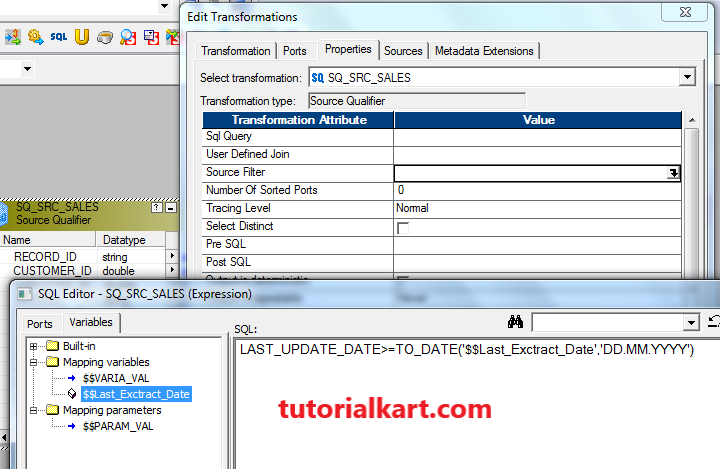
Use the correct comparison operator for the extraction window. A filter using only > can miss rows when multiple records share the same timestamp as the stored value. Many production mappings therefore use both a lower and an upper boundary.
LAST_UPDATED_DATE >= $$WindowStart
AND LAST_UPDATED_DATE < $$WindowEnd
In this pattern, $$WindowStart is the previous successful boundary and $$WindowEnd is captured before the current extraction begins. Using a fixed upper boundary prevents rows changed during the workflow from falling unpredictably inside or outside the current load.
3. Create and run the Informatica session and workflow
For example use our same m_Passthrough_Sales mapping as shown in diagram and create session and workflow then execute and see.
The session should read the parameter file, run the mapping, and update the stored extraction boundary only after the workflow completes successfully. Do not advance the boundary after a failed session because doing so can cause records to be skipped during the restart.
Mapping parameter versus mapping variable for incremental loads
| Feature | Mapping parameter | Mapping variable |
|---|---|---|
| Value during a session | Remains constant | Can change during the session |
| Common source | Parameter file | Repository-saved value or parameter file |
| Typical use | Supplying a fixed extraction window | Maintaining a maximum processed timestamp |
| Restart control | Managed externally | Requires careful handling of saved values |
A parameter is suitable when the orchestration process calculates and supplies both boundaries. A variable can be useful when the mapping must calculate a value such as the maximum processed timestamp. In either case, the value should be committed only after a successful load.
Handling inserts and updates in the target table
The Source Qualifier filter determines which rows are extracted, but the target logic determines whether each row is inserted or updated. If the incremental result can contain both new and changed records, the mapping must identify whether the business key already exists in the target.
- Use a Lookup transformation or another key-matching method to check whether the target row exists.
- Use an Update Strategy transformation to mark new rows for insert and existing rows for update.
- Configure the session target update option to support the required insert and update operations.
- Reject or separately process rows with missing business keys.
If the target keeps historical versions, the mapping requires slowly changing dimension logic rather than a simple overwrite update.
Null timestamps and other incremental extraction risks
Before applying incremental logic to a date column, check whether that column contains null values. A condition such as LAST_UPDATED_DATE > $$LastExtractDate does not select rows whose update date is null.
When null timestamps are possible, first determine their business meaning. Possible treatments include rejecting the rows for correction, using the creation date as a controlled fallback, or processing them through a separate exception flow.
COALESCE(LAST_UPDATED_DATE, CREATION_DATE) >= $$WindowStart
AND COALESCE(LAST_UPDATED_DATE, CREATION_DATE) < $$WindowEnd
Use this fallback only when the source-system rules confirm that CREATION_DATE is valid for rows with a missing update timestamp.
Other risks to review include:
- Insufficient timestamp precision: A date column without time can cause many rows to share the same boundary value.
- Source clock differences: The Informatica server and source database may use different time zones.
- Late-arriving changes: A source transaction may be committed after the extraction window is captured.
- Deleted source rows: A timestamp filter cannot detect hard deletes unless the source provides a delete flag, audit table, log, or change-data-capture mechanism.
- Failed workflow restart: Advancing the saved boundary too early can permanently skip rows.
How to test an Informatica incremental load
Test the mapping with controlled source records and known extraction boundaries. The test should verify both row selection and target processing.
- Run an initial load and record the extraction start time, end time, source count, target count, and rejected-row count.
- Insert a new source row with a timestamp inside the next extraction window and confirm that it is inserted into the target.
- Update an existing source row and confirm that the changed row is selected and updated in the target.
- Create rows exactly on the lower and upper boundaries to verify the behavior of
>,>=, and<. - Run the workflow without changing source data and confirm that no duplicate target rows are created.
- Force a session failure and confirm that the stored extraction boundary is not advanced.
- Restart the failed load and verify that all expected records are processed once.
- Test null timestamps, duplicate business keys, rejected rows, and source records with identical timestamps.
Incremental load count reconciliation
Do not compare only the total source and target table counts. For an incremental run, reconcile the rows inside the extraction window:
- Rows selected by the source query
- Rows read by the Informatica session
- Rows inserted into the target
- Rows updated in the target
- Rows rejected or skipped
The selected source count should equal the total of successfully inserted, successfully updated, intentionally skipped, and rejected rows after accounting for the mapping rules.
Incremental extraction editorial QA checklist
- The source timestamp column is populated, indexed where appropriate, and sufficiently precise.
- The lower and upper extraction boundaries are defined clearly.
- The boundary value is advanced only after successful workflow completion.
- Rows sharing the same timestamp cannot be skipped between runs.
- Insert, update, reject, restart, and duplicate-handling paths have been tested.
- Null timestamps and deleted source records have an explicit handling rule.
- Source and Informatica server time zones are documented and aligned.
- Incremental source counts reconcile with target inserts, target updates, and rejected rows.
Incremental extraction in Informatica FAQs
What is incremental extraction in Informatica?
Incremental extraction is a load method that selects only source rows inserted or modified after a stored processing boundary. It avoids reprocessing the complete source table during every workflow run.
Which date column should be used for an incremental load?
Use a reliable source column that changes whenever a row is inserted or updated. A properly maintained Last_Updated_Date or timestamp is usually preferable to creation date alone because creation date does not identify later modifications.
Why can an incremental load miss records with the same timestamp?
Records can be missed when the next run uses a strict greater-than comparison and several rows have the same timestamp as the saved boundary. A controlled half-open window, overlap strategy, or timestamp-plus-key watermark can prevent this problem.
Can timestamp-based incremental extraction detect deleted rows?
Not when rows are physically deleted from the source without an audit record. Delete detection requires a soft-delete flag, audit table, database log, trigger-based history, or change-data-capture process.
When should the last extraction date be updated?
Update the saved extraction date only after the session and required downstream processing complete successfully. If the workflow fails, retain the previous value so the same extraction window can be processed again safely.