 TutorialKart.com
In this Java Tutorial, you will learn what access modifiers are in Java, how they control access to a class, constructor, field, and method, and when to use public, protected, package-private default access, and private.
Access Modifiers in Java
Access modifiers in Java define where a class or a member of a class can be accessed from. They are part of Java’s encapsulation model, which helps you expose only the required API and keep internal implementation details hidden.
There are two common levels at which access control is discussed:
- Class Level Modifiers – These modifiers control access to a top-level class.
- public
- default
- Class-Member Level Modifiers – These modifiers control access to the members of a class: methods and properties.
- public
- private
- protected
- default
The Java language uses the term package access for default access. In day-to-day Java tutorials, this is often called default access or package-private access. It means no access modifier keyword is written.
Java Access Modifiers Summary Table
The following table gives a quick view of the four Java access levels before we discuss each one in detail.
| Access modifier | Keyword used | Accessible from same class | Accessible from same package | Accessible from subclass in another package | Accessible from unrelated class in another package |
|---|---|---|---|---|---|
| public | public | Yes | Yes | Yes | Yes |
| protected | protected | Yes | Yes | Yes, through inheritance rules | No |
| default or package-private | No keyword | Yes | Yes | No, unless the subclass is in the same package | No |
| private | private | Yes | No | No | No |
Oracle’s Java documentation describes access levels as public, protected, package-private, and private. This tutorial follows the same idea and uses practical examples to show how each modifier behaves.
Class Level Modifiers in Java
The syntax to specify a modifier for Class is as shown below.
modifier class ClassName{ ... }| modifier | could be public / default |
| class | is the standard keyword to define a class |
| ClassName | is the name of the class |
A top-level class can be either public or package-private. A top-level class cannot be declared private or protected. However, nested classes declared inside another class can use all four access modifiers.
1. public – Class Level Modifier
The modifier, public, makes the class visible/accessible to the classes everywhere. A sample code snippet to make a class, which is accessible to public, is shown below:
public class MyClass{
    ...
}
If a top-level class is public, the source file name must match the public class name. For example, public class MyClass should normally be saved in a file named MyClass.java.
2. default – Class Level Modifier
By default, if no modifier is given to a class, its visible only to the classes present in same package as that of the class. A sample code snippet to make a class, which is accessible by default only to classes in the same path as of itself, is shown below:
class MyClass{
    ...
}
Package-private classes are useful when a class is only a helper for other classes in the same package and should not become part of the public API of that package.
Diagrammatic Representation of Class Modifiers in Java
The following diagram depicts the public, default accessibility of SampleClass.java.
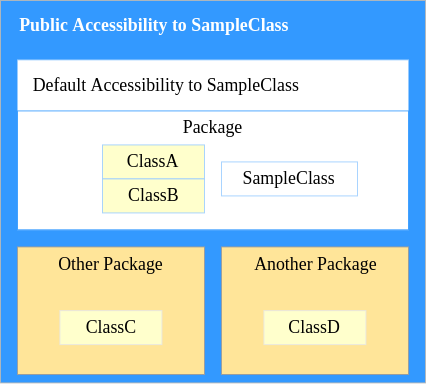
- If class definition of SampleClass.java is public class SampleClass{ }, then any of the classes ClassA, ClassB, ClassC, ClassD or any other class could access SampleClass.
- If class definition of SampleClass.java is class SampleClass{ }, then only ClassA and ClassB could access SampleClass.
Class Member Level Modifiers in Java
Going forward, we refer variables and methods of a Class as Class Members.
Class member access modifiers can be applied to fields, methods, and constructors. They decide how code in the same class, same package, subclass, and other package can use those members.
Java Field Access Modifier Syntax
The syntax for defining a variable with access modifier is
access_modifier data_type variable_name [ = initial value];Example: public int i = 10;
Java Method Access Modifier Syntax
The syntax for defining a method with access modifier is
access_modifier return_type method_name(arguements){ ... }Example: public int getPrimeNumer(int nth){..};
Overview of Class Member Level Access Modifiers
Following table gives an overview of Accessibility to different scopes for Class Member Level Access Modifiers.
| Access to | public | protected | default | private |
|---|---|---|---|---|
| Other members of the same class | Yes | Yes | Yes | Yes |
| Classes in the same package | Yes | Yes | Yes | No |
| Its Sub-classes | Yes | Yes | No | No |
| Classes in other packages | Yes | No | No | No |
The table above is a useful beginner summary. The only point that needs extra care is protected: a subclass in a different package can access inherited protected members, but not as a general public member of every object reference.
1. public
If a class member is declared public, then the class member is accessible to :
- Other members of the same class
- Classes in the same package
- Its Sub-classes
- Classes in other packages
The following example shows how to make class members public.
The variables/properties: age, name are made public using public keyword in the declaration/initialization. Also, the method: getEntityInfo() is made public using public keyword in the definition of this method.
MyClass.java
public class MyClass {
	// variables that are public
	public int age = 2;
	public String name = "TutorialKart.com";

	/**
	 * This method is declared public.
	 * @return Persons information
	 */
	public String getEntityInfo(){
		return name+" is "+age+" years old.";
	}

	public static void main(String[] args) {
		System.out.println(new AccessModifiers().getEntityInfo());
	}
}
Use public for classes and methods that are intended to be used from outside the package, such as API methods, utility methods, controller methods, or application entry points. Avoid making fields public unless there is a clear reason, because public fields can be modified directly by other code.
2. protected
If a class member is declared protected, then the class member is accessible to
- Other members of the same class
- Classes in the same package
- Its Sub-classes
Classes in other packages
The following example shows how to make class members protected.
The variables/properties: age, name are made protected using protected keyword in the declaration/initialization. Also, the method: getEntityInfo() is made protected using protected keyword in the definition of this method.
MyClass.java
public class MyClass {
	// variables that are protected
	protected int age = 2;
	protected String name = "TutorialKart.com";

	/**
	 * This method is declared protected.
	 * @return Persons information
	 */
	protected String getEntityInfo(){
		return name+" is "+age+" years old.";
	}

	public static void main(String[] args) {
		System.out.println(new AccessModifiers().getEntityInfo());
	}
}
Use protected when a member is part of the inheritance design and subclasses are expected to use or override it. Do not use protected only to avoid writing getters or setters; that can expose too much internal state to child classes.
3. default
If no modifier is speicified, default access is given to the class member. If a class member is declared default, then the class member is accessible to
- Other members of the same class
- Classes in the same package
Its Sub-classesClasses in other packages
The following example java program shows how to give default access to class members.
The variables/properties: age, name and the method getEntityInfo() does not have any modifier specified. This means these class members will give access to only other members of the same class or classes in the same package.
MyClass.java
public class MyClass {
	// variables that have no access modifier
	int age = 2;
	String name = "TutorialKart.com";

	/**
	 * This method is declared with default access modifier.
	 * @return Persons information
	 */
	String getEntityInfo(){
		return name+" is "+age+" years old.";
	}

	public static void main(String[] args) {
		System.out.println(new AccessModifiers().getEntityInfo());
	}
}
Default access is useful for package-level collaboration. For example, several classes inside the same package can share helper methods without exposing them to the rest of the application.
4. private
If a class member is declared private,
then the class member is accessible to :
- Other members of the same class
Classes in the same packageIts Sub-classesClasses in other packages
The following example shows how to give private access to class members.
The class members: age, name and getEntityInfo() are made private using private keyword in the declaration/initialization. Only members of MyClass class will have access these private class members.
MyClass.java
public class MyClass {
	// variables that are private
	private int age = 2;
	private String name = "TutorialKart.com";

	/**
	 * This method is declared private.
	 * @return Persons information
	 */
	private String getEntityInfo(){
		return name+" is "+age+" years old.";
	}

	public static void main(String[] args) {
		System.out.println(new AccessModifiers().getEntityInfo());
	}
}
Use private for fields and helper methods that should not be used directly outside the class. This is the most restrictive access level and is commonly used with constructors, fields, and internal methods.
Java Access Modifier Example with Encapsulation
A common Java pattern is to keep fields private and expose controlled access through public methods. This allows a class to validate data before storing it.
public class Student {
    private String name;
    private int age;

    public Student(String name, int age) {
        this.name = name;
        setAge(age);
    }

    public int getAge() {
        return age;
    }

    public void setAge(int age) {
        if (age < 0) {
            throw new IllegalArgumentException("Age cannot be negative");
        }
        this.age = age;
    }
}
In this example, age cannot be changed directly from another class. The only public way to change it is setAge(), where validation is applied.
protected Access Modifier Across Java Packages
The protected modifier is often misunderstood. In the same package, a protected member behaves much like package-private access. In a different package, it is available to subclasses through inheritance.
// File: parent/BaseAccount.java
package parent;

public class BaseAccount {
    protected double balance = 1000.0;
}// File: child/SavingsAccount.java
package child;
import parent.BaseAccount;
public class SavingsAccount extends BaseAccount {
public void printBalance() {
System.out.println(balance); // allowed through inheritance
}
}This example shows why protected is connected to inheritance. It is not the same as public; unrelated classes in another package still cannot access the protected field.
Which Java Access Modifier Should You Choose?
Choose the narrowest access level that supports the design. This keeps classes easier to maintain and reduces accidental use from unrelated code.
| Use this access modifier | When it is suitable |
|---|---|
private | For fields, helper methods, and implementation details used only inside the same class. |
| default or package-private | For classes and members that should be shared only inside the same package. |
protected | For members that are intentionally available to subclasses as part of an inheritance design. |
public | For classes, constructors, and methods that are meant to be used from other packages. |
Common Mistakes with Java Access Modifiers
- Using
publicfields instead of private fields with controlled methods. - Assuming default access means public access. Default access is limited to the same package.
- Declaring a top-level class as
privateorprotected, which is not allowed. - Using
protectedas a general sharing mechanism when package-private or private would be safer. - Changing access modifiers only to fix a compiler error without checking whether the design should expose that member.
Java Access Modifiers QA Checklist
- Does the article clearly distinguish top-level class access from class-member access?
- Does the summary table show public, protected, default/package-private, and private access correctly?
- Does the explanation mention that a top-level Java class can be public or package-private only?
- Does the protected modifier explanation include the subclass-in-another-package nuance?
- Do Java code examples use PrismJS-compatible
language-javaclasses? - Do FAQ answers avoid saying that default access is an explicit Java keyword?
Java Access Modifiers FAQs
What are access modifiers in Java?
Access modifiers in Java are keywords or access rules that control where a class, field, constructor, or method can be accessed from. Java uses public, protected, private, and default package-private access.
What is the default access modifier in Java?
The default access modifier means no access keyword is written. A default or package-private class or member is accessible only from classes in the same package.
Can a top-level Java class be private or protected?
No. A top-level Java class can be public or package-private. Private and protected access can be used for members and nested classes, but not for a top-level class.
What is the difference between protected and default access in Java?
Default access allows access only within the same package. Protected access allows access within the same package and also allows subclasses in other packages to access inherited protected members.
Which access modifier is best for Java fields?
In most Java classes, fields should be private. Public methods such as getters and setters can then control how other code reads or changes those fields.
Conclusion
In this Java tutorial, we have learned Access Modifiers in Java. Access modifiers help control the visibility of top-level classes, fields, methods, and constructors. Use private for internal details, default access for package-only code, protected for inheritance-based access, and public for the API that other packages should use. In our next tutorial, we shall learn Arithmetic Operators and Relational Operators in Java.