 TutorialKart.com
In this tutorial, you will learn about call stack in Java, and how a call stack is created for each method call, with examples.
Java Call stack and Stack frame
Java call stack contains stack frames . Stack frame contains the information regarding method and its variables(variables local to the method). A stack frame is added to the call stack when the execution enters the method. And the stack frame is removed, from the call stack, for a method, if the execution is done in the method. Consider the below example:
In simple terms, the Java call stack is the runtime structure that tracks active method calls. When main() calls another method, Java places a new stack frame on top of the stack. When that method finishes, its frame is removed, and control returns to the method below it. This last-in, first-out behavior helps Java know exactly where to continue execution after each method call returns.
How the Java call stack works during method execution
Every active method call has its own stack frame. A stack frame generally contains the method’s local variables, parameters, return information, and intermediate execution state. The frame on the top of the call stack belongs to the method that is currently executing.
- When a Java program starts, the
main()method gets its stack frame. - When
main()calls another method, a new stack frame is pushed on top of the stack. - If that method calls one more method, another frame is pushed.
- When a method completes, its frame is popped from the stack.
- Execution continues in the previous method from the point immediately after the method call.
This is why the call stack is useful while debugging. It shows the current method and the chain of method calls that brought execution to that point.
Java stack frame contents: method parameters and local variables
A stack frame is created for one method invocation. If the same method is called again, Java creates a separate stack frame for that separate call. This is important in recursion because each recursive call has its own local variables and parameters.
| Stack frame item | What it represents in Java |
|---|---|
| Method parameters | Values passed into the method for that specific call |
| Local variables | Variables declared inside the method body |
| Return point | The place where execution should continue after the method finishes |
| Current execution state | Information needed by the JVM while the method is running |
Local variables inside one stack frame are not the same as local variables inside another stack frame, even if they have the same name. Each method call gets its own frame and its own copy of local method data.
Java call stack example with nested method calls
In the following example, we call a method from inside another method, and observe the call stack in the eclipse IDE.
CallStackDemo.java
package com.tutorialkart.java;

public class CallStackDemo {

	public static void main(String[] args) {
		int a=0,b=1;
		new CallStackDemo().method1(b);
		System.out.println("End of main");
	}

	public void method1(int b){
		System.out.println("In method1. Value recieved : "+b);
		method2(b);
	}

	public void method2(int b){
		System.out.println("In method2. Value recieved : "+b);
		method3();
	}

	public void method3(){
		System.out.println("In method3");
	}
}
Output of the Java call stack demo program
If the program is run normally, the methods execute in the order in which they are called. The output is shown below.
In method1. Value recieved : 1
In method2. Value recieved : 1
In method3
End of main
The method calls happen as main() → method1() → method2() → method3(). The returns happen in the reverse order: method3() finishes first, then method2(), then method1(), and finally main().
Call stack order for the Java nested method example
The following table shows how stack frames are pushed and popped as the program executes.
| Execution point | Top of call stack | Frames currently active |
|---|---|---|
| Program starts | main() | main() |
main() calls method1() | method1() | method1(), main() |
method1() calls method2() | method2() | method2(), method1(), main() |
method2() calls method3() | method3() | method3(), method2(), method1(), main() |
method3() returns | method2() | method2(), method1(), main() |
method2() returns | method1() | method1(), main() |
method1() returns | main() | main() |
main() finishes | No active method | Call stack is empty for this thread |
Viewing Java call stack and stack frames in Eclipse debugger
Let us debug the above program in eclipse. Debug perspective in eclipse lets us observe the call stack and the variables stored in each stack frame:
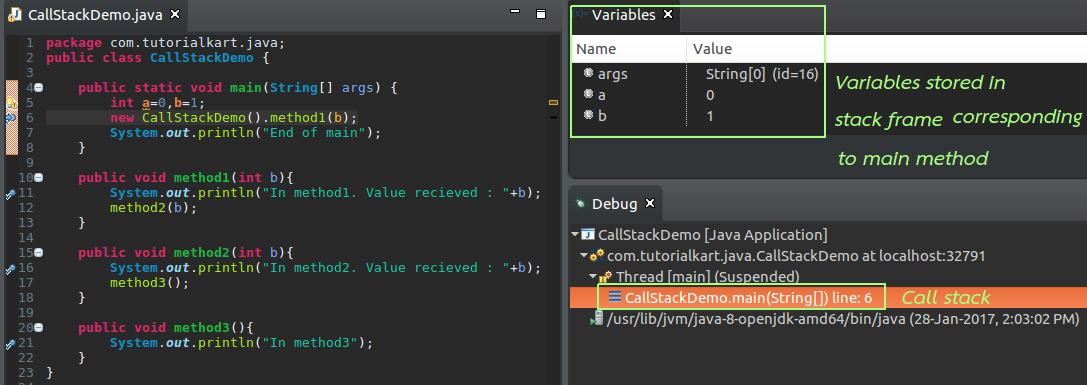
At this point, the program is still inside main(). Therefore, the call stack contains the frame for main(). The local variables of main(), such as a and b, are available in this stack frame.
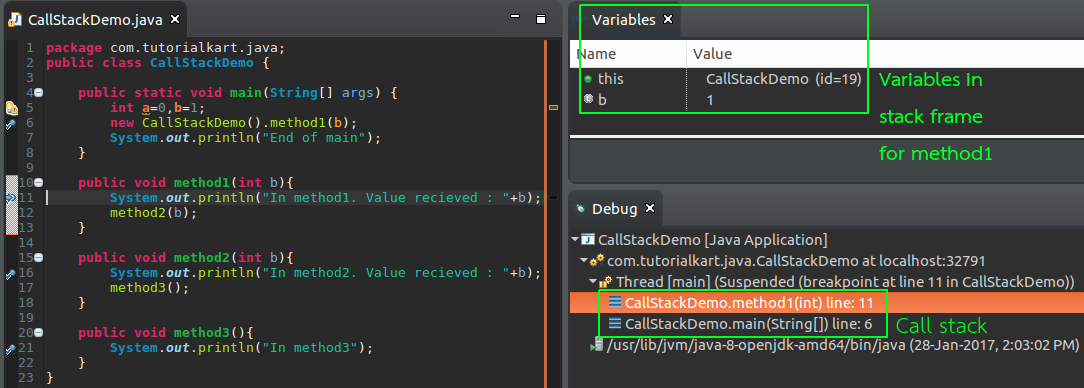
After main() calls method1(), a stack frame for method1() is added above the frame for main(). The debugger shows both frames because main() has not finished yet; it is waiting for method1() to return.
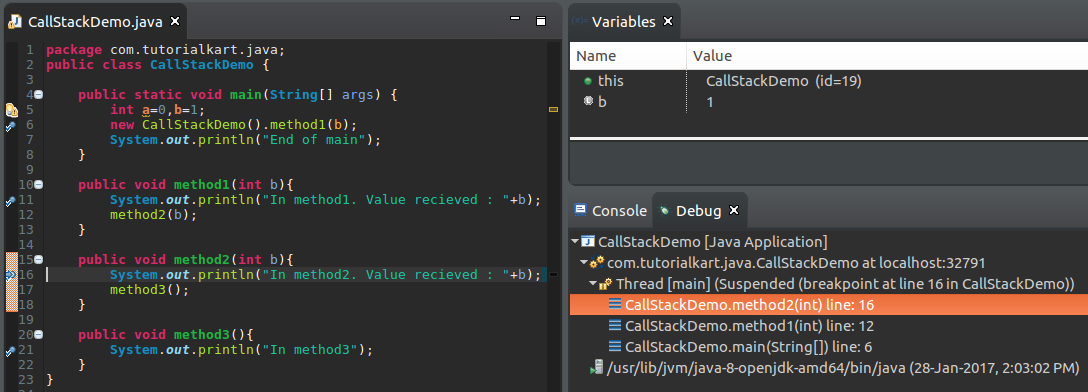
When the execution reaches deeper method calls, the call stack shows the chain of calls. The top frame is the currently executing method, and the lower frames show the calling methods that are still waiting for control to return.
Java call stack and recursion
Recursion is a common case where stack frames are easy to observe. In recursion, a method calls itself. Each recursive call gets a new stack frame. The local variables of one recursive call are separate from the local variables of another recursive call.
public class RecursionStackDemo {
    public static void main(String[] args) {
        countDown(3);
    }

    static void countDown(int n) {
        if (n == 0) {
            return;
        }
        System.out.println(n);
        countDown(n - 1);
    }
}
In this example, countDown(3), countDown(2), and countDown(1) are different method invocations. Each invocation has its own stack frame and its own value of n.
3
2
1
StackOverflowError in Java call stack
A StackOverflowError can occur when the Java call stack runs out of space. This commonly happens when recursion does not have a correct stopping condition, or when too many nested method calls are made.
public class StackOverflowDemo {
    public static void main(String[] args) {
        callAgain();
    }

    static void callAgain() {
        callAgain();
    }
}
The method callAgain() keeps calling itself without a base condition. Java keeps adding stack frames until the stack space is exhausted. In real programs, recursive methods should always move toward a clear stopping condition.
Call stack, stack memory and heap memory in Java
The call stack is often discussed along with stack memory and heap memory. They are related concepts, but they are not the same.
| Concept | Meaning in Java |
|---|---|
| Call stack | The sequence of active method calls for a thread |
| Stack frame | The data area created for one method invocation |
| Stack memory | Memory used for method frames, parameters, and local method data |
| Heap memory | Memory where objects are generally allocated |
For example, when a local variable holds a reference to an object, the local reference variable is part of the method’s stack frame, while the object itself is usually stored on the heap.
Why Java developers use the call stack while debugging
The Java call stack helps you understand how execution reached the current line of code. When an exception occurs, the stack trace printed by Java is also based on method calls in the call stack. Reading the stack trace from top to bottom usually shows where the error happened first and which methods called it.
- Use the call stack to identify the currently executing method.
- Move between stack frames in the debugger to inspect local variables.
- Check the caller method when the current method receives an unexpected value.
- Use stack traces to find the line where an exception occurred.
- Watch recursive calls carefully to avoid unexpected stack growth.
Common mistakes while learning Java call stack and stack frames
- Thinking that a method has only one stack frame for the whole program. A new frame is created for every method invocation.
- Assuming local variables are shared between method calls. Local variables belong to their own stack frame.
- Confusing the object on the heap with the reference variable stored in a stack frame.
- Reading a stack trace from the wrong direction and missing the method where the exception first occurred.
- Writing recursive methods without a proper base condition.
Java call stack interview points
For interviews and debugging discussions, remember these key points about the Java call stack:
- The call stack stores active method calls for a thread.
- Each method call creates a stack frame.
- The currently executing method is at the top of the stack.
- When a method returns, its stack frame is removed.
- Recursive calls create multiple stack frames for the same method.
- A very deep or infinite call sequence can cause
StackOverflowError.
Java call stack and stack frame FAQ
What is call stack in Java?
The call stack in Java is the runtime structure that keeps track of active method calls. The method currently running is at the top of the stack, and the methods below it are waiting for called methods to return.
What is a stack frame in Java?
A stack frame is the data area created for one method call. It contains information such as method parameters, local variables, return information, and execution state for that method invocation.
When is a stack frame created and removed in Java?
A stack frame is created when a method is invoked. It is removed when that method completes normally or exits because of an exception.
How does recursion affect the Java call stack?
Each recursive call creates a separate stack frame. If recursion continues too deeply or has no proper stopping condition, the call stack can run out of space and Java may throw StackOverflowError.
Is call stack the same as heap memory in Java?
No. The call stack tracks method calls and stores stack frames. Heap memory is generally used for objects. A stack frame may contain a local reference variable that points to an object stored on the heap.
QA checklist for Java call stack tutorial
- Confirm that the Java call stack is explained as a last-in, first-out structure for active method calls.
- Confirm that every method invocation is described as having its own stack frame.
- Confirm that method parameters and local variables are explained as frame-specific data.
- Confirm that the nested method example shows push and pop behavior clearly.
- Confirm that recursion is explained with separate stack frames for each recursive call.
- Confirm that
StackOverflowErroris connected to excessive stack growth, especially uncontrolled recursion. - Confirm that stack memory and heap memory are not described as the same thing.
Conclusion: Java call stack and stack frame
The Java call stack helps the JVM manage method execution. Every method call creates a stack frame, and that frame is removed when the method finishes. By understanding how stack frames are pushed and popped, you can debug method calls, read stack traces, understand recursion, and identify problems such as StackOverflowError more clearly.