 TutorialKart.com
Java try-catch block for exception handling
The Java try-catch block is used to handle an exception at the point where risky code is executed. Code that may throw an exception is placed inside the try block, and the recovery logic is placed inside one or more catch blocks.
When an exception is handled by a matching catch block, the program can continue with the statements after the try-catch structure instead of stopping abruptly. This is useful for cases such as invalid input, arithmetic errors, missing files, failed parsing, or any operation where the program can recover safely.
Java try-catch syntax
The basic syntax of a try-catch block in Java is shown below. The catch block must immediately follow the try block, unless a finally block or another valid exception-handling structure is used.
try {
    // code that may throw an exception
} catch (SpecificException e) {
    // code that handles SpecificException
} catch (Exception e) {
    // fallback handler for other exceptions
}
In the syntax above, SpecificException should be replaced with the actual exception type expected from the risky statement. The variable e receives the exception object, so you can read details such as the message, stack trace, or exception type.
How Java chooses the matching catch block
- Enclose the code that may throw an exception inside the
tryblock. - Place one or more
catchblocks after the try block. - When an exception occurs, the normal flow inside the try block stops immediately.
- The Java runtime creates an exception object and checks the catch blocks from top to bottom.
- The first catch block whose parameter type matches the exception handles it.
- If no catch block can handle the exception, the exception is passed to the calling method.
Catch block order matters. A catch block for a subclass such as ArithmeticException should appear before a catch block for a superclass such as Exception. If the broader Exception catch block is placed first, a later catch block for ArithmeticException becomes unreachable code.
The official Java tutorial on exceptions also describes this top-to-bottom matching behavior when a try block is followed by more than one exception handler. You can refer to Oracle’s exception handling documentation for the formal explanation: Catching and Handling Exceptions.
Java try-catch example with ArithmeticException
The scenario mentioned is created in the following example, Example.java. In this example, there are two catch blocks following the try block. Based on the type of exception object created, the respective catch block receives the exception object. Looking at the code in the example, it is clear that an ArithmeticException would be thrown because the code attempts integer division by zero. So, the catch block that handles ArithmeticException receives the exception object.
If another type of exception happens, the runtime checks for a catch block that handles that specific exception. If a specific handler is not found, and a catch block for java.lang.Exception exists, that catch block can handle it because Exception is the superclass of many exception classes in Java. If no catch block can handle the exception, it is thrown to the calling method.
Example.java
package com.tutorialkart.java;

public class Example {

	public static void main(String[] args) {
		new TryCatchDemo().routine();
		System.out.println("End of main");
	}

	public void routine(){
		System.out.println("In routine..");
		try {
			int c = 4/0;
			System.out.println("This statement is not printed if an exception occurs at the line above.");
		} catch (ArithmeticException e) {
			System.out.println("Exception is handled in ArithmeticException catch block.");
		} catch (Exception e) {
			System.out.println("Exception is handled in Exception catch block");
		}
		System.out.println("Continuing with rest of statements after try-catch block.");
	}
}
When the program is run, the output to console is
In routine..
Exception is handled in ArithmeticException catch block.
Continuing with rest of statements after try-catch block.Else
End of main
For the code shown above, the execution prints the line inside the ArithmeticException catch block, then continues with the statement after the try-catch block, and finally returns to main().
In routine..
Exception is handled in ArithmeticException catch block.
Continuing with rest of statements after try-catch block.
End of main
Execution flow in a Java try-catch block
The path of the execution follows the yellow line starting from the first statement in the main() method, shown in the following figure:
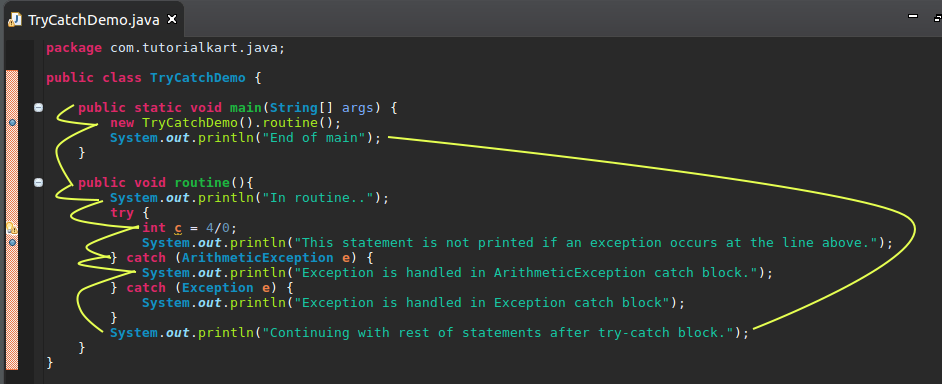
In the example, execution begins in main() and calls routine(). Inside routine(), the statement int c = 4/0; throws an ArithmeticException. The statement immediately after it inside the try block is skipped. Java then checks the catch blocks, finds the ArithmeticException handler, executes it, and continues after the try-catch block.
Using the exception object inside a Java catch block
The exception variable in a catch block is not only a placeholder. It gives access to useful details about the problem. For simple examples, printing a friendly message is enough. In real applications, you may log the exception message or show a safe message to the user.
try {
    int value = Integer.parseInt("abc");
    System.out.println(value);
} catch (NumberFormatException e) {
    System.out.println("Input is not a valid number.");
    System.out.println("Exception message: " + e.getMessage());
}
The code above catches NumberFormatException, which occurs when the string cannot be converted into an integer.
Input is not a valid number.
Exception message: For input string: "abc"
Multiple catch blocks and catch order in Java
A try block can be followed by multiple catch blocks when different exceptions need different handling. Place the most specific exception types first and the more general types later.
try {
    int[] numbers = {10, 20, 30};
    System.out.println(numbers[5]);
} catch (ArrayIndexOutOfBoundsException e) {
    System.out.println("Array index is outside the valid range.");
} catch (RuntimeException e) {
    System.out.println("A runtime exception occurred.");
}
Here, ArrayIndexOutOfBoundsException is more specific than RuntimeException, so it is written first. This keeps the exception handling clear and avoids unreachable catch blocks.
Java multi-catch for similar exception handling
When two or more exception types require the same handling, Java allows a multi-catch block using the pipe symbol. This helps avoid duplicate catch blocks.
try {
    String input = null;
    int length = input.length();
    int number = Integer.parseInt("abc");
    System.out.println(length + number);
} catch (NullPointerException | NumberFormatException e) {
    System.out.println("Input could not be processed.");
}
Use multi-catch only when the same recovery logic is suitable for each exception type. If the program should respond differently, use separate catch blocks.
Checked and unchecked exceptions with Java try-catch
Java exceptions are commonly discussed as checked and unchecked exceptions. A checked exception must be handled with try-catch or declared with throws. An unchecked exception is a runtime exception, and the compiler does not force you to catch it.
For example, file handling often involves checked exceptions because a file may not exist or may not be readable. Arithmetic errors and invalid array indexes are unchecked exceptions because they are subclasses of RuntimeException.
Use try-catch when the program has a meaningful way to recover, report, retry, or continue safely. Do not catch an exception only to hide it, because that can make bugs harder to find.
Common mistakes in Java try-catch exception handling
- Catching
Exceptiontoo early: Catch specific exception types before broader ones. - Leaving the catch block empty: An empty catch block hides the problem and makes debugging difficult.
- Putting too much code in the try block: Keep only the risky statements inside the try block when possible.
- Using try-catch for normal decisions: Do not use exceptions as a replacement for simple condition checks.
- Printing stack traces in user-facing programs: Log technical details for developers and show safe messages to users.
When to use Java try-catch and when to throw the exception
Handle the exception with try-catch when the current method knows how to recover from it. For example, if a user enters invalid input, the same method may ask for input again or show a useful message.
Let the exception move to the calling method when the current method cannot decide the correct recovery action. In that case, the method may use throws, and the caller can handle the exception at a better level of the program.
Java try-catch FAQs
Can a Java try block have more than one catch block?
Yes. A Java try block can have multiple catch blocks. Java checks them from top to bottom and executes the first catch block that matches the thrown exception.
Why should specific Java exceptions be caught before Exception?
Specific exceptions should be caught first because a broader catch block such as catch (Exception e) can also catch many subclass exceptions. If the broad handler appears first, the specific handler after it may become unreachable.
Does Java continue after a catch block is executed?
Yes, if the exception is handled and the catch block does not throw another exception or terminate the program, Java continues with the statements after the try-catch block.
Can a catch block be empty in Java?
Java allows an empty catch block syntactically, but it is usually a bad practice. At minimum, the program should log the exception or provide a clear recovery path.
Is try-catch required for every Java exception?
No. Checked exceptions must be caught or declared with throws. Unchecked exceptions do not have to be caught, but you can catch them when there is a useful recovery action.
Editorial QA checklist for this Java try-catch tutorial
- Does the tutorial explain that catch blocks are checked from top to bottom?
- Does every Java try-catch example show a clear reason for the exception?
- Are specific exception handlers placed before broader handlers such as
Exception? - Are output blocks marked with the
outputclass and Java code blocks marked withlanguage-java? - Does the page avoid suggesting empty catch blocks or exception swallowing as good practice?
Summary of Java try-catch block usage
In this Java Tutorial, we learned how to use the try-catch block in Java to handle exceptions. A try block contains the code that may fail, and catch blocks define how the program should respond when a matching exception occurs. In the next topic of Java tutorials, we shall learn how to use try-with-resources for resources that must be closed after use.