 TutorialKart.com
Express.js Middleware
Express.js middleware functions run during the request-response cycle. They can inspect or modify the incoming request, prepare the response, end the request, or pass control to the next middleware function.
In this tutorial, you will learn how Express middleware works, how to define and register middleware, why middleware order matters, and how to use application-level, router-level, built-in, and error-handling middleware.
What Is Middleware in Express.js?
Middleware is a function that can access request and response objects and can also use next function in the application’s request-response cycle.
An Express middleware function usually receives three arguments:
req: the incoming HTTP request objectres: the HTTP response objectnext: a function that passes control to the next matching middleware or route handler
A middleware function must either send a response, end the response, or call next(). Otherwise, the request remains pending because Express has not been told how to continue.
Express Middleware Terminology
request – is the HTTP request that reaches the Express application when a client makes HTTP request like PUT, GET, etc. It contains properties like query string, url parameters, headers, etc.
response – object represents the HTTP response that an Express application sends when it gets an HTTP request.
next – next is used to continue with the next middleware in the middleware stack.
request-response cycle – The cycle of operations that get executed starting with a request hitting the Express application till a response leaves the application for the request.
middleware stack – stack of middleware functions that get executed for a request-response cycle.
What an Express Middleware Function Can Do
A middleware function can perform one or more of the following operations:
- Run code such as logging, timing, validation, or authentication checks.
- Read or modify properties on the
reqobject. - Set headers or other values on the
resobject. - Send a response with methods such as
res.send(),res.json(), orres.status(). - Pass control to the next middleware by calling
next(). - Pass an error to Express by calling
next(error).
Define an Express Middleware Function
As we have already mentioned in the definition of middleware function, it has access to request, response objects and next function.
The syntax is same as that of a JavaScript Function. It accepts request, response objects and next function as arguments.
 function logger(req, res, next) {

 }
here, logger is the function name, req is the HTTP request object, res is the Node Response Object and next is the next function in request-response cycle.
You can access all the properties and methods of request object req.
Similarly, you can access all the properties and methods of response object res.
Calling next() function inside the middleware function is optional. If you use next() statement, the execution continues with the next middleware function in request-response cycle. If you do not call next() function, the execution for the given request stops here.
 function logger(req, res, next) {
    // your code
    next()  // calls the next function in the middleware stack
 }
Not calling next() is correct when the middleware sends the final response. For example, an authentication middleware may return a 401 Unauthorized response instead of allowing the request to continue.
Register Middleware with app.use()
In an Express application, you call middleware using use function on application object.
var express = require('express')
var app = express()

function logger(req, res, next) {
   // your code
   next()
}

app.use(logger)
When middleware is registered with app.use(logger) without a path, it runs for every request that reaches that point in the middleware stack.
Express Middleware Order and Execution Flow
Express executes middleware in the order in which it is registered. This means a middleware function must normally appear before the routes that need to use it.
const express = require('express')
const app = express()

app.use(function requestLogger(req, res, next) {
  console.log(req.method, req.url)
  next()
})

app.get('/', function (req, res) {
  res.send('Home page')
})
For a request to /, Express first executes requestLogger. After the middleware calls next(), Express continues to the matching app.get() route.
If the route were registered before the middleware and the route sent a response, the middleware below it would not run for that request.
Run Middleware Only for a Specific Path
You can provide a path as the first argument to app.use(). The middleware then runs only when the request URL matches that path prefix.
app.use('/admin', function adminLogger(req, res, next) {
  console.log('Admin request:', req.method, req.originalUrl)
  next()
})
This middleware runs for paths such as /admin, /admin/users, and /admin/settings, but not for an unrelated path such as /products.
Attach Middleware to a Single Express Route
Middleware can also be passed directly to a route method. This is useful for validation, authorization, or preprocessing that applies to one route or a small group of routes.
function validateUserId(req, res, next) {
  const userId = Number(req.params.id)

  if (!Number.isInteger(userId) || userId < 1) {
    return res.status(400).json({ error: 'Invalid user ID' })
  }

  next()
}

app.get('/users/:id', validateUserId, function (req, res) {
  res.json({ id: Number(req.params.id) })
})
The return statement prevents the middleware from continuing after it sends the error response. When the ID is valid, next() transfers control to the route handler.
Built-in Express Middleware for JSON and Form Data
Express includes middleware for parsing common request-body formats. Register the parser before routes that need to read req.body.
const express = require('express')
const app = express()

app.use(express.json())
app.use(express.urlencoded({ extended: true }))

app.post('/users', function (req, res) {
  res.status(201).json({ received: req.body })
})
express.json() parses requests whose body contains JSON. express.urlencoded() parses URL-encoded form submissions. Without the appropriate parsing middleware, req.body may be undefined.
Router-level Middleware with express.Router()
Router-level middleware works like application-level middleware, but it is attached to an Express router. It helps keep middleware close to the routes it protects or prepares.
const express = require('express')
const app = express()
const adminRouter = express.Router()

adminRouter.use(function requireAdmin(req, res, next) {
  const isAdmin = req.get('x-admin') === 'true'

  if (!isAdmin) {
    return res.status(403).json({ error: 'Admin access required' })
  }

  next()
})

adminRouter.get('/dashboard', function (req, res) {
  res.json({ page: 'Admin dashboard' })
})

app.use('/admin', adminRouter)
With this setup, the router middleware runs before routes mounted under /admin.
Error-handling Middleware in Express.js
Error-handling middleware uses four parameters: err, req, res, and next. Express identifies it as an error handler because of this four-argument signature.
app.get('/report', function (req, res, next) {
  try {
    throw new Error('Unable to create report')
  } catch (error) {
    next(error)
  }
})

app.use(function errorHandler(err, req, res, next) {
  console.error(err)
  res.status(500).json({ error: 'Internal server error' })
})
Error-handling middleware is generally registered after normal middleware and routes. Calling next(error) skips regular middleware and transfers control to the next matching error handler.
Express.js Logger Middleware Example
In this example, we will define a middleware called logger which logs the current time and query string to the console.
app.js
var express = require('express')
var app = express()

// define middleware function
function logger(req, res, next) {
   console.log(new Date(), req.url)
   next()
}

// calls logger:middleware for each request-response cycle
app.use(logger)

// route that gets executed for the path '/'
app.get('/', function (req, res) {
   res.send('This is a basic Example for Express.js by TUTORIALKART')
})

// start the server
var server = app.listen(8000, function(){
    console.log('Listening on port 8000...')
})
Start this application and hit the following urls in your browser.
- http://localhost:8000/
- http://localhost:8000/hello-page/
The output would be
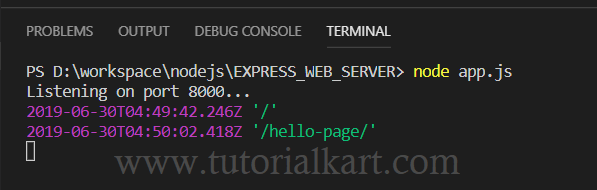
For each request made to the application listening on 8000, we attached a middleware function. For the url http://localhost:8000/, the url is / and hence the output of logger is current time and ‘/’. Similarly for url '/hello-page/'.
The logger also runs for /hello-page/, even though the application does not define a route for that path. The middleware executes before Express determines that no matching route is available.
Common Express Middleware Mistakes
- Forgetting to call
next(): If the middleware does not send a response, the request will remain unfinished. - Calling
next()after sending a response: This can cause later middleware to attempt another response and produce a headers-already-sent error. - Registering middleware after a route: Middleware placed below a route will not run when that route has already completed the response.
- Using request-body data before a parser: Register
express.json()orexpress.urlencoded()before routes that usereq.body. - Using the wrong error-handler signature: An Express error handler must declare all four parameters, including
next, even when the function does not call it.
Express.js Middleware FAQs
What happens when middleware does not call next()?
If the middleware sends or ends the response, nothing else is required. If it neither completes the response nor calls next(), the request remains pending.
Does Express middleware run in the order it is written?
Yes. Express processes matching middleware and route handlers in registration order. Place middleware before the routes that depend on it.
What is the difference between app.use() and app.get() middleware?
app.use() can run for multiple HTTP methods and matching path prefixes. app.get() handles only GET requests for its specified route pattern.
Can an Express route have more than one middleware function?
Yes. You can pass multiple middleware functions before the final route handler. Each function must call next() to continue unless it completes the response.
How is error-handling middleware different from normal middleware?
Normal middleware usually receives req, res, and next. Error-handling middleware receives err, req, res, and next, and it handles errors passed with next(error) or produced by matching handlers.
Express Middleware Editorial QA Checklist
- Confirm that every middleware either calls
next()or completes the response. - Verify that middleware appears before the routes that depend on it.
- Check that JSON or form-body parsers are registered before reading
req.body. - Ensure error handlers use the four-parameter
err, req, res, nextsignature. - Test both successful requests and requests rejected by validation or authentication middleware.