 TutorialKart.com
What is Express.js in Node.js?
Express.js is a minimal web application framework for Node.js. It provides routing, middleware, request handling, and response utilities that make it easier to build web servers and APIs.
Node.js includes an HTTP module that can create a server without an external framework. Express.js builds on that module and provides a simpler interface for common server-side tasks such as matching URLs, reading request data, setting response headers, returning JSON, and handling errors.
An Express application can listen on a network port and respond to HTTP methods such as GET, POST, PUT, PATCH, and DELETE. JavaScript code runs on the Node.js event loop, while asynchronous operations such as file access, database queries, and network requests can be handled without blocking the server during normal use.
What Express.js provides
- Routing: Match an HTTP method and URL path to a handler function.
- Middleware: Run reusable functions during the request-response cycle.
- Request utilities: Read route parameters, query strings, headers, cookies, and request bodies.
- Response utilities: Send text, HTML, JSON, files, redirects, and HTTP status codes.
- Error handling: Pass errors to dedicated middleware and return controlled responses.
- Static file serving: Make CSS, JavaScript, images, and other public files available through HTTP.
- Application structure: Organize larger projects with routers, controllers, services, or an MVC-style architecture.
Express does not force a specific project structure, database, template engine, or authentication system. Developers select and combine those components according to the application’s requirements.
How an Express.js request is processed
When a client sends an HTTP request, Express checks registered middleware and routes in the order in which they were added. A matching route handler receives a request object and a response object.
- The client sends a request to the Node.js server.
- Express runs applicable middleware functions.
- Express looks for a route that matches the request method and path.
- The route handler performs the required work.
- The handler sends a response or passes an error to error-handling middleware.
The request object is commonly named req, and the response object is commonly named res. A third parameter, next, is used by middleware to pass control to the next matching function.
A simple web server using Express.js
As we have already mentioned that it is just a couple of minutes required to create a web server using Express.js, let us create one.
app.js
var express = require('express')
var app = express()

app.get('/', function (req, res) {
  res.send('Node.js Express Tutorial by TUTORIALKART')
  res.end()
})

app.listen(8000)
When you run this using node command, node app.js, and do not find any errors, the server is up and running.
Open a browser and hit the url http://localhost:8000/.
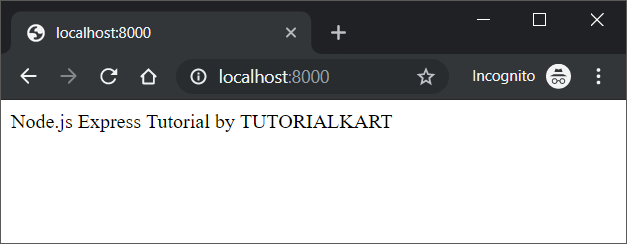
Set up an Express.js project
Node.js and npm must be installed before creating an Express project. Create a project directory, initialize its package configuration, and install Express.
mkdir express-example
cd express-example
npm init -y
npm install express
Create an app.js file in the project directory. The following example starts a server and logs the local address after the server begins listening.
const express = require('express');

const app = express();
const port = 8000;

app.get('/', (req, res) => {
  res.send('Hello from Express.js');
});

app.listen(port, () => {
  console.log(`Server running at http://localhost:${port}`);
});
Run the application from the project directory:
node app.jsThe terminal should display:
Server running at http://localhost:8000Express.js routes and HTTP methods
A route defines how the application responds to a particular HTTP method and URL path. The basic route syntax is:
app.METHOD(PATH, HANDLER);In this syntax, METHOD is an HTTP method such as get or post, PATH is the requested URL path, and HANDLER is the function that prepares the response.
app.get('/products', (req, res) => {
  res.json([
    { id: 1, name: 'Keyboard' },
    { id: 2, name: 'Mouse' }
  ]);
});

app.post('/products', (req, res) => {
  res.status(201).json({ message: 'Product created' });
});
The GET route returns a JSON array. The POST route returns HTTP status code 201, which indicates that a resource was created.
Route parameters and query strings in Express.js
Route parameters are named sections of a URL path. Express makes their values available through req.params.
app.get('/users/:userId', (req, res) => {
  res.json({ userId: req.params.userId });
});
A request to /users/42 produces the following response:
{"userId":"42"}Query-string values are available through req.query. For example, a request to /search?term=node can be handled as follows:
app.get('/search', (req, res) => {
  res.json({ searchTerm: req.query.term || '' });
});
Reading JSON request bodies with Express.js
Use express.json() middleware before routes that need to read JSON request bodies. After the middleware parses a valid JSON body, its value is available through req.body.
app.use(express.json());

app.post('/users', (req, res) => {
  const { name } = req.body;

  if (!name) {
    return res.status(400).json({ error: 'Name is required' });
  }

  res.status(201).json({ id: 1, name });
});
The validation in this example is intentionally simple. Production applications should validate the expected type, length, format, and allowed values of all client-supplied data.
How Express.js middleware works
Middleware is a function that can inspect or modify a request and response. It can end the request by sending a response, pass control with next(), or pass an error with next(error).
app.use((req, res, next) => {
  console.log(`${req.method} ${req.path}`);
  next();
});
Middleware order matters. A middleware function registered after a route does not run for requests that have already received a response from that route.
Express.js 404 and error handling
A server does not automatically remain reliable simply because it uses Express. Errors must be passed to error-handling middleware, and unexpected process-level failures still require logging, monitoring, and an appropriate restart strategy.
Place a 404 handler after all valid routes. Place error-handling middleware after the 404 handler and other middleware.
app.use((req, res) => {
  res.status(404).json({ error: 'Route not found' });
});

app.use((err, req, res, next) => {
  console.error(err);
  res.status(500).json({ error: 'Internal server error' });
});
An Express error handler is identified by its four parameters: err, req, res, and next. Avoid returning internal stack traces, database details, credentials, or other sensitive debugging information to clients.
Express.js compared with the Node.js HTTP module
| Task | Node.js HTTP module | Express.js |
|---|---|---|
| Create an HTTP server | Supported directly | Uses Node.js HTTP capabilities through a framework API |
| Match routes | Usually implemented manually or with custom utilities | Built-in method and path routing |
| Parse JSON bodies | Read and combine request stream data manually | Use express.json() |
| Send JSON | Set headers and serialize data manually | Use res.json() |
| Compose request processing | Custom application logic | Middleware pipeline |
| Handle application errors | Custom conventions | Dedicated error-handling middleware pattern |
The Node.js HTTP module is suitable when an application needs direct, low-level control or has very limited requirements. Express is useful when routing and middleware would otherwise require repeated custom code.
When Express.js is commonly used
- REST-style JSON APIs
- Backend services for web and mobile applications
- Server-rendered websites
- Internal dashboards and administration tools
- Webhook receivers
- Prototype applications and small services
Express can also be used in larger systems, but the application still needs deliberate choices for validation, authentication, authorization, database access, security headers, logging, testing, deployment, and process management.
Common Express.js mistakes to avoid
- Sending more than one response: Return after sending an early error response so later code does not call another response method.
- Registering middleware in the wrong order: Add parsers, authentication, and other required middleware before the routes that depend on them.
- Trusting request data: Validate route parameters, query values, headers, and request bodies.
- Exposing internal errors: Log detailed errors on the server but return controlled messages to clients.
- Blocking the event loop: Avoid long synchronous computations and synchronous file operations inside request handlers.
- Starting the server before configuration is ready: Load required configuration and establish essential dependencies before accepting traffic.
- Omitting HTTP status codes: Return status codes that accurately describe success, validation errors, missing resources, and server failures.
Express.js questions and answers
Is Express.js a programming language?
No. Express.js is a JavaScript web framework that runs on Node.js. JavaScript is the programming language, Node.js is the runtime, and Express provides web application features.
Does Express.js replace Node.js?
No. Express depends on Node.js. It provides a higher-level API for features such as routing, middleware, and responses while using Node.js networking capabilities underneath.
Can Express.js return JSON for an API?
Yes. Use res.json(value) to serialize a JavaScript value and send it as a JSON response. Use express.json() when the application also needs to parse incoming JSON bodies.
What is the difference between a route and middleware?
A route normally handles a specific HTTP method and path. Middleware can run for many requests, inspect or modify request data, perform shared work, end the response, or pass control to another middleware function or route.
Why does middleware order matter in Express.js?
Express evaluates middleware and routes in registration order. A parser, authentication check, or logger must therefore be added before the handlers that need it, while 404 and error handlers are generally placed after application routes.
Express.js tutorial review checklist
- Confirm that Node.js and Express installation commands match the project’s package setup.
- Verify that every route sends one response or passes control with
next(). - Check that
express.json()appears before routes that readreq.body. - Validate every route parameter, query value, and request-body field used by the application.
- Place the 404 handler after valid routes and the error handler last.
- Use suitable HTTP methods and status codes for each operation.
- Ensure server responses do not expose stack traces, credentials, or internal system details.
- Test the application with valid input, missing fields, malformed JSON, unknown routes, and unexpected server errors.