 TutorialKart.com
Node.js forEach
In Node.js, forEach() is an Array method that runs a callback function once for each element in an array. It is useful when you need to perform a side effect such as printing values, updating an object, or calling a function for every item.
This tutorial explains the forEach() callback parameters, shows common Node.js examples, and clarifies when another array method or a for...of loop is a better choice.
Node.js Array forEach Syntax
The syntax of forEach is;
let arr = [element1, element2, elementN];
arr.forEach(myFunction(element, index, array, this){  function body  });
myFunction function is executed for each element in arr. The element of array is passed as argument to the function during each iteration.
In practical JavaScript, the callback has the following form. The index, array, and thisArg values are optional.
array.forEach(function (element, index, array) {
  // statements executed for each element
}, thisArg);element: the current array value.index: the zero-based position of the current value.array: the array on whichforEach()was called.thisArg: an optional value used asthisinside a regular callback function.
Node.js forEach Example with Array Elements
In this example, we will use forEach to apply on each element of array.
index.js
let array1 = ['a1', 'b1', 'c1'];

array1.forEach(function(element) {
  console.log(element);
});
Output
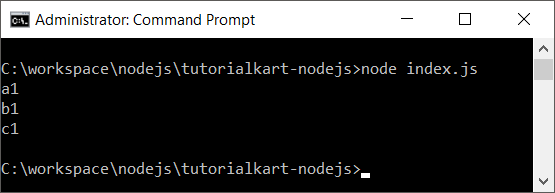
The callback runs three times, once for each string in array1. The method processes the elements in ascending index order.
Node.js forEach with an External Callback Function
In this example, we will use forEach to apply on each element of array. And we define the function separately and pass as argument to forEach.
index.js
let array1 = ['a1', 'b1', 'c1']

let myFunc = function(element) {
  console.log(element)
}

array1.forEach(myFunc)
Passing a named or separately assigned callback is useful when the same operation is reused or when moving the callback out of the forEach() call makes the code easier to read.
Access Element, Index, and Array in Node.js forEach
In this example, we will access index and array along with element in each iteration.
index.js
let array1 = ['a1', 'b1', 'c1']

let myFunc = function(element, index, array) {
  console.log(index + ' : ' + element + ' - ' + array[index])
}

array1.forEach(myFunc)
Output
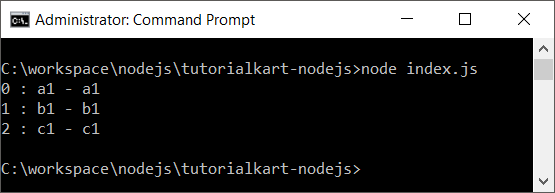
The value returned by array[index] is the same current value supplied through element. Access to the complete array can be useful when an operation depends on neighboring values or other positions.
Use an Arrow Function with Node.js forEach
An arrow function provides a shorter callback syntax when you do not need a separate function declaration.
const numbers = [2, 4, 6];

numbers.forEach((number, index) => {
  console.log(`Index ${index}: ${number}`);
});
Output
Index 0: 2
Index 1: 4
Index 2: 6
Run Node.js forEach on an Array of Objects
When an array contains objects, the callback receives one object during each iteration. You can read or update its properties inside the callback.
const users = [
  { name: 'Asha', active: true },
  { name: 'Ravi', active: false }
];

users.forEach((user) => {
  console.log(`${user.name}: ${user.active}`);
});
Output
Asha: true
Ravi: false
Why Node.js forEach Does Not Return a New Array
forEach() returns undefined. A value returned from its callback is ignored, so the method should not be used when you need to transform every element into a new array.
const numbers = [1, 2, 3];

const result = numbers.forEach((number) => {
  return number * 2;
});

console.log(result);
Output
undefinedUse map() when you need a new array containing transformed values.
const numbers = [1, 2, 3];
const doubled = numbers.map((number) => number * 2);

console.log(doubled);
Output
[ 2, 4, 6 ]Node.js forEach with Async Functions
forEach() does not wait for promises returned by an async callback. As a result, code after the loop may run before the asynchronous work finishes.
For sequential asynchronous processing, use for...of with await.
async function processItems(items) {
  for (const item of items) {
    await saveItem(item);
  }

  console.log('All items processed');
}
For parallel processing, create promises with map() and wait for them with Promise.all().
async function processItems(items) {
  await Promise.all(items.map((item) => saveItem(item)));
  console.log('All items processed');
}
Stopping or Skipping Iterations in Node.js forEach
A normal break or continue statement cannot be used to control a forEach() loop. A return inside the callback only ends the current callback invocation; it does not stop the remaining iterations.
Use for...of when you need break or continue. Use methods such as some(), every(), or find() when you want iteration to stop after a condition is satisfied.
Choose Between forEach, map, filter, and for…of
| Requirement | Recommended option |
|---|---|
| Run an operation for every element | forEach() |
| Create a transformed array | map() |
| Create an array containing matching elements | filter() |
Stop early with break | for...of |
| Await asynchronous work sequentially | for...of with await |
| Await asynchronous work in parallel | Promise.all() with map() |
Node.js forEach Frequently Asked Questions
Does forEach change the original array?
forEach() does not create a new array, but the callback can modify object properties or assign values to the original array. Whether the array changes depends on the statements inside the callback.
Can Node.js forEach use await?
An async callback can contain await, but forEach() itself does not wait for the callback promises. Use for...of or Promise.all() when completion order matters.
Can forEach return a new array?
No. forEach() returns undefined. Use map() to create a new array from callback return values.
Can a forEach loop be stopped with break?
No. Use a for loop, a for...of loop, or a condition-based array method such as some() or find().
Node.js forEach Editorial QA Checklist
- Confirm every callback example uses the parameters in the order
element,index, andarray. - Confirm examples do not imply that callback return values are collected by
forEach(). - Confirm asynchronous examples do not use
awaitinsideforEach()as if the loop waits for completion. - Confirm examples that require early exit use
for...ofor a condition-based array method. - Run each code sample with a supported Node.js release and compare the displayed output.