 TutorialKart.com
This tutorial explains the step by step procedure for assignment of personnel area to company code in SAP HR. This configuration links a personnel area with a company code so that the HR enterprise structure is connected with the Financial Accounting company structure.
In SAP HR, a personnel area represents a specific enterprise structure unit used for personnel administration. A company code represents a legally independent accounting unit in SAP FI. The assignment of personnel area to company code tells SAP which company code is responsible for that personnel area.
How personnel area and company code assignment works in SAP HR
The link between personnel area and company code is established through the assignment of company code to personnel area in SAP. A company code can have more than one personnel area assigned to it, but a personnel area is normally assigned to one company code in the HR enterprise structure. This keeps employee organizational assignment, reporting, and accounting integration consistent.
This activity is not the same as assigning company code to controlling area or using a business area in FI. It is an SAP HR enterprise structure assignment used before maintaining employees under the relevant personnel area in HR master data.
SAP navigation for assigning personnel area to company code
| SAP R/3 role menu | Assignment of personnel area to company code |
| Transaction Code | SPRO |
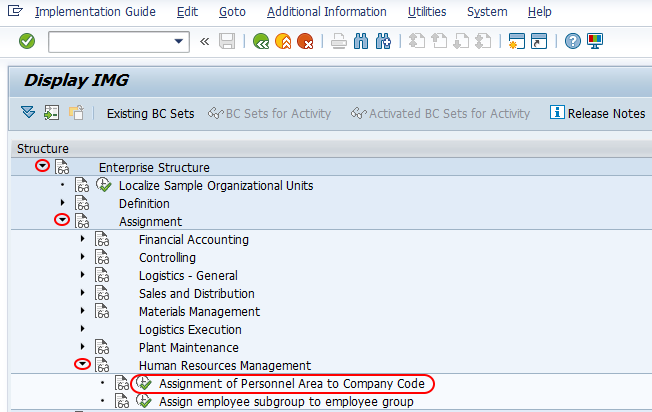
| SAP IMG path | SPRO => IMG => Enterprise Structure => Assignment => Human Resource Management (HRM) => Assign personnel area to company code. |
Prerequisites before assigning personnel area to company code in SAP
Before you maintain this assignment, confirm that the company code and personnel area are already created. If either object is missing, complete the definition first and then return to this assignment activity.
- The company code must be defined in SAP FI enterprise structure.
- The personnel area must be defined in SAP HR enterprise structure.
- The country grouping key should be selected according to the country for which the personnel area is valid.
- The assignment should be saved in the correct customizing transport request where transport management is active.
- The assignment should match the organization design used for HR master data, payroll, and reporting.
Steps to assign personnel area to company code in SAP HR
For assignment, perform the following configuration steps.
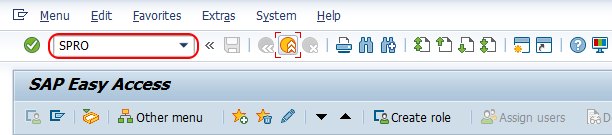
Step 1 : – Execute tcode “SPRO” on command field as shown below.
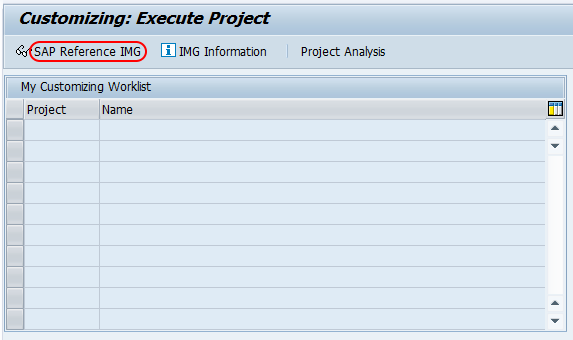
Step 2 :- Choose “Display SAP Reference IMG”
Step 3 :- On display IMG screen, follow the navigation menu Assignment > Human Resource Management > Assign Personnel area to Company code.
Step 4 : – On change view “Assignment of personnel area to company code” overview screen, click on position button and enter the personnel area key in the entry field, press enter ? to continue. Now you your personnel area key displays on top of the screen, so that you easily assign company code to this personnel area in SAP.
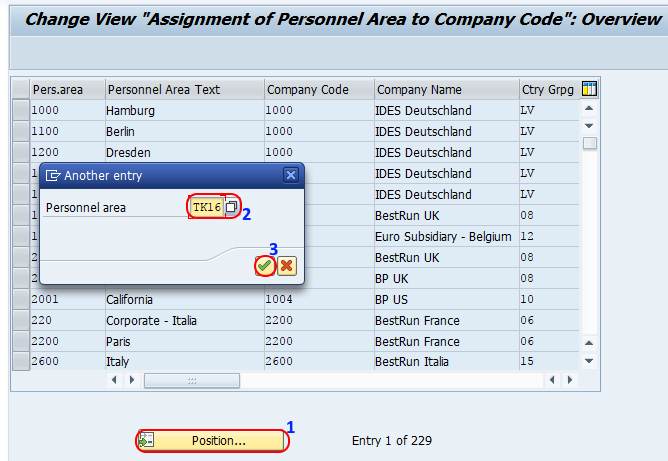
Step 5 : – Now enter the company code “TK01” in the given field company code, country grouping key (Press F4 for list of available country grouping codes) and press enter..

Click on save button and save the configured assignment details. If the system asks for a customizing request, choose the correct transport request and continue saving the assignment.
Fields used in SAP personnel area to company code assignment
| Field | Purpose in assignment | Configuration note |
|---|---|---|
| Personnel Area | Identifies the HR enterprise structure unit being assigned. | Use the personnel area key already created in SAP HR. |
| Company Code | Identifies the FI company code linked to the personnel area. | Select the legal accounting unit that owns the personnel area. |
| Country Grouping | Determines the country context for the personnel area. | Use F4 help and choose the country grouping that matches the personnel area. |
Effect of personnel area assignment in SAP HR master data
After this configuration is saved, the personnel area can be used in HR master data according to the assigned company code and country grouping. In employee master data, personnel area information is maintained as part of the employee’s organizational assignment. Transaction PA30 is commonly used to maintain HR master data records, while this tutorial covers the customizing activity that must exist before the personnel area can be used correctly.
If an employee cannot be assigned to the expected personnel area, check whether the personnel area is defined correctly and whether it is linked to the correct company code in this IMG activity.
Table check for personnel area and company code assignment in SAP
Consultants may verify the personnel area definition and its company code relationship in SAP tables during analysis. The personnel area configuration is commonly associated with table T500P. Use table display for checking values only. Configuration changes should normally be made through the SAP IMG path so that validation and transport control are handled correctly.
Common mistakes in SAP personnel area to company code assignment
- Trying to assign one personnel area to multiple company codes instead of creating a clear one-company-code relationship for that personnel area.
- Selecting the wrong country grouping key while maintaining the personnel area assignment.
- Confusing this HR assignment with FI business area or controlling area configuration.
- Maintaining employee master data before the personnel area assignment is completed.
- Saving the assignment in the wrong customizing transport request.
QA checklist for SAP HR personnel area to company code tutorial
- Confirm that the IMG path points to Enterprise Structure > Assignment > Human Resource Management > Assign personnel area to company code.
- Confirm that the article explains personnel area, company code, and country grouping in the context of SAP HR.
- Confirm that the tutorial does not suggest assigning one personnel area to multiple company codes.
- Confirm that PA30 is mentioned only for HR master data maintenance, not for customizing this assignment.
- Confirm that table T500P is presented as a verification reference, not as the recommended method for configuration changes.
FAQs on assigning personnel area to company code in SAP HR
How do I assign personnel area to company code in SAP?
Use transaction code SPRO and follow the IMG path Enterprise Structure > Assignment > Human Resource Management > Assign personnel area to company code. Then maintain the company code and country grouping for the selected personnel area and save the configuration.
Can one company code have multiple personnel areas in SAP HR?
Yes. A company code can be linked with multiple personnel areas when the organization has several HR locations or personnel administration units under the same legal accounting company.
Can one personnel area be assigned to more than one company code?
In a standard HR enterprise structure design, a personnel area is assigned to one company code. If the organization needs another company code relationship, review the personnel area design instead of assigning the same personnel area to multiple company codes.
What is the SAP table for personnel area and company code assignment?
The personnel area configuration is commonly checked in table T500P. Use it for verification and analysis, while maintaining the assignment through the IMG configuration activity.
Is PA30 used to assign personnel area to company code?
No. PA30 is used to maintain HR master data for employees. The assignment of personnel area to company code is a customizing activity maintained through SPRO in the SAP IMG.
Successfully we have assigned personnel area to company code in SAP HR.