 TutorialKart.com
How to Assign Counting Rules to Absence Types in SAP HR
After you define counting classes for period work schedules and create counting rules for absences, the next configuration step is to assign counting rules to absence types in SAP HR Time Management. This assignment tells SAP how an employee absence should be counted and whether the absence should reduce an absence quota.
For example, a full-day leave may count as 1 day, a half-day absence may count as 0.5 day, and a special absence type may not deduct quota at all. These results depend on the counting rule and quota deduction settings assigned to the absence type.
- Purpose of assigning counting rules to absence types
- SAP IMG path for absence counting assignment
- Prerequisites before assigning counting rules
- Steps to assign counting rules to absence types in SAP
- Fields used in absence counting and quota deduction
- Checks after assigning a counting rule
- FAQs on assigning counting rules to absence types
Purpose of Assigning Counting Rules to Absence Types
The link between counting rules and absence types is created through the assignment activity. The absence type identifies the kind of absence, while the counting rule decides how that absence is valuated for counting and quota deduction.
This configuration is important in SAP Time Management because the same absence may need to be counted differently depending on work schedule, holiday class, day type, planned working time, or quota deduction requirement.
SAP IMG Path to Assign Counting Rules to Absence Types
Navigation
| SAP R/3 Role Menu | Assign counting rules to absence types |
| Transaction Code | SPRO |
| SAP Menu Path | SPRO > Time Management > Time data recording and administration > Absences > Absence catalog > Absence counting > Assign counting rules to absence types. |
You can also refer to SAP Learning material on assigning counting rules to absence types when studying the standard configuration flow for SAP HCM Time Management.
Prerequisites Before Assigning Counting Rules to Absence Types
Before you maintain this assignment, check that the basic Time Management configuration is already available for the personnel area and absence type being configured.
- The required absence type should already be defined.
- The counting rule should already be created for the absence counting requirement.
- The counting class for period work schedule should be maintained where it is needed.
- The personnel subarea grouping for absence and attendance types should be known.
- The quota type and deduction rule should be available if the absence must deduct quota.
If any of these settings are missing, the absence type may still be visible in configuration, but the counting or deduction result may not work as expected during absence entry.
Steps to Assign Counting Rules to Absence Types in SAP
Configuration steps
Step 1 : – Execute tcode “SPRO” from sap command field.
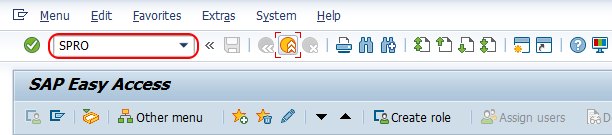
Step 2 : – Choose “SAP Reference IMG”
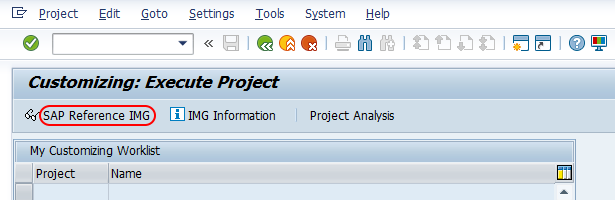
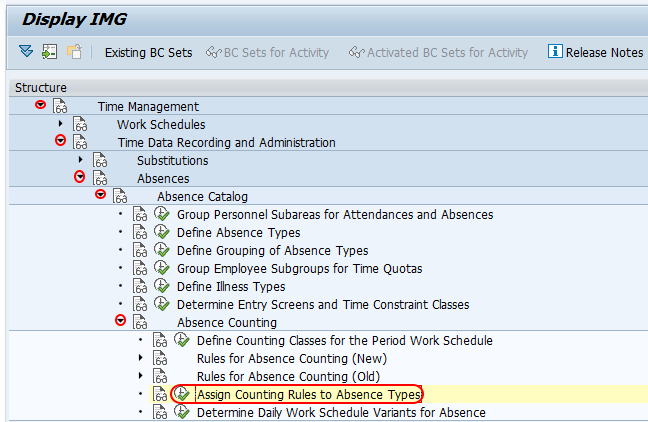
Step 3 : – From display IMG screen, follow the navigation Time management – Time data recording and administration – Absences – Absence catalog – Absence counting and choose IMG activity “Assign counting rules to absence types”.
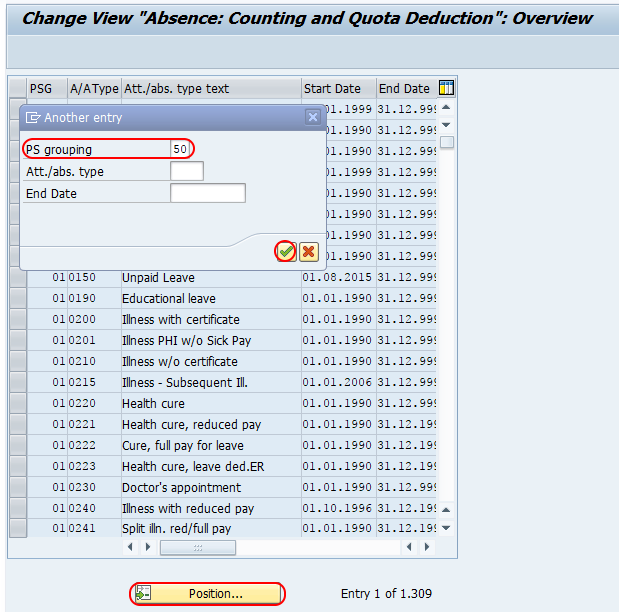
Step 4 : – On change view “Absence: counting and quota deduction” overview screen, choose the position button and enter grouping key in the key field and press enter. Now PS grouping and absence types displays on top of the screen, so you can assign counting rules to absence type in SAP.
Step 5 : – Now double click on you absence types for assign of counting rule configuration screen.
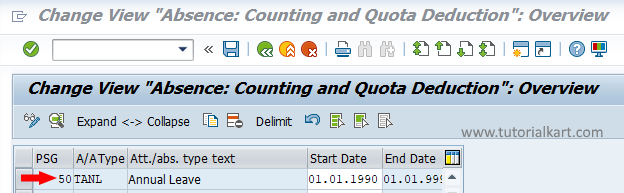
Step 6 : – On change view Absence counting and quota deduction details screen, enter the following details.
- Assign the counting rule key 222 in the given field counting rule
- Choose the check field for Quota deduction.
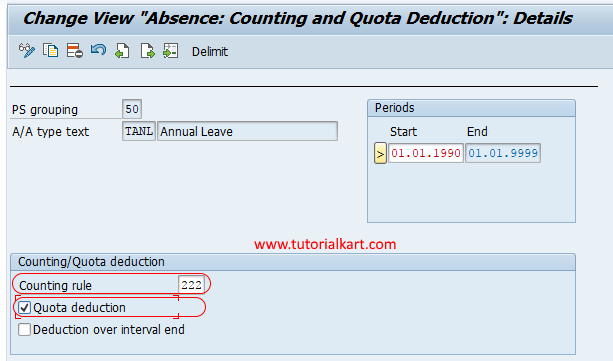
Choose save icon and save the configured assignment details.
Fields Used in Absence Counting and Quota Deduction
When you assign a counting rule to an absence type, the main fields decide how the absence is counted and whether quota deduction should happen.
| Field | Meaning in SAP absence counting |
|---|---|
| PS grouping | Personnel subarea grouping used to control absence and attendance type behavior. |
| Absence type | The absence category, such as leave, sick leave, or other time-off type configured in the absence catalog. |
| Counting rule | The rule that determines how the absence duration is counted for the selected absence type. |
| Quota deduction | Indicates whether the counted absence should reduce an absence quota. |
The counting rule entered here should match the business rule for the absence type. For example, do not use a full-day counting rule for an absence type that should count only half-day absences unless the rule is designed for that requirement.
Example Scenario for Absence Type Counting Rule Assignment
Assume an organization has an annual leave absence type. The leave should deduct from the employee quota based on the planned working time. In this case, the absence type should be assigned to a counting rule that counts planned working days correctly and the quota deduction checkbox should be selected.
If the same absence type is used for a non-deductible leave scenario, assigning a quota deduction setting incorrectly can reduce the employee quota when it should not. This is why the assignment should be checked with the business leave policy before saving it in the system.
Checks After Assigning Counting Rules to Absence Types
- Verify that the correct personnel subarea grouping is selected before assigning the counting rule.
- Confirm that the absence type belongs to the intended leave or absence category.
- Check whether the quota deduction checkbox is required for the absence type.
- Test the absence entry for a full working day, a non-working day, and a public holiday if those cases apply.
- Check the generated absence duration and quota deduction result after saving a test absence.
These checks help confirm that the counting rule assignment is working correctly with the work schedule and quota configuration.
Common Issues in SAP Absence Counting Rule Assignment
If absence counting does not produce the expected result, review the assignment together with the related Time Management settings.
- Wrong counting value: Check whether the assigned counting rule matches the absence policy.
- No quota deduction: Check whether quota deduction is selected and whether the quota setup is maintained.
- Absence type not found: Check the personnel subarea grouping and absence type configuration.
- Unexpected counting on holidays: Review the day type, holiday class, period work schedule counting class, and counting rule conditions.
FAQs on Assigning Counting Rules to Absence Types in SAP HR
What is the use of assigning counting rules to absence types in SAP?
Assigning a counting rule to an absence type tells SAP how to count the absence duration. It also helps control whether the counted absence should deduct an absence quota.
Which transaction code is used to assign counting rules to absence types?
The configuration is reached through transaction code SPRO. In the SAP Reference IMG, follow Time Management > Time data recording and administration > Absences > Absence catalog > Absence counting > Assign counting rules to absence types.
Should quota deduction always be selected for an absence type?
No. Select quota deduction only when the absence type should reduce an employee absence quota. Some absence types may be counted for records but may not deduct quota, depending on the business policy.
Why is the absence counting result different from the entered absence duration?
The counting result can differ because SAP applies the assigned counting rule along with work schedule, day type, holiday class, and quota settings. Check these related configurations when the result is not as expected.
Can one counting rule be assigned to more than one absence type?
Yes. A counting rule can be reused for multiple absence types if the same counting logic is valid for those absence types. Each assignment should still be reviewed against the absence policy.
Conclusion
Successfully we have learned how to assign counting rules to absence types in this SAP HR tutorials. This assignment connects the absence type with the correct counting logic and quota deduction behavior in SAP Time Management.