 TutorialKart.com
SAP HR Daily Work Schedules and Break Schedules
A daily work schedule in SAP HR Time Management defines the planned working time for one calendar day. It contains the start time, end time, planned working hours, break schedule, daily work schedule class, tolerance times, and other rules that control how employee working time is evaluated for that day.
Daily work schedules are normally configured after deciding the organization’s shift timings and break rules. They are then used in period work schedules and work schedule rules to generate employee planned working time.
- Define Break schedules
- Define Rules for variants
- Define daily work schedules
Navigation
| SAP R/3 Role Menu | Daily Work Schedules |
| Transaction code | SPRO |
| SAP Menu Path | SPRO => Time Management => Work Schedules => Daily Work Schedules |
How Daily Work Schedules Fit into SAP HR Work Schedule Configuration
In SAP HR, the daily work schedule is one building block of the complete work schedule setup. A break schedule defines break intervals. A daily work schedule uses that break schedule and defines the working day. Period work schedules arrange daily work schedules across a weekly or multi-day pattern. Work schedule rules use these elements to generate the planned working time for employees.
For example, if an organization has a general shift from 09:00 to 18:00 with a one-hour lunch break, the daily work schedule stores the planned start and end time, the break schedule key, and the planned working hours. If the same organization also has night and afternoon shifts, each shift normally needs its own daily work schedule and break schedule.
Define Break Schedules in SAP HR
In this activity, you define break schedules in SAP. Every organization follows some break schedules like breakfast break, lunch break, coffee or tea break, dinner break, and other rest intervals. When you create a new break schedule in SAP, you need to enter the starting time, ending time, duration, and whether the break is paid or unpaid according to the client requirement.
Break schedule time differs from shift to shift. So you can define break schedules as per shifts, for e.g. morning shift, afternoon shift, night shift, etc.
Configuration steps
Step 1 : – Execute tcode “SPRO”
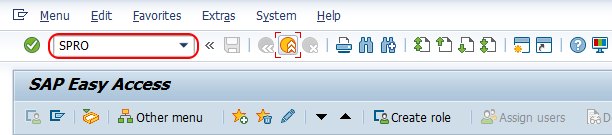
Choose “Display SAP Reference IMG”
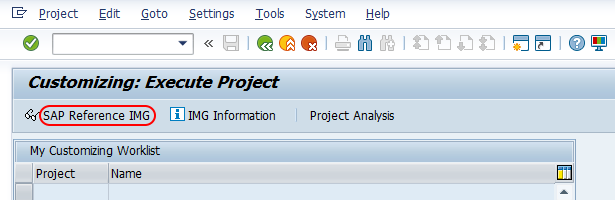
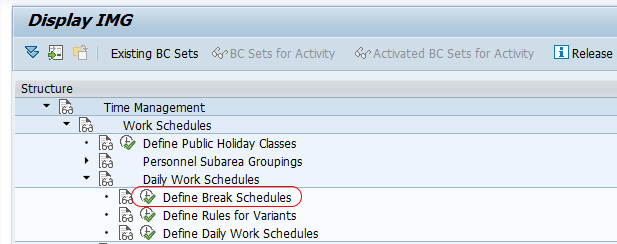
Step 2 : – Follow the navigation Time management – Work schedules – Daily work schedules and choose img activity “Define break schedules”.
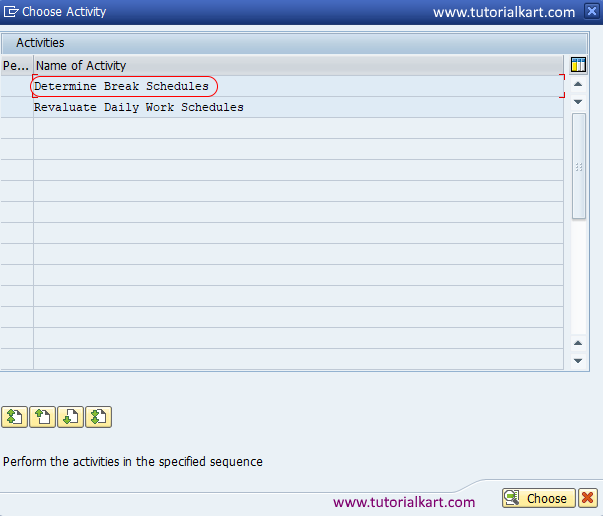
Step 3 : – From choose activity screen, click on “Determine break schedules”.
Step 4 : – On change view “Work break schedule”: overview screen, click on new entries option to create new break schedules as per requirements of client in SAP.
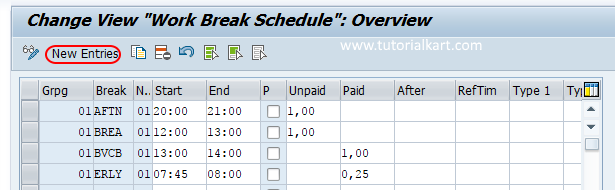
Step 5 : – On new entries work break schedule screen, enter the following details.
- Grpg : – Update the key which is Personnel Subarea grouping for daily work schedules.
- Break : – Update any name
- No : – Update the sequence number of field.
- Start : – Update the break schedule starting time, update the time 24hrs format.
- End : – Update the break schedule end time.
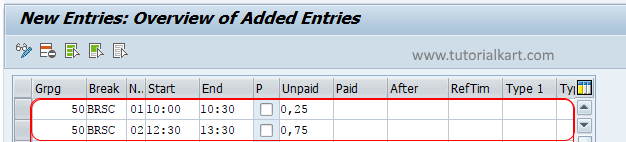
- 0, 25: – Specifies quarter – 15 minutes.
- 0,75 specifies 45 minutes.
Click on save button and save the configured work break schedule in SAP.
Useful Checks Before Saving a SAP HR Break Schedule
- Check that the personnel subarea grouping is the same grouping that will be used in the daily work schedule.
- Use the 24-hour time format consistently, especially for afternoon and night-shift breaks.
- Confirm whether the break is paid or unpaid before assigning it to the daily work schedule.
- For multiple breaks in one shift, maintain the sequence number correctly so the breaks appear in the correct order.
- Make sure the break times fall within the planned working time of the daily work schedule.
Define Rules for Daily Work Schedule Variants in SAP HR
Daily work schedule variants are used when the same daily work schedule key needs to behave differently under specific conditions. For example, a normal working day, a shortened day before a public holiday, or a special rule for a particular day type may require a different variant during work schedule generation.
To define working schedule rules for variant follow the configuration steps.
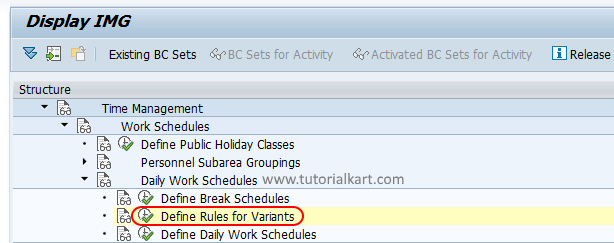
Menu Path: Time Management/ Work Schedules / Daily Work Schedules / Define rules for variant.
Step 1 : – From display IMG screen, follow the navigation and choose IMG activity “Define rules for variant”
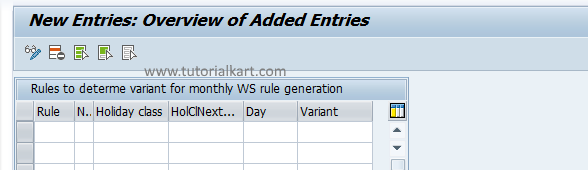
Step 2 : – From change view “Rules to determine variant for monthly WS rule generation, click on new entries button to create rules for variants.
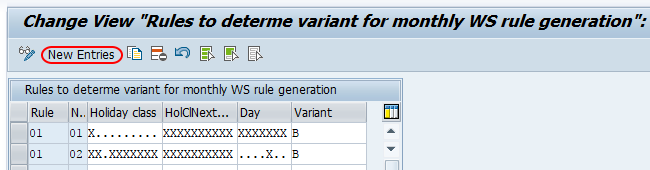
Step 3 : – From new entries rules for variant screen, define the rules as per your requirements and save the details.
Use variants only when there is a clear business rule. If all days use the same timing and break rule, a separate variant may not be required. If the client has shortened working hours for specific day types or public holiday rules, maintain the variant logic carefully before generating work schedules.
Define Daily Work Schedules in SAP HR
In daily work schedules, you define actual working hours per day in an organization with scheduled break times. The daily work schedule is assigned to the relevant grouping and later used in work schedule generation.
Step 1 : – Follow the menu navigation and choose define daily work schedule.
Menu Path: – Time Management/ Work Schedules / Daily Work Schedules / Define daily work schedules.
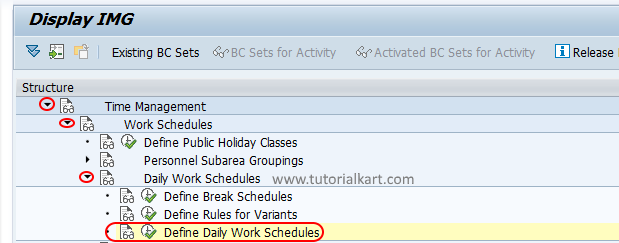
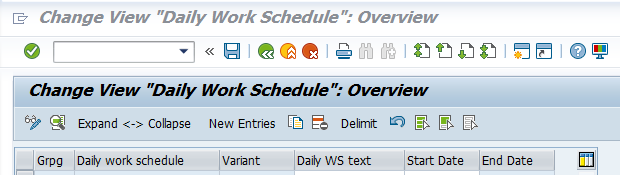
Step 2 : – On change view “daily work schedule” overview screen, click on new entries button to create the daily work schedules as per the requirements of client.
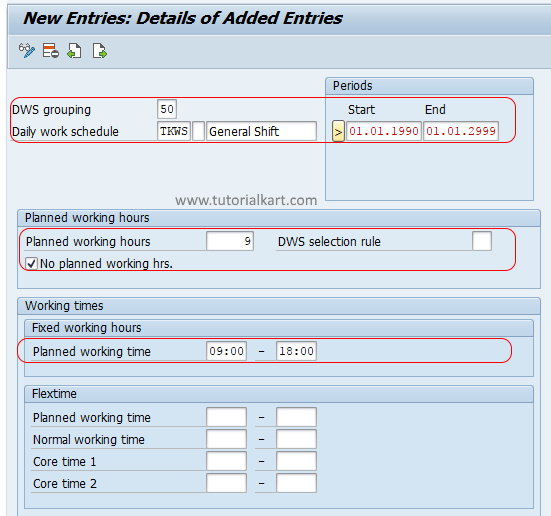
Step 3 : – On new entries daily work schedules screen, enter the following details.
- DWS Grouping : – Enter Personnel Subarea grouping for daily work schedules key.
- Daily work schedule : – Enter the four digits key that defines as daily work schedule in SAP and its description in the text field.
- Start/ End : – Enter the starting date of daily work schedule and end time appears automatically.
- Daily ws class : – It specifies whether a particular day is working day or day off/ week off (1 to 9 indicates working days).
- Breaks : – Update the working break schedule (WBS) key as BRSC as we defined in SAP system.
- Flextime : – Flex time determines the employees should work for 9 hours in between the time.
- Tolerance time : – Enter time for begin tolerance and end tolerance as per requirements.
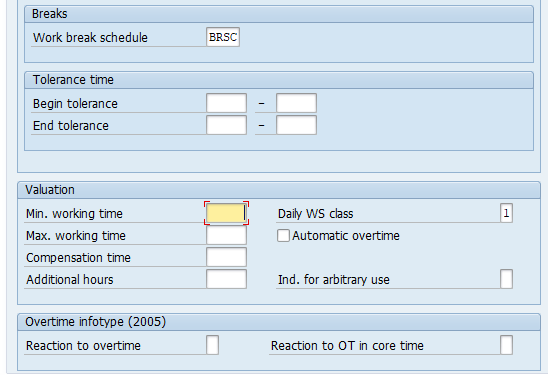
Choose save button and save the details.
Important SAP HR Daily Work Schedule Fields Explained
| Field | Meaning in SAP HR daily work schedule configuration |
|---|---|
| DWS Grouping | Controls which personnel subarea grouping can use the daily work schedule. |
| Daily Work Schedule | The key and description used to identify one day’s planned working time. |
| Start and End Time | Defines the planned clock time range for the work day or shift. |
| Planned Working Hours | Represents the net planned work time after considering breaks, depending on configuration. |
| Daily Work Schedule Class | Classifies the day for time evaluation and work schedule generation rules. |
| Break Schedule | Connects the daily work schedule to the configured break schedule. |
| Flextime | Used when employees may work within a defined flexible time frame rather than a fixed start and end time. |
| Tolerance Time | Defines allowed tolerance around clock-in or clock-out based on the organization’s time policy. |
Example of a Daily Work Schedule and Break Schedule Setup
Assume a general day shift starts at 09:00 and ends at 18:00. The employee has a lunch break from 13:00 to 14:00. In this case, the break schedule can be created for 13:00 to 14:00, and the daily work schedule can be created with 09:00 as the start time and 18:00 as the end time.
| Shift | General day shift |
| Planned start time | 09:00 |
| Planned end time | 18:00 |
| Break time | 13:00 to 14:00 |
| Total time range | 9 hours |
| Break duration | 1 hour |
| Net planned working time | 8 hours |
This is only an example. The actual values should be configured according to the client’s working hours, break policy, personnel subarea grouping, public holiday rules, and time evaluation requirements.
Common Mistakes in SAP HR Daily Work Schedule Configuration
- Using a break schedule that belongs to a different personnel subarea grouping.
- Entering break start or end times outside the planned working time.
- Creating daily work schedule variants without checking the day type or holiday condition.
- Maintaining planned hours that do not match the start time, end time, and break duration.
- Using the same daily work schedule for different shifts that have different timings.
- Saving the daily work schedule but not checking how it behaves during work schedule generation.
QA Checklist for SAP HR Daily Work Schedules
- Verify that the daily work schedule grouping is correct for the relevant personnel subarea.
- Check that the break schedule key assigned in the daily work schedule exists and has correct break timings.
- Compare planned working hours with start time, end time, and unpaid break duration.
- Confirm that the daily work schedule class is suitable for a working day, day off, or special day.
- Review tolerance and flextime settings with the client’s attendance policy.
- Generate or test the work schedule after configuration to confirm that the daily work schedule appears on the expected days.
SAP HR Daily Work Schedule FAQs
What is the work schedule rule in SAP HR?
A work schedule rule in SAP HR defines how planned working time is generated for employees. It combines elements such as daily work schedules, period work schedules, public holiday calendar, and employee subgroup or personnel subarea groupings.
How do you create a daily work schedule in SAP HR?
To create a daily work schedule in SAP HR, go to SPRO, open Time Management, choose Work Schedules, then Daily Work Schedules, and select Define daily work schedules. Create a new entry with the correct grouping, daily work schedule key, start time, end time, break schedule, daily work schedule class, and tolerance settings.
How do you make a break schedule in SAP HR?
To make a break schedule in SAP HR, go to the Daily Work Schedules configuration area and choose Define break schedules. Maintain the personnel subarea grouping, break key, sequence number, start time, end time, and duration details, then save the break schedule.
What is the table for work schedule rules in SAP HR?
In SAP HR Time Management, work schedule rule information is commonly associated with table T508A. Related daily work schedule, period work schedule, and break schedule data is stored in other time management tables depending on the specific configuration object.
Why is a break schedule assigned to a daily work schedule?
A break schedule is assigned to a daily work schedule so that SAP can calculate planned working time correctly. The break intervals help separate gross time range from net working time and support time evaluation rules for paid and unpaid breaks.
Successfully we have defined daily work schedules in SAP HR.