 TutorialKart.com
How to define absence quota types in SAP
Absence quota types in SAP HR define the time-off entitlements that can be credited to an employee, such as annual leave, earned leave, sick leave, compensatory off, or time off from overtime. A quota type controls how the entitlement is recorded, measured, deducted, rounded, and displayed in SAP Time Management.
After you define absence quota types, the configuration normally continues with generation rules, deduction rules, counting rules, and assignment to absence types. The absence quota balance that is available for an employee is stored and maintained through the Absence Quotas infotype, commonly known as Infotype 2006.
SAP absence quota type purpose in Time Management
An absence quota type is not the same as an absence type. The absence type is what the employee records, such as casual leave or sick leave. The quota type is the entitlement bucket from which that recorded absence can be deducted.
| SAP Time Management object | What it controls | Example |
|---|---|---|
| Absence type | The type of absence entered for the employee | Paid Leave, Sick Leave, Unpaid Leave |
| Absence quota type | The entitlement balance available for deduction | Annual Leave Quota, Sick Leave Quota |
| Deduction rule | The order and conditions for quota deduction | Deduct annual leave before special leave |
| Infotype 2006 | The employee-specific quota balance record | 12 days annual leave for a validity period |
Before defining absence quota types in SAP, confirm the business rules for the leave category: unit of measurement, validity period, whether deduction is allowed beyond entitlement, whether compensation is allowed, and how decimal values should be rounded.
Navigation
| SAP R/3 Role Menu | Time quota types |
| Transaction code | SPRO |
| SAP Menu Path | SPRO > Time Management > Time data recording and administration > Managing time accounts using attendance /absence quotas > Time quota types > Define absence quota types. |
IMG path for defining absence quota types in SAP HR
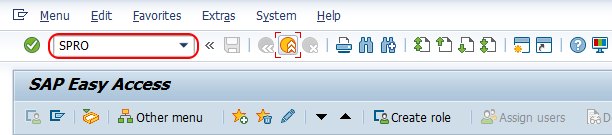
Step 1 : – Execute tcode “SPRO” from SAP command field.
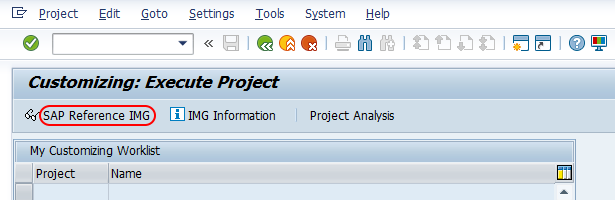
Step 2 : – Choose “display SAP reference IMG”.
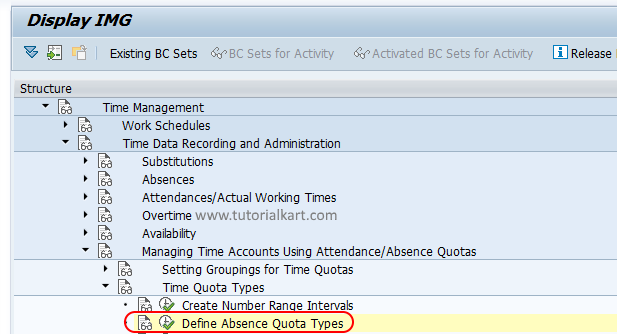
Step 3 : – Follow the navigation Time Management – Time data recording and administration – Managing time accounts using attendance /absence quotas – Time quota types and choose img activity “Define absence quota types”
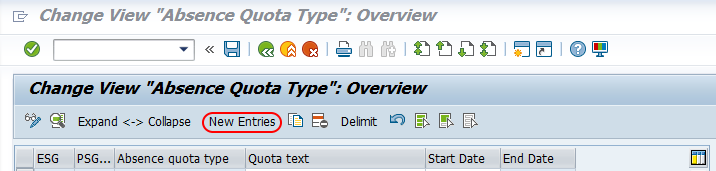
Step 4 : – On change view absence quota type overview screen, choose new entries button to create new absence quota types as per requirements of an organization.
Fields used while creating an absence quota type in SAP
Step 5 : – On new entries absence quota type screen, enter the following details.
- ESG Time quota types : – Update the key for employee subgroup grouping for time quota.
- PS Grpg Tm Quota Typ : -Update the key of grouping of personnel subarea for time quota types
- Absence quota type : – Enter the two digits key that defines as absence quota type in SAP and update descriptive text of quota type in given text field.
- Recording : – Under recording fields, update as
- Time /measurement unit – Days, (time is measured based on days or hours)
- Time constraint class – 01
- Start time – 00:00
- End time – 00:00
- Deduction : – It specifies time quota to be deducted over or above the entitlement.
- Rounding : – It specifies to rounding the value when it is decimal, for e.g. 21/4 = 5.25.
- No Comp. : – If you check this field, than it specifies as the current time quota is locked for compensation.
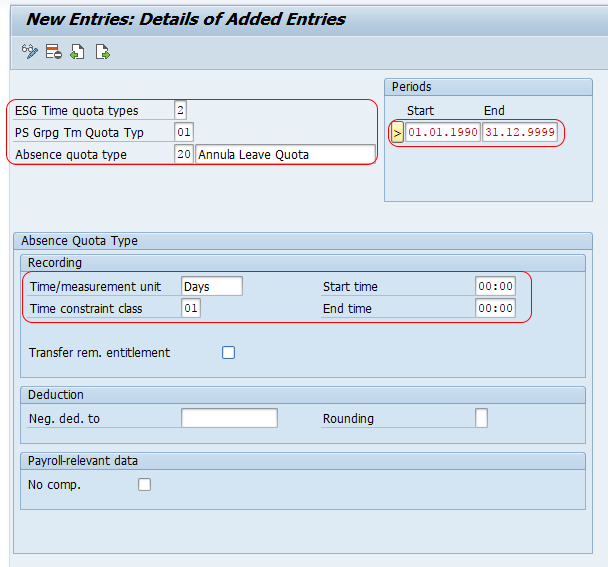
Choose save icon and save the configured absence quota type in SAP.
Meaning of key fields in SAP absence quota type configuration
The entries on the absence quota type screen should match the organization’s leave policy. The most important fields are explained below so that the configuration can be reviewed before saving.
| Field | Use in absence quota type setup | Configuration note |
|---|---|---|
| Employee subgroup grouping for time quota types | Controls which employee subgroup group can use the quota type | Use separate groupings when leave rules differ for employee categories |
| Personnel subarea grouping for time quota types | Controls which personnel subarea grouping can use the quota type | Useful when leave rules differ by location, factory, branch, or legal entity |
| Absence quota type key | Identifies the quota type in customizing | Use a meaningful two-character key and description |
| Time/measurement unit | Defines whether the quota is measured in days or hours | Choose the same unit that will be used for leave deduction and reporting |
| Time constraint class | Controls collision and time constraint behavior | Use the class required by the organization’s time configuration design |
| Deduction settings | Controls whether and how quota balances can be deducted | Coordinate with deduction rules and counting rules |
| Rounding | Controls decimal handling for quota values | Important when accruals generate values such as 1.25 days or 2.5 hours |
| No compensation | Prevents the quota from being used for compensation processing | Select it only when the leave balance must not be encashed or compensated |
How absence quota types connect with Infotype 2006
The configured absence quota type becomes useful only when an employee receives quota entitlement. In SAP HR Time Management, employee-specific absence quota balances are maintained in Infotype 2006. A record in Infotype 2006 normally includes the quota type, validity period, deduction period, entitlement value, and deduction information.
For example, if the absence quota type represents annual leave, an employee may have an Infotype 2006 record for 12 days of annual leave valid from 01.01.2024 to 31.12.2024. When the employee records an eligible absence type, the corresponding quota can be reduced based on the deduction rules.
Difference between absence quota type and absence type in SAP HR
Many configuration errors happen because absence type and absence quota type are treated as the same object. They are related, but they serve different purposes.
| Point | Absence type | Absence quota type |
|---|---|---|
| Purpose | Defines the leave or absence recorded by the employee | Defines the entitlement balance available for deduction |
| Common example | Sick Leave, Privilege Leave, Leave Without Pay | Sick Leave Quota, Annual Leave Quota |
| Employee transaction impact | Used when recording an absence | Used when checking and deducting available balance |
| Configuration dependency | Connected with counting and deduction behavior | Connected with generation, validity, rounding, deduction, and compensation settings |
| Employee master data | Recorded as absence entries | Stored as quota balance records in Infotype 2006 |
Checks after saving an absence quota type in SAP
After saving the absence quota type, review the related Time Management configuration before testing with an employee record. Defining the quota type alone does not complete the leave setup.
- Confirm that the employee subgroup grouping and personnel subarea grouping are correct.
- Check whether the quota is measured in days or hours and whether this matches the absence type and work schedule rules.
- Maintain deduction rules so that the correct quota type is deducted when absence is recorded.
- Check rounding rules if leave accrual can create decimal balances.
- Confirm whether the quota is allowed or locked for compensation.
- Test the quota record in Infotype 2006 for a sample employee.
- Record an applicable absence and verify whether the expected quota is deducted.
For SAP’s official learning flow on this topic, refer to SAP Learning material on setting up attendance and absence quotas and setting up attendance and absence types. SAP Help also documents the structure and use of absence quota information in Time Management.
Common configuration mistakes in SAP absence quota types
- Creating an absence quota type but not assigning it correctly in deduction rules.
- Using days in the quota type while the business process expects hourly leave deduction.
- Using the wrong employee subgroup grouping or personnel subarea grouping, causing the quota type to be unavailable for the intended employees.
- Ignoring rounding rules when the quota is generated in decimal values.
- Leaving compensation settings open for a quota that should not be encashed.
- Testing only the customizing screen and not testing an actual Infotype 2006 quota record and absence deduction.
Successfully we have learned how to define absence quota types in SAP HR tutorials.
SAP absence quota type FAQ
What is the absence quota infotype in SAP HR?
The absence quota infotype in SAP HR is Infotype 2006. It stores employee-specific absence quota balances, including the quota type, validity period, entitlement, and deduction information.
How do you configure absence quota in SAP HR?
Start in SPRO and define the absence quota type under Time Management. Then maintain the related generation, counting, and deduction rules, assign the quota to relevant absence processing, create or generate Infotype 2006 records, and test deduction with a sample absence.
What is the difference between absence type and absence quota type in SAP?
An absence type is the leave category recorded for an employee, such as sick leave or unpaid leave. An absence quota type is the entitlement balance from which the absence can be deducted, such as sick leave quota or annual leave quota.
What are the common types of absences in SAP HR?
SAP does not force one fixed list for every company. Common absence categories include paid leave, sickness absence, unpaid leave, and special leave. The exact absence types depend on the organization’s HR policy and country requirements.
How do you create an absence type in SAP HR?
An absence type is configured separately from absence quota types. In IMG, it is maintained under Time Management settings for attendance and absence types. After creating the absence type, connect it with counting and deduction rules so that the correct quota is reduced.
SAP absence quota type QA checklist
- Verify that the IMG path and transaction code SPRO are stated correctly for defining absence quota types.
- Check that the tutorial clearly separates absence type, absence quota type, deduction rule, and Infotype 2006.
- Confirm that every field explanation is specific to absence quota configuration, especially grouping, unit, deduction, rounding, and compensation.
- Review whether the content avoids claiming a universal fixed list of absence types, because absence categories vary by organization and country.
- Ensure the final testing advice includes both quota balance creation in Infotype 2006 and actual absence deduction testing.