 TutorialKart.com
In SAP HR / SAP HCM, a personnel area is an enterprise structure unit used to represent a major organizational location or division of a company code for HR administration. It is commonly used for grouping employees by site, branch, plant, region, or other HR-relevant organizational units.
A personnel area is created with a four-character key and maintained in table T500P. After it is created, it can be used in employee master data, especially in Organizational Assignment infotype IT0001.
Important correction: The technical field for personnel area in SAP HR is commonly WERKS. The technical field BTRTL is used for personnel subarea.
Personnel Area in SAP HR and Personnel Subarea Difference
Personnel area and personnel subarea are closely related, but they are not the same. A personnel area is the higher-level HR enterprise structure unit, while a personnel subarea is a smaller subdivision under a personnel area.
| Structure element | SAP HR meaning | Common technical field | Example use |
|---|---|---|---|
| Personnel Area | Main HR location or organizational unit under a company code | WERKS | Hyderabad branch, New York office, Plant 1000 |
| Personnel Subarea | Subdivision of a personnel area | BTRTL | Factory workers, office staff, union group, regional payroll grouping |
For example, a company may create one personnel area for a city office and then create personnel subareas for different employee groups or work locations within that office.
SAP HR Personnel Area Configuration Details
| SAP R/3 Role Menu | Define personnel area |
| Table | T500P |
| Key length | Up to 4 characters |
| Used in employee master data | IT0001 – Organizational Assignment |
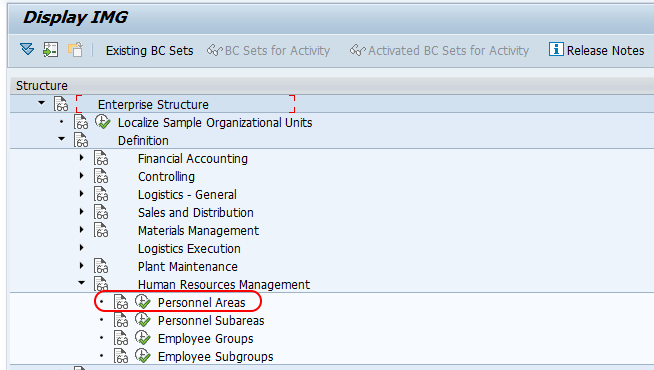
| SAP IMG path | SPRO => SAP Reference IMG => Enterprise Structure => Human Resource Management (HRM) => Personnel Areas. |
Before creating a new personnel area in SAP HR, decide the naming standard for the four-character key. In most projects, the key is kept meaningful and stable because it appears in configuration and employee assignment data.
How to Define Personnel Area in SAP HR
Follow the steps below to define a personnel area in SAP using the SAP Implementation Guide.
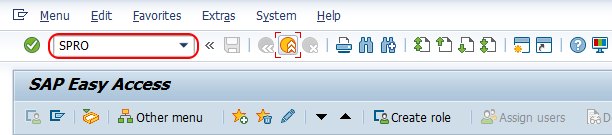
Step 1 :- Execute tcode “SPRO” from command field.
Step 2 :- From display IMG screen, follow the IMG path as shown below image and click on IMG activity personnel areas.
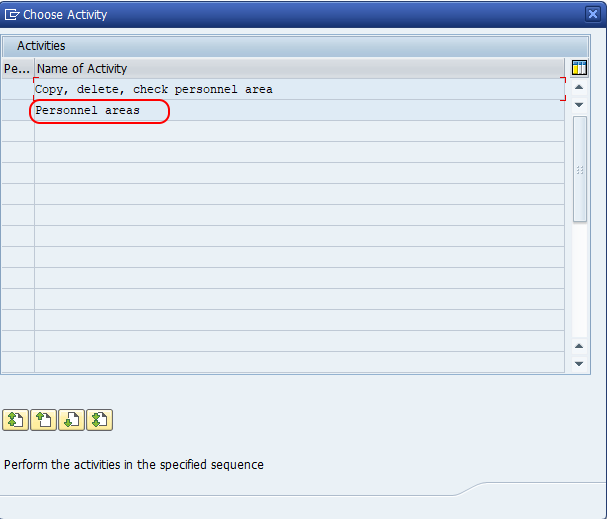
Step 3 : – From choose activity screen, you will get display with two options i.e.
- Copy, delete, check personnel area
- Personnel areas.
If you want to copy, delete, or check an existing personnel area, choose the first option and perform the required action. To create a new personnel area in SAP, double click on the “personnel areas” option.
Step 4 : – From change view personnel areas overview screen, you can create new personnel area in SAP either using new entries option or copying from existing personnel area. Click on new entries button to create new personnel area in SAP HRM.

Step 5 : – On new entries personnel areas screen, enter the following details.
- Personnel area : – Enter the new key that identifies the personnel area in SAP. You are allowed to enter up to a 4-character alphanumeric key.
- Description : – Update the description of personnel area.
- Personnel areas : – Under personnel areas, update the address details of personnel area. The required fields may include house number, PO box, postal code, country key, region, country code, and city code, depending on the country and system settings.
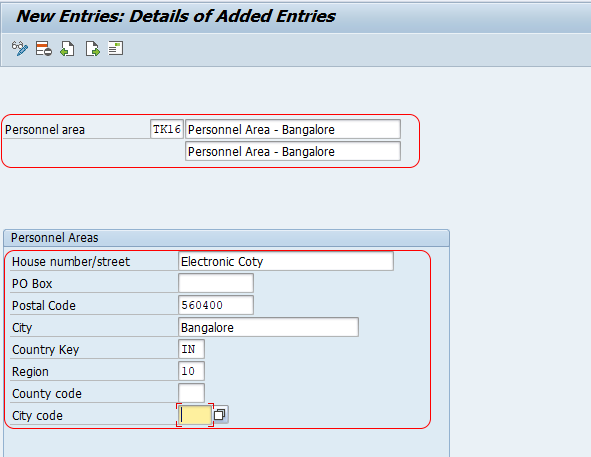
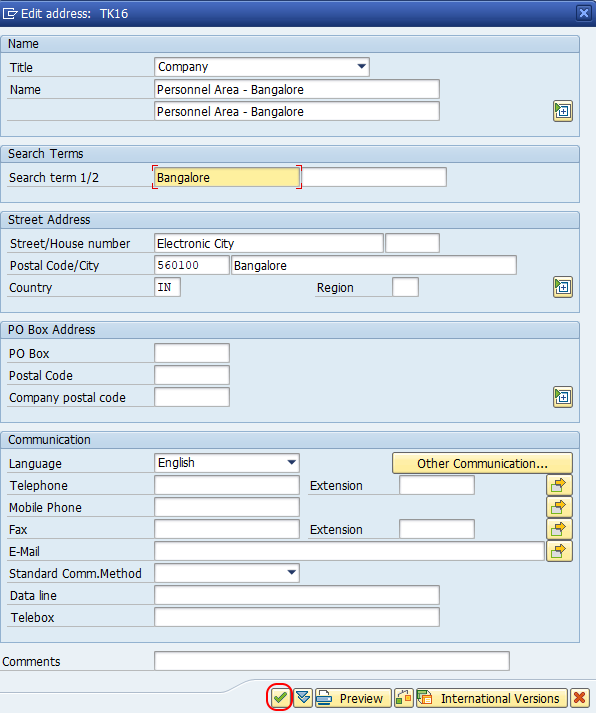
After maintaining all the required details of personnel area in SAP, click on save button. Now a window opens for updating detailed address information of personnel area. Update the required address details and save the updated address data.
Where Personnel Area Is Used in SAP HCM
Once a personnel area is configured, it is used in several SAP HR processes. The most common place where users see it is employee master data in IT0001 – Organizational Assignment. In database terms, the Organizational Assignment infotype is stored in table PA0001, where the personnel area field is used along with company code, personnel subarea, employee group, and employee subgroup.
- Employee assignment: Helps assign an employee to a location or HR unit.
- Reporting: Allows HR reports to be filtered or grouped by personnel area.
- Authorization and administration: Can support HR administrative grouping depending on the project design.
- Personnel subarea configuration: Personnel subareas are created under personnel areas and used for more detailed grouping.
Changing Personnel Area for an Employee in SAP HR
Changing the personnel area for an employee is not the same as changing the configuration in T500P. Employee assignment changes are usually made through personnel actions or by maintaining Organizational Assignment infotype IT0001, depending on the business process and system authorization.
In a live SAP HR system, do not directly change configuration keys that are already used in employee records unless the impact has been reviewed. Existing employee history, payroll, reporting, and authorization logic may depend on those keys.
Personnel Area Configuration Checks Before Saving
- Confirm that the four-character personnel area key follows the project naming convention.
- Check whether the personnel area should be created from scratch or copied from an existing personnel area.
- Maintain a clear description so HR users can identify the personnel area easily.
- Enter address details accurately because they may be used in HR forms, reports, or legal grouping depending on system design.
- After saving, verify that the personnel area is available for further enterprise structure configuration, including personnel subareas.
Common Mistakes While Defining Personnel Area in SAP HR
- Using BTRTL as the personnel area field. BTRTL belongs to personnel subarea, while personnel area is commonly represented by WERKS.
- Creating a personnel area when a personnel subarea would be the correct level of grouping.
- Using unclear four-character keys that are difficult to understand later.
- Forgetting to maintain address information after creating the personnel area.
- Changing configuration in a production system without checking employee master data impact.
SAP HR Personnel Area FAQ
What is personnel area in SAP HCM?
Personnel area in SAP HCM is an HR enterprise structure unit used to represent a major location, branch, site, or organizational division under a company code. It is maintained in table T500P and commonly appears in employee Organizational Assignment data.
What is the table for personnel area in SAP HR?
The main configuration table for personnel areas is T500P. Employee assignment data that uses personnel area is stored in Organizational Assignment infotype IT0001, with database table PA0001.
What is IT0001 in SAP HR?
IT0001 is the Organizational Assignment infotype in SAP HR. It stores assignment-related information such as company code, personnel area, personnel subarea, employee group, employee subgroup, position, job, and organizational unit.
What is personnel subarea in SAP HR?
Personnel subarea is a subdivision of a personnel area. It is used for more detailed grouping of employees within a personnel area. The common technical field for personnel subarea is BTRTL.
How do you change personnel area for an employee in SAP?
For an employee, personnel area is changed through HR master data processes, usually by maintaining IT0001 or running the relevant personnel action. The exact process depends on system configuration, authorizations, and whether the change affects payroll or employee history.
Editorial QA Checklist for SAP HR Personnel Area Tutorial
- Confirm that personnel area and personnel subarea are not described as the same object.
- Confirm that T500P is mentioned for personnel area configuration.
- Confirm that WERKS is used for personnel area and BTRTL is used for personnel subarea.
- Confirm that the SPRO IMG path is shown clearly for defining personnel areas.
- Confirm that IT0001 and PA0001 are explained only in the context of employee organizational assignment.
Successfully we have defined personnel area in SAP HCM.