 TutorialKart.com
This SAP HR tutorial explains how to assign employee subgroup to employee group in SAP using the IMG configuration path. This assignment connects valid employee subgroup keys with the correct employee group keys so that the personnel structure can be used consistently in HR master data.
In SAP HCM, an employee group is a broad classification of employees, while an employee subgroup is a more specific classification inside that group. For example, an organization may define separate employee groups for active employees, pensioners, contractors, or external workers, and then use employee subgroups for payroll, work schedule, time management, or country-specific processing requirements.
The link between employee subgroups and employee groups is established through the assignment of employee subgroups to employee groups in SAP. Without this assignment, the relevant employee subgroup may not be available for use with the selected employee group in personnel administration.
SAP HR employee subgroup to employee group assignment details
| SAP R/3 Role Menu | Assign employee subgroup to employee group |
| Transaction code | SPRO |
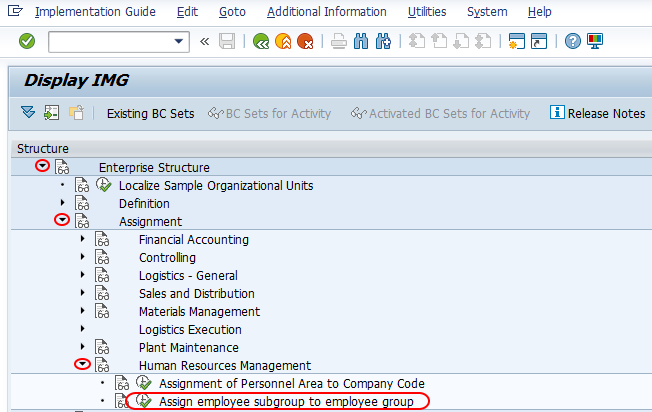
| SAP Path | SPRO => IMG => Enterprise Structure => Assignment => Human Resource Management (HRM) =>Assign employee subgroup to employee group |
When this SAP HR personnel structure assignment is required
You maintain this assignment after defining employee groups and employee subgroups. The configuration is usually completed during SAP HR enterprise structure setup, before employee master data is created in production.
- Use this activity when a new employee subgroup has to be made valid for an employee group.
- Check this assignment when an employee subgroup is not available while maintaining employee organizational assignment data.
- Review the assignment when employee classifications are redesigned for payroll, time management, or reporting needs.
- Maintain country assignment carefully when the same employee group and subgroup combination is not valid for all countries.
How to assign employee subgroup to employee group in SAP HR
Perform the following configuration steps for assigning employee subgroup to employee group in SAP HR.
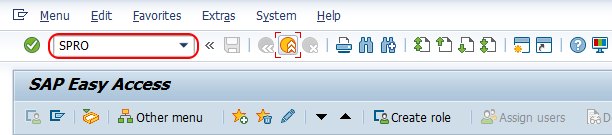
Step 1: – Execute transaction code “SPRO” on SAP command field as shown below image.
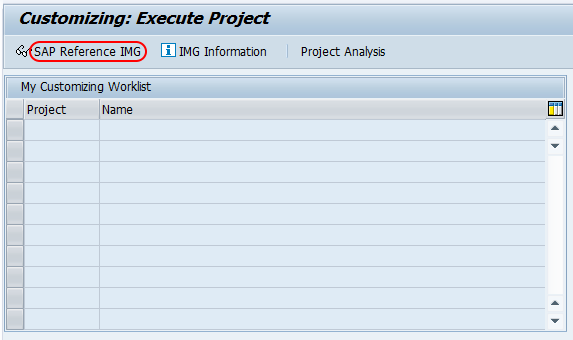
Step 2 : – Double click on “Display SAP Reference IMG”
Step 3 :- From display IMG screen, follow the navigation path as Assignment > Human Resource Management > Assign employee subgroup to employee group.
Step 4 : – On change view country assignment for employee group/subgroup overview screen, click on new entries button for assignment of employee subgroups to employee groups as per requirements of HR enterprise structure.

On new entries Employee group and subgroup assignment screen, enter the following details.
- EE group :– Enter the employee group key in the field EE group.
- EE Subgroup : – Enter the employee subgroup key for assignment to employee group.
- Choose the countries that you like activate this assignment configurations.
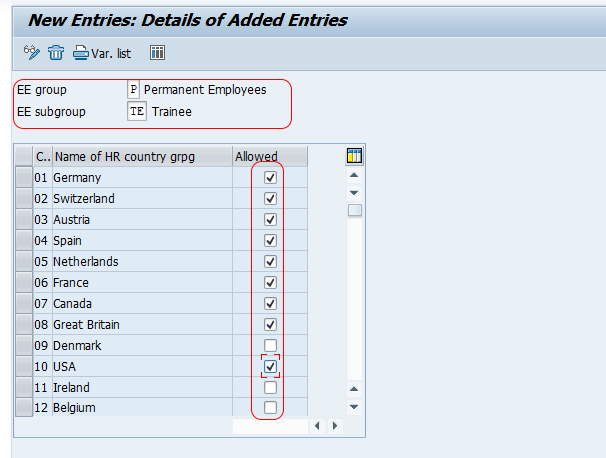
Similarly assign other employee groups to employee subgroups as per HR enterprise structure.
After entering the required combinations, choose Save. If the system prompts for a customizing request, select the relevant transport request and save the configuration.
Fields used in SAP employee group and subgroup assignment
| Field | Meaning in this SAP HR configuration | Editorial note for setup |
|---|---|---|
| EE group | The employee group key that represents the broad employee classification. | Use only a group that has already been defined in SAP HR. |
| EE Subgroup | The employee subgroup key that belongs under the selected employee group. | Use the subgroup that matches the organization’s personnel structure design. |
| Country assignment | The country or countries for which the employee group and subgroup combination is valid. | Select countries carefully when configuration differs by country grouping. |
Employee group and employee subgroup meaning in SAP HR
Employee group is a high-level personnel structure classification in SAP HR. It is used to separate employees into broad categories such as active employees, retirees, external persons, trainees, or similar organizational classifications.
Employee subgroup is a more detailed classification under an employee group. It can influence HR processing areas such as payroll grouping, work schedule rules, time management, and reporting. The exact usage depends on the organization’s SAP HR configuration.
This assignment tells SAP which employee subgroups are valid for each employee group. For example, if the employee group represents active employees, only the relevant active employee subgroups should be assigned to that group.
How to check employee subgroup assignment in SAP HR tables
After configuration, consultants often verify the employee group and subgroup relationship in SAP tables or through the IMG activity. The employee group/subgroup relationship is commonly associated with table T503. Employee organizational assignment data for an individual employee is maintained in infotype 0001, also called Organizational Assignment.
Use table checks only for verification and analysis. Configuration changes should normally be made through the SAP IMG activity so that the correct customizing process and transport control are followed.
Changing employee subgroup for an employee in SAP HR
Changing the configuration assignment is different from changing an employee’s subgroup in master data. This tutorial covers the customizing assignment between employee group and employee subgroup. To change the employee subgroup for a specific employee, the relevant HR master data record has to be maintained, usually through the employee’s organizational assignment infotype, based on the organization’s authorization and business process.
Before changing an employee’s subgroup, confirm the effective date, payroll impact, time management impact, and whether the employee group/subgroup combination is already valid in customizing.
Common mistakes while assigning employee subgroup to employee group
- Assigning an employee subgroup to the wrong employee group because the group and subgroup keys look similar.
- Forgetting to select the required country assignment for the employee group/subgroup combination.
- Maintaining the assignment before completing the definition of employee groups and employee subgroups.
- Changing employee master data without checking whether the employee subgroup is valid for the selected employee group.
- Not saving the configuration in the correct customizing transport request.
QA checklist for SAP HR employee group/subgroup assignment article
- Confirm that the IMG path clearly shows Enterprise Structure > Assignment > Human Resource Management > Assign employee subgroup to employee group.
- Confirm that the article separates employee group definition, employee subgroup definition, and assignment between the two.
- Confirm that the table reference T503 is mentioned only as a verification point, not as the recommended method for configuration changes.
- Confirm that the master data note explains that employee subgroup changes for an employee are handled separately from customizing.
- Confirm that the saved configuration step includes transport request handling where applicable.
FAQs on assigning employee subgroup to employee group in SAP HR
What is employee group and employee subgroup in SAP HR?
Employee group is a broad personnel classification, while employee subgroup is a more detailed classification under an employee group. SAP HR uses these values in personnel administration and related HR processing areas.
How do I assign employee subgroup to employee group in SAP?
Use transaction code SPRO and follow the IMG path Enterprise Structure > Assignment > Human Resource Management > Assign employee subgroup to employee group. Then maintain the required employee group, employee subgroup, and country assignment combinations.
What is the SAP table for employee group and subgroup assignment?
The employee group/subgroup relationship is commonly checked in table T503. However, configuration should normally be maintained through the SAP IMG activity rather than by directly changing table entries.
How can I change employee subgroup for an employee in SAP HR?
Changing an employee’s subgroup is a master data activity, not the same as this customizing assignment. The employee’s organizational assignment data, generally infotype 0001, must be maintained with the correct effective date and valid employee group/subgroup combination.
Why is employee subgroup not appearing for an employee group in SAP HR?
One common reason is that the employee subgroup has not been assigned to the selected employee group for the required country. Check the IMG assignment and confirm that the employee group and employee subgroup definitions are complete.
Successfully we have assigned employee group to employee subgroup in SAP HR.