 TutorialKart.com
How to define attendance quota types in SAP HR Time Management
Attendance quota types in SAP HR are used to define time accounts for recorded attendances, such as overtime, training hours, compensatory attendance, or other attendance-based balances that an organization wants to track and deduct. In this tutorial, you will learn how to create attendance quota types in SAP using the IMG configuration path.
This configuration is part of SAP HCM Time Management. It should be maintained carefully because the attendance quota type is later used with employee subgroup groupings, personnel subarea groupings, time units, deduction rules, and attendance recording.
Recommended to read:
Attendance quota type configuration path in SAP
You can define attendance quota types from the SAP Reference IMG by using transaction code SPRO. The following table shows the configuration navigation used in SAP HR Time Management.
| SAP R/3 Role Menu | Time quota types |
| Transaction code | SPRO |
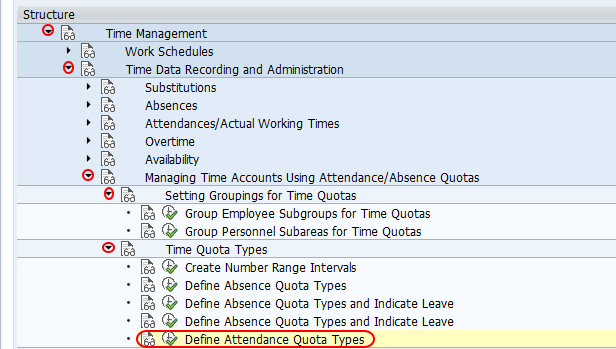
| SAP Menu Path | SPRO > Time Management > Time data recording and administration > Managing time accounts using attendance /absence quotas > Time quota types > Define attendance quota types. |
Tip: Before creating a new attendance quota type, confirm the employee subgroup grouping and personnel subarea grouping that will use it. These groupings control where the quota type is valid.
Configuration steps to define attendance quota types in SAP
Follow the steps below to create a new attendance quota type in SAP.
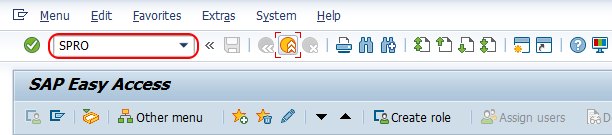
Step 1 : – Execute tcode “SPRO” from SAP command field and enter.
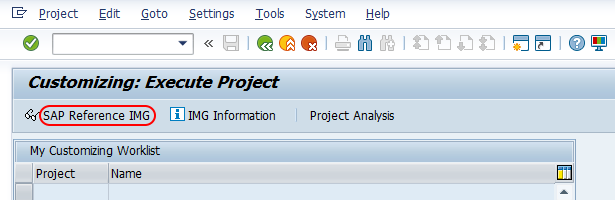
Step 2 : – Choose “display SAP Reference IMG”.
Step 3 : – Follow the navigation path Time Management – Time data recording and administration – Managing time accounts using attendance /absence quotas – Time quota types and choose IMG activity “Define attendance quota types”.
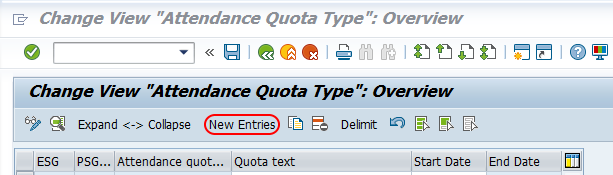
Step 4 : – On change view attendance quota type overview screen, choose new entries button to create new attendance quota type in sap system.
Step 5 : – On new entries attendance quota type screen, enter the following details.
- ESG Time quota types : – Update the key of employee subgroup groupings for time quota
- PS grpg Tm Quota Typ : – Update the key of personnel subarea grouping for time quota.
- Att. quota type : – Update the two digits key that defines as attendance quota type in SAP, and update the descriptive text of attendance quota type.
- Time/measurement unit : – Update the time measurement unit as hours.
- Time constraint class : – Update the time constraint class as 1
- Deduction : – It specifies the time quota to be deducted through time evaluation or through attendances, check the option deduct through attendances.
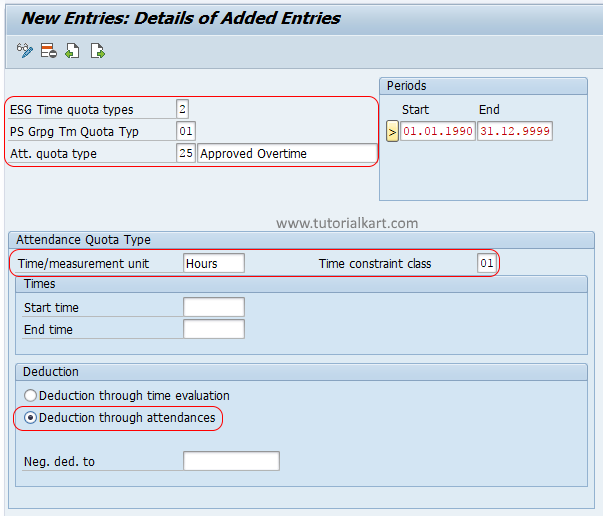
After maintaining all the required details, choose save icon and save the configured attendance quota types in SAP HR module.
Field details for SAP attendance quota type setup
The attendance quota type screen contains several control fields. The exact values depend on the client configuration, but the purpose of each field remains similar across SAP HR implementations.
| Field | Purpose in attendance quota configuration |
|---|---|
| ESG Time quota types | Assigns the attendance quota type to an employee subgroup grouping for time quotas. |
| PS grpg Tm Quota Typ | Assigns the quota type to a personnel subarea grouping for time quota types. |
| Att. quota type | Defines the two-character quota type key and its description. |
| Time/measurement unit | Specifies whether the quota is managed in hours, days, or another time unit supported by your configuration. |
| Time constraint class | Controls how records are checked when they overlap with other time records. |
| Deduction | Defines whether the quota is deducted through attendances, time evaluation, or the method selected in your configuration. |
For many attendance quota scenarios, the time unit is maintained as hours, especially when the quota is related to working time or recorded attendance duration. If your business process tracks full-day attendance balances, choose the unit according to the time management design used in your system.
Attendance quota type and absence quota type difference in SAP HR
An attendance quota type is used for quota balances connected to attendance records. An absence quota type is used for quota balances connected to absence records, such as leave or vacation entitlement. Both are part of time quota processing, but they are used for opposite time recording purposes.
| Configuration object | Used for | Example |
|---|---|---|
| Attendance quota type | Balances that are consumed by attendance records | Overtime attendance quota or training attendance quota |
| Absence quota type | Balances that are consumed by absence records | Annual leave, sick leave, or casual leave quota |
Because the two quota objects are closely related in the IMG, it is important to choose the correct configuration activity. If the requirement is to deduct a leave balance, configure an absence quota type. If the requirement is to manage a balance for attendance recording, configure an attendance quota type.
Prerequisites before creating attendance quota types
Check the following SAP HR Time Management settings before you create or change attendance quota types:
- The employee subgroup grouping for time quotas is already maintained for the relevant employees.
- The personnel subarea grouping for time quota types is already maintained.
- The required attendance types are available if the quota will be deducted through attendance recording.
- The time unit is agreed with the business process owner, for example hours or days.
- The quota type number range does not conflict with an existing attendance quota type.
- The transport request is available if the configuration is being moved from development to quality or production.
Testing an SAP attendance quota type after configuration
After saving the attendance quota type, test it with an employee who belongs to the same employee subgroup grouping and personnel subarea grouping. The test should confirm that the quota type is visible, the unit is correct, and deduction happens according to the configured rule.
- Create or assign the relevant attendance quota for a test employee.
- Record an attendance that should deduct from the attendance quota.
- Check whether the quota balance is reduced correctly.
- Verify that the time unit shown in the employee record matches the configuration.
- Confirm that the attendance record does not create unexpected time constraint errors.
Common errors while defining attendance quota types in SAP
The most common issues in attendance quota configuration are usually caused by grouping mismatches or incorrect deduction settings. If the attendance quota does not work as expected, check these points first:
- Wrong employee subgroup grouping: The quota type may not apply to the employee being tested.
- Wrong personnel subarea grouping: The quota type may be valid for a different personnel subarea grouping.
- Incorrect time unit: Hours and days should not be used interchangeably without checking the full time management design.
- Deduction not selected correctly: If the quota should be reduced by attendance entry, the deduction setting must support that process.
- Existing quota type key reused incorrectly: Reusing an old key without checking its earlier purpose can create confusion in reporting and support.
Editorial QA checklist for SAP attendance quota type tutorial
- Confirm that the transaction code is shown as SPRO and the IMG path points to Define attendance quota types.
- Check that attendance quota types are not described as absence quota types.
- Verify that employee subgroup grouping and personnel subarea grouping are explained as prerequisites.
- Ensure the time unit example, such as hours, matches the screenshot and the business scenario.
- Confirm that the deduction setting is explained in relation to attendance recording or time evaluation.
FAQs on attendance quota types in SAP HR
What is an attendance quota type in SAP HR?
An attendance quota type is a configuration object used to define a time quota that can be consumed by attendance records. It helps track attendance-based balances such as overtime hours, training attendance, or similar time accounts.
Which transaction code is used to define attendance quota types in SAP?
Use transaction code SPRO, then open the SAP Reference IMG and follow the Time Management path to Define attendance quota types.
What is the difference between attendance quota and absence quota in SAP?
An attendance quota is connected with attendance records, while an absence quota is connected with absence records such as leave. Both are time quota objects, but they are used for different types of time recording.
Why is employee subgroup grouping required for attendance quota types?
The employee subgroup grouping determines which category of employees can use a particular time quota type. If the grouping is incorrect, the attendance quota may not apply to the employee during testing or processing.
Can attendance quota types be maintained in hours?
Yes. Attendance quota types can be maintained in hours when the business process tracks attendance duration by working time. The selected time unit should match the organization’s time management rules.