 TutorialKart.com
Define Counting Classes for Period Work Schedule in SAP HR
Counting classes for period work schedule are used in SAP HR Time Management to control how an attendance or absence is counted on a specific type of planned working day. They help the system distinguish between different period work schedule patterns when absence counting rules are processed.
For example, two employees may use different period work schedules even though both belong to the same company. One schedule may have regular working days from Monday to Friday, while another may include rotating shifts or different weekly patterns. Counting classes help SAP apply the correct counting logic for absence records such as leave, sickness, or unpaid absence.
Counting classes for period work schedule specifies how to count the absences records on a particular day. If an employee is having absence quota restrictions, SAP system supports through country class for period work schedule.
Where Counting Classes Fit in SAP HR Absence Counting
In SAP HR, absence counting is not based only on the absence type. The final counted value can depend on the employee work schedule, planned working hours, day type, public holiday class, and the counting rule assigned to the absence. Counting classes for period work schedule are one part of this configuration.
- Period work schedule: Defines the repeated sequence of daily work schedules for an employee group.
- Counting class: Classifies a period work schedule for attendance or absence counting logic.
- Counting rule: Uses conditions such as planned hours, day type, holiday class, and counting class to decide how much of an absence is counted.
- Absence quota deduction: Uses the counted absence value where quota deduction is configured.
If a leave record is not counted as expected, the issue is often not in the absence type alone. The period work schedule, counting class, and counting rule should be checked together.
Minimum Duration and Holiday Class Conditions for SAP HR Counting Classes
When absence counting rules are maintained, minimum duration and holiday-related conditions can affect whether the absence is counted. In a typical configuration review, check the following points carefully.
- If minimum duration is given 001 – Do not check
- If minimum duration is not given – Check holiday class 2.
You can count absence only if planned working hours are >0. For every class maintained, you need to define counting rule. The rules set for counting class is very mandatory configuration to record the absences of an employee in an organization.
Prerequisites Before Defining Counting Classes for Period Work Schedule
Before you create or change counting classes, confirm that the related work schedule configuration is already available. This avoids creating entries that do not match the employee assignment or the period work schedule used in master data.
- The personnel subarea grouping for work schedules is configured.
- The daily work schedules used in the period work schedule are available.
- The required period work schedule key is already defined.
- The validity dates match the period for which the work schedule is used.
- The absence counting rules that refer to the counting class are planned or already maintained.
The personnel subarea grouping is important because the same period work schedule key may not be valid for every group. Always use the grouping that matches the employees for whom the absence counting rule should apply.
Navigation
| SAP R/3 Role Menu | Define counting classes for the period work schedule |
| Transaction code | SPRO |
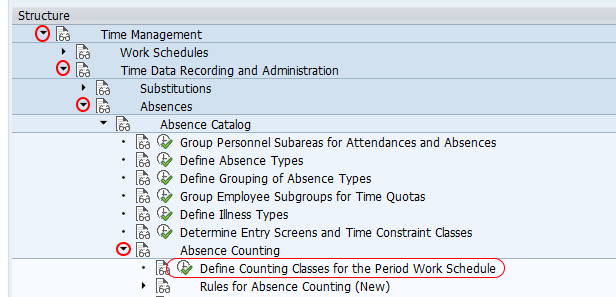
| SAP Path | SPRO > Time Management > Time data recording and administration > Absences > Absence catalog > Absence counting > Define counting classes for the period work schedule. |
Configuration Steps to Define Counting Classes for Period Work Schedule
In this activity, you assign PS grouping, Period work schedule to counting class.
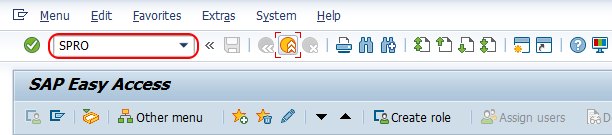
Step 1 : – Execute tcode “SPRO” from command field.
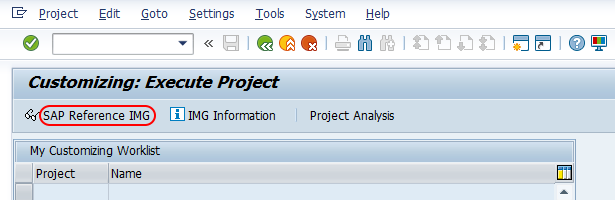
Step 2 : – Choose “Display SAP Reference IMG”
Step 3 : – Follow the navigation Time Management – Time data recording and administration – Absences – Absence catalog – Absence counting and choose img activity “define counting classes for the period work schedule”.
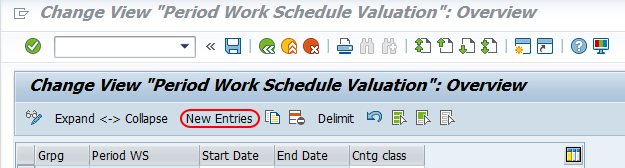
Step 4 : – On change view period work schedule valuation screen, choose new entries button to create new counting classes for period work schedule (PWS).
Step 5 : – On new entries configuration screen, enter the following details.
- Grpg : – Enter the personnel subarea grouping for DWS i.e. 50.
- Period WS : – Enter the period work schedule key i.e. TPWS
- Start date : – Enter starting date of counting class
- End date : – Enter ending date of counting class
- Counting class : -Enter the counting class key from 1 to 9.
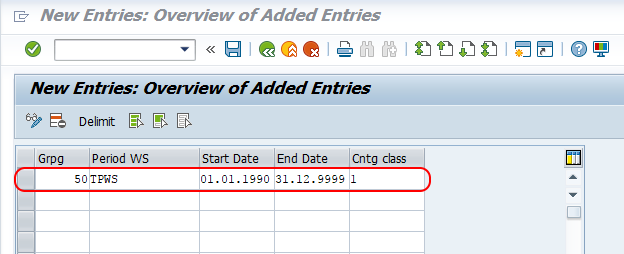
Choose save icon and save the configured details.
Field Details for Period Work Schedule Counting Class Entries
| Field | Purpose in SAP HR Time Management | Configuration note |
|---|---|---|
| Grpg | Identifies the personnel subarea grouping used for work schedule configuration. | Use the grouping that applies to the employees whose absences will be counted. |
| Period WS | Specifies the period work schedule key. | Enter the existing period work schedule, such as the tutorial example TPWS. |
| Start date | Defines when the counting class assignment becomes valid. | Use a date that matches the intended work schedule validity. |
| End date | Defines when the assignment stops being valid. | Use a proper end date so old and new rules do not overlap incorrectly. |
| Counting class | Classifies the period work schedule for absence and attendance counting rules. | Use the class value consistently in the related counting rules. |
Example Use of Counting Class in SAP HR Absence Counting
Assume that an organization has one period work schedule for regular office employees and another period work schedule for employees working in a shift pattern. The same absence type may need to be counted differently for these two schedules.
- Office period work schedule: Absence is counted only on planned working days.
- Shift period work schedule: Absence is counted based on the planned shift day.
- Public holiday or off day: Counting may be skipped or handled differently based on the counting rule.
By assigning a counting class to the period work schedule, you give the absence counting rule a condition that can identify which schedule pattern is being evaluated. This makes the counting result more precise than using the absence type alone.
How Counting Classes Affect Absence Quota Deduction
Counting classes do not deduct absence quota by themselves. They support the counting rule that calculates the counted absence value. If quota deduction is active for the absence type, the counted value can then be used for quota deduction.
For this reason, changing a counting class assignment should be tested with a complete absence entry. Create or simulate an absence for an employee who belongs to the relevant work schedule group, and then check whether the counted days or hours match the expected result.
Common Issues in SAP HR Counting Class Configuration
- Absence is not counted: Check whether planned working hours are greater than zero for that day.
- Wrong counting rule is triggered: Verify the counting class used in the absence counting rule conditions.
- Entry does not apply to the employee: Check the personnel subarea grouping and the period work schedule assigned through the employee work schedule rule.
- Configuration works for one date but not another: Review the start date and end date of the counting class entry.
- Public holiday result is different: Review holiday class, day type, and minimum duration conditions in the counting rule.
Testing Counting Classes for Period Work Schedule in SAP HR
After saving the entry, test the configuration with an employee who uses the same personnel subarea grouping and period work schedule. Enter a relevant absence and verify the counted value. A practical test should include a normal working day, an off day, and a public holiday if those cases are part of the business rule.
- Confirm the employee has the expected work schedule assignment.
- Check that the absence date falls within the validity period of the counting class entry.
- Verify planned working hours for the day being tested.
- Confirm that the absence counting rule contains the expected counting class condition.
- Review the final counted absence value before checking quota deduction.
Frequently Asked Questions on Counting Classes for Period Work Schedule
What is counting class in SAP HR?
A counting class in SAP HR is a classification used in Time Management to help attendance and absence counting rules identify how a day or work schedule pattern should be counted. For period work schedules, it helps link a schedule pattern with absence counting logic.
What is a period work schedule in SAP HR?
A period work schedule is a repeated sequence of daily work schedules. It defines the work pattern over a period, such as a weekly or shift-based sequence, and is used to generate the employee work schedule.
Why are counting classes assigned to period work schedules?
They are assigned so that absence counting rules can apply different counting conditions for different work schedule patterns. This is useful when leave should be counted differently for regular days, shift days, off days, or holiday-related cases.
Does a counting class directly deduct absence quota in SAP HR?
No. A counting class supports the absence counting rule. The counted absence value can then be used for quota deduction if quota deduction is configured for the absence type.
What should I check if an SAP HR absence is not counted correctly?
Check the employee work schedule, personnel subarea grouping, period work schedule, counting class validity dates, planned working hours, holiday class, day type, and the absence counting rule assigned to the absence type.
QA Checklist for SAP HR Period Work Schedule Counting Classes
- Verify that the personnel subarea grouping matches the employees being tested.
- Confirm that the period work schedule key exists and is used by the relevant work schedule rule.
- Check that the counting class validity dates cover the absence dates.
- Ensure the related absence counting rule refers to the same counting class.
- Test counting on a working day, non-working day, and public holiday where applicable.
Successfully we have defined Counting Classes for Period Work Schedule in SAP HR.
In practice, this configuration should always be reviewed together with work schedule rules, absence counting rules, planned working hours, and absence quota deduction settings. That complete check helps ensure that employee absences are counted consistently for the intended period work schedule.