 TutorialKart.com
Define Absence Types in SAP HR Time Management
Absence types in SAP HR are used to classify employee nonattendance such as annual leave, casual leave, sick leave, maternity leave, unpaid leave, and other company-specific leave categories. Each absence type controls how an absence is entered, checked, counted, displayed, and linked with absence quotas in SAP Time Management.
In SAP HCM, absence types are maintained mainly in view V_T554S. When an employee absence is recorded in Infotype 2001 – Absences, the selected absence type determines the input rules, duration limits, counting behavior, and quota deduction logic based on the related time management configuration.
SAP HR Absence Type Configuration Path, Table, and Transaction Code
| SAP R/3 Role Menu | Define absence types in SAP |
| Table / View | V_T554S |
| Tcode | S_AHR_61010289 |
| SAP Navigation Path | SPRO > Time Management > Time data recording and administration > Absences > Absences catalog > Define absence types |
You can also reach this configuration through the SAP Implementation Guide. The exact menu wording can vary slightly by SAP release and country version, but the configuration activity is used to maintain the absence type catalog for personnel subarea groupings.
Before Creating an Absence Type in SAP HR
Before defining a new absence type, confirm the business rule for the leave category. A clear requirement avoids later corrections in payroll, quota deduction, and time evaluation.
- Confirm the absence category, such as paid leave, unpaid leave, sick leave, compensatory off, or special leave.
- Check the correct personnel subarea grouping for absence and attendance types.
- Decide whether the absence should deduct from an absence quota.
- Confirm whether employees can enter the absence for half days, full days, calendar days, or working days.
- Check whether the absence is allowed on holidays, weekly offs, or non-working days.
- Decide the minimum and maximum absence duration allowed for one record.
Steps to Define Absence Types in SAP HR
Step 1: Open SAP HR Absence Type Transaction S_AHR_61010289
Execute tcode “S_AHR_61010289″ from SAP command field.
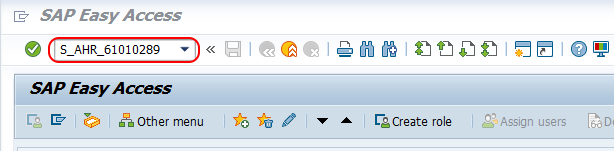
If you are using the IMG path, go to SPRO, choose SAP Reference IMG, and follow the Time Management path shown above. Both methods open the same absence type configuration activity.
Step 2: Choose New Entries in the Absence Input Checks View
From change view Absence Input checks overview screen, choose new entries icon to create new absence type in SAP.
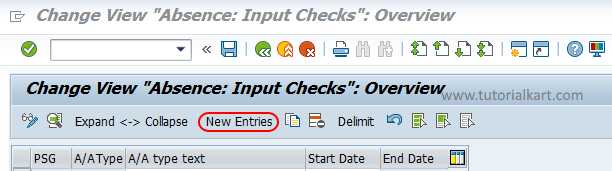
If your organization already has a similar absence type, you can review it before creating a new entry. This helps keep the input checks, validity dates, and grouping logic consistent with existing leave categories.
Step 3: Maintain the Absence Type Key, Text, and Validity Period
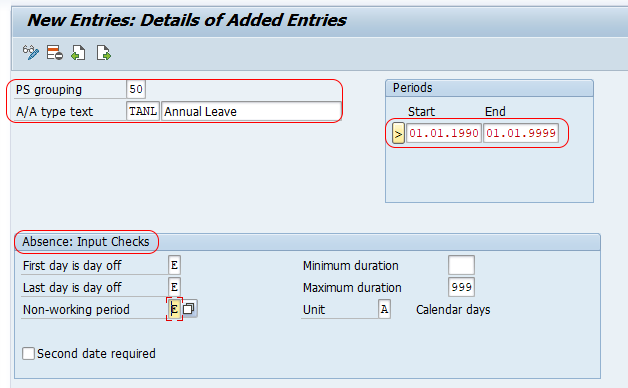
On new entries absence type screen, enter the following details.
- PS Grouping : – Update the PS grouping key for absence type.
- A/A type text : – For A/A (Absence & Attendance) you can enter any alpha numeric key based on the client requirements. Enter description of A/A in the text field
- Periods : – Update the validity period from starting date to end date.
- Absence: Input checks : – Choose the absence input checks based on the requirements.
- First day is off : E (Error Message)
- Last day is off : E (Error Message)
- Non-working period : E (Error Message)
- Minimum duration : Enter minimum duration, so the employee can apply for leave.
- Maximum duration : Update maximum duration, by default it can be 999.
- Unit : – By default unit is A (Calendar days).
- Second date : – Choose second date if required, it specifies the starting date and ending date has to be updated when an absence is recorded for an employee.
Important Fields While Maintaining SAP Absence Types in V_T554S
| Field | Purpose in absence type configuration |
|---|---|
| Personnel subarea grouping | Controls which absence type rules apply to a group of personnel subareas. |
| A/A type | Identifies the absence or attendance type key used during time data entry. |
| A/A type text | Displays the absence type name to users, such as Sick Leave or Casual Leave. |
| Validity period | Defines the date range for which the absence type configuration is valid. |
| First day is off | Controls the system response when the absence starts on a day off. |
| Last day is off | Controls the system response when the absence ends on a day off. |
| Non-working period | Controls whether absence entry is allowed during non-working periods. |
| Minimum duration | Restricts the shortest absence duration allowed for the absence type. |
| Maximum duration | Restricts the longest absence duration allowed for one absence record. |
| Unit | Specifies the unit used for duration checks, such as days or hours depending on configuration. |
Absence Input Checks for Holidays, Off Days, and Duration Limits
Input checks are important because they decide whether SAP should accept, warn, or stop an absence entry. For example, if a company does not allow leave to begin on a weekly off, the First day is off setting can be configured to issue an error message.
Typical system responses include an error, warning, or no message depending on the rule maintained. Use strict error messages only when the business rule is clear, because an error prevents users from saving the absence record.
- Use an error message when the absence must never be entered in that situation.
- Use a warning when the user should review the entry but may still be allowed to save it.
- Use no message only when the situation is acceptable for the absence type.
How SAP Absence Types Work with Infotype 2001 and Absence Quotas
When HR users maintain employee leave in SAP, the absence is usually recorded in Infotype 2001 – Absences. The absence type selected in Infotype 2001 determines the leave category and triggers the related checks.
If the absence type is quota-relevant, it must also be connected with absence quota configuration. In that case, the system can deduct entitlement from the correct absence quota, such as annual leave quota or sick leave quota. Defining the absence type alone may not be enough if quota deduction, counting classes, or payroll treatment is also required.
Common SAP HR Absence Type Examples
The exact absence types depend on country rules and company policy. Common examples include:
- Annual leave – Paid leave deducted from yearly entitlement.
- Casual leave – Short-term leave used for personal reasons.
- Sick leave – Absence due to illness, often with separate documentation rules.
- Unpaid leave – Leave without pay, usually relevant for payroll processing.
- Maternity or paternity leave – Statutory or policy-based family leave.
- Compensatory off – Leave granted against eligible extra work or holiday work.
Save the SAP Absence Type Configuration
After maintaining the required details, choose save button to save the configured absence type in SAP system.
The system may ask for a customizing request. Select the correct transport request based on your project procedure. After saving, test the absence type by entering an absence record for an employee in the relevant personnel subarea grouping.
Testing a Newly Defined Absence Type in SAP HR
After configuration, test the absence type before moving it to production. A simple test should cover valid entries and invalid entries so that both normal behavior and error messages are confirmed.
- Create an absence record in Infotype 2001 for an eligible employee.
- Check whether the absence type appears for the correct personnel subarea grouping.
- Enter a start date and end date that should be allowed.
- Test an absence that starts or ends on an off day, if this rule is maintained.
- Check the minimum and maximum duration restrictions.
- If the absence deducts quota, verify the quota balance after saving.
- If payroll is affected, confirm the expected payroll result with the payroll consultant.
Common Issues When Defining Absence Types in SAP HR
| Issue | Likely configuration area to check |
|---|---|
| Absence type is not visible during entry | Personnel subarea grouping, validity dates, and user authorization. |
| Leave is saved but quota is not deducted | Quota deduction, counting rule, and absence quota assignment configuration. |
| System allows leave on weekly off or holiday | First day off, last day off, and non-working period input checks. |
| Employee can apply for too many days | Maximum duration and related absence rule settings. |
| Half-day absence is not working as expected | Unit, counting rule, daily work schedule, and partial-day absence setup. |
Editorial QA Checklist for SAP HR Absence Type Tutorial
- Confirm that the tutorial uses the correct SAP HR configuration view V_T554S.
- Confirm that tcode S_AHR_61010289 and the SPRO path are shown clearly.
- Check that absence type behavior is explained with Infotype 2001 – Absences.
- Verify that the difference between defining an absence type and configuring quota deduction is clear.
- Ensure the examples do not imply one fixed leave policy for all countries or companies.
FAQs on Absence Types in SAP HR
How to configure absence type in SAP HR?
To configure an absence type in SAP HR, use tcode S_AHR_61010289 or follow SPRO > Time Management > Time data recording and administration > Absences > Absences catalog > Define absence types. Maintain the personnel subarea grouping, absence type key, text, validity period, and input checks, then save the configuration.
What is the table or view for absence types in SAP HR?
The main SAP HR view used to define absence types is V_T554S. It stores absence and attendance type configuration for the relevant personnel subarea groupings and validity periods.
What is the absence infotype in SAP HR?
The absence infotype in SAP HR is Infotype 2001 – Absences. It is used to record employee absences such as leave, sickness, unpaid leave, or other absence categories based on the configured absence types.
What are common types of absences in SAP HR?
Common absence types include annual leave, casual leave, sick leave, unpaid leave, maternity or paternity leave, and compensatory off. The actual list depends on company policy, country rules, and SAP Time Management configuration.
Does defining an absence type automatically deduct quota in SAP?
No. Defining an absence type creates the leave category and its input checks, but quota deduction needs related absence quota and counting configuration. If quota deduction is required, test the absence in Infotype 2001 and verify the quota balance.
Successfully we have defined absence types in SAP HR.