 TutorialKart.com
Day Types in SAP HR Time Management
In SAP HR Time Management, a day type is a key that tells the system how a calendar day should be treated for work schedule generation, time evaluation, and payroll-related payment conditions. It helps the SAP system distinguish a normal working day, a paid day off, an unpaid day off, a public holiday, a half-day holiday, or another client-specific special day.
Day types are not maintained directly on an employee master record. They are configured in Customizing and used together with the public holiday calendar, weekday, Saturday/Sunday rules, and special-day rules when work schedules are generated.
Day type configuration in SAP HR normally includes the following activities:
- Define day types
- Define selection rules for day types
- Define special days
Standard SAP HR Day Types and Their Payment Meaning
The standard SAP system provides four day type keys. The text can be adjusted during implementation, but the common purpose of each day type is shown below.
| Day type | Typical meaning in SAP HR | Common use in work schedules |
|---|---|---|
| 0 | Work / paid | Normal working day where the employee is expected to work and is paid according to the work schedule. |
| 1 | Off / paid | Weekly off, paid public holiday, or another paid non-working day. |
| 2 | Off / unpaid | Unpaid non-working day or unpaid special closure, depending on the client policy. |
| 3 | Special day | Client-specific day that needs separate handling in time evaluation or payroll rules. |
If your project needs more than the delivered day type texts, you can create or adjust day type descriptions as per the client requirement. Before doing that, confirm how payroll rules and time evaluation rules are expected to read those day types.
Day Type Rules for Weekdays, Holidays, Saturdays, and Sundays
You can configure day type rules as per the requirements of the project. The rule should answer how the employee is paid or treated when the date falls on a normal weekday, a public holiday, a half-day holiday, a Saturday, a Sunday, or a client-specific special day.
- If Monday to Friday is not a public holiday, which day type should be assigned?
- If Monday to Friday has a full public holiday, should the day be treated as paid off or handled differently?
- If Monday to Friday has a half-day holiday, which day type should be assigned?
- If a client-specific holiday occurs on a working day, should it follow the normal holiday rule or a special-day rule?
- If a Bandh, plant closure, or regional event occurs between Monday and Friday, how should employees be paid or marked?
The public holiday class is also important. In many SAP HR implementations, holiday class 0 means the date is not a public holiday, class 1 is used for a full-day public holiday, and class 2 may be used for a half-day public holiday. However, the exact use of holiday classes should match the public holiday calendar and client policy configured in that system.
How SAP HR Derives the Day Type During Work Schedule Generation
When SAP generates a work schedule, the day type is derived by checking the calendar date, public holiday class, weekday, Saturday/Sunday indicator, and the assigned day type selection rule. If a special day is maintained for a date, the special-day rule can change how that date is treated.
| Check performed by SAP HR | Why it matters for day type selection |
|---|---|
| Calendar date | Identifies the exact date for which the work schedule is being generated. |
| Public holiday calendar | Determines whether the date is a normal day, public holiday, or half-day holiday. |
| Weekday / Saturday / Sunday | Applies separate day type values for weekdays, Saturdays, and Sundays when the rule requires it. |
| Day type selection rule | Controls which day type is assigned for each relevant day category. |
| Special day entry | Overrides the normal pattern for one specific date when the business needs exceptional handling. |
Define Day Types in SAP HR Customizing
The standard SAP system provides different day types, and you can define new day types or maintain day type texts in SAP as per client requirements. Use this activity when you need to maintain the day type key, short text, and description used by the work schedule configuration.
Navigation
| SAP R/3 Role Menu | Day types |
| Transaction code | SPRO |
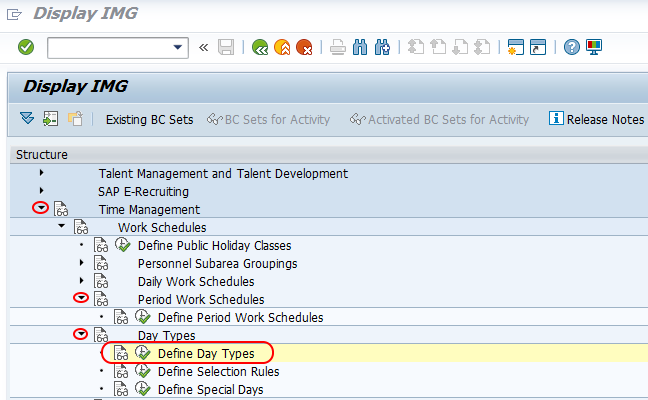
| Menu Path | SPRO > Time Management > Work schedules > Day types > Define day types |
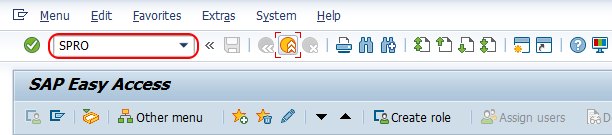
Step 1 : – Execute tcode “SPRO” from SAP command field.
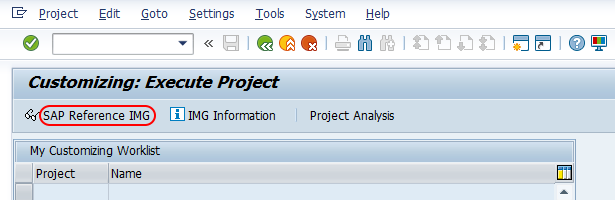
Step 2 : – Choose “SAP Reference IMG”.
Step 3 : – Follow the navigation menu Time Management – Work schedules – Day types and choose IMG activity “Define day type”.
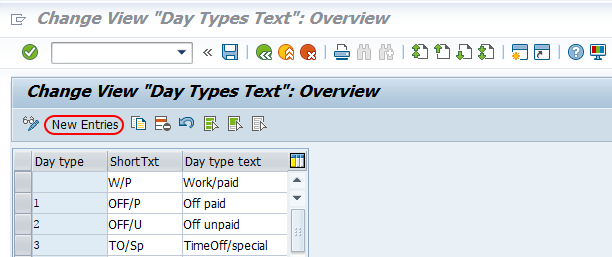
Step 4 : – From change view day type text overview screen, choose new entries option to create new day type as per requirements.
Step 5 : – On new entries day type screen,update day type key from the list, short text and day type text in the given fields.
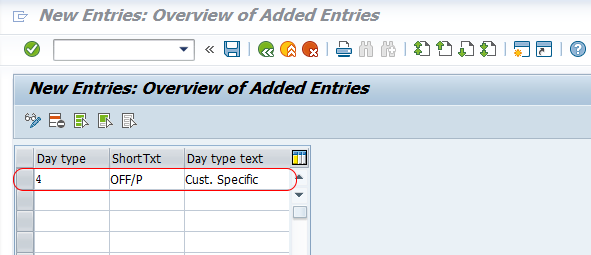
Choose save button and save the configured day types in SAP system.
Define Selection Rules for SAP HR Day Types
Selection rules in SAP determine which day type should be assigned when the date is a weekday, Saturday, Sunday, or public holiday. In practice, the rule connects the holiday calendar result with the day type that will be stored in the generated work schedule.
Menu Path: – Time Management > Work schedules > Day types > Define selection rules.
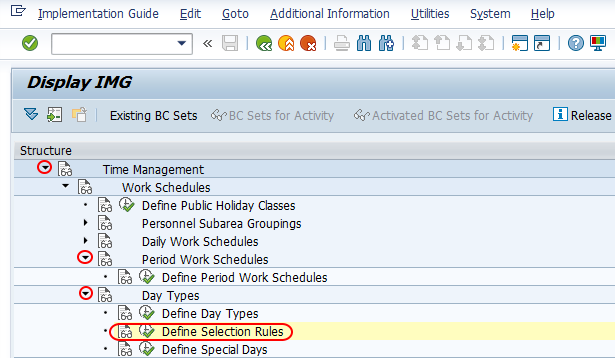
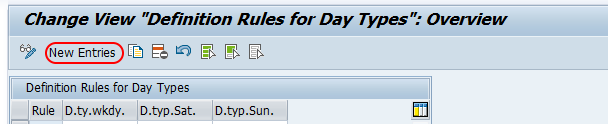
On change view definition rules for day types overview screen, choose new entries button to create selection rule in SAP.
On new entries day types rules screen, update the rule key, day type for weekday and holiday class (D.ty.wkdy), day type for Saturday (D.typ.Sat.) and day type for Sunday (D.typ.Sun).
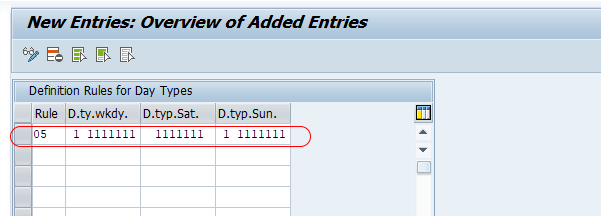
Choose save button and save the configured rules for day types in SAP.
Example Mapping for SAP HR Day Type Selection Rules
The exact mapping depends on the client’s work schedule and payroll rules. The following example shows how a simple rule can be interpreted for a weekly work schedule where Monday to Friday are working days and Saturday/Sunday are weekly offs.
| Calendar situation | Possible day type | Reason |
|---|---|---|
| Monday to Friday, no public holiday | 0 | Normal working day and paid according to planned working time. |
| Monday to Friday, full public holiday | 1 | Paid day off if the client policy treats the public holiday as paid. |
| Monday to Friday, unpaid closure | 2 | Unpaid non-working day if the closure should not be paid. |
| Saturday or Sunday weekly off | 1 | Paid off day or weekly off, depending on the work schedule and payroll design. |
| Client-specific special date | 3 or custom setting | Used when time evaluation or payroll needs special processing for that date. |
Do not copy this mapping into production without checking the payroll schema, time evaluation rules, employee subgroup rules, and country-specific holiday requirements.
Define Special Days for Exceptional SAP HR Dates
In this activity, you define a special calendar date and assign the relevant day type rule to be used for that date. This is useful when one date must be treated differently from the usual weekday, holiday, Saturday, or Sunday logic.
Menu Path: Time Management > Work schedules > Day types > Define special days.
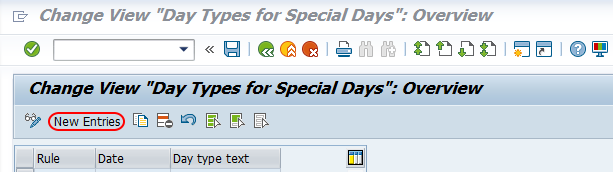
On change view “Day types for special days” overview screen, choose new entries option.
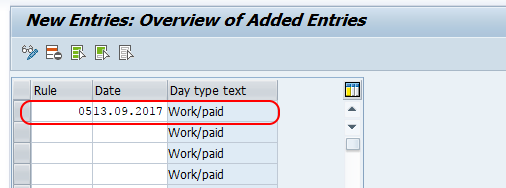
On new entries screen, update day type rule key and date.
Choose save icon and save the configured special days in SAP.
When to Use Special Days Instead of Changing the Public Holiday Calendar
Use special days only when a specific date needs exceptional treatment for day type selection. Do not use special days as a substitute for the public holiday calendar when the date is a regular legal or company holiday that should be reused every year or across multiple personnel areas.
| Requirement | Better configuration option |
|---|---|
| Regular public holiday such as a national or regional holiday | Maintain the public holiday calendar and use the correct holiday class. |
| One-time plant closure for a specific date | Maintain a special day and assign the required day type rule. |
| Weekly Saturday/Sunday off pattern | Maintain the day type selection rule and work schedule logic. |
| Half-day holiday repeated by calendar rule | Maintain the holiday class and selection rule consistently. |
Checks After Configuring Day Types in SAP HR
After saving day types, selection rules, and special days, test the configuration with a generated work schedule before moving the change to production. The day type should be visible on the relevant generated dates and should match the payment and time evaluation requirement.
- Check that the correct day type appears for normal weekdays.
- Check full public holidays, half-day holidays, Saturdays, and Sundays separately.
- Check each special day date after work schedule generation.
- Confirm whether payroll rules and time evaluation rules expect the same day type values.
- Test at least one employee work schedule that uses the affected personnel subarea and employee subgroup grouping.
Common SAP HR Day Type Configuration Mistakes
- Confusing holiday class with day type: Holiday class comes from the public holiday calendar, while day type is the result used in the work schedule.
- Changing day type text without checking rules: Text changes alone do not change payroll or time evaluation behavior.
- Using special days for recurring holidays: Regular holidays should normally be maintained through the public holiday calendar.
- Not regenerating the work schedule: Configuration changes may not reflect on already generated schedules until the relevant work schedules are regenerated.
- Testing only one date: Test weekdays, weekends, holidays, and special days because each can follow a different rule.
Editorial QA Checklist for SAP HR Day Types Tutorial
- Does the tutorial clearly explain the difference between day type, holiday class, selection rule, and special day?
- Are the IMG paths for Define Day Types, Define Selection Rules, and Define Special Days shown correctly?
- Are existing SAP screenshots and links preserved without changing their URLs?
- Does the example mapping warn readers to validate payroll and time evaluation rules before using it?
- Are the FAQ answers limited to SAP HR day type configuration and not mixed with unrelated infotype setup?
FAQs on SAP HR Day Types, Selection Rules, and Special Days
What are the day types in SAP HR?
Day types in SAP HR are keys used to classify a calendar day for work schedule, time evaluation, and payroll-related payment treatment. Common standard day types are 0 for work/paid, 1 for off/paid, 2 for off/unpaid, and 3 for special day.
What is the difference between holiday class and day type in SAP HR?
Holiday class identifies the holiday status of a date in the public holiday calendar. Day type is the value assigned by the day type selection rule after considering the holiday class, weekday, Saturday/Sunday setting, and special-day configuration.
Why are selection rules required for day types in SAP HR?
Selection rules tell SAP which day type to assign for weekdays, Saturdays, Sundays, and public holidays. Without the correct rule, work schedule generation may assign the wrong payment treatment for holidays or weekly offs.
When should special days be configured in SAP HR?
Special days should be configured when a particular date needs different day type handling from the normal holiday calendar or weekly work schedule pattern. Examples include a one-time plant closure, local event, or client-specific exception.
Are day types maintained in Infotype 0041 or Infotype 0014?
No. Day types are maintained in SAP HR Customizing under Time Management and Work Schedules. Infotype 0041 is used for date specifications, and Infotype 0014 is used for recurring payments and deductions; they are not the configuration screens for day types.
Successfully we have configured day types, selection rules, and special days in SAP HR.