 TutorialKart.com
Personnel Subarea Groupings in SAP HR Time Management
Personnel subarea groupings in SAP HR are used to control which work schedules and daily work schedules can be assigned to employees in a specific personnel area and personnel subarea. The grouping is normally a two-character key. Instead of maintaining separate schedule rules for every personnel subarea, you can group personnel subareas that follow the same working time rules.
For example, two plant locations may have different personnel subareas but the same weekly working pattern, holiday calendar logic, and shift planning rules. In that case, both personnel subareas can use the same personnel subarea grouping for work schedules. This keeps SAP Time Management configuration easier to maintain and reduces duplicate work schedule entries.
Personnel subarea groupings are delivered with standard SAP defaults in many systems. In real-time projects, consultants usually review the existing settings first and create or adjust groupings only when the business working time rules require it.
Where Personnel Area, Personnel Subarea, and Work Schedule Grouping Fit in SAP HR
In SAP HR enterprise structure, the personnel area represents a broad organizational unit, and the personnel subarea represents a more specific subdivision used for HR, payroll, and time management rules. For time management, personnel subareas are assigned to grouping keys so that SAP can determine valid work schedules and daily work schedules for employees assigned to those subareas.
| SAP HR element | Purpose in this configuration |
|---|---|
| Personnel Area | Represents a major HR location or organizational unit. |
| Personnel Subarea | Represents a subdivision of the personnel area and is used for time, payroll, and work rule control. |
| Personnel Subarea Grouping for Work Schedules | Groups personnel subareas that can use the same work schedule rules. |
| Personnel Subarea Grouping for Daily Work Schedules | Controls which daily work schedules can be used under the work schedule grouping. |
Two Personnel Subarea Groupings Used for Work Schedules
Personnel subarea groupings consists two configurations.
- Group Personnel Subareas for the work schedules
- Group Personnel Subareas for the daily work schedules.
First we need to define groupings for daily work schedules in SAP, and then it is mapped to work schedules grouping. This sequence is important because a work schedule rule uses daily work schedules as its building blocks.
| Configuration activity | When it is used |
|---|---|
| Group Personnel Subareas for daily work schedules | Used when defining which daily work schedule grouping belongs to a personnel subarea grouping for work schedules. |
| Group Personnel Subareas for work schedules | Used to group personnel subareas that share the same work schedule rules. |
Group Personnel Subareas for Daily Work Schedules in SAP HR
First you need to configure daily work schedules and then it is mapped to work schedules. A daily work schedule defines the working time pattern for one day, such as planned working hours, breaks, and day type usage. The daily work schedule grouping allows SAP to restrict or reuse daily work schedules for the relevant personnel subarea grouping.
Navigation
| SAP R/3 Role Menu | Group Personnel Subareas for the daily work schedules |
| Table | V_001P_N |
| Transaction code | SPRO |
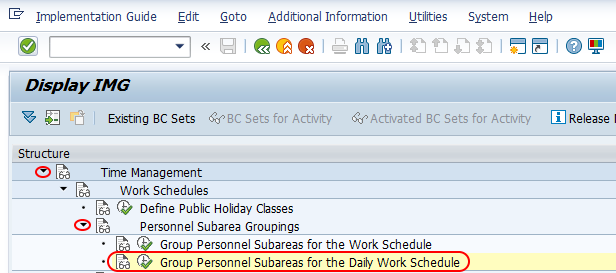
| SAP Menu Path | SPRO => Time Management (TM) => Work schedules => Personnel subarea groupings |
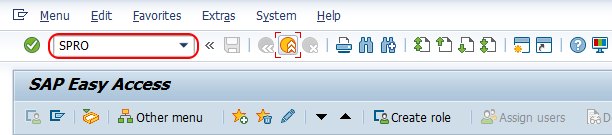
Step 1 :- Execute tcode “SPRO” from command field.
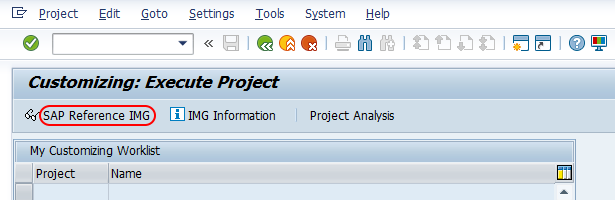
Choose “SAP Reference IMG“
Follow the navigation and choose img activity “Group Personnel Subareas for the daily work schedules”
Step 2 : – From change view “Assignment of PS groupings for work schedules to daily WS” overview screen, click on new entries button.

Step 3 : – On new entries, same number is given for PS grouping and DWS grouping.
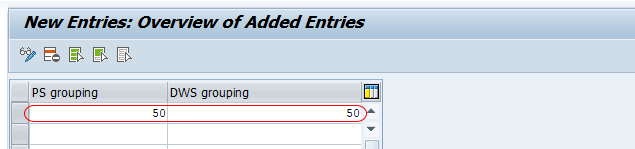
Click on save button and save the details.
In many training systems, the same key is used for the personnel subarea grouping and the daily work schedule grouping to keep the example simple. In a client project, use the key design agreed for the enterprise structure and time management blueprint. The key should represent the working time rule clearly enough for consultants to understand it during later maintenance.
Group Personnel Subareas for Work Schedules in SAP HR
Work Schedules specifies the number of working days and hours for a specific period of time. Here you group personnel area and personnel subareas according to the daily work schedules. So you need to define separately group personnel subareas for work schedules.
The personnel subarea grouping for work schedules is used while creating and assigning work schedule rules. It helps SAP decide which schedule rules are valid for employees in a particular personnel subarea. This is especially useful when different groups of employees follow different weekly patterns, shifts, or planned working hours.
Typical examples of work schedule grouping differences include office employees working Monday to Friday, factory employees working rotating shifts, and part-time employee groups with a separate planned working time pattern. If the working time rules are different, a separate grouping may be required. If the rules are identical, the same grouping can usually be reused.
Example of Personnel Subarea Grouping for Work Schedule Rules
| Personnel Area | Personnel Subarea | Working pattern | Possible work schedule grouping |
|---|---|---|---|
| 1000 | 0001 | General office, Monday to Friday | 01 |
| 1000 | 0002 | General office, Monday to Friday | 01 |
| 1000 | 0003 | Rotating production shift | 02 |
| 2000 | 0001 | Part-time fixed weekly hours | 03 |
In the above example, personnel subareas 0001 and 0002 can share grouping 01 because the working pattern is the same. The production shift and part-time groups use separate groupings because their work schedule rules are different.
Checks Before Saving Personnel Subarea Groupings in SAP HR
- Confirm that the personnel area and personnel subarea are already defined correctly in enterprise structure.
- Check whether a standard SAP grouping can be reused before creating a new one.
- Use separate groupings only when daily work schedules or work schedule rules differ.
- Keep the grouping key consistent with the client naming or numbering convention.
- Test the grouping while creating or assigning work schedule rules to make sure the expected schedules are available.
Common Issues in Personnel Subarea Grouping Configuration
| Issue | Likely reason | What to check |
|---|---|---|
| Expected work schedule rule is not available | Personnel subarea grouping does not match the work schedule rule configuration. | Check the grouping assigned to the personnel subarea and the grouping used in the work schedule rule. |
| Daily work schedule is not available for selection | Daily work schedule grouping is not mapped correctly. | Review the assignment in V_001P_N. |
| Too many duplicate schedule entries | Separate groupings were created where one grouping would be enough. | Compare working time rules across personnel subareas before creating new keys. |
| Incorrect employee working time | Employee is assigned to a personnel subarea with the wrong time grouping. | Check the employee organizational assignment and the personnel subarea configuration. |
Personnel Subarea Grouping FAQs in SAP HR
What is a personnel subarea grouping for work schedules in SAP HR?
A personnel subarea grouping for work schedules is a key used to group personnel subareas that follow the same work schedule rules. It helps SAP Time Management determine which work schedules can be assigned to employees in those personnel subareas.
What is the difference between personnel area and personnel subarea in SAP HR?
A personnel area is a larger organizational unit in SAP HR, while a personnel subarea is a subdivision of the personnel area. Personnel subareas are used in several HR settings, including time management, payroll-related controls, and work schedule grouping.
Why do we group personnel subareas for daily work schedules?
We group personnel subareas for daily work schedules so that the correct daily work schedules are available for the relevant work schedule grouping. This prevents unrelated daily schedules from being used for employees who follow a different working time pattern.
Can the same personnel subarea grouping be used for multiple personnel subareas?
Yes. The same grouping can be assigned to multiple personnel subareas when those subareas follow the same work schedule and daily work schedule rules. This is one of the main reasons for using groupings in SAP HR Time Management.
Do we always need to create a new personnel subarea grouping?
No. A new grouping is required only when the existing groupings do not match the required working time rules. In many cases, standard or already configured groupings can be reused after validation.
Editorial QA Checklist for Personnel Subarea Groupings Tutorial
- Verify that the tutorial distinguishes personnel subarea grouping for work schedules from grouping for daily work schedules.
- Confirm that table V_001P_N is shown only for the daily work schedule grouping assignment.
- Check that all SAP IMG navigation text matches the system version used in the screenshots.
- Ensure that the examples do not imply one universal grouping design for every SAP HR implementation.
- Confirm that the existing SAP HR internal links and screenshots are retained without changing their URLs.
Successfully we have defined personnel subarea groups in SAP HR.