 TutorialKart.com
Employee subgroup in SAP HR is a subdivision of an employee group used to classify employees more precisely for HR administration, payroll, time management, and reporting. For example, the employee group Regular Employees can be divided into employee subgroups such as full-time employees, part-time employees, trainees, executives, associates, and consultants.
In SAP HCM, employee subgroup is part of the personnel structure. It works together with employee group, personnel area, personnel subarea, and other HR master data fields to determine how an employee is processed in the system.
Technical field name of employee subgroup in SAP is “PERSK”
Employee subgroup in SAP HR: purpose and examples
An employee subgroup represents a more detailed employment category under an employee group. It helps SAP HR distinguish between employees who belong to the same broad employment group but follow different rules for payroll, working time, benefits, reporting, or statutory processing.
Common examples of employee subgroups in SAP HR include:
- Trainee employees
- Executives
- Associates
- Consultants
- Full-shift employees
- Part-time employees
The exact employee subgroup list depends on the organization design. You should define only the subgroups that are required for HR master data, payroll rules, time rules, authorizations, and reporting.
SAP employee subgroup field, table, and configuration path
The employee subgroup key is stored as a short code in SAP. It is normally maintained as a two-character key with a description that users can understand in HR master data screens.
| SAP HR object | Details |
| Employee subgroup field | PERSK |
| Configuration transaction | SPRO |
| Common configuration table | T503 – Employee Group/Subgroup |
| Personnel structure level | Employee group and employee subgroup |
| Used in HR master data | Organizational assignment and related personnel structure processing |
Navigation path to define employee subgroup in SAP HR
| SAP R/3 Role Menu | Employee Subgroups |
| Transaction Code | SPRO |
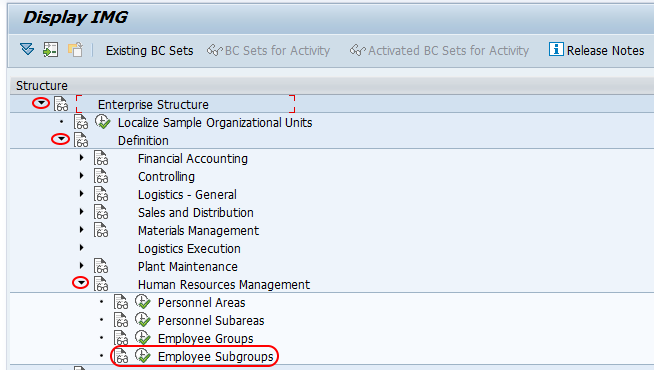
| SAP IMG Path | SPRO => SAP Reference IMG => Definition => Human Resources Management => Employee Subgroups. |
Sample employee subgroup values for SAP HR configuration
We are going to create the employee subgroups in SAP as per below values.
| Employee subgroup | Name of EE subgroup |
| TE | Trainee |
| EX | Executive |
| AS | Associate |
| TC | Consultant |
| FS | Full Shift |
| PT | Part Time |
These are sample configuration values. In a real project, the employee subgroup codes should be finalized after reviewing payroll requirements, working time rules, statutory reporting, and employee classification standards used by the organization.
How to define employee subgroup in SAP
Refer below step by step configuration procedure for creation of new employee subgroup in SAP HRM.
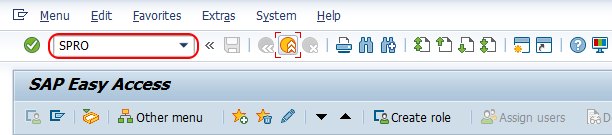
Step 1 : – Execute tcode “SPRO” from SAP command field.
Step 2 :- From display IMG screen, follow the navigation menu as shown below image and double click on img activity “Employee subgroups”.
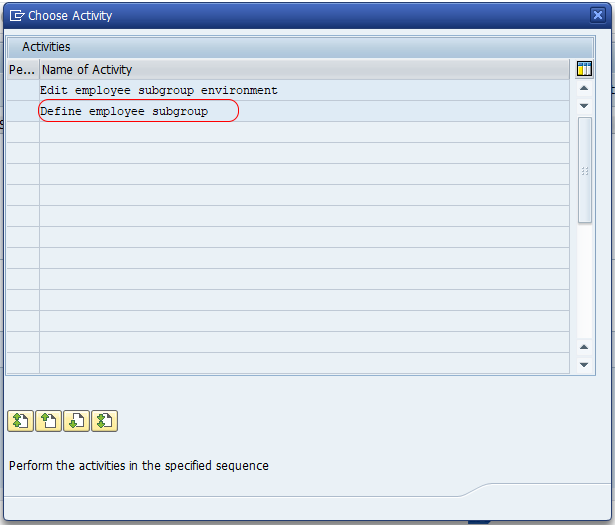
Step 3 : – In next screen, a choose activity with two options displays for maintaining the employee subgroups in SAP.
- Edit employee subgroup environment
- Define employee subgroup.
Double click on employee subgroup option to define new employee subgroup in SAP as per requirements of an organization enterprise structure.
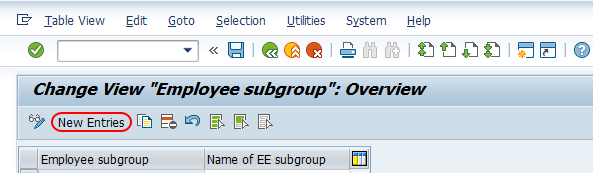
Step 4 : – From change view employee subgroups overview screen, choose the option new entries for creation of new employee subgroup in sap.
Step 5 : – On new entries employee subgroup SAP screen, enter the following details.
- Employee subgroup : – Enter the 2 digits key that defines as employee subgroup in SAP.
- Name of EE subgroup : – Enter the name of an employee subgroup that shows in SAP system.
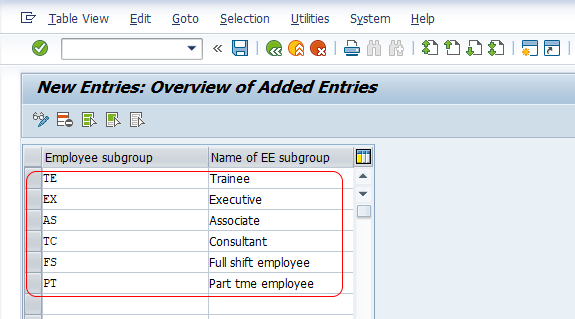
Maintain all the required employee subgroups in SAP as per requirements an organization enterprise structure, choose save button and save the details. Now you get a message as “Data was saved”.

Successfully we have created new employee subgroups in SAP HR.
Employee subgroup environment in SAP HR
While defining an employee subgroup creates the key and name, the employee subgroup environment is used to maintain control-related settings that influence HR processing. These settings can affect areas such as payroll processing, time management grouping, and employee classification behavior.
Before transporting employee subgroup configuration to another SAP system, check whether dependent configuration is also required. Employee subgroups are often used in combination with employee group/subgroup grouping rules, personnel calculation rules, wage type permissibility, work schedule rules, and reports.
Employee group vs employee subgroup in SAP HR
Employee group is the broader classification of employment, while employee subgroup is the detailed classification within that group. For example, an organization may have an employee group called Regular Employees. Under that group, it may maintain employee subgroups such as Full Time and Part Time.
| Comparison point | Employee group | Employee subgroup |
| Level | Higher-level employee category | Detailed category under employee group |
| Example | Regular employees | Full-time, part-time, trainee |
| Purpose | Broad HR classification | Detailed processing and reporting classification |
| Configuration dependency | Used with employee subgroup | Usually assigned and controlled with employee group/subgroup settings |
Checks before saving employee subgroup configuration in SAP
Use the following checks before saving or transporting employee subgroup configuration in SAP HR:
- Confirm that the employee subgroup key is short, clear, and not already used for another classification.
- Use a meaningful employee subgroup description so HR users can select the correct value in master data.
- Check whether the subgroup is required for payroll, time management, benefits, or reporting.
- Confirm that employee group and employee subgroup combinations follow the organization structure.
- Review dependent configuration before moving the change to quality or production systems.
- Test employee master data creation or change using the new employee subgroup.
SAP employee subgroup configuration QA checklist
- Does the tutorial clearly explain what employee subgroup means in SAP HR?
- Are the field name PERSK and common table T503 mentioned correctly?
- Does the SPRO path match the SAP IMG activity shown in the screenshots?
- Are sample employee subgroup keys and names easy to understand?
- Does the article distinguish employee group from employee subgroup?
- Does the final step remind the user to save and verify the configuration?
FAQs on defining employee subgroup in SAP HR
What is an employee subgroup in SAP HR?
An employee subgroup in SAP HR is a detailed employee classification under an employee group. It is used to separate employees such as trainees, executives, consultants, full-time employees, and part-time employees for HR processing and reporting.
How do you create an employee subgroup in SAP HR?
To create an employee subgroup in SAP HR, execute transaction code SPRO and follow the IMG path to Human Resources Management > Employee Subgroups. Choose the activity to define employee subgroup, select New Entries, enter the employee subgroup key and name, and save the configuration.
What is the technical field name for employee subgroup in SAP?
The technical field name for employee subgroup in SAP is PERSK. It stores the employee subgroup key used in SAP HR personnel structure processing.
What is the table for employee group and employee subgroup in SAP HR?
A commonly used SAP table for employee group and employee subgroup configuration is T503. It stores employee group/subgroup related settings used in personnel structure configuration.
Why is employee subgroup important in SAP payroll and time management?
Employee subgroup is important because it can influence how employees are grouped for payroll rules, work schedules, time management, benefits, and reports. The exact impact depends on the organization-specific SAP HR configuration.