 TutorialKart.com
Define Public Holiday Classes in SAP HR Time Management
Public holiday classes in SAP HR classify holidays so that work schedules, day type rules, time evaluation, and absence counting can process each holiday correctly. A public holiday is first created in the SAP calendar, then assigned to a holiday calendar, and finally used through factory calendars and work schedule rules.
The SAP calendar is not client-specific. If a calendar change is made, it can affect all clients in SAP. Because of this cross-client behavior, maintain SAP public holiday classes only after checking the requirement with the payroll, time management, and basis teams.
In many SAP HR implementations, public holiday class 1 is used for an ordinary public holiday. Other classes can be reserved for special cases such as regional holidays, partial holidays, company holidays, or holidays that need different absence and attendance behavior. The exact meaning of each class should be defined in your project design and then used consistently in day type rules.
Where SAP HR uses public holiday classes
- Holiday calendar: The holiday is assigned to a country or regional holiday calendar for a valid period.
- Factory calendar: Working days and non-working days are calculated by combining weekly workdays with holiday calendars.
- Work schedule rules: Public holiday class helps determine whether a day is processed as a normal workday, paid holiday, unpaid day, or special day.
- Time evaluation and absence counting: Rules can count or ignore attendance and absence hours differently when the day has a holiday class.
Types of public holidays available in SAP calendar
Types of public holidays in SAP
- With fixed date
- With a fixed day from date
- Distance to easter
- Easter sunday
- Floating public
Choose the holiday type according to how the date is decided. A national day that always falls on the same calendar date can be created as a fixed-date public holiday. A festival date that changes every year and cannot be calculated by a fixed rule is usually maintained as a floating public holiday.
| SAP public holiday type | When to use it |
|---|---|
| With fixed date | For holidays that always occur on the same day and month. |
| With a fixed day from date | For holidays calculated from a known base date and weekday rule. |
| Distance to Easter | For holidays calculated a fixed number of days before or after Easter Sunday. |
| Easter Sunday | For Easter Sunday itself when it must be maintained as a public holiday. |
| Floating public holiday | For manually maintained dates that vary by year. |
SAP SCAL navigation for defining public holiday classes
| SAP R/3 Role Menu | Define public holiday classes. |
| Transaction code | SCAL |
| SAP Menu Path | SPRO > Time Management > Work Schedules > Define public holiday classes |
You can reach the same SAP calendar maintenance screen either by using transaction code SCAL directly or through the SAP Reference IMG path shown above. In project systems, the IMG path is often preferred because it keeps the configuration activity clear for documentation and transports.
Start SAP IMG activity for public holiday class configuration
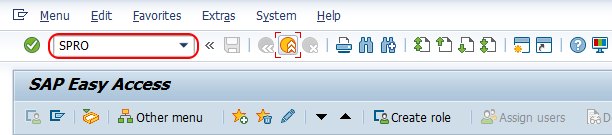
Step 1 : – Execute tcode “SPRO”
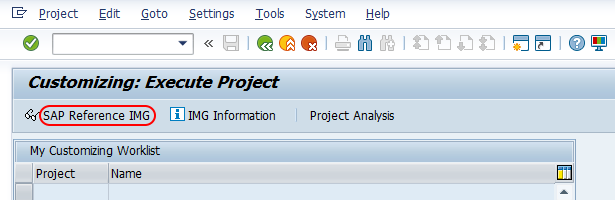
Choose “SAP Reference IMG”
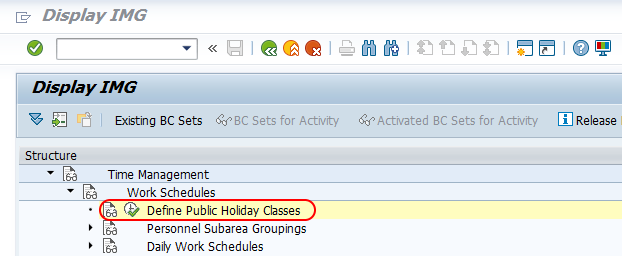
Follow the navigation Time Management >> Work Schedules and choose IMG activity Define public holiday classes.
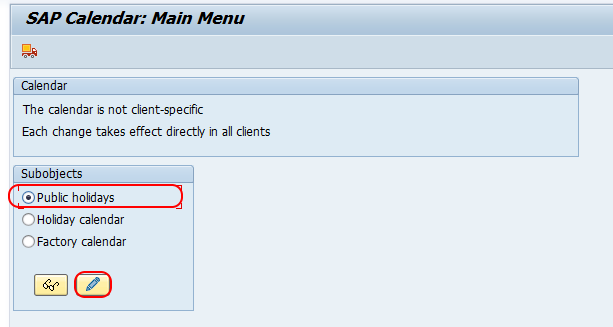
Choose Public Holidays in SAP calendar maintenance
Step 2 : – From SAP calendar: Main menu screen, you will get three options i.e.
- Public holidays – Individual public holiday definitions are created and changed here.
- Holiday calendar – It groups public holidays for a country, state, region, or company requirement over a validity period.
- Factory calendar – It determines working days by combining weekly workdays with the assigned holiday calendar.
Choose public holidays and click on change button.
From change public holidays: overview screen, click on create button.
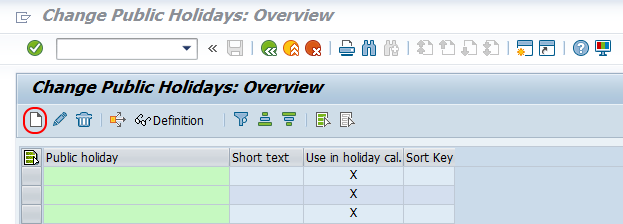
Create a fixed-date public holiday class in SAP
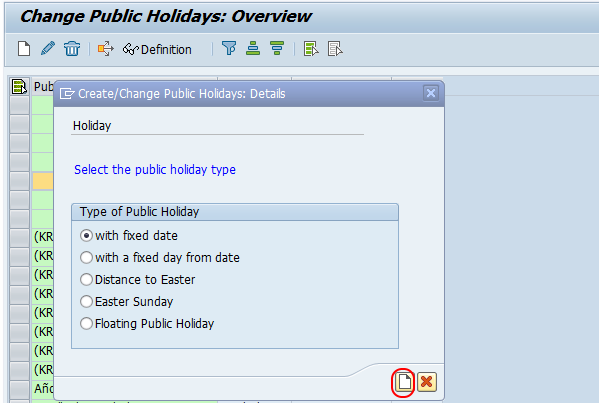
A fixed-date holiday is used when the holiday always falls on the same day and month every year, such as a national holiday with a fixed calendar date. The holiday date is generated automatically for the calendar years in the validity period.
Step 3 : Choose the type of public holiday – with fixed date and click on create button.
Step 4 : – On Create/ change public holidays: fixed date screen, enter the following details.
- Day: – Enter the day of the month.
- Month :- Update the month.
- Guaranteed : – Choose not guaranteed radio button.
- Public holiday attributes : –
- Sort Criterion :- Update the sort key, so the holidays can be sorted accordingly.
- Religion denomination : – Choose the religion if the holiday for a specific religion.
- Public holiday class : – Choose 1 (ordinary public holiday)
- Holiday name : – Enter name of holiday in short and long holiday name fields.
Use the Guaranteed setting only after checking the business rule. If a fixed-date holiday falls on a weekly off day, guaranteed handling can shift the holiday depending on the country or company requirement. If the holiday should not move, keep it as not guaranteed.
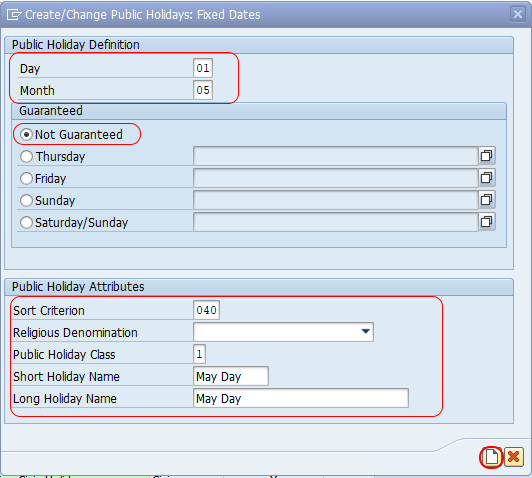
After updating required details for creation of public holiday in SAP, click on create button and save the configured details.
Create a floating public holiday class in SAP
Use a floating public holiday when the exact date changes from year to year and cannot be derived by a fixed rule in the system. The date must be maintained for every relevant year in the public holiday definition.
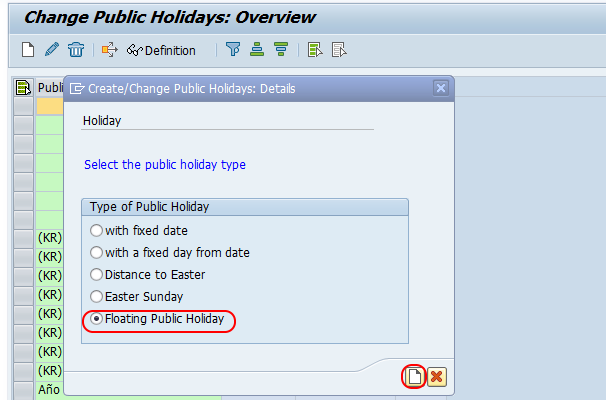
From change view public holidays overview screen, choose create button.
Now choose floating public holiday option and click on create button to create the floating public holiday in SAP system.
On create/ change public holidays: floating public holidays screen, enter the following details.
- Year: Enter the calendar year for which the floating holiday is valid.
- Day and month: Maintain the actual date of the holiday for that year.
- Sort criterion: Use a consistent key so that holiday lists remain easy to review.
- Public holiday class: Select the class that matches the business treatment of the holiday.
- Holiday name: Enter clear short and long names so users can identify the holiday in calendar displays and reports.
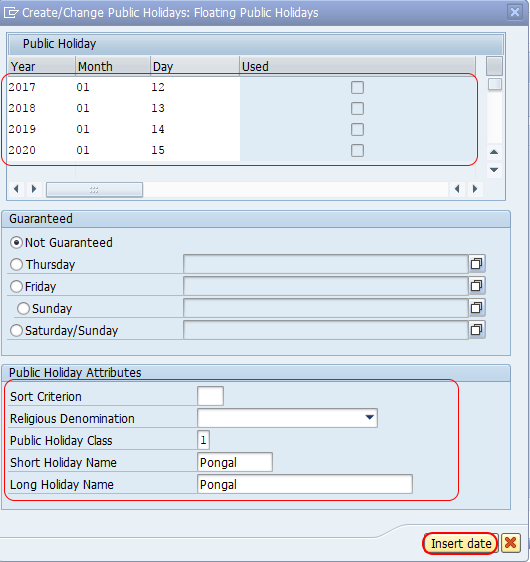
After maintaining the required details, click on insert button >> and then click on create button. Now you get a message as “Public holiday was entered”.

Distance to Easter and Easter Sunday public holidays in SAP
Distance to Easter : – Use this option when a public holiday is calculated as a fixed number of days before or after Easter Sunday. It is commonly required in countries where holidays such as Good Friday, Easter Monday, Ascension Day, or Whit Monday are derived from the Easter calendar.
Use the Easter Sunday option when Easter Sunday itself must be maintained as a public holiday. Do not use distance-to-Easter logic for holidays whose dates are decided manually every year; floating public holiday is more suitable for those cases.
Fixed day from date public holiday option in SAP
The fixed-day-from-date option is useful when the holiday is not simply a fixed calendar date but is calculated from a known date rule. Before selecting this type, confirm the legal or company rule for the holiday and test the generated dates for multiple years.
Assign SAP public holidays to a holiday calendar after class creation
Creating a public holiday does not automatically make it active for employees. After the public holiday class is created, assign the public holiday to the relevant holiday calendar for the correct country, state, region, or company grouping. Then generate or save the holiday calendar for the required validity years.
- Check that the holiday calendar has the correct validity period.
- Assign only the holidays that apply to that region or employee group.
- Review the generated holiday dates before saving.
- Confirm that the related factory calendar and work schedule rules use the correct holiday calendar.
Public holiday class impact on SAP day type and work schedule rules
The public holiday class is important because SAP Time Management does not use the holiday name alone to process working time. The class is read along with day type rules and work schedule configuration. For example, a normal public holiday, a half-day holiday, and a company-specific holiday may need different processing even when all of them appear as holidays in the calendar.
| Configuration item | Why it matters for SAP public holiday class |
|---|---|
| Public holiday class | Groups the holiday for rule processing. |
| Holiday calendar | Controls where and when the holiday is valid. |
| Day type rule | Decides how the day is treated in the employee work schedule. |
| Work schedule rule | Determines planned working time after holidays and weekly offs are considered. |
| Absence counting rule | Controls whether leave is counted, reduced, or ignored on holidays. |
SAP public holiday class QA checklist before transport
- Verify that the holiday type matches the actual date rule: fixed date, fixed day from date, distance to Easter, Easter Sunday, or floating public holiday.
- Confirm that public holiday class 1 or any other selected class matches the time management design document.
- Check the validity years in the holiday calendar so employees do not miss future holiday dates.
- Review whether the holiday should be guaranteed or not guaranteed when it falls on a weekly off.
- Test one employee work schedule for the relevant personnel area or personnel subarea before moving the change to production.
- Validate absence counting and time evaluation behavior for the holiday date.
- Coordinate calendar transports carefully because SAP calendar changes can affect more than one client or region.
Common SAP HR public holiday class mistakes to avoid
- Creating the holiday but not assigning it to a holiday calendar: The holiday will exist in SAP but will not affect employee schedules.
- Using the wrong public holiday class: Time evaluation and absence counting may process the day incorrectly.
- Maintaining a floating holiday for only one year: Future years may not show the holiday unless each year is maintained.
- Ignoring regional calendars: A holiday that applies to one state or region should not be assigned to every employee calendar.
- Skipping work schedule testing: Calendar setup should be checked in the employee work schedule before production use.
SAP public holiday class FAQs
What is a public holiday class in SAP HR?
A public holiday class in SAP HR is a classification assigned to a holiday in the SAP calendar. It helps time management rules decide how that holiday should be processed in work schedules, day types, attendance, absence counting, and time evaluation.
Is transaction SCAL used to define public holiday classes in SAP?
Yes. Transaction code SCAL is used for SAP calendar maintenance, including public holidays, holiday calendars, and factory calendars. The same activity can also be reached through SPRO under Time Management and Work Schedules.
What is the difference between a public holiday and a holiday calendar in SAP?
A public holiday is the individual holiday definition, such as a fixed-date or floating holiday. A holiday calendar is a collection of public holidays assigned for a country, region, or business requirement over a defined validity period.
When should a floating public holiday be used in SAP?
A floating public holiday should be used when the holiday date changes every year and cannot be calculated by a fixed rule such as fixed date or distance to Easter. The date must be maintained for each applicable year.
Why should SAP public holiday class changes be tested before production?
Public holiday class changes can affect work schedules, absence counting, payroll-related time data, and employee holiday processing. Testing confirms that the holiday is generated on the correct date and is handled correctly by time management rules.
Successfully we have defined public holiday classes in SAP HR. After saving the public holiday, continue with holiday calendar assignment and work schedule testing so that the class is used correctly in employee time processing.