 TutorialKart.com
What is an Infotype Menu in SAP HR?
An infotype menu in SAP HR is a grouping of relevant employee master data infotypes under a single tab in transaction PA30. It helps HR users maintain employee information in a structured way, such as personal data, organizational assignment, addresses, bank details, and payroll-related records.
In SAP Personnel Administration, an infotype stores a specific category of employee data. For example, Organizational Assignment, Personal Data, Addresses, Planned Working Time, and Basic Pay are separate infotypes. The infotype menu controls which infotypes are displayed together for a user group in the master data maintenance screen.
In transaction code PA30 (Maintain HR Master Data), different infotypes are maintained under each tab. You can maintain maximum 10 infotype menus in the master data for a specific user group.
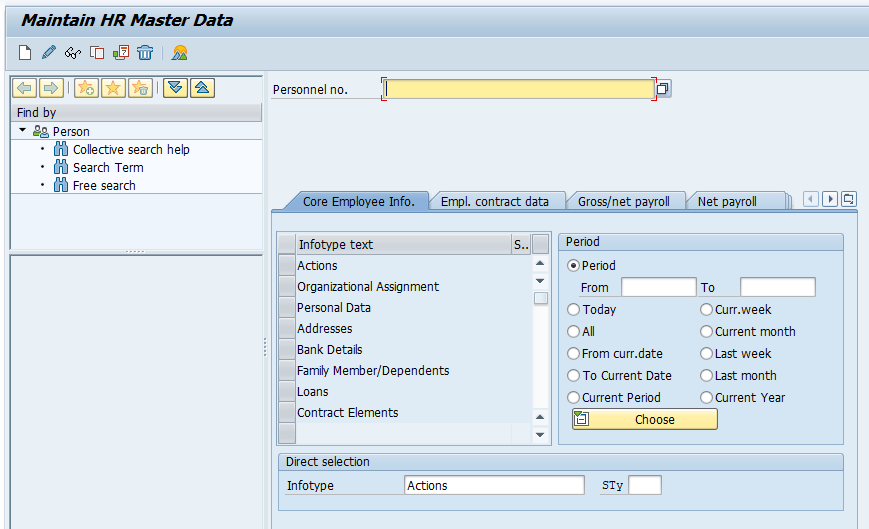
Why Infotype Menus are configured in SAP Personnel Administration
Infotype menus are configured so that HR users see the required employee data screens in a logical order. Instead of searching for every infotype manually, the user can select the relevant menu tab and work with the infotypes assigned to that menu.
| SAP HR term | Meaning in this configuration |
|---|---|
| Infotype | A logical record type that stores one category of employee data, such as personal data or basic pay. |
| Infotype menu | A menu tab in PA30 that groups selected infotypes for easier master data maintenance. |
| User group dependency | A setting that determines which menu is assigned to a user group. |
| Infogroup | A sequence of infotypes processed during a personnel action, such as hiring or transfer. |
An infotype menu is different from an infogroup. An infotype menu is mainly used for displaying and maintaining groups of infotypes in PA30. An infogroup is used during personnel actions to guide the user through a defined sequence of infotypes.
How to define Infotype Menu in SAP HR customizing
Refer below step by step procedure of configuring new infotype menus in SAP.
Navigation
| SAP R/3 Role Menu | Define Infotype menu |
| Transaction Code | SPRO |
| SAP Path | SPRO => IMG > Personnel Management (PM) => Personnel Administration (PA) -> Customizing Procedures –>Infotype Menus > Info type menu |
The configuration has two important parts. First, maintain the menu key and text under user group dependency. Second, assign the required infotypes to the menu in the required sequence.
Step-by-step SAP HR Infotype Menu configuration in SPRO
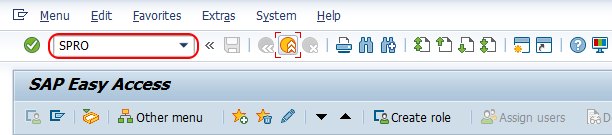
Step 1 :- Execute tcode “SPRO” from command field.
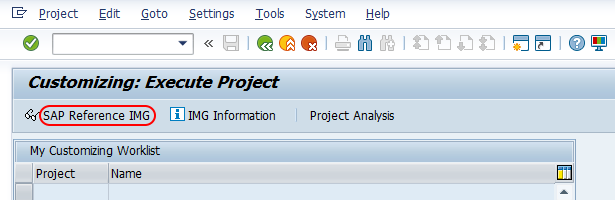
Step 2 : – Choose “Display SAP Reference IMG”
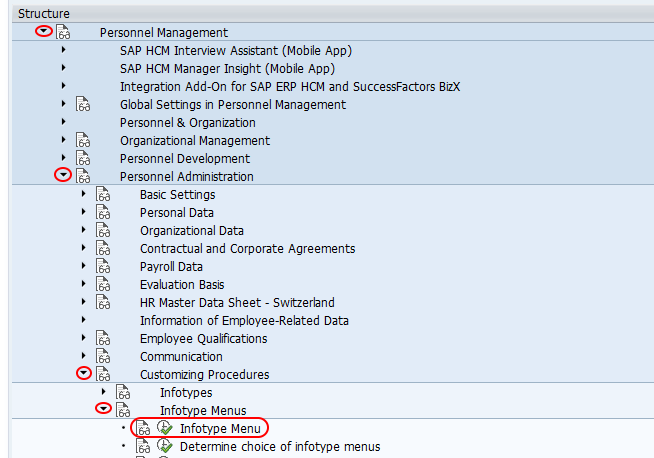
Step 3 : – Follow the navigation as PM – PA – Customizing procedures – Infotype menus and click on IMG activity “Infotype Menu.
Step 4 : – In next screen choose activities, it displays with two options. i.e.
- User group dependency on menu and info groups
- Infotype Menu.
Double click on the first option “User group dependency on menu and infogroup
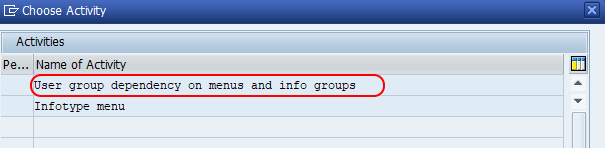
Maintain user group dependency for SAP HR infotype menus
Step 5 : – On user group dependency on menu and infogroups screen, check the existing entries and use those menu as per your requirements. Choose new entries button to create new menu as per requirements of project.
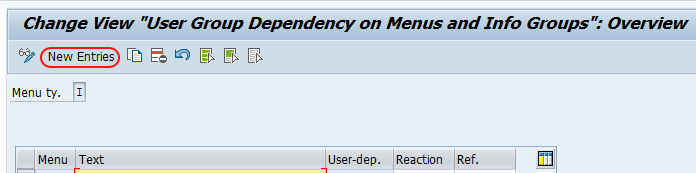
Step 6 : – From new entries menu type screen, update
- Menu : – Enter the key defines as infotype menu in SAP.
- Text : – Enter the description of menu.
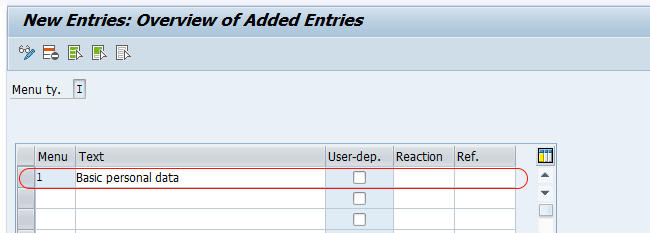
Press enter and choose save button and save the configuration.
Note : – We have already configured one infotype menu “TH” when we are creating infogroups in SAP. You can edit this info type menu or create new one.
Assign infotypes to the SAP HR infotype menu
Step 7 : – Now click on back button or press function key F3 for choose activity screen. Click on infotype menu option to configure infotype menus in SAP as per client requirements.
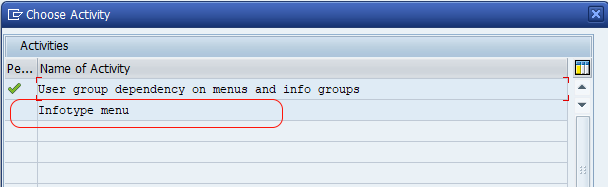
On determine work area entry scree, enter menu key as “1”.
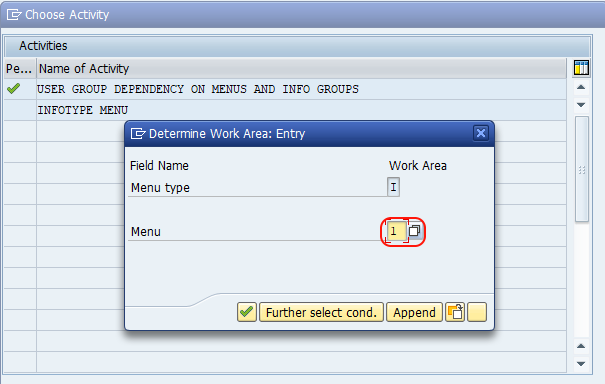
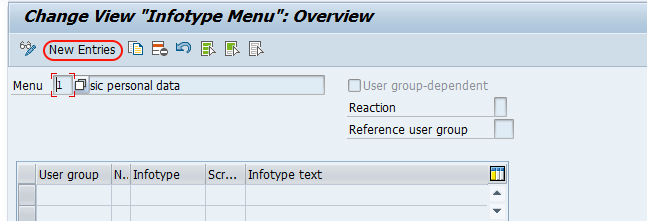
From change view infotype menu overview screen, click on new entries button to configure new infotype menu in SAP
On new entries menu (1 – basic personal data) screen, enter the required infotypes as per sequential order.
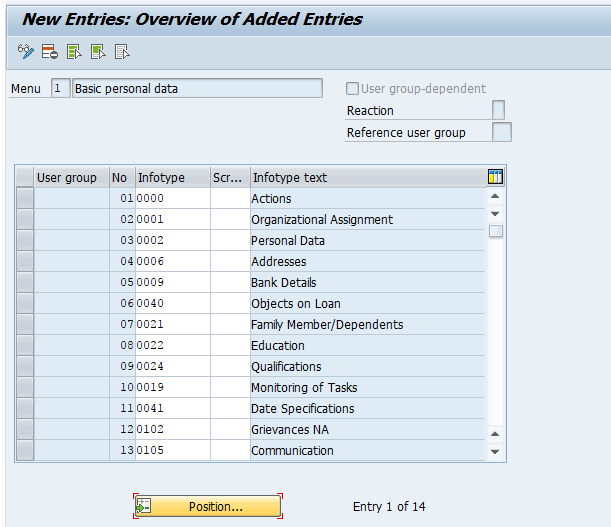
Click on save button and save the details.
Successfully we have defined new infotype menus in SAP HR.
Fields to check while defining an Infotype Menu in SAP HR
| Configuration field | What to enter | Check before saving |
|---|---|---|
| Menu | Enter the menu key used for the infotype menu. | Use a meaningful key that follows the project naming approach. |
| Text | Enter the menu description displayed to users. | Keep the text clear for HR users, such as Basic Personal Data or Payroll Data. |
| Infotype | Enter the HR infotype number to appear in the menu. | Confirm that the infotype is relevant for the user group and country/process requirement. |
| Sequence | Maintain the order in which infotypes should appear. | Place frequently used infotypes in a practical order for PA30 maintenance. |
After saving the configuration, test the result in PA30 using a suitable personnel number and user group. Open the employee master data screen and confirm that the required infotypes are displayed under the expected menu tab.
Infotype Menu vs Infogroup in SAP HR
Many SAP HR beginners confuse infotype menus with infogroups because both deal with infotypes. The purpose is different. An infotype menu helps users access and maintain grouped infotypes in PA30, while an infogroup controls the sequence of infotypes during personnel actions such as hiring, promotion, transfer, or leaving.
| Comparison point | Infotype Menu | Infogroup |
|---|---|---|
| Main use | Groups infotypes under a menu tab for master data maintenance. | Defines a processing sequence of infotypes during a personnel action. |
| Common transaction | PA30 | PA40 |
| User experience | User selects a menu and opens the required infotype. | System guides the user through a sequence of screens. |
| Configuration focus | Menu key, text, and assigned infotypes. | Action type, infogroup, operation, and infotype sequence. |
Common mistakes while configuring SAP HR Infotype Menus
- Using an unclear menu text: HR users should understand the menu purpose without checking configuration documentation.
- Assigning unrelated infotypes: Keep the menu focused. For example, do not mix basic personal data and payroll-only infotypes unless the business process requires it.
- Ignoring user group dependency: If the menu is not assigned correctly for the user group, the expected menu may not appear in PA30.
- Wrong sequence of infotypes: Arrange infotypes in the order users normally maintain them.
- Not testing in PA30: Always verify the configuration from the end-user transaction after saving customizing entries.
FAQ on SAP HR Infotype Menu configuration
What is the infotype menu in SAP HR?
An infotype menu in SAP HR is a grouping of related infotypes under a menu tab in employee master data maintenance. It helps users maintain employee data in PA30 without manually searching for each infotype.
What is an infotype in SAP HR?
An infotype is a structured record that stores one category of HR master data. Examples include Organizational Assignment, Personal Data, Addresses, Bank Details, Planned Working Time, and Basic Pay.
How is an infotype menu different from an infogroup in SAP HR?
An infotype menu groups infotypes for display and maintenance in PA30. An infogroup defines a sequence of infotypes that are processed during personnel actions, commonly through PA40.
How do I change an infotype menu in SAP HR?
Go to SPRO, open Personnel Management > Personnel Administration > Customizing Procedures > Infotype Menus, and maintain the required menu entries. After changing the assigned infotypes or sequence, save the configuration and test it in PA30.
Why is my SAP HR infotype menu not visible in PA30?
The usual causes are incorrect user group dependency, missing menu assignment, wrong menu key, or incomplete infotype entries. Check the user group dependency first, then verify the infotype menu entries and test again in PA30.
Editorial QA checklist for SAP HR Infotype Menu tutorial
- The tutorial defines infotype menu in the context of SAP HR and PA30.
- The difference between infotype, infotype menu, and infogroup is explained clearly.
- The SPRO navigation path and transaction code are included before the configuration steps.
- The user group dependency step is included before assigning infotypes to the menu.
- The existing screenshots are retained in the same tutorial flow.
- The FAQ answers the main search-intent questions about infotype menus, infotypes, subtypes, and changing infotype menu configuration.