 TutorialKart.com
Listen for EditText text changes in Kotlin Android
Android’s EditText accepts text input from the user. To respond while the user types, attach a TextWatcher with addTextChangedListener() and place the required logic in one of its text-change callbacks.
This tutorial shows how to detect an EditText text change in Kotlin, read the current value, and display it in a TextView. The same approach can be used for live validation, character counters, search filtering, and enabling or disabling form controls.
In the following video, entering text in the EditText triggers the listener and displays the current value in a TextView.
Attach a TextWatcher to an EditText
Step 1: Obtain a reference to the EditText and pass a TextWatcher object to addTextChangedListener().
editTextSample.addTextChangedListener(object : TextWatcher {
    override fun afterTextChanged(s: Editable) {}
    override fun beforeTextChanged(s: CharSequence, start: Int,
                                   count: Int, after: Int) {
    }
    override fun onTextChanged(s: CharSequence, start: Int,
                               before: Int, count: Int) {
    }
})
Step 2: Add the action that must run as the value changes to onTextChanged(). In this callback, s contains the current text, start is the position where the change began, before is the number of replaced characters, and count is the number of new characters.
override fun onTextChanged(s: CharSequence, start: Int,
                           before: Int, count: Int) {
    // your code here
}
Step 3: Read the current value from s. Convert it with s.toString() when the receiving API requires a Kotlin String.
How addTextChangedListener works
addTextChangedListener() registers a TextWatcher on an editable text control such as EditText. The watcher remains active until it is removed with removeTextChangedListener() or the view is destroyed.
TextWatcher callback order and parameters
beforeTextChanged()runs immediately before the editable text is changed.onTextChanged()runs while the new text is being applied and provides the currentCharSequence.afterTextChanged()runs after the change and provides anEditableobject.
Use onTextChanged() when you only need to read the current value. Use afterTextChanged() when the logic needs the resulting Editable. Avoid changing the watched text repeatedly from inside a callback because another change can invoke the watcher again.
EditText on text change example using TextWatcher
Create an Android application with an Empty Activity and replace the layout and activity content with the following example. This original example uses the older Android Support Library and Kotlin synthetic view references. A current AndroidX version is provided in the next section.
activity_main.xml
<?xml version="1.0" encoding="utf-8"?>
<android.support.constraint.ConstraintLayout xmlns:android="http://schemas.android.com/apk/res/android"
    xmlns:tools="http://schemas.android.com/tools"
    android:layout_width="match_parent"
    android:layout_height="match_parent"
    tools:context=".MainActivity">
    <LinearLayout
        android:orientation="vertical"
        android:padding="10sp"
        android:gravity="center_horizontal"
        android:layout_width="match_parent"
        android:layout_height="match_parent">
        <TextView
            android:text="TutorialKart\nEditText On Text Change"
            android:textSize="25sp"
            android:gravity="center"
            android:layout_marginBottom="50sp"
            android:layout_width="wrap_content"
            android:layout_height="wrap_content" />
        <TextView
            android:id="@+id/tvSample"
            android:textSize="20sp"
            android:layout_marginBottom="50sp"
            android:layout_width="match_parent"
            android:layout_height="wrap_content" />
        <EditText
            android:id="@+id/editTextSample"
            android:textSize="20sp"
            android:hint="Enter Text ..."
            android:layout_width="match_parent"
            android:layout_height="wrap_content" />
    </LinearLayout>
</android.support.constraint.ConstraintLayout>
MainActivity.kt
package com.tutorialkart.edittextonchange
import android.support.v7.app.AppCompatActivity
import android.os.Bundle
import android.text.Editable
import android.text.TextWatcher
import kotlinx.android.synthetic.main.activity_main.*
class MainActivity : AppCompatActivity() {
    override fun onCreate(savedInstanceState: Bundle?) {
        super.onCreate(savedInstanceState)
        setContentView(R.layout.activity_main)
        editTextSample.addTextChangedListener(object : TextWatcher {
            override fun afterTextChanged(s: Editable) {}
            override fun beforeTextChanged(s: CharSequence, start: Int,
                                           count: Int, after: Int) {
            }
            override fun onTextChanged(s: CharSequence, start: Int,
                                       before: Int, count: Int) {
                tvSample.setText("Text in EditText : "+s)
            }
        })
    }
}
Run the application on an Android device or emulator and type in the EditText. Each change calls onTextChanged(), which assigns the current input to the TextView.
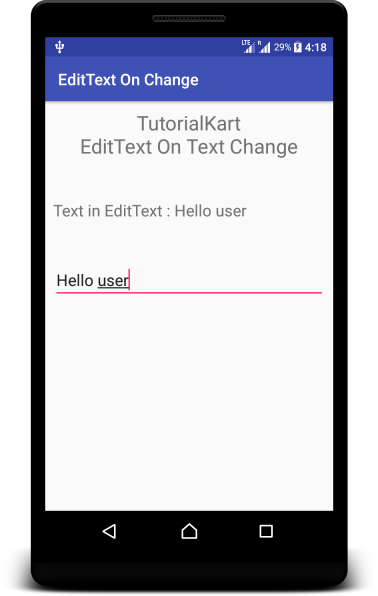
Current AndroidX EditText listener example
For a current AndroidX project, use View Binding or findViewById() instead of Kotlin synthetic view references. The following activity attaches the same listener with findViewById().
package com.tutorialkart.edittextonchange

import android.os.Bundle
import android.text.Editable
import android.text.TextWatcher
import android.widget.EditText
import android.widget.TextView
import androidx.appcompat.app.AppCompatActivity

class MainActivity : AppCompatActivity() {
    override fun onCreate(savedInstanceState: Bundle?) {
        super.onCreate(savedInstanceState)
        setContentView(R.layout.activity_main)

        val editText = findViewById<EditText>(R.id.editTextSample)
        val resultText = findViewById<TextView>(R.id.tvSample)

        editText.addTextChangedListener(object : TextWatcher {
            override fun beforeTextChanged(
                text: CharSequence?,
                start: Int,
                count: Int,
                after: Int
            ) = Unit

            override fun onTextChanged(
                text: CharSequence?,
                start: Int,
                before: Int,
                count: Int
            ) {
                resultText.text = "Text in EditText: ${text.orEmpty()}"
            }

            override fun afterTextChanged(text: Editable?) = Unit
        })
    }
}
The callback parameters are nullable in this version because they match the Android platform declarations. text.orEmpty() safely produces an empty character sequence if the callback supplies null.
Set and read EditText text in Kotlin
Assign text with the text property or setText(). Read the value by converting the Editable returned by text into a String.
editText.setText("Initial value")

val enteredText: String = editText.text.toString()
Calling setText() also counts as a text change and therefore invokes an attached TextWatcher. Account for this when populating a form programmatically.
Prevent repeated EditText listener calls
If a watcher must replace or format the EditText value, guard the update so that the callback does not continually trigger itself. One option is to compare the formatted value with the current value before calling setText(). Another is to temporarily remove the watcher, update the text, and attach it again.
For network-backed search or validation, avoid sending a request for every keystroke. Apply a short debounce in the surrounding application logic and cancel work associated with an older value when a newer value arrives.
Kotlin EditText text-change FAQs
How do I detect an EditText value change in Kotlin?
Call addTextChangedListener() on the EditText and implement a TextWatcher. Read the latest value from the text parameter in onTextChanged() or from the Editable parameter in afterTextChanged().
How do I set text in an Android EditText using Kotlin?
Use editText.setText("Value"). If a TextWatcher is already attached, setting the value programmatically will invoke its callbacks.
Which TextWatcher callback should I use?
Use onTextChanged() to react to and read the current character sequence. Use afterTextChanged() when you need the final Editable. Use beforeTextChanged() only when the previous value or replacement details are required.
Why is my EditText listener called more than once?
Each user edit and each programmatic text assignment can trigger the watcher. Changing the EditText again from inside a callback can produce additional calls. Compare values before updating the control or temporarily remove the watcher during a programmatic replacement.
EditText text-change implementation checklist
- Confirm that the TextWatcher is attached after the EditText reference has been initialized.
- Use the callback that matches whether the code needs a
CharSequenceor anEditable. - Convert EditText content with
text.toString()when a String is required. - Test both keyboard input and programmatic calls to
setText(). - Guard text formatting logic against recursive callback invocations.
- Debounce expensive validation, filtering, database, or network operations.
Summary of EditText on text change in Kotlin
Attach a TextWatcher with addTextChangedListener() to receive EditText changes. The current input is available in onTextChanged() and afterTextChanged(). In this Kotlin Android Tutorial, the listener reads each new value and displays it in a TextView.