 TutorialKart.com
Android can justify paragraph text inside a TextView by adjusting the spacing between words so that most lines align with both the left and right edges. This is useful for long-form content, but it should be applied selectively because large gaps may appear in narrow layouts or paragraphs containing long words.
Platform requirement: Native TextView justification with android:justificationMode is available on Android 8.0, API level 26, and later.
Justify Text in Android TextView Using Kotlin
In this Android Tutorial, we explain how to justify text in a TextView through an XML layout and programmatically in Kotlin. We also cover API-level checks, common reasons why justified text does not work, and the difference between justification, gravity, and text alignment.
Android TextView Justification Mode in XML
To justify text through a layout file, set android:justificationMode to inter_word on the TextView. The system then distributes additional space between words on eligible lines.
<TextView
	android:id="@+id/tvJustified"
	android:layout_width="wrap_content"
	android:layout_height="wrap_content"
	android:justificationMode="inter_word"
	android:text="The text in this TextView is justified." />
For paragraph text, use a width that gives the view a clear line boundary, such as match_parent or a constrained width. A wrap_content width may leave little or no extra horizontal space for visible justification.
Set TextView Justification Programmatically
To justify text programmatically, assign JUSTIFICATION_MODE_INTER_WORD to the view’s justification mode.
textView.setJustificationMode(JUSTIFICATION_MODE_INTER_WORD);In Kotlin, use an API-level check before setting this property when the application’s minimum SDK is lower than API 26.
import android.os.Build
import android.text.Layout
import android.widget.TextView

if (Build.VERSION.SDK_INT >= Build.VERSION_CODES.O) {
    textView.justificationMode = Layout.JUSTIFICATION_MODE_INTER_WORD
}
To remove native justification on Android 8.0 or later, set the mode to Layout.JUSTIFICATION_MODE_NONE.
if (Build.VERSION.SDK_INT >= Build.VERSION_CODES.O) {
    textView.justificationMode = Layout.JUSTIFICATION_MODE_NONE
}
Example 1 – Justify Text in TextView via Layout File
Create Android Project and replace activity_main.xml with the following code.
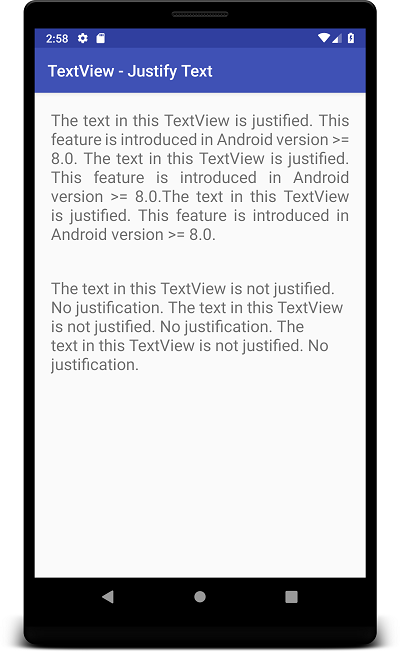
We have two TextViews in this layout file. The text in first TextView is justified, while that of second TextView is not justified.
activity_main.xml
<?xml version="1.0" encoding="utf-8"?>
<LinearLayout xmlns:android="http://schemas.android.com/apk/res/android"
    xmlns:app="http://schemas.android.com/apk/res-auto"
    xmlns:tools="http://schemas.android.com/tools"
    android:layout_width="match_parent"
    android:layout_height="match_parent"
    android:orientation="vertical"
    tools:context=".MainActivity">

    <TextView
        android:id="@+id/tvJustified"
        android:layout_width="wrap_content"
        android:layout_height="wrap_content"
        android:textSize="20sp"
        android:padding="20sp"
        android:justificationMode="inter_word"
        android:text="The text in this TextView is justified. This feature is introduced in Android version >= 8.0. The text in this TextView is justified. This feature is introduced in Android version >= 8.0.The text in this TextView is justified. This feature is introduced in Android version >= 8.0." />
    <TextView
        android:id="@+id/tvNotJustified"
        android:layout_width="wrap_content"
        android:layout_height="wrap_content"
        android:textSize="20sp"
        android:padding="20sp"
        android:text="The text in this TextView is not justified. No justification. The text in this TextView is not justified. No justification. The text in this TextView is not justified. No justification. " />

</LinearLayout>
On a device running Android 8.0 or later, the first TextView distributes space between words, while the second retains the default text layout. The final line of a paragraph is normally not stretched to fill the full width.
Complete Kotlin Example for TextView Justification
The following example applies justification from MainActivity.kt. It safely skips the property on devices below Android 8.0.
package com.tutorialkart.textviewjustify

import android.os.Build
import android.os.Bundle
import android.text.Layout
import android.widget.TextView
import androidx.appcompat.app.AppCompatActivity

class MainActivity : AppCompatActivity() {

    override fun onCreate(savedInstanceState: Bundle?) {
        super.onCreate(savedInstanceState)
        setContentView(R.layout.activity_main)

        val textView = findViewById<TextView>(R.id.tvJustified)

        if (Build.VERSION.SDK_INT >= Build.VERSION_CODES.O) {
            textView.justificationMode = Layout.JUSTIFICATION_MODE_INTER_WORD
        }
    }
}
TextView Justification, Gravity, and Text Alignment Differences
Justification is different from aligning text to the left, right, or center. These properties affect different parts of the layout.
| Android property | What it controls | Typical values |
|---|---|---|
android:justificationMode | Spacing between words so paragraph lines fill the available width | inter_word, none |
android:gravity | Position of text inside the bounds of the TextView | start, end, center |
android:layout_gravity | Position of the entire TextView inside its parent layout | start, end, center |
android:textAlignment | Alignment of text relative to the view or layout direction | viewStart, viewEnd, center |
For example, android:gravity="end" aligns text to the end edge of the view, but it does not create justified paragraph edges. Similarly, layout_gravity moves the view rather than changing how its text is rendered.
Why Android TextView Justification May Not Work
The device is below Android 8.0
Native TextView justification is unavailable below API level 26. Use an API-level check and provide ordinary start-aligned text on older versions, or use a carefully evaluated third-party implementation when the project has a strict requirement for older devices.
The TextView does not have enough width
Justification is easiest to see when the TextView spans a meaningful width and contains multiple lines. With wrap_content, the measured view may closely follow its text, leaving little space to distribute.
<TextView
    android:id="@+id/tvJustified"
    android:layout_width="match_parent"
    android:layout_height="wrap_content"
    android:padding="16dp"
    android:justificationMode="inter_word"
    android:text="@string/paragraph_text"
    android:textSize="18sp" />
The paragraph contains manual line breaks
Each manually separated line may be treated as a paragraph boundary. Avoid inserting line breaks merely to control wrapping. Let the TextView wrap the paragraph according to its measured width.
The text contains long words or narrow columns
Inter-word justification can create visibly uneven spaces when a line contains only a few words. Test the layout with realistic content, longer words, different screen sizes, and increased system font sizes.
The code uses the wrong justification constant
Use Layout.JUSTIFICATION_MODE_INTER_WORD for justification and Layout.JUSTIFICATION_MODE_NONE to disable it. Make sure the property is applied to the intended TextView after the view has been inflated.
TextView Justification on Older Android Versions
When the app supports Android versions below API 26, the most predictable fallback is normal start-aligned text. This preserves readability without introducing custom rendering behavior.
if (Build.VERSION.SDK_INT >= Build.VERSION_CODES.O) {
    textView.justificationMode = Layout.JUSTIFICATION_MODE_INTER_WORD
} else {
    textView.textAlignment = TextView.TEXT_ALIGNMENT_VIEW_START
}
Third-party justified TextView libraries and custom drawing implementations exist, but they should be tested for accessibility, text selection, bidirectional text, links, spans, font scaling, and performance before being used in production.
Text Justification in Jetpack Compose
Jetpack Compose uses its own text APIs rather than the XML android:justificationMode attribute. In Compose versions that support justified alignment, set textAlign to TextAlign.Justify on a Text composable.
import androidx.compose.foundation.layout.fillMaxWidth
import androidx.compose.material3.Text
import androidx.compose.ui.Modifier
import androidx.compose.ui.text.style.TextAlign

Text(
    text = "This paragraph is displayed with justified alignment.",
    modifier = Modifier.fillMaxWidth(),
    textAlign = TextAlign.Justify
)
Use fillMaxWidth() or another explicit width constraint so the paragraph has space across which it can be aligned. Verify support and rendering behavior against the Compose version used by the project.
Android TextView Justification Usability Notes
- Use justification mainly for multi-line paragraphs rather than labels, buttons, headings, or short messages.
- Check the layout on narrow screens because inter-word gaps can become distracting.
- Test with large accessibility font sizes and translated strings.
- Avoid fixed heights that may clip justified text after font scaling or localization.
- Prefer
dpfor padding and margins. Reservespfor text size. - Test right-to-left scripts and mixed-direction content when the app supports them.
Android TextView Justify Text FAQs
How do I justify text in an Android TextView?
On Android 8.0 and later, set android:justificationMode="inter_word" in XML or assign Layout.JUSTIFICATION_MODE_INTER_WORD to textView.justificationMode in Kotlin.
Why is android:justificationMode not working?
Common causes include running on a device below API 26, using a view that is too narrow or measured with wrap_content, having only one short line, or applying the property to the wrong TextView.
Is TextView gravity the same as justified text?
No. Gravity positions text inside the view, while justification changes the spacing between words so paragraph lines align with both horizontal edges.
Can TextView text be justified below Android 8.0?
The native TextView justification property is not available below API 26. Use normal start alignment as a fallback or evaluate a custom or third-party implementation for older devices.
How do I justify text in Jetpack Compose?
Use a Text composable with textAlign = TextAlign.Justify and provide an appropriate width constraint, such as Modifier.fillMaxWidth(), when supported by the Compose version in the project.
Editorial QA Checklist for Android TextView Justification
- Confirm that native justification is described as requiring Android 8.0 or API level 26.
- Verify that the XML example uses
android:justificationMode="inter_word". - Verify that Kotlin code uses
Layout.JUSTIFICATION_MODE_INTER_WORDbehind an API-level check. - Test the justified paragraph with
match_parentor another meaningful width constraint. - Compare the result with an ordinary non-justified
TextView. - Check narrow screens, long words, translated content, and increased font sizes for excessive spacing or clipping.
- Confirm that gravity, layout gravity, text alignment, and justification are explained as separate behaviors.
- Verify the fallback behavior on devices below API 26.