 TutorialKart.com
Android Spinner in Kotlin
Android Spinner is a view that displays one child at a time and when user clicks on it, it lets the user pick among multiple values.
In this tutorial, we will learn how to create a Spinner in layout file, and how to set listener for the Spinner to serve user actions like clicking on the Spinner, selecting a value from Spinner, etc.
A Spinner is used when the user has to choose one item from a fixed list, such as language, country, category, sort order, or account type. In Kotlin Android, the usual setup is: add a Spinner in XML, attach an ArrayAdapter, and handle the selected item in onItemSelected().
Android Spinner dropdown example in Kotlin
The following GIF shows how an Android Spinner looks, and how user could interact with it.
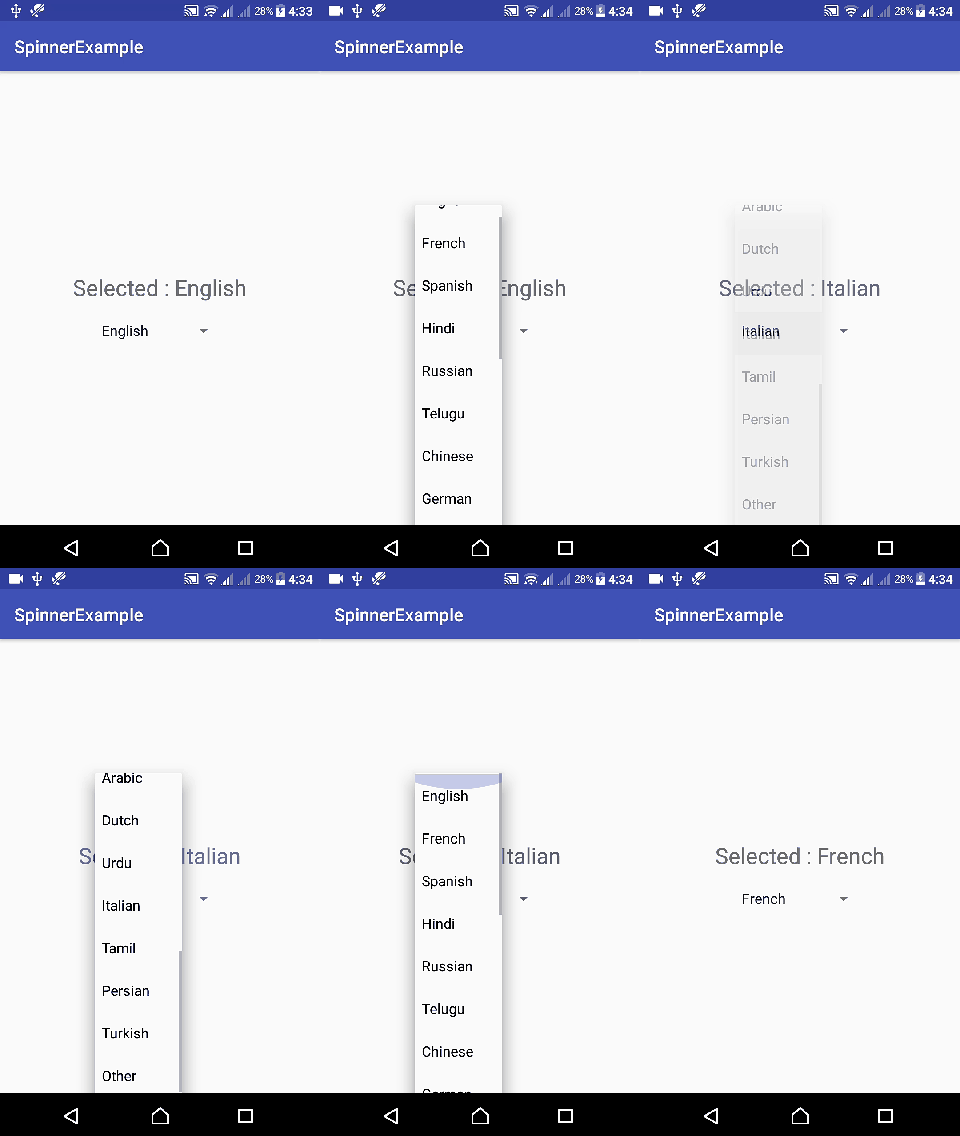
By default, the first item in the adapter is selected. When the Spinner is tapped, Android shows the other values in a dropdown list.
Android Spinner Code
A quick code snippet to use Android Spinner in layout and Kotlin file is as shown in the following respectively.
<Spinner
    android:id="@+id/spinner"
    android:layout_width="wrap_content"
    android:layout_height="wrap_content"/>
import android.view.View
import android.widget.*
class MainActivity : /** Other Classes, */AdapterView.OnItemSelectedListener {
var list_of_items = arrayOf("Item 1", "Item 2", "Item 3")
override fun onCreate(savedInstanceState: Bundle?) {
spinner!!.setOnItemSelectedListener(this)
// Create an ArrayAdapter using a simple spinner layout and languages array
val aa = ArrayAdapter(this, android.R.layout.simple_spinner_item, list_of_items)
// Set layout to use when the list of choices appear
aa.setDropDownViewResource(android.R.layout.simple_spinner_dropdown_item)
// Set Adapter to Spinner
spinner!!.setAdapter(aa)
}
override fun onItemSelected(arg0: AdapterView<*>, arg1: View, position: Int, id: Long) {
// use position to know the selected item
}
override fun onNothingSelected(arg0: AdapterView<*>) {
}
}
By default, the first element of the specified list is selected in the Spinner.
Spinner, ArrayAdapter, and selected position in Kotlin
A Spinner gets its values from an adapter. In this tutorial, ArrayAdapter connects the language array to the Spinner. When the user selects an item, the position parameter in onItemSelected() tells which item was selected.
| Part | Use in Android Spinner |
|---|---|
Spinner | Shows the selected item and opens the list of choices. |
ArrayAdapter | Supplies array or list data to the Spinner. |
simple_spinner_item | Layout for the collapsed selected item. |
simple_spinner_dropdown_item | Layout for dropdown rows. |
onItemSelected() | Reads the selected item position and value. |
Following is a step by step guide of what is happening in the above code snippet to use Spinner
Step 1: Create a Spinner in layout file.
<Spinner
    android:id="@+id/spinner_sample"
    android:layout_width="wrap_content"
    android:layout_height="wrap_content"/>
Step 2: Add AdapterView.OnItemSelectedListener to the interface list of your Activity.
class MainActivity : /** Other Classes, */AdapterView.OnItemSelectedListener {
}
Step 3: Prepare an array of elements to be shown in Spinner view.
var list_of_items = arrayOf("Item 1", "Item 2", "Item 3")Step 4: Set setOnItemSelectedListener to the Spinner.
spinner!!.setOnItemSelectedListener(this)Step 5: Create an ArrayAdapter with the list of items and default layouts.
val array_adapter = ArrayAdapter(this, android.R.layout.simple_spinner_item, list_of_items)
array_adapter.setDropDownViewResource(android.R.layout.simple_spinner_dropdown_item)
Step 6: Set ArrayAdapter to Spinner.
spinner!!.setAdapter(array_adapter)Step 7: We have to override the following three methods of AdapterView.OnItemSelectedListener.
override fun onItemSelected(arg0: AdapterView<*>, arg1: View, position: Int, id: Long) {
    textView_msg!!.text = "Selected : "+languages[position]
}

override fun onNothingSelected(arg0: AdapterView<*>) {

}
Get selected Spinner value in Kotlin
The selected item can be read from the same array using the position value, or directly from the adapter using getItemAtPosition().
override fun onItemSelected(parent: AdapterView<*>, view: View?, position: Int, id: Long) {
    val selectedValue = parent.getItemAtPosition(position).toString()
    textView_msg?.text = "Selected : $selectedValue"
}
Example – Android Spinner
Following are the details of the Android Application we created for this example.
| Application Name | SpinnerExample |
| Company name | tutorialkart.com |
| Minimum SDK | API 21: Android 5.0 (Lollipop) |
| Activity | Empty Activity |
You may keep rest of the values as default and create Android Application with Kotlin Support.
The example contains a TextView and a Spinner. When the user selects a language from the Spinner, the selected language is displayed in the TextView.
activity_main.xml
<?xml version="1.0" encoding="utf-8"?>
<LinearLayout xmlns:android="http://schemas.android.com/apk/res/android"
    xmlns:tools="http://schemas.android.com/tools"
    android:layout_width="match_parent"
    android:layout_height="match_parent"
    android:gravity="center"
    android:orientation="vertical"
    tools:context="com.tutorialkart.spinnerexample.MainActivity">

    <TextView
        android:id="@+id/msg"
        android:layout_width="wrap_content"
        android:layout_height="wrap_content"
        android:textSize="25dp"
        android:padding="20dp"/>

    <Spinner
        android:id="@+id/spinner_sample"
        android:layout_width="wrap_content"
        android:layout_height="wrap_content"/>

</LinearLayout>
MainActivity.kt
package com.tutorialkart.spinnerexample

import android.support.v7.app.AppCompatActivity
import android.os.Bundle
import kotlinx.android.synthetic.main.activity_main.*
import android.view.View
import android.widget.*


class MainActivity : AppCompatActivity(),AdapterView.OnItemSelectedListener {

    var languages = arrayOf("English", "French", "Spanish", "Hindi", "Russian", "Telugu", "Chinese", "German", "Portuguese", "Arabic", "Dutch", "Urdu", "Italian", "Tamil", "Persian", "Turkish", "Other")

    var spinner:Spinner? = null
    var textView_msg:TextView? = null

    override fun onCreate(savedInstanceState: Bundle?) {
        super.onCreate(savedInstanceState)
        setContentView(R.layout.activity_main)

        textView_msg = this.msg

        spinner = this.spinner_sample
        spinner!!.setOnItemSelectedListener(this)

        // Create an ArrayAdapter using a simple spinner layout and languages array
        val aa = ArrayAdapter(this, android.R.layout.simple_spinner_item, languages)
        // Set layout to use when the list of choices appear
        aa.setDropDownViewResource(android.R.layout.simple_spinner_dropdown_item)
        // Set Adapter to Spinner
        spinner!!.setAdapter(aa)

    }

    override fun onItemSelected(arg0: AdapterView<*>, arg1: View, position: Int, id: Long) {
        textView_msg!!.text = "Selected : "+languages[position]
    }

    override fun onNothingSelected(arg0: AdapterView<*>) {

    }
}
Output
Modern Android Spinner Kotlin setup with View Binding
The example above uses older Kotlin synthetic view access. For new Android projects, View Binding is a safer way to access the Spinner from Kotlin.
val languages = arrayOf("English", "French", "Spanish", "Hindi")

val adapter = ArrayAdapter(
    this,
    android.R.layout.simple_spinner_item,
    languages
)

adapter.setDropDownViewResource(android.R.layout.simple_spinner_dropdown_item)
binding.spinnerSample.adapter = adapter

binding.spinnerSample.onItemSelectedListener = object : AdapterView.OnItemSelectedListener {
    override fun onItemSelected(parent: AdapterView<*>, view: View?, position: Int, id: Long) {
        binding.msg.text = "Selected : ${languages[position]}"
    }

    override fun onNothingSelected(parent: AdapterView<*>) = Unit
}
Add initial Select text to Android Spinner
Spinner selects the first item automatically. If the screen should initially show a prompt, add the prompt as the first item and treat position 0 as a non-final choice.
val languages = arrayOf("Select a language", "English", "French", "Hindi")

override fun onItemSelected(parent: AdapterView<*>, view: View?, position: Int, id: Long) {
    if (position == 0) {
        textView_msg?.text = "Please select a language"
    } else {
        textView_msg?.text = "Selected : ${languages[position]}"
    }
}
Bind Android Spinner to custom objects in Kotlin
Use a custom object list when the displayed text and stored value are different. For example, the Spinner can show a language name while the app stores a language code.
data class LanguageOption(val code: String, val name: String) {
    override fun toString(): String = name
}

val options = listOf(
    LanguageOption("en", "English"),
    LanguageOption("fr", "French"),
    LanguageOption("hi", "Hindi")
)

val adapter = ArrayAdapter(this, android.R.layout.simple_spinner_item, options)
adapter.setDropDownViewResource(android.R.layout.simple_spinner_dropdown_item)
spinner.adapter = adapter
In onItemSelected(), cast the selected adapter item back to your object type when you need the stored value.
val selectedOption = parent.getItemAtPosition(position) as LanguageOption
val selectedCode = selectedOption.code
Common Android Spinner Kotlin mistakes and fixes
- Expecting an empty initial state: Spinner selects the first adapter item by default. Add a prompt item when needed.
- Forgetting the dropdown row layout: Call
setDropDownViewResource()so dropdown rows use a readable layout. - Reading only visible text for app logic: Use a custom object when you need an id, code, or database value.
- Using Kotlin synthetics in new projects: Prefer View Binding or
findViewById()for new Kotlin Android code. - Doing heavy work in
onItemSelected(): This callback can run during setup, so keep it lightweight.
Android Spinner Kotlin FAQ
What is Spinner in Android Kotlin?
Spinner is an Android selection widget that shows one selected item and opens a dropdown list when the user taps it.
How do I get the selected Spinner value in Kotlin?
Use the position argument in onItemSelected(), or call parent.getItemAtPosition(position) to get the selected adapter item.
Why is the first Spinner item selected automatically?
A Spinner always displays one selected item, so the first adapter item is selected by default. Add a first item such as Select a language for hint-style text.
Can Android Spinner show custom object values?
Yes. Pass a list of objects to an adapter. Override toString() for the displayed text and cast the selected item back to the object type when needed.
Editorial QA checklist for Android Spinner Kotlin tutorial
- The Spinner XML includes a valid id, width, and height.
- The Kotlin code creates an adapter and sets it on the Spinner.
- The selected value is read using
positionorgetItemAtPosition(). - The tutorial explains the default first-item selection behavior.
- The existing Android Spinner GIF, internal links, and original code blocks are kept unchanged.
Android Spinner Kotlin references
Android Spinner Kotlin example summary
In this Android Tutorial : Android Spinner – Kotlin Example, we have learnt to use Spinner with an example Android Application. We also covered how to get the selected value, how the first item works by default, how to add select text, and how to bind a Spinner to custom objects in Kotlin.