 TutorialKart.com
How to Assign standard purchasing organization to plant in SAP
In this SAP MM tutorials, you will learn step by step configurations of how to assign purchasing organization to plant in SAP.
If plant is having multiple purchasing organizations, then we can declare one purchasing organization as standard purchasing organization. Where the standard purchase organization involves in procurement of special stocks such as consignments, subcontracting, stock transfers, etc.
Standard purchasing organization is mainly used for special procurement process.
Purpose of standard purchasing organization assignment in SAP MM
The standard purchasing organization assignment tells SAP which purchasing organization should be used as the default or reference purchasing organization for a plant in specific procurement scenarios. This setting is useful when a plant can work with more than one purchasing organization, but one purchasing organization should be treated as the standard one for special procurement processes.
In SAP MM enterprise structure, a plant is assigned to purchasing organization for normal procurement activities. The standard purchasing organization setting is an additional assignment used where SAP needs a single purchasing organization for the plant in processes such as consignment, subcontracting, pipeline procurement, and stock transfer related purchasing control.
Prerequisites before assigning standard purchasing organization to plant
- The plant must already be defined in enterprise structure.
- The purchasing organization must already be defined in SAP MM configuration.
- The purchasing organization should be relevant for the plant procurement design.
- Normal purchasing organization to plant assignment should be reviewed before maintaining the standard purchasing organization.
- You should have authorization to access SPRO customizing and save the change in a customizing request if the system asks for a transport.
SPRO path for assigning standard purchasing organization to plant
Use the following SAP IMG path to maintain the standard purchasing organization for a plant.
| SAP Menu Path | SPRO > IMG > Enterprise Structure > Assignment > Material Management > Assign standard purchasing organization to plant |
| T-Code | SPRO |
In many SAP systems, this activity updates the plant-level standard purchasing organization assignment in enterprise structure customizing. If you are checking the configuration from tables, the purchasing organization definition is commonly associated with table T024E, while plant and purchasing organization assignment details are maintained through enterprise structure assignment configuration.
Configuration steps to assign standard purchasing organization to plant in SAP
Perform the following configuration steps to assign standard purchasing organization to plant in SAP.
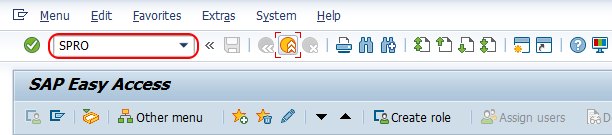
Step 1 : – Execute transaction code “SPRO” in command field from sap easy access screen.
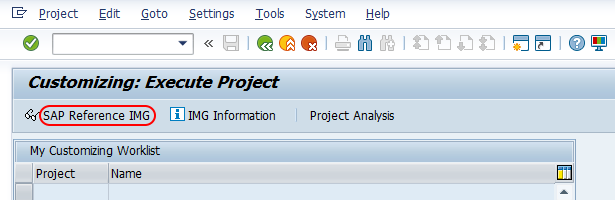
Step 2 : – Choose “SAP reference IMG”
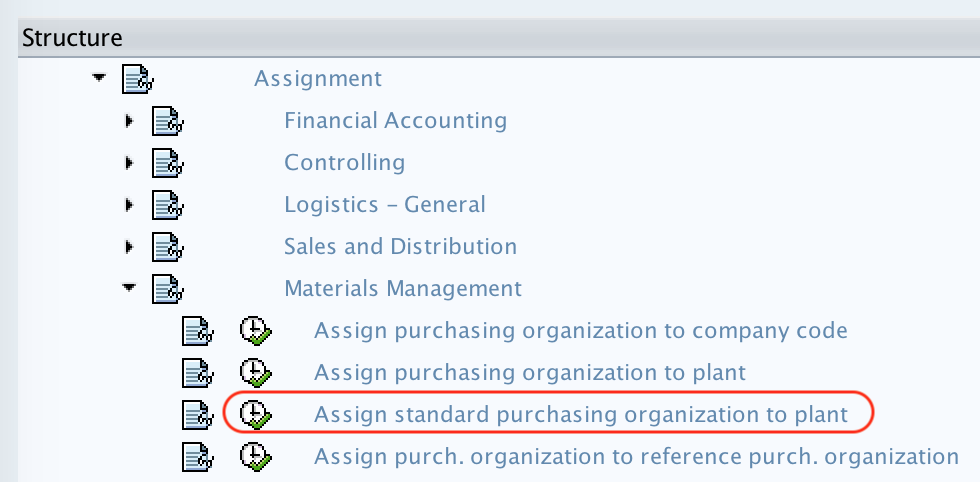
Step 3 : – Follow the navigation path Enterprise Structure – Assignment – Material Management and choose img activity “Assign standard purchasing organization to plant”.
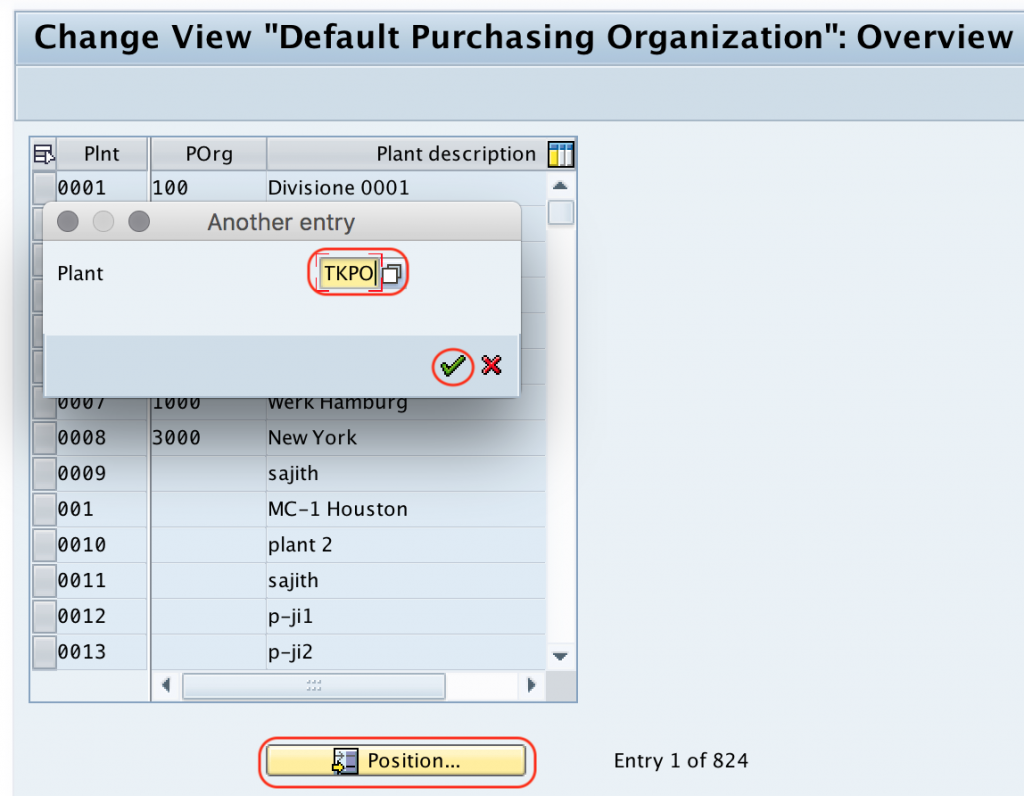
Step 4 : – On change view default purchasing organization overview screen, choose position option and enter plant code “TKPO” in the given field plant.
Step 5 : – Now assign the purchase organization to plant as standard purchase organization.
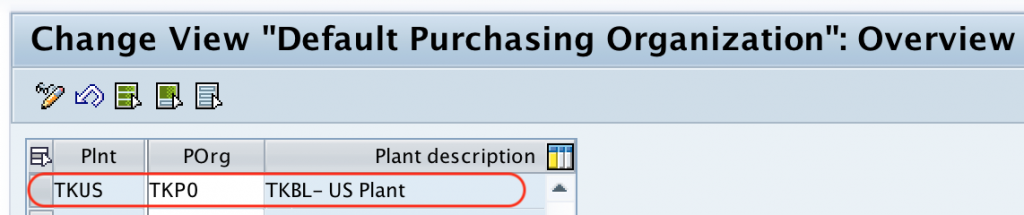
After assignment of purchasing organization as standard purchasing organization in SAP, choose save icon and save the configured assignment details.
Successfully we have assigned standard purchase organization to plant in SAP MM.
Example values for standard purchasing organization assignment
The values used in this tutorial are sample training values. In a real SAP project, use the plant and purchasing organization keys approved in the enterprise structure design document.
| Field | Sample value | Meaning |
|---|---|---|
| Plant | TKPO | Plant for which standard purchasing organization is maintained |
| Standard purchasing organization | TKPO or project-specific key | Purchasing organization treated as standard for the plant |
| Configuration area | Enterprise Structure Assignment | IMG area where the plant and purchasing organization relationship is maintained |
Standard purchasing organization vs normal purchasing organization assignment
It is important to understand the difference between assigning a purchasing organization to a plant and assigning a standard purchasing organization to a plant. Both settings are related, but they are not used for the same purpose.
| Configuration | Purpose in SAP MM | Typical use |
|---|---|---|
| Assign purchasing organization to plant | Allows a purchasing organization to procure for a plant. | Normal purchasing documents and plant procurement structure. |
| Assign standard purchasing organization to plant | Defines the default or standard purchasing organization for the plant where SAP requires one standard value. | Special procurement processes such as consignment, subcontracting, stock transfers, and similar scenarios. |
| Define purchasing organization | Creates the purchasing organization key and description. | Initial enterprise structure setup before assignment. |
Where standard purchasing organization affects SAP MM process flow
The standard purchasing organization can affect procurement processing when the system needs a single purchasing organization for plant-based purchasing control. The exact impact depends on the SAP version, activated business functions, and project configuration.
- Consignment procurement: The plant may need a standard purchasing organization for vendor and purchasing data determination.
- Subcontracting procurement: The standard purchasing organization can support purchasing control where the plant is involved in special procurement.
- Stock transport processes: Certain stock transfer scenarios may depend on the plant purchasing setup.
- Source determination: Purchasing organization settings can influence which purchasing data is considered by the system.
- Reporting and configuration checks: Consultants often review this assignment when procurement behavior is not matching the enterprise structure design.
Common checks if standard purchasing organization is not working as expected
| Issue | Possible reason | What to verify |
|---|---|---|
| Plant is not found in the assignment screen | The plant may not be defined or you may be in the wrong client/system. | Check plant definition and client. |
| Purchasing organization is not accepted | The purchasing organization may not be defined correctly. | Check purchasing organization definition before assignment. |
| Procurement document uses a different purchasing organization | Defaulting may come from master data, user parameter, source list, or project-specific logic. | Check material master, vendor purchasing data, source list, and enhancements. |
| System asks for customizing request | The assignment is customizing data. | Save the change under the correct transport request. |
| Special procurement still fails | Other MM settings may be incomplete. | Review vendor master, purchasing info record, special procurement key, and plant assignment settings. |
Best practices for SAP MM standard purchasing organization setup
- Maintain this assignment only after the plant and purchasing organization structure is finalized.
- Use one standard purchasing organization per plant based on the approved procurement model.
- Do not use this setting as a substitute for normal purchasing organization to plant assignment.
- Test consignment, subcontracting, and stock transfer scenarios after saving the configuration.
- Document the reason for the standard purchasing organization selection, especially when a plant works with multiple purchasing organizations.
Editorial QA checklist for standard purchasing organization to plant tutorial
- Confirm that the tutorial uses SPRO as the transaction code and shows the correct IMG path.
- Check that the article explains when standard purchasing organization is needed for a plant.
- Verify that the difference between normal purchasing organization assignment and standard purchasing organization assignment is clear.
- Ensure that the screenshots and steps follow the same SAP configuration sequence.
- Review the FAQ section for questions on T024E, purchase organization creation, and purchase group assignment without mixing unrelated sales organization configuration.
FAQs on assigning standard purchasing organization to plant in SAP MM
What is the T-code to assign standard purchasing organization to plant in SAP?
The configuration is maintained through transaction code SPRO. Follow the IMG path Enterprise Structure > Assignment > Material Management > Assign standard purchasing organization to plant.
What is the use of standard purchasing organization in SAP MM?
Standard purchasing organization is used to identify one purchasing organization as the standard for a plant, especially when the plant can work with multiple purchasing organizations and SAP needs one value for special procurement processing.
What is T024E in SAP?
T024E is commonly associated with purchasing organization data in SAP. It is useful for checking purchasing organization details, but enterprise structure assignments should be maintained through the proper SAP IMG configuration activity rather than direct table changes.
How to create a standard purchase organization in SAP MM?
First define the purchasing organization in enterprise structure configuration. Then assign it to the relevant plant and maintain it as the standard purchasing organization for that plant using the SPRO path shown in this tutorial.
Is purchasing group assigned in the same screen as standard purchasing organization?
No. Purchasing group is a buyer or buyer team and is maintained separately in SAP MM. Standard purchasing organization to plant assignment is an enterprise structure setting for plant-level purchasing organization control.