 TutorialKart.com
In this SAP MM tutorial, you will learn how to maintain quotation comments in SAP using transaction code OMES. Quotation comments are used in SAP MM Purchasing to record internal notes or action remarks for quotations received against RFQs.
This configuration is useful when purchasing users compare vendor quotations and need a controlled list of internal comments such as rejected, accepted, technically suitable, price too high, or pending clarification. These comments help keep quotation evaluation consistent across users.
Maintain quotation comments in SAP MM using OMES
In this activity you maintain quotation comments in SAP for internal comments related to quotations. The comments help users note detailed information on a quotation and identify the action or observation made against a quotation during purchasing processing.
Do not confuse this configuration with maintaining a vendor quotation in transaction ME47. Transaction ME47 is used to enter or maintain quotation data from a vendor, while OMES is a customizing activity used to define the internal quotation comment keys that can be used in quotation processing.
SAP OMES navigation for quotation comment configuration
You can maintain quotation comments in SAP by using one of the following navigation methods.
| Transaction code | OMES |
| SAP IMG Path | IMG > Material Management > Purchasing > RFQ/Quotation > Maintain Quotation Comments. |
You can also reach the same configuration from SPRO by following the IMG menu path. Direct transaction code OMES is usually faster when you know the configuration activity name.
Steps to create quotation comments in SAP MM
Perform the following configuration steps for maintaining quotation comments in SAP.
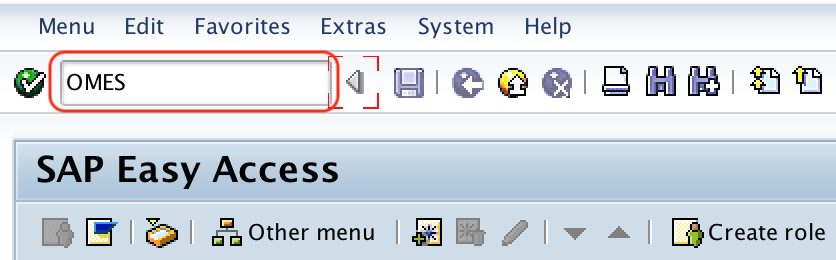
Step 1: Execute SAP transaction code OMES
Execute t-code OMES in the command field from the SAP Easy Access screen.
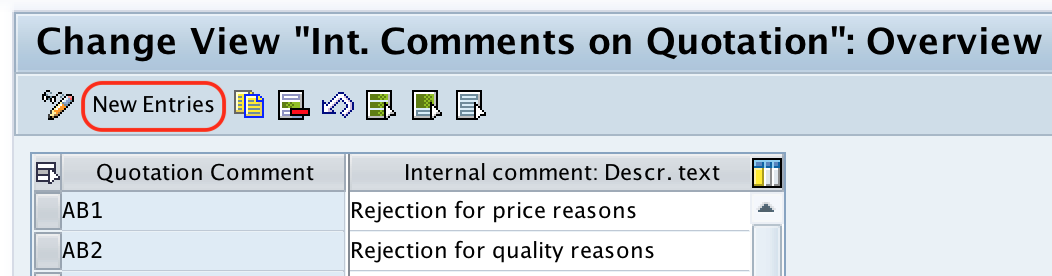
Step 2: Open new entries for internal quotation comments
On the change view Int comments on quotation overview screen, click on the New Entries button for maintaining new quotation comments in SAP.
Step 3: Enter quotation comment key and description
On the new entries quotation comments screen, update the following details.
- Quotation Comment: Enter the code that identifies the quotation comment in SAP. Keep the code short and meaningful so that purchasing users can understand it easily.
- Internal comment: Descr.text: Update the descriptive text of the quotation internal comment. This text should clearly describe the remark or action represented by the comment key.
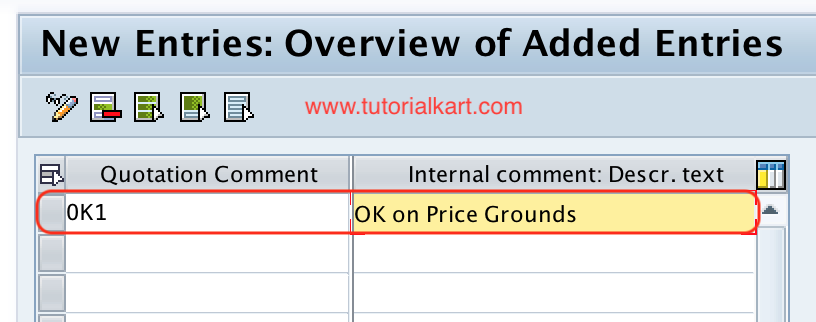
After maintaining all the required details, choose the Save icon and save the configured details. If the system prompts for a customizing request, select or create the appropriate transport request according to your project process.
Example quotation comment keys for SAP MM purchasing
The exact quotation comment codes depend on your organization. The following examples show how the key and description can be planned before configuration.
| Quotation comment key | Internal comment description | Typical use in quotation review |
|---|---|---|
| AC | Accepted for comparison | Quotation can be considered for price comparison or further processing. |
| RJ | Rejected by purchaser | Quotation is not suitable for the current purchasing requirement. |
| PH | Price too high | Vendor price needs negotiation or should not be selected. |
| TC | Technical clarification required | Quotation needs technical review before a decision. |
| DL | Delivery time not acceptable | Vendor delivery date does not meet the requirement. |
Use codes that match your purchasing terminology. Avoid creating too many similar comments because users may select them inconsistently during quotation evaluation.
OMES quotation comments and ME47 quotation maintenance
Quotation comments configured in OMES support the quotation process, but they are not the same as the quotation document itself. In a normal SAP MM RFQ process, RFQs are created and sent to vendors, vendor responses are entered or maintained as quotations, and the quotations are compared or evaluated. The comments configured here help users record internal observations during that process.
For example, a purchasing user may maintain a vendor quotation and then use an internal comment to indicate whether the quotation is acceptable, rejected, or waiting for clarification. This keeps the comment values controlled by configuration instead of allowing free and inconsistent text entries.
Common issues while maintaining quotation comments in SAP
- OMES transaction is not accessible: Check whether the user has the required authorization for SAP MM purchasing configuration.
- New Entries button is not available: The client may not allow changes, or the user may not have configuration change access.
- Transport request is required: Since this is customizing, SAP may ask for a transport request when saving changes.
- Duplicate comment code error: Use a unique quotation comment key. Existing keys cannot be reused for another meaning.
- Users do not understand the comment: Update the description text so that the purpose of the quotation comment is clear.
SAP MM quotation comments configuration checklist
- Confirm that the requirement is to configure internal quotation comments, not to enter a vendor quotation.
- Use transaction code OMES or the IMG path under Purchasing > RFQ/Quotation.
- Create short and meaningful quotation comment keys.
- Write descriptions that purchasing users can understand without additional explanation.
- Avoid duplicate or overlapping comment meanings.
- Save the configuration in the correct customizing transport request when prompted.
- Test the configured comments in the quotation process before moving the change to production.
Successfully we have maintained Quotation Comments in SAP MM.
SAP MM maintain quotation comments FAQs
How to maintain quotation comments in SAP MM?
To maintain quotation comments in SAP MM, execute transaction code OMES, choose New Entries, enter the quotation comment key and internal comment description, and save the configuration.
What is OMES used for in SAP MM?
OMES is used to configure internal comments for quotations in SAP MM Purchasing. These comments help purchasing users record controlled internal remarks during quotation processing.
Is OMES the same as ME47 in SAP MM?
No. OMES is used to configure quotation comment keys, while ME47 is used to maintain vendor quotation data. OMES is a configuration transaction, and ME47 is a purchasing document transaction.
Why does SAP ask for a transport request when saving quotation comments?
Quotation comments maintained through OMES are customizing entries. In many SAP systems, customizing changes must be saved in a transport request so that they can be moved from development to quality or production systems.
What should be entered in the quotation comment description field?
Enter a clear description that explains the meaning of the quotation comment key, such as accepted for comparison, rejected by purchaser, price too high, or technical clarification required.