 TutorialKart.com
How to create sundry creditor account in SAP FICO
Learn how to create a sundry creditor account in SAP FICO. In SAP, a sundry creditor G/L account is normally created as a vendor reconciliation account, so that vendor subledger postings are automatically reflected in the General Ledger.
A sundry creditor represents an amount payable by the business to suppliers, service providers, or other vendors. In SAP, vendor invoices, credit memos, payments, and adjustments are posted to vendor accounts in the subledger. The reconciliation account connects those vendor postings with the correct balance sheet G/L account.
Sundry creditor reconciliation account meaning in SAP
In SAP Financial Accounting, the reconciliation account controls how subledger balances are summarized in the General Ledger. When a vendor invoice is posted, the system updates the vendor account and automatically updates the assigned vendor reconciliation account. This is why the sundry creditor account is usually created as a balance sheet account under current liabilities.
The reconciliation account is assigned in the vendor master record. After that, users post vendor transactions to the vendor account, not directly to the reconciliation G/L account. This keeps the vendor subledger and G/L balance consistent.
FS00 navigation for vendor reconciliation account creation
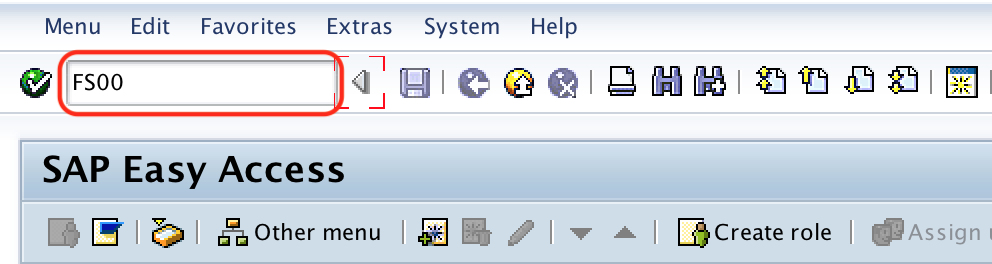
| Transaction code | FS00 |
| SAP Menu Path | SPRO > IMG > Financial Accounting > G/L Accounting > GL Accounts > Master data > Preparations > G/L Account creation and processing > Edit GL Account. |
Before creating sundry creditor account in SAP
Before you create the sundry creditor reconciliation account, confirm the following details with your SAP FI design or chart of accounts configuration:
- The G/L account number to be used for sundry creditors.
- The company code in which the account must be extended.
- The correct G/L account group for current liabilities or payables.
- The account type to be used as balance sheet account.
- The reconciliation account type, which must be Vendor for sundry creditors.
- The sort key and line item display settings required for reporting and reconciliation.
In this tutorial, the G/L account number is shown as 100501 and the company code is shown as TK01 for demonstration. Use the values defined for your own chart of accounts and company code.
Configuration steps to create sundry creditor account in SAP
To create a vendor reconciliation account in SAP, perform the following configuration steps.
Step 1 : – Execute t-code “FS00” in command field from SAP easy access screen.
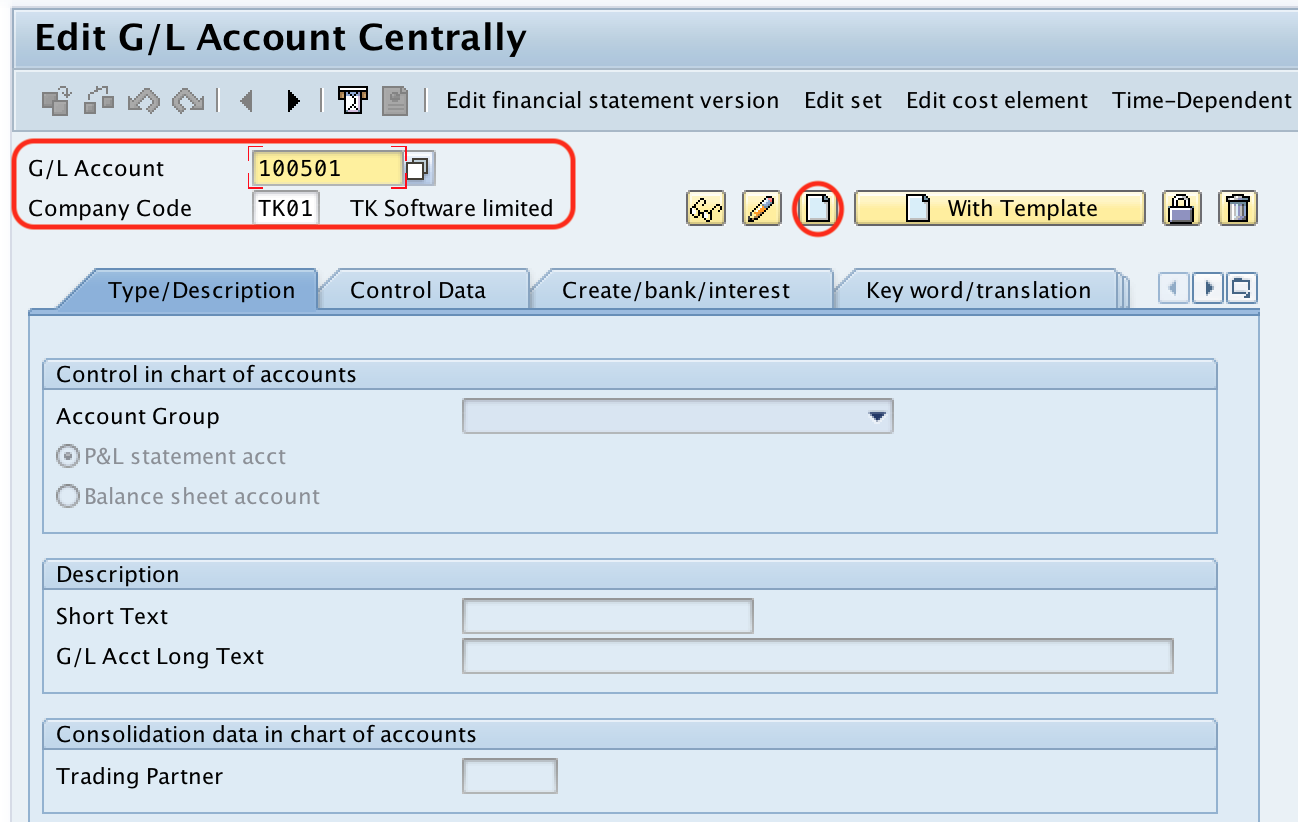
Step 2 : – On Edit G/L account centrally screen, update
- G/L account number as 100501
- Company code as TK01 (TK Software limited).
After maintaining the required details, click on create button.
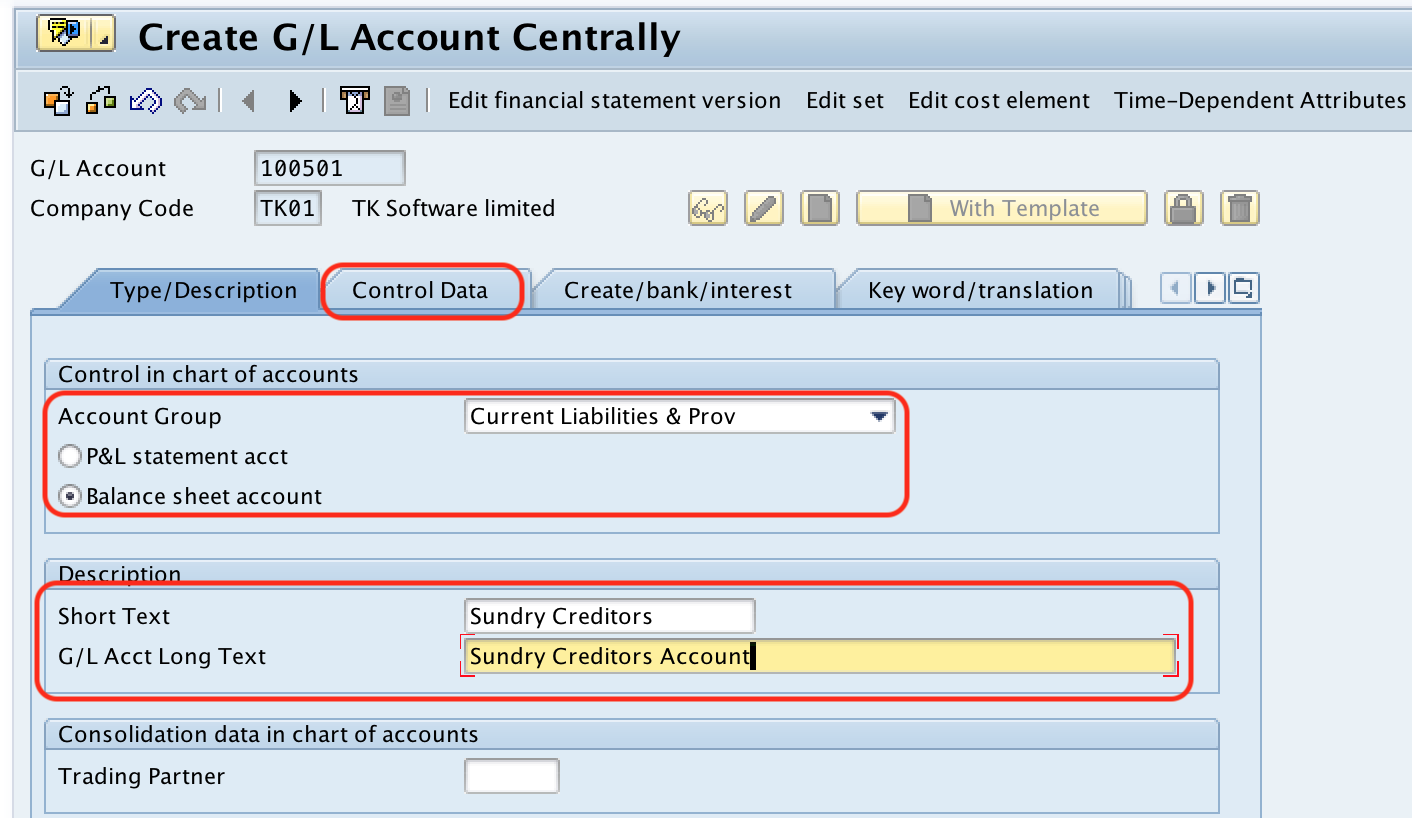
Step 3 : – Under G/L account type/ Description, update
- Update G/L Account group (Current liabilities and Provisions).
- Choose balance sheet account radio button.
- Description : – Update the short description of G/L account as sundry creditors.
- G/L acct long text : – Update G/L account long text as sundry creditors account.
After maintaining the sundry creditor type details, click on control data tab.
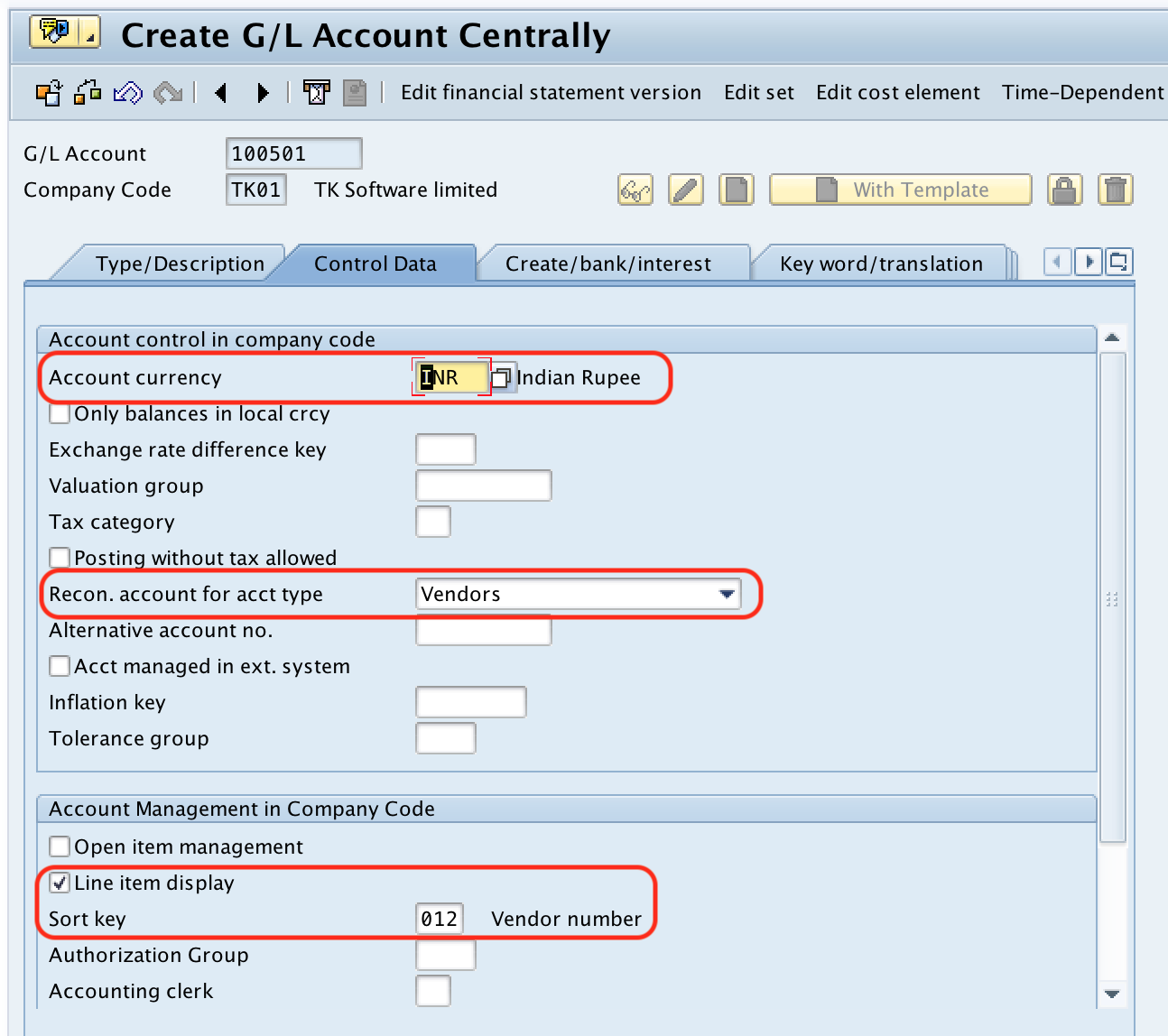
Step 4 : – Under control data screen, update the following details.
- Account currency : – Account currency field will be automatically updated based on company code currency.
- Recon. account for acct type : – Update the reconciliation account for account type as “Vendor”.
- Account management in company code : – Choose the options of line item display, sort key as “012” (Vendor number).
Step 5 : – Click on Create/Bank/Interest tab and update the required details of
- Control of document creation in company code
- Bank/financial details in company code
- Interest calculation information in company code.
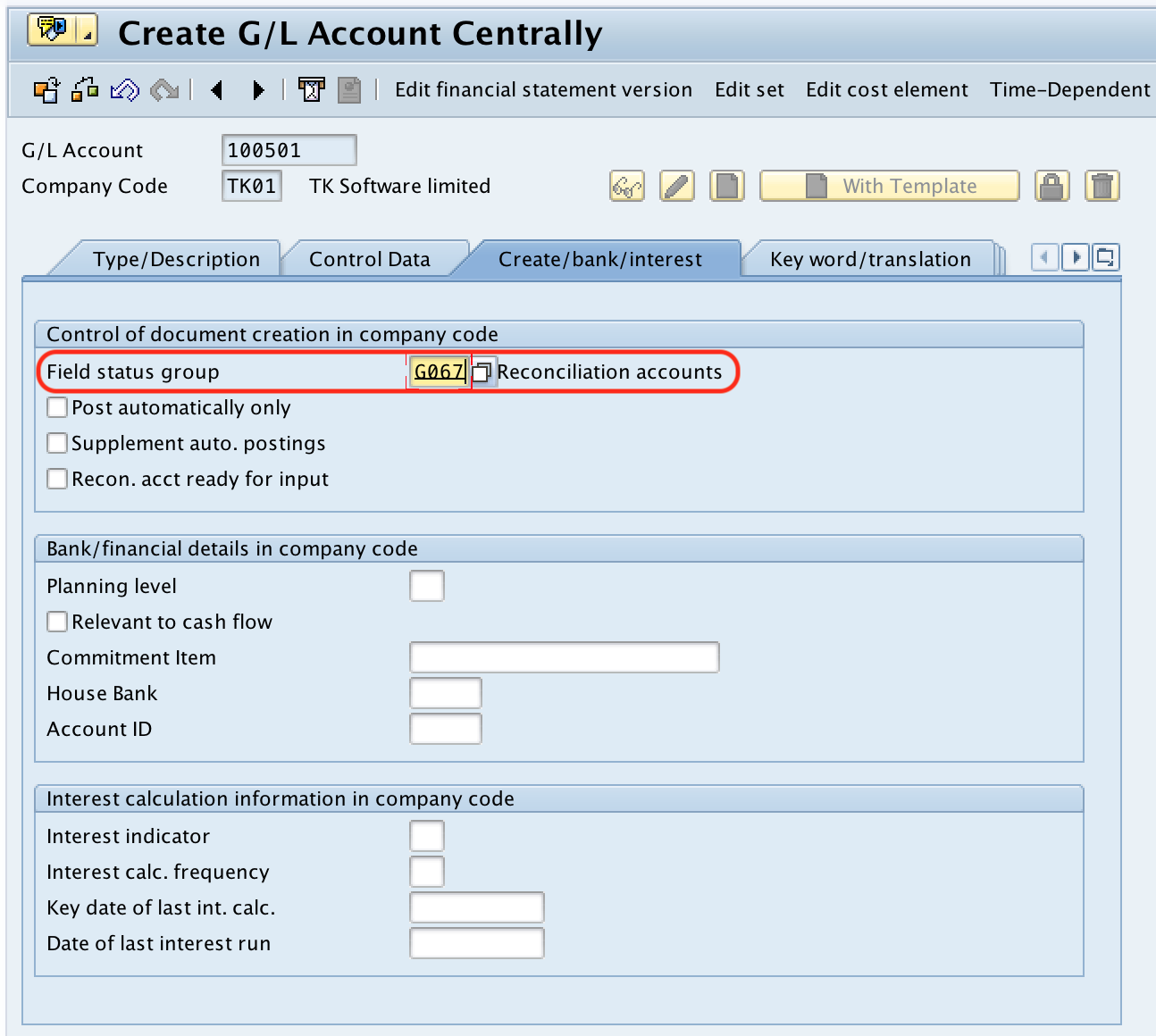
After maintaining all the required details, choose save icon and save the configured vendor reconciliation account in SAP.
Successfully we have created sundry creditor account in SAP.
Important field settings for SAP sundry creditor G/L account
| Field in FS00 | Recommended setting for sundry creditors | Purpose |
|---|---|---|
| Account type | Balance sheet account | Sundry creditors are liabilities and appear in the balance sheet. |
| Account group | Current liabilities and provisions, or the equivalent payables group | Controls number range and field layout for the G/L account. |
| Recon. account for acct type | Vendor | Allows the G/L account to work as a vendor reconciliation account. |
| Line item display | Selected, if required by your reporting design | Helps review posted line items for the G/L account. |
| Sort key | 012 Vendor number, or the sort key used in your project | Helps sort and display line items with meaningful reference values. |
How vendor postings update the sundry creditor reconciliation account
After the sundry creditor reconciliation account is created, it must be assigned to vendor master records. When users post a vendor invoice, SAP posts the payable amount to the vendor account and automatically updates the reconciliation G/L account in the General Ledger.
For example, when a vendor invoice is posted for office supplies, the accounting entry normally debits the relevant expense or asset account and credits the vendor account. Because the vendor master contains the reconciliation account, SAP also updates the sundry creditor G/L balance. This automatic update is the main reason reconciliation accounts should not be used like normal manual posting accounts.
How to reconcile sundry creditors in SAP
Reconciliation means checking that the vendor subledger total agrees with the sundry creditor G/L account balance. A typical SAP FI review includes the following checks:
- Run vendor line item or vendor balance reports for the required company code and period.
- Compare the total open vendor payables with the balance of the sundry creditor reconciliation account.
- Check whether any vendor master record has been assigned to an incorrect reconciliation account.
- Review manual postings or adjustment postings, if your system allows special posting scenarios.
- Investigate differences before closing the period.
For clean reconciliation, vendor invoices and payments should be posted through vendor accounts. Direct postings to the reconciliation G/L account should be avoided unless the configuration and business process explicitly allow a controlled adjustment.
Common errors while creating vendor reconciliation account in SAP
- Wrong account type selected: Sundry creditor accounts should be created as balance sheet accounts, not profit and loss accounts.
- Vendor reconciliation type not maintained: If the reconciliation account type is not set to Vendor, the account cannot be used correctly in vendor master data.
- Incorrect account group: The wrong account group can cause incorrect number range, field status, or reporting classification.
- Company code not extended: The G/L account must be available in the relevant company code before it can be used for postings.
- Mismatch with vendor master: Creating the G/L account alone is not enough. The account must also be assigned in the vendor master where required.
Difference between sundry creditors and sundry debtors in SAP FI
| Point | Sundry creditors | Sundry debtors |
|---|---|---|
| Business meaning | Amounts payable to vendors | Amounts receivable from customers |
| Subledger | Vendor subledger | Customer subledger |
| Reconciliation account type | Vendor | Customer |
| Balance sheet nature | Liability | Asset |
| Typical transaction | Vendor invoice and vendor payment | Customer invoice and customer receipt |
Editorial QA checklist for SAP sundry creditor account setup
- Confirm that the FS00 account is created as a balance sheet G/L account.
- Confirm that the reconciliation account type is maintained as Vendor.
- Confirm that the company code is correct before saving the G/L master data.
- Confirm that the G/L account group matches the organization’s chart of accounts design.
- Confirm that vendor master records use the intended sundry creditor reconciliation account.
- Confirm that reconciliation reports are checked after test vendor postings.
FAQs on creating sundry creditor account in SAP
How do you account for sundry creditors in SAP?
Sundry creditors are accounted for through vendor subledger postings. In SAP FI, vendor transactions are posted to vendor accounts, and the system automatically updates the assigned vendor reconciliation G/L account in the General Ledger.
How do you record sundry creditors in SAP FICO?
You record sundry creditors by posting vendor invoices, credit memos, and payments to vendor accounts. The vendor master record contains the reconciliation account, so the sundry creditor G/L account is updated automatically during posting.
How to create a reconciliation account for a vendor in SAP?
Use transaction code FS00, enter the G/L account and company code, create the account as a balance sheet account, and maintain the reconciliation account type as Vendor under the Control Data tab. Save the G/L account after maintaining the required company code settings.
What is OB13 in SAP for G/L accounts?
OB13 is used for G/L account group configuration. Account groups influence how G/L accounts are organized and which fields are controlled during master data maintenance. FS00 is used to create or change the actual G/L account master record.
Can users post directly to a sundry creditor reconciliation account?
In normal SAP FI processing, users should post to vendor accounts instead of posting directly to the reconciliation account. The reconciliation account is updated automatically from vendor subledger postings, which helps keep vendor balances and General Ledger balances in agreement.