 TutorialKart.com
How to define screen layout at document level in SAP MM
In SAP MM, the screen layout at document level controls the field selection attributes for purchasing documents such as purchase requisitions. It decides whether a field is mandatory, optional, display-only, or hidden for a particular document type.
This configuration is useful when different business documents need different data entry rules. For example, one purchase requisition document type may require valuation price, material group, or account assignment details, while another document type may keep those fields optional or hidden.
You define the screen layout by maintaining a field selection key and assigning that field selection key to the relevant purchase requisition document type.
Field selection options used in SAP MM document screen layout
A field selection key specifies the input behavior of fields in field selection groups. In SAP MM purchasing configuration, a field can be maintained with one of the following statuses.
- Required entry: The user must enter a value before saving the document.
- Optional entry: The user can enter a value, but it is not mandatory.
- Display: The field is visible, but the user cannot change the value.
- Suppress: The field is hidden on the document screen.
It is mandatory to assign field selection group to purchase requisition document type. As per requirements of clients, it is recommended to define one field selection for one PR document type and assign vice versa.
When to create a separate field selection key for a purchase requisition document type
Create a separate field selection key when a purchase requisition document type needs a different screen behavior from the standard SAP configuration. This helps keep configuration controlled and avoids changing a standard field selection key that may be used by other document types.
- Use a custom field selection key when a PR document type requires specific mandatory fields.
- Use display status when users should see a field but should not maintain it manually.
- Use suppress status only when the field should not appear for that document process.
- Copy from a standard key such as NBB when you want to start with an existing SAP layout and adjust only the required field groups.
Configuration steps to define screen layout at document level in SAP MM
You can define screen layout at document level in SAP using the following navigation method.
| Transaction code | SPRO |
| SAP IMG Path | IMG > Material Management > Purchasing > Purchase requisition > Define screen layout at document level. |
| Relevant table shown in configuration | T162 – Field selection groups |
| Configuration object | Field selection key for purchase requisition document screen layout |
Perform the following steps to define input attribute fields in SAP for document.
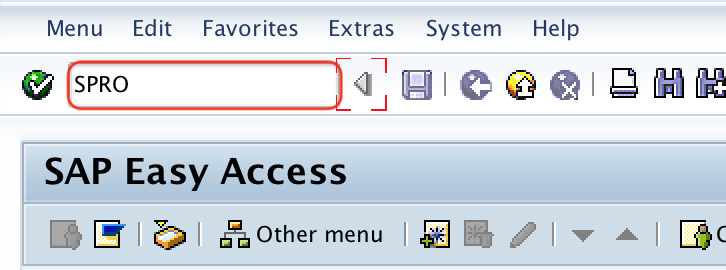
Step 1 : – Execute t-code “SPRO” in command field from SAP easy access screen.
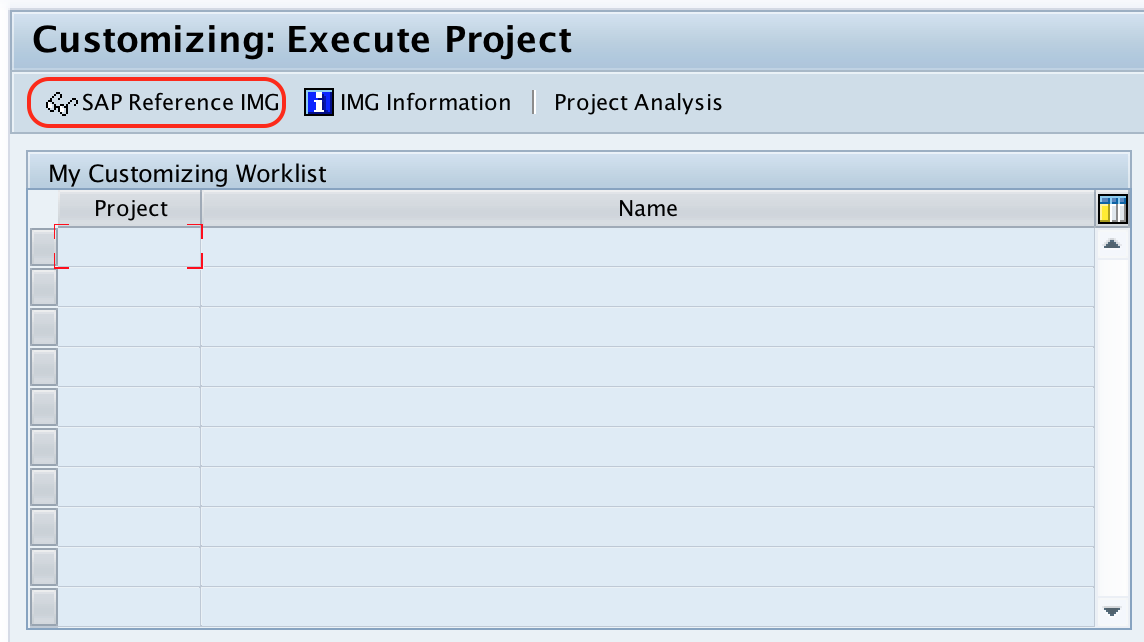
Step 2 : – Choose “SAP Reference IMG” from customizing execute project screen.
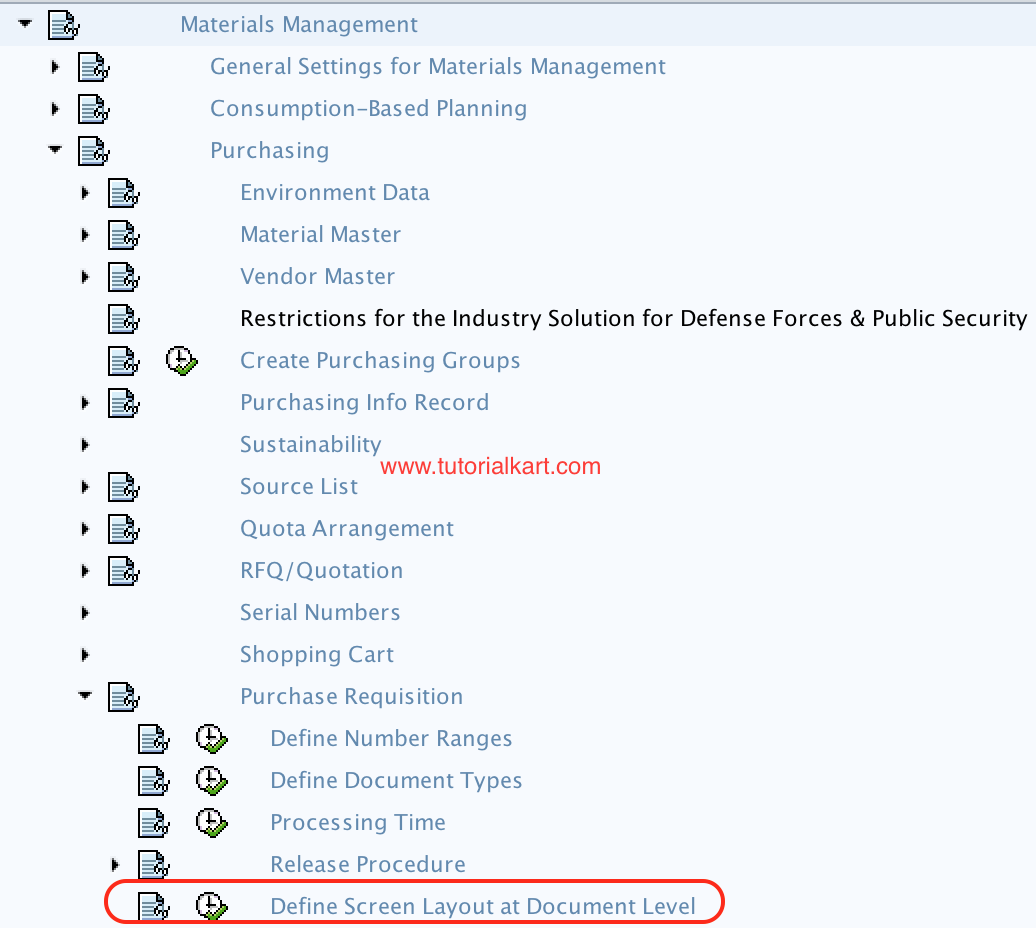
Step 3 : – Follow the navigation menu path Material Management – Purchasing – Purchase requisition and choose img activity “define screen layout at document level”.
Step 4 : – On change view “Screen layout: purchase requisition” overview screen, you can create new screen layout by using new entries function or copy as function. Choose the standard field selection “NBB” and click on copy as icon. So all the entries field selection are copied to new screen layout field selection and you can modify as per requirements.

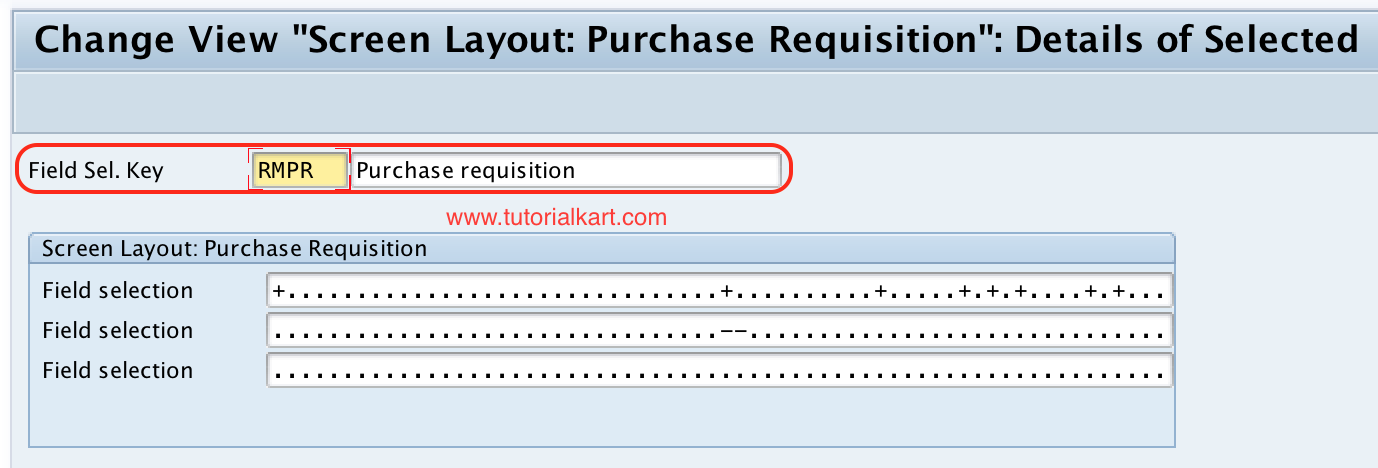
Step 5 : – On change view “Screen layout: purchase requisition”: details of selected screen, rename the field selection group from NBB to RMPR (name as per requirements of project) and press enter.
Step 6 : – Now double click on field selection group RMPR.

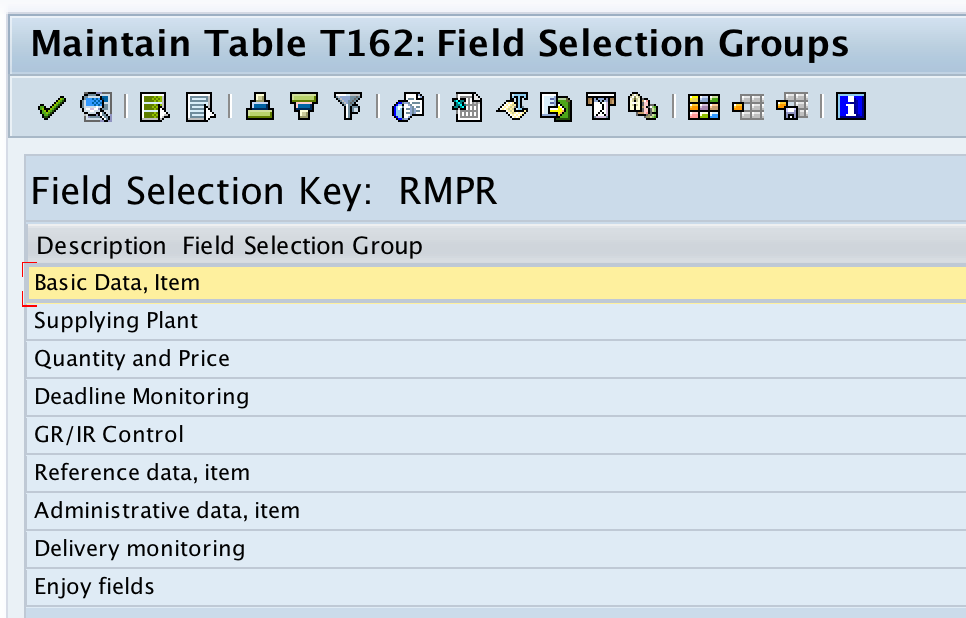
Step 7 : – On Maintain table T162: field selection groups, Double click on field selection keys i.e. Basic data, supplying plant, quantity & price,, GR/IR control, etc and maintain the required details.
Choose the required fields for field keys with required entry or optional entry or display options as per requirements.
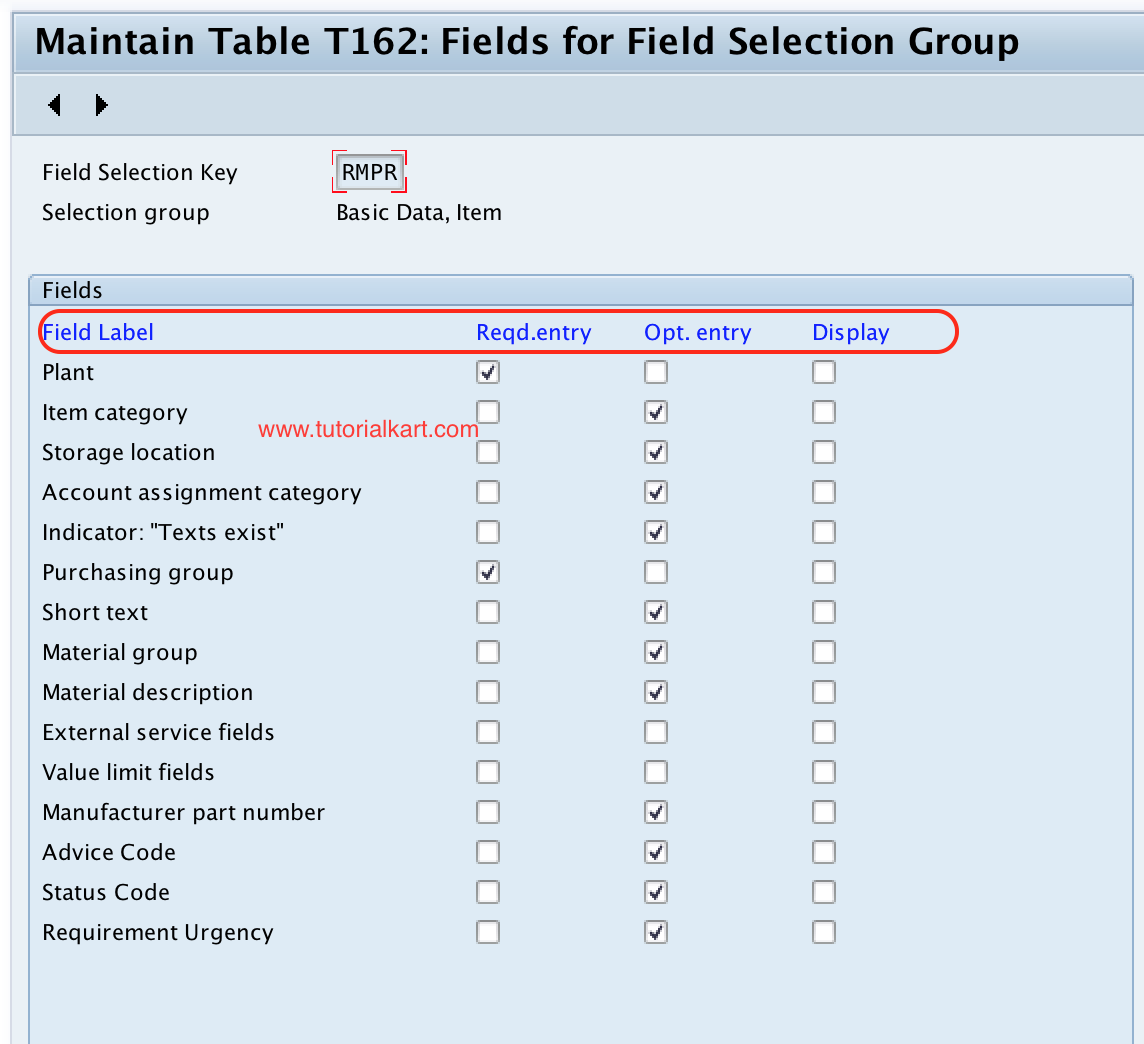
After maintaining all the required details, choose save icon and save the configured field selection group details.
For document type purchase requisition RMPR assign field selection group as RMPR as shown below screen shot.
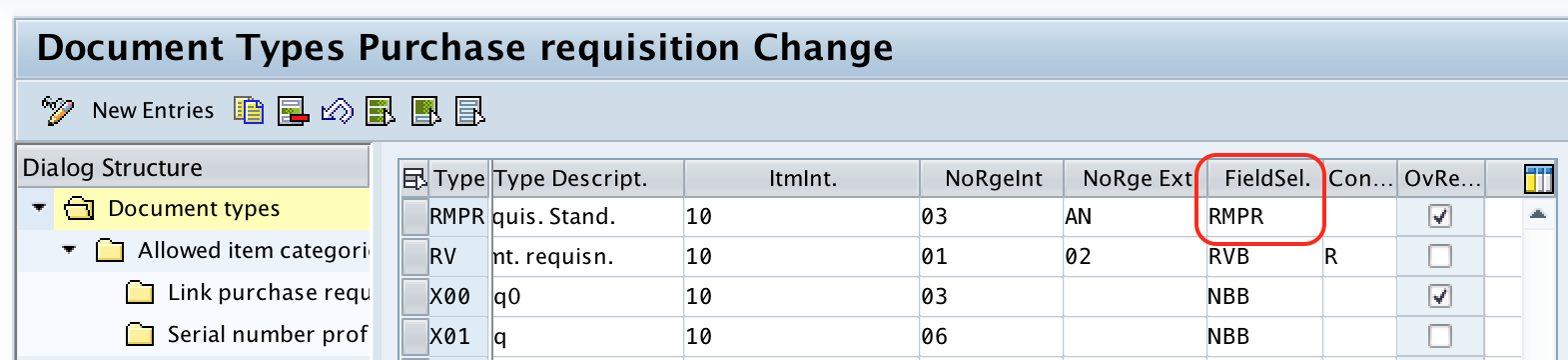
How the document type assignment affects SAP MM purchase requisition screens
The field selection key becomes effective for users only when it is assigned to the purchase requisition document type. If you create a new field selection key but do not assign it to the document type, the purchase requisition screen will continue to follow the field selection key already assigned to that document type.
For a clean configuration, first copy an existing key, adjust only the relevant field groups, save the key, and then assign it to the required PR document type. This makes it easier to test and trace the screen behavior later.
Common field selection groups checked while defining SAP MM screen layout
The exact field groups depend on the purchasing document and system configuration, but purchase requisition screen layout usually requires careful review of these areas.
| Field selection area | What to check before saving |
|---|---|
| Basic data | Fields such as material, short text, plant, purchasing group, and material group. |
| Quantity and price | Quantity, unit of measure, delivery date, valuation price, and related price fields. |
| Account assignment | Account assignment category, cost object fields, and related mandatory entry behavior. |
| Source of supply | Vendor, fixed vendor, supplying plant, or source-related fields where applicable. |
| GR/IR control | Goods receipt, invoice receipt, and control fields that influence follow-on processing. |
Testing the SAP MM screen layout after document level configuration
After saving the configuration, create or change a test purchase requisition with the relevant document type. Verify the screen behavior before moving the change to a production system.
- Check whether required fields stop the document from being saved when left blank.
- Check whether optional fields remain editable.
- Check whether display fields are visible but not open for input.
- Check whether suppressed fields are not shown on the PR screen.
- Check the document type assignment if the expected screen behavior is not visible.
Difference between screen layout at document level and field status in other SAP areas
Screen layout at document level in SAP MM is specific to purchasing document configuration. It should not be confused with field status configuration used in other SAP modules, such as finance account assignment screens. In purchasing, this configuration works through field selection keys and document type assignment.
If a field is not behaving as expected, check the complete configuration chain. The field may be influenced by document type settings, item category, account assignment category, release or authorization restrictions, or other purchasing configuration.
Editorial QA checklist for SAP MM document screen layout configuration
- Confirm that the field selection key name follows the project naming convention.
- Confirm that standard SAP keys such as NBB are copied instead of directly changed, unless the project specifically requires it.
- Confirm that every required field has been tested in a purchase requisition with the assigned document type.
- Confirm that suppressed fields are not needed for reporting, integration, or follow-on purchasing steps.
- Confirm that the field selection key is assigned to the correct purchase requisition document type.
Successfully we have defined screen layout at document level in SAP MM.
FAQs on defining screen layout at document level in SAP MM
What is screen layout at document level in SAP MM?
Screen layout at document level in SAP MM is the configuration that controls whether fields in a purchasing document are required, optional, display-only, or suppressed for a specific document type.
Which transaction code is used to define screen layout at document level?
The configuration is maintained through transaction code SPRO by following the SAP IMG path for Material Management, Purchasing, Purchase Requisition, and Define Screen Layout at Document Level.
Why is the field selection key assigned to a purchase requisition document type?
The field selection key must be assigned to a purchase requisition document type so that SAP can apply the correct field behavior when users create or change purchase requisitions of that document type.
Can I change the standard NBB field selection key directly?
It is safer to copy the standard NBB field selection key to a custom key and then adjust the copied key. Directly changing a standard key can affect other document types or processes that already use it.
What should I check if the purchase requisition screen layout does not change?
Check whether the custom field selection key is saved, whether it is assigned to the correct PR document type, and whether the user is creating the purchase requisition with that same document type.