 TutorialKart.com
Learn how to define number ranges for purchase requisition in SAP MM module using transaction code OMH7. A purchase requisition number range controls the document number that SAP assigns when users create a PR manually, through MRP, or through another purchasing process.
How to define number ranges for purchase requisition in SAP MM
The SAP system manages purchase requisition (PR) as a purchasing document. Each PR document type is assigned to a number range interval. After you define number ranges for purchase requisition and assign the interval to a document type, the number series is used when a new purchase requisition is created. The number can be assigned automatically by the SAP system as an internal number, or entered manually by the user as an external number if the interval is marked for external assignment.
In SAP MM, transaction code OMH7 is used to maintain purchase requisition number range intervals. The interval only defines the available number series. To make the interval active for a specific purchase requisition type, it must also be assigned in the purchase requisition document type configuration.
Purchase requisition number range purpose in SAP MM
A purchase requisition number range helps SAP MM identify and separate PR documents in a controlled sequence. For example, a company may use one number range for standard purchase requisitions and another number range for special internal processes. This makes document tracking easier and helps avoid duplicate or uncontrolled PR numbers.
| Purchase requisition number range field | Meaning in SAP MM |
|---|---|
| Number range interval | A unique interval key with a from number and to number. |
| Internal number assignment | SAP automatically assigns the next available PR number from the interval. |
| External number assignment | The user enters the PR number manually within the allowed interval. |
| Current number status | The latest used number in the interval. For a new interval, it is normally kept as 0. |
| Document type assignment | The number range interval is linked to a purchase requisition document type. |
Configuration path and transaction code for PR number ranges
Refer below step by step configuration steps to define number ranges for purchase requisition in SAP. You can maintain PR number ranges by using the following transaction code or IMG menu path.
| Transaction code | OMH7 |
| Menu Path | IMG > Material Management > Purchasing > Purchase requisition > Define number ranges. |
Before maintaining purchase requisition number ranges in OMH7
Before you create or change a PR number range interval, decide the interval number, starting number, ending number, and whether the interval should be internal or external. In most business processes, purchase requisitions use internal number assignment so that SAP automatically provides the next PR number.
- Use a unique interval key that is not already assigned for the same number range object.
- Do not create overlapping number intervals, because overlapping intervals can cause document numbering issues.
- Use internal numbering when users should not manually enter PR numbers.
- Use external numbering only when the business process specifically requires user-entered PR numbers.
- Confirm which purchase requisition document type should use the new interval.
Configuration steps
Step 1: Open transaction OMH7 for purchase requisition number ranges
Step 1 : – Execute transaction code “OMH7” in command field from SAP easy access screen.
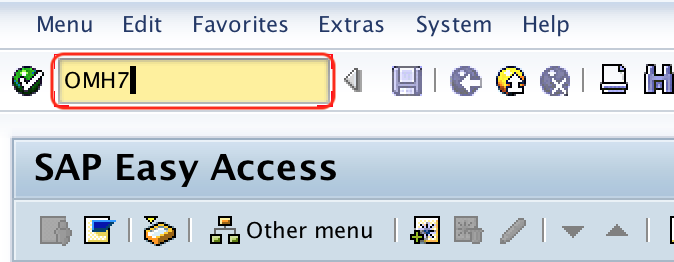
This opens the number range maintenance screen for purchase requisitions. If your system requests a customizing request while saving, choose or create the appropriate transport request according to your project practice.
Step 2: Choose change intervals for purchase requisition number range maintenance
Step 2 : – On range maintenance purchase requisition screen, click on change interval icon as shown below screen shot.
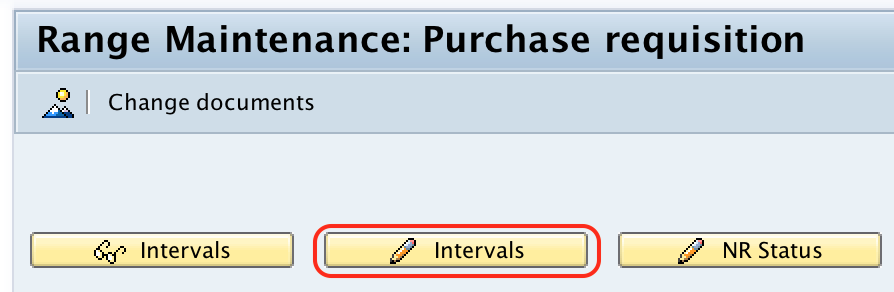
The interval screen displays the existing number ranges for purchase requisitions. Review the existing intervals before inserting a new one, especially in a shared configuration client.
Step 3: Insert a new SAP MM purchase requisition interval
Step 3 : – On maintenance Intervals purchase requisition screen, click on insert interval icon.
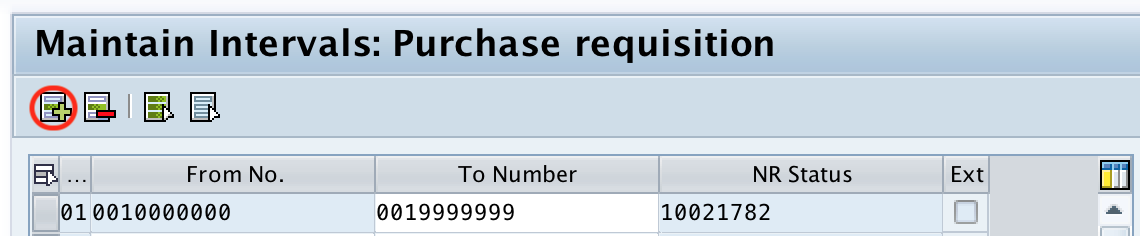
When you insert a new interval, SAP expects a non-overlapping number range. If an interval already exists for the same number series, create a different interval or adjust the planned number series before saving.
Step 4: Enter from number, to number, current number, and external indicator
Step 4 : – Now on insert interval window, update the following details.
- No : – Update the unique key that define number ranges for purchase requisition in SAP.
- From No : -Update the starting digits of number range interval.
- To Number : – Update the last digits of number range interval.
- Current No/NR Status : – By default current number for Purchase requisition is “0”.
- Ext : – Choose the external assignment option, if you want to choose this number range interval for assignment. By choosing this option, you need to give number externally during creation of purchase requisition in SAP.
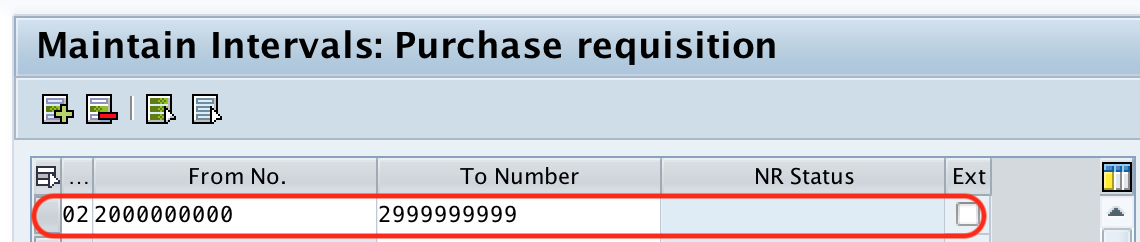
After maintaining all the required details for PR number range intervals, choose save icon to save the configured details.
Internal and external number assignment for purchase requisitions
The Ext indicator decides whether the purchase requisition number is assigned internally or externally. If the field is not selected, SAP assigns the PR number automatically from the interval. If the field is selected, the user must enter a valid PR number manually during purchase requisition creation.
| Number assignment type | How the PR number is created | Typical use |
|---|---|---|
| Internal | SAP picks the next available number from the interval. | Standard PR processing where users should not control document numbers. |
| External | User enters a number within the allowed interval. | Special cases where an outside reference or legacy sequence must be followed. |
For normal SAP MM purchase requisition processing, internal assignment is usually easier to control. External assignment should be used carefully because users must enter values within the correct number interval.
Assign the purchase requisition number range to a PR document type
Defining the interval in OMH7 is only one part of the configuration. The interval must be assigned to the relevant purchase requisition document type so that SAP knows which number range to use during PR creation. This assignment is maintained in the purchase requisition document type configuration under the same Purchasing area in IMG.
When you review the purchase requisition document type, check the number range field assigned to that document type. If the wrong interval is assigned, the PR may be created with an unexpected number series even though the interval in OMH7 is correct.
Example purchase requisition number range interval in SAP MM
The following example shows how a simple internal number range can be planned for purchase requisitions. The exact interval values depend on the company numbering policy.
| Field | Example value | Explanation |
|---|---|---|
| No | 01 | Interval key used in PR document type assignment. |
| From No | 10000000 | First purchase requisition number in the interval. |
| To Number | 19999999 | Last purchase requisition number in the interval. |
| Current No | 0 | Initial status before numbers are consumed. |
| Ext | Blank | Internal number assignment by SAP. |
Common issues while configuring SAP PR number ranges
| Issue | Possible reason | What to check |
|---|---|---|
| Purchase requisition uses the wrong number series | The PR document type is assigned to another interval. | Check the number range assignment in the purchase requisition document type. |
| System does not allow the new interval | The interval overlaps with an existing number range. | Review existing intervals in OMH7 and use a non-overlapping from and to number. |
| User is asked to enter PR number manually | The number range interval may be marked as external. | Check whether the Ext indicator is selected for the interval. |
| PR creation fails due to number range issue | The assigned interval may be exhausted or incorrectly maintained. | Check the current number status and the to number of the interval. |
| Transport-related warning appears while saving | Number range configuration may require a customizing request depending on the system. | Use the correct transport request as per project procedure. |
SAP MM purchase requisition number range QA checklist
- The transaction code
OMH7is used for maintaining purchase requisition number range intervals. - The interval key, from number, and to number are unique and do not overlap with another PR interval.
- The Ext indicator is selected only when external PR number assignment is required.
- The number range interval is assigned to the correct purchase requisition document type.
- The current number status is reviewed carefully and is not changed without understanding the document numbering impact.
- The configuration is tested by creating a purchase requisition and checking the generated PR number.
FAQs on purchase requisition number ranges in SAP MM
How do you configure PR number range in SAP MM?
Use transaction code OMH7 to define the purchase requisition number range interval. Maintain the interval key, from number, to number, current number status, and external number indicator if required. Then assign the interval to the relevant purchase requisition document type.
What is the transaction code for purchase requisition number ranges?
The transaction code for maintaining purchase requisition number ranges in SAP MM is OMH7.
What is internal number assignment for purchase requisition?
Internal number assignment means SAP automatically assigns the next available PR number from the assigned number range interval when a purchase requisition is created.
What is external number assignment for purchase requisition?
External number assignment means the user manually enters the purchase requisition number during PR creation. The entered number must fall within the externally assigned number range interval.
Why is the purchase requisition not using the new number range?
The number range interval may not be assigned to the purchase requisition document type being used. Check the PR document type configuration and confirm that it refers to the correct interval defined in OMH7.
Conclusion: number ranges for purchase requisition in SAP MM
Successfully we have maintained number ranges for purchase requisition in SAP MM. The main steps are to open transaction OMH7, create or change the required number range interval, save the interval, and assign it to the relevant purchase requisition document type. After configuration, test the setup by creating a purchase requisition and checking whether SAP assigns the expected PR number.