 TutorialKart.com
How to Maintain Plant Parameters for MRP in SAP MM
You can maintain plant parameters for MRP (Material Requirement Planning) by using transaction code OMI8. These settings control important plant-level defaults used during material requirements planning, especially for consumption-based planning and procurement proposals.
Plant parameters for MRP tell SAP how planning should behave for a specific plant. They include settings related to master data, MRP controllers, special procurement, planned orders, planning runs, reporting, and performance. Because the configuration is plant-specific, each plant can have its own MRP behavior based on its planning process.
This activity is normally performed during SAP MM and MRP configuration. It should be maintained carefully because the settings can influence how MRP creates procurement proposals such as planned orders, purchase requisitions, and schedule lines, depending on the planning scenario and material master data.
What Plant Parameters for MRP Control in SAP
Plant parameters for material requirement planning define the general planning environment for a plant. They do not replace material master MRP views, but they provide plant-level configuration that supports how planning is executed and displayed.
| MRP plant parameter area | Purpose in SAP MRP configuration |
|---|---|
| Master data | Controls settings such as MRP controller maintenance, special procurement settings, and float-related planning controls. |
| Planned orders | Supports configuration related to planned order handling during planning. |
| Reporting | Controls settings used in MRP reporting and planning evaluation. |
| Planning run | Defines settings that affect how planning runs are handled for the plant. |
| Performance | Contains configuration that can influence MRP run performance and processing behavior. |
For example, a plant that uses simple reorder point planning may need a different setup from a plant that uses more detailed MRP procedures. The plant parameter maintenance screen groups these settings so that planners and consultants can maintain them from one configuration activity.
Prerequisites Before Maintaining Plant Parameters for MRP
Before you maintain plant parameters for MRP, make sure the basic enterprise structure and planning setup are available in the SAP system.
- The plant should already be defined in SAP.
- The plant should be assigned correctly in the enterprise structure.
- The MRP-relevant material master views should be maintained for materials that will be planned.
- MRP controllers and planning responsibilities should be agreed with the business team.
- The configuration change should be recorded in the correct customizing transport request.
If the plant itself is missing, first create or verify the plant using the relevant enterprise structure configuration. You can refer to the plant configuration step here: plant.
OMI8 Transaction Code and SAP IMG Path for MRP Plant Parameters
Plant parameters for material requirement planning can created by using one of the following navigation method.
| SAP Transaction code | OMI8 |
| SAP IMG Path | SPRO > IMG > Material Management >Consumption based planning > Plant parameters > Carry out overall maintenance of plant parameters |
OMI8 opens the overall plant parameter maintenance activity. From this screen you can create the plant parameter entry first and then maintain the detailed parameter groups for the plant.
Step 1: Open OMI8 for Plant Parameters for Material Requirement Planning
Step 1 : – Execute t-code “OMI8” in command field from SAP easy access screen.
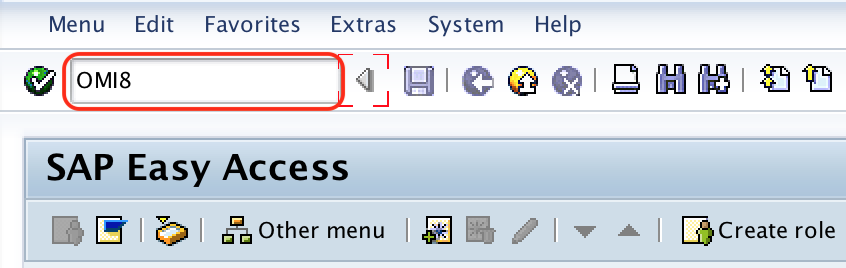
You can also open the same configuration through the SAP IMG path. Direct transaction code OMI8 is useful when you already know that the requirement is to maintain MRP settings at plant level.
Step 2: Create a Plant Parameter Entry for MRP
Step 2 : – On change view plant parameters for material requirement planning screen, click on new entries button to maintain plant parameters for MRP.
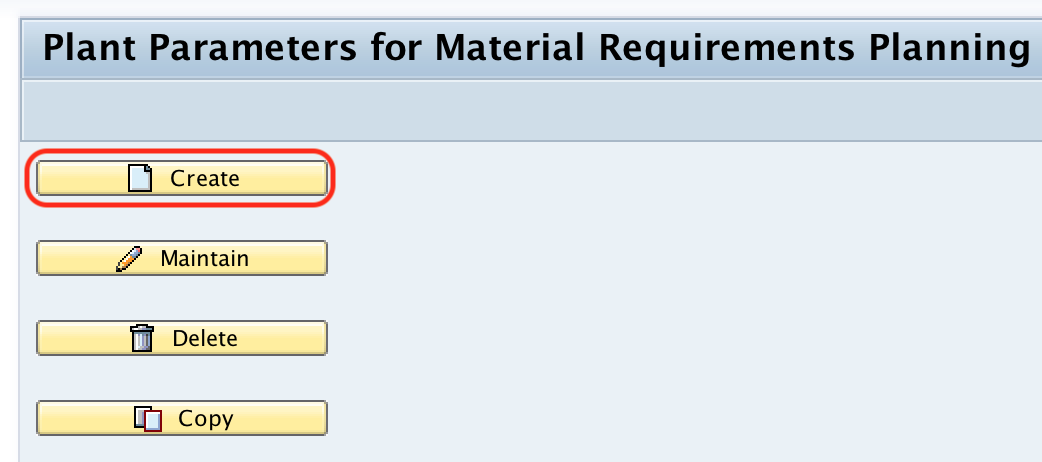
Use New Entries only when the plant does not already have MRP plant parameters. If a plant entry already exists, select that plant and use the maintain option to review or update the detailed parameters.
Step 3: Enter the SAP Plant Key for MRP Parameter Maintenance
Step 3 : – On create plant parameters screen, enter the plant key in the text field plant and click on create icon as shown below image.
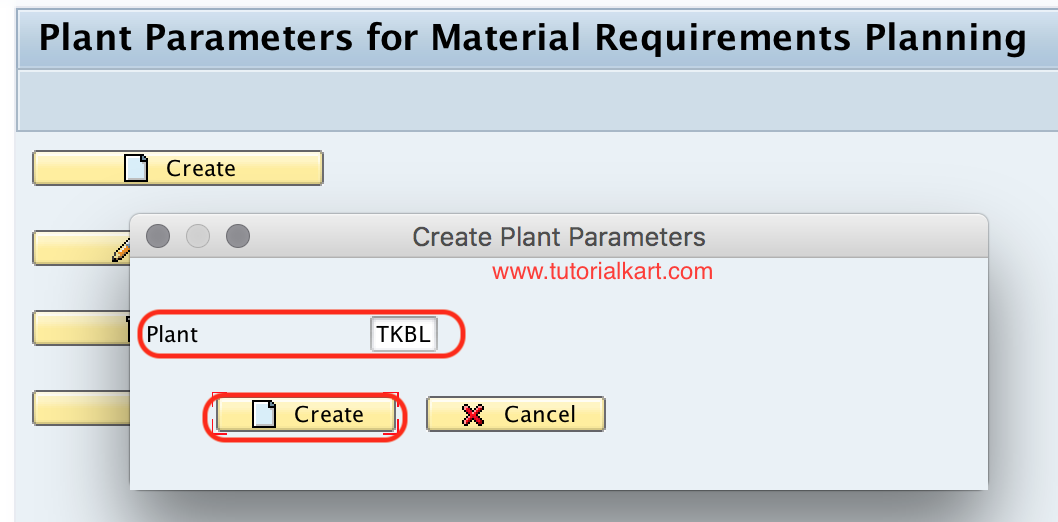
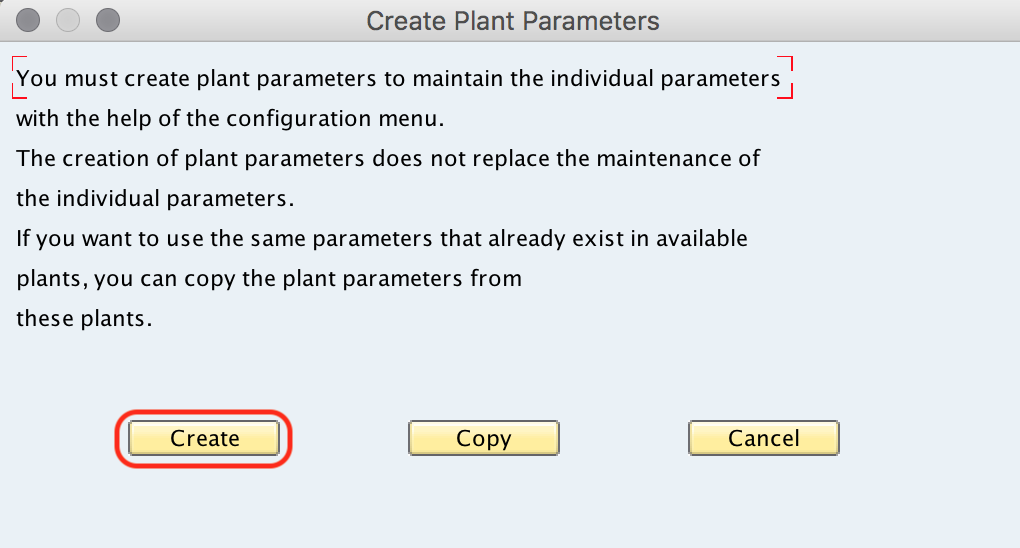
A warning message displays as “You must create pant parameters to maintain individual parameters with the help of the configuration menu”. Choose create option.
This message appears because SAP requires the basic plant parameter entry before the individual MRP parameter groups can be maintained. Choose Create and continue with the customizing request when prompted.
Now you are prompted for customising request, choose the request id and save the configured details.
Step 4: Use Maintain Option for the MRP Plant Parameter Groups
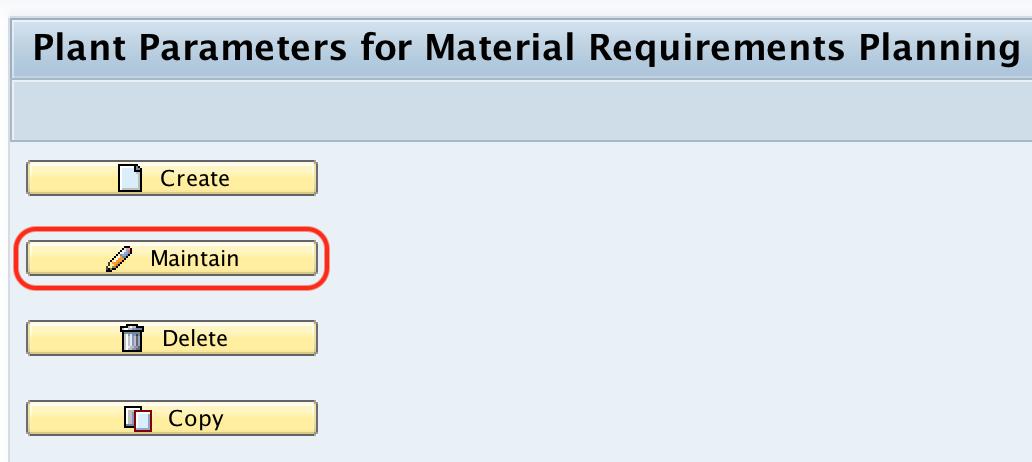
Step 4 : – From main screen of Plant parameters for Material Requirement Planning, click on maintain button to maintain the parameters for plant.
Now enter the plant key in the given text field and click on maintain button.
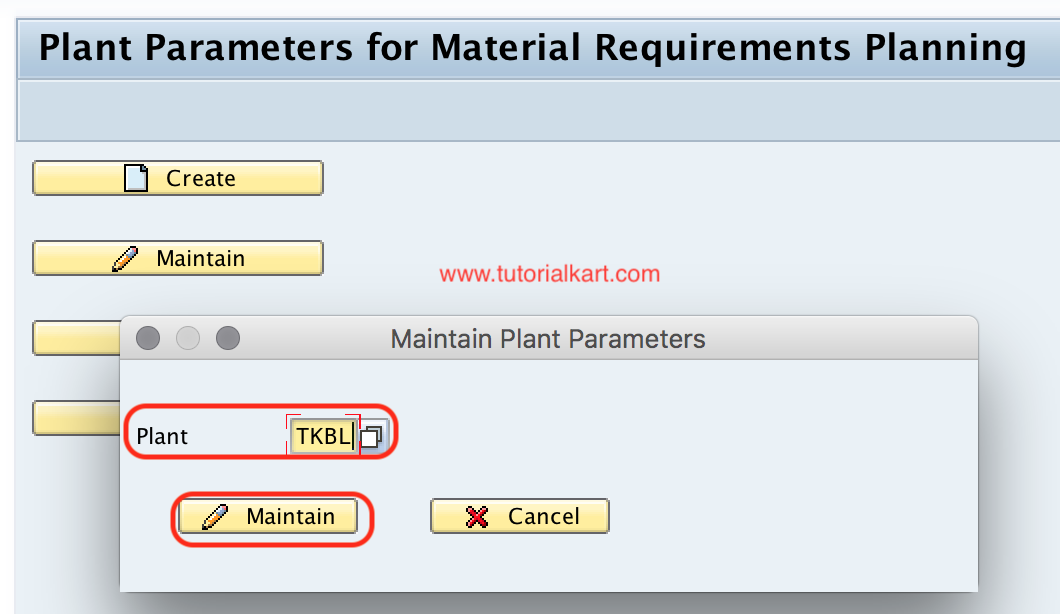
The maintain option opens the detailed parameter maintenance for the selected plant. This is where you update the MRP-related configuration groups rather than only creating the plant entry.
Step 5: Maintain Master Data, Planned Orders, Reporting, Planning Run, and Performance Parameters
Step 5 : – On Maintain plant parameters screen, choose the required field and maintain parameters as per requirements of an organization. The important plant parameters for MRP are
- Master data – MRP controller, Special procurement, Floats.
- Planned orders
- Reporting
- Planning Run
- Performance.
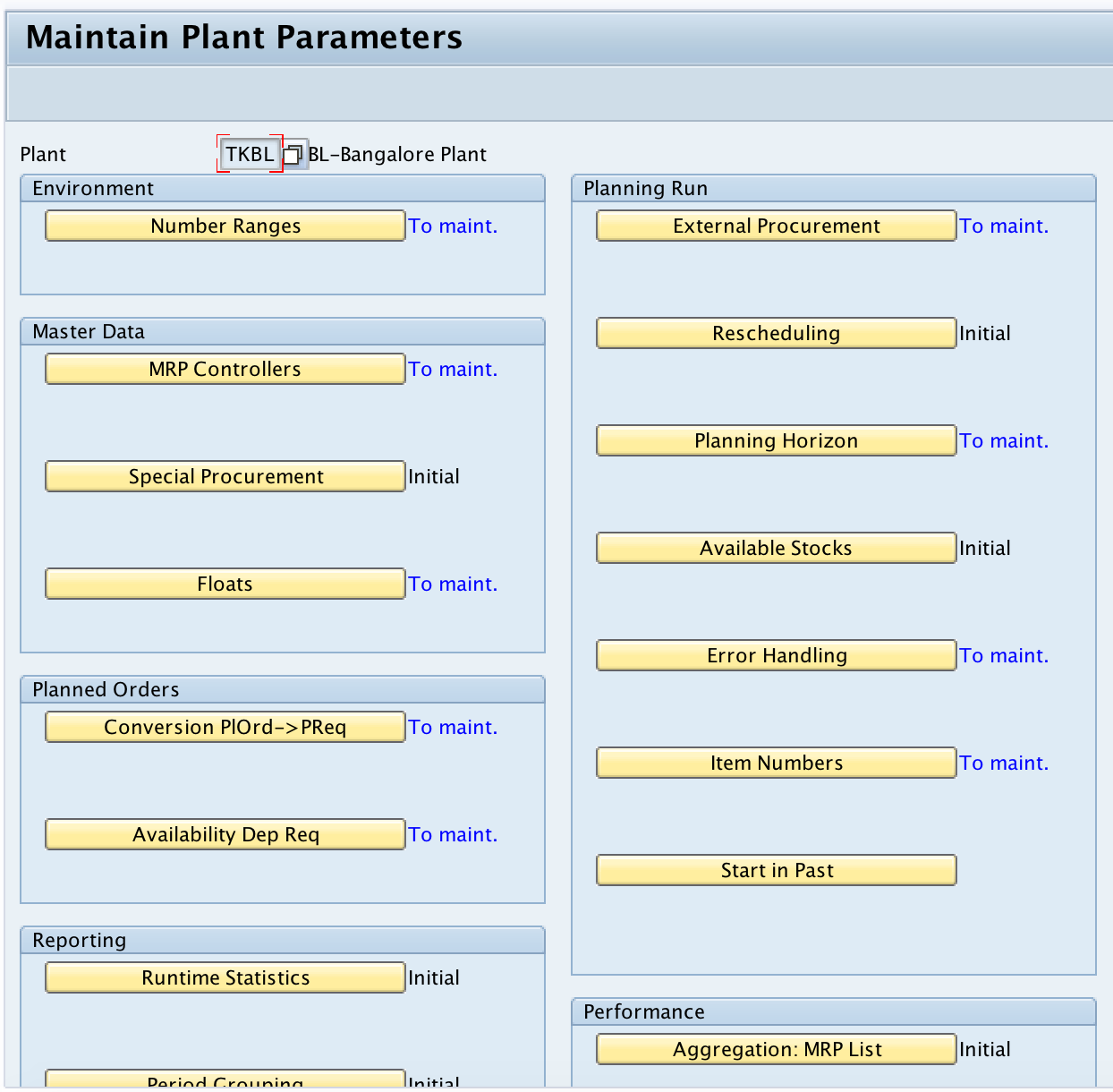
Open each required parameter group and maintain the values according to the plant’s planning process. Do not copy values from another plant without checking whether the same MRP controllers, procurement methods, planning run rules, and reporting requirements apply.
| Parameter group in OMI8 | What to check before saving |
|---|---|
| Master data | Check MRP controller setup, special procurement options, and float settings used by the plant. |
| Planned orders | Review whether planned order handling supports the plant’s planning and conversion process. |
| Reporting | Confirm that reporting settings support the planning lists and evaluation methods used by planners. |
| Planning Run | Review settings that affect planning execution for the plant. |
| Performance | Maintain performance-related settings with care, especially in plants with large material volumes. |
After maintaining all the required details, choose save icon and save the configured details.
Successfully we have maintained plant parameters for MRP in SAP MM module.
How to Maintain MRP Controller for a Plant in SAP
MRP controllers are part of the planning responsibility setup for a plant. In the plant parameter maintenance area, the master data section is one of the important places to review MRP controller-related settings. The MRP controller is then used in material master MRP views to identify the planner or planning group responsible for a material.
When configuring MRP controllers, use codes and descriptions that match how the planning team works. For example, a plant may use separate MRP controllers for raw materials, packaging materials, traded goods, or production lines. The exact structure should be based on the business planning responsibility, not only on technical convenience.
T399I Table and MRP Plant Parameter Storage in SAP
MRP plant parameter configuration is stored in SAP tables such as T399I, which is commonly associated with planning plant parameters. Functional consultants usually maintain the setting through OMI8 or the IMG activity rather than directly updating tables.
Use table display only for checking or troubleshooting, based on the authorizations and rules in your SAP system. Configuration changes should be made through the approved customizing transaction so that validations and transport recording are handled correctly.
MRP Plant Parameters and MRP Areas in SAP Planning
Plant parameters apply to the plant-level planning setup. MRP areas are used when planning needs to be separated below plant level, such as storage-location-level planning or subcontractor-related planning. If a company uses MRP areas, check the plant parameter configuration along with the MRP area setup so that the planning design remains consistent.
For basic SAP MM configuration, first make sure the plant-level parameters are correct. Then review whether additional MRP area configuration is required for the actual planning process.
Common Checks When Plant Parameters for MRP Are Not Working as Expected
- Confirm that the correct plant was created and selected in OMI8.
- Check whether the configuration was saved in the correct customizing request and moved to the target system.
- Verify that MRP-relevant material master views are maintained for the test material.
- Review the MRP type, procurement type, lot-sizing procedure, and MRP controller in the material master.
- Check whether the planning run was executed after the configuration change.
- Review whether an MRP area setup is affecting the planning result.
Editorial QA Checklist for SAP MRP Plant Parameters Tutorial
- Confirm that OMI8 is explained as plant-level MRP configuration, not as a material master maintenance transaction.
- Check that the SAP IMG path and transaction code are shown clearly before the step-by-step screenshots.
- Verify that the tutorial explains the difference between creating the plant parameter entry and maintaining the detailed parameter groups.
- Ensure that MRP controller, planning run, planned orders, reporting, and performance are described as plant parameter areas.
- Review the troubleshooting section for plant-specific checks such as material master MRP views, MRP type, and transport movement.
FAQs on Maintaining Plant Parameters for MRP in SAP MM
What are plant parameters for MRP in SAP?
Plant parameters for MRP are plant-level configuration settings that control how material requirements planning works for a plant. They include settings for master data, MRP controllers, planned orders, reporting, planning runs, and performance.
Which transaction code is used to maintain plant parameters for MRP?
The transaction code used to maintain plant parameters for MRP is OMI8. You can also access the same activity through SPRO under Material Management, Consumption Based Planning, Plant Parameters, and Carry out overall maintenance of plant parameters.
How to maintain MRP controller for a plant in SAP?
MRP controller-related settings are maintained as part of the plant’s planning setup. After the controller setup is available, the MRP controller can be assigned in the material master MRP view so that planning responsibility is clearly identified for each material.
What is the T399I table in SAP?
T399I is commonly associated with planning plant parameters in SAP. Consultants may use it for checking configuration values, but plant parameters should normally be maintained through OMI8 or the IMG activity rather than by direct table changes.
Are plant parameters for MRP the same as material master MRP views?
No. Plant parameters for MRP are configuration settings maintained at plant level. Material master MRP views are master data settings maintained for individual materials. Both can influence planning results, so they should be reviewed together during testing.