 TutorialKart.com
How to Define Texts for RFQ/Quotations in SAP MM
In this SAP MM customizing activity, you define texts for RFQ/Quotations in SAP so that users can maintain structured header and item notes in request for quotation and quotation documents. These text types help purchasing teams capture instructions, commercial notes, item-specific remarks, delivery requirements, and other procurement communication in a consistent way.
The definition of text types is a cross-client customizing object. It involves the following configuration steps.
SPRO Navigation for RFQ/Quotation Text Types in SAP MM
You can define text types for RFQ/Quotation documents in SAP by using the following IMG navigation path.
| Transaction code | SPRO |
| SAP IMG Path | IMG > Material Management > Purchasing > RFQ/Quotation > Texts for RFQ/ Quotations |
This configuration controls the text categories available in RFQ and quotation documents. It does not create an RFQ or maintain a supplier’s quotation response. For document processing, the commonly used SAP MM transaction codes are ME41 for creating an RFQ, ME42 for changing an RFQ, ME43 for displaying an RFQ, ME47 for maintaining a quotation, and ME48 for displaying a quotation.
Header Texts and Item Texts in SAP RFQ/Quotation
RFQ/Quotation text configuration is usually maintained at two levels.
| Text level | Where it is used | Typical examples |
|---|---|---|
| Header text | Applies to the overall RFQ or quotation document. | General instructions, vendor communication notes, quotation terms, overall delivery instructions. |
| Item text | Applies to a specific RFQ or quotation line item. | Material-specific notes, item remarks, technical details, packing instructions, item-level delivery notes. |
Use header text when the note applies to the complete purchasing document. Use item text when the note applies only to one material or service line. This separation keeps RFQ communication clear when a document contains multiple items.
Define Text Types for Header Texts in SAP RFQ/Quotation
Perform the following configuration steps for defining header text types for RFQ/Quotation documents in SAP MM.
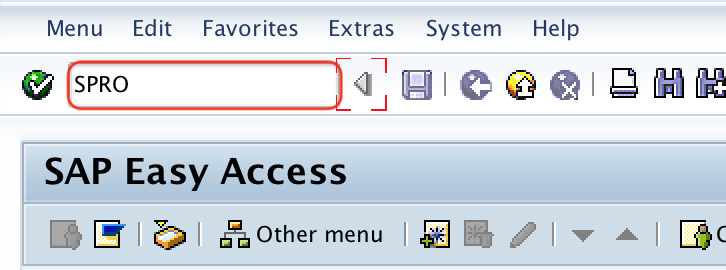
Step 1 : – Execute t-code “SPRO” in command field from SAP easy access.
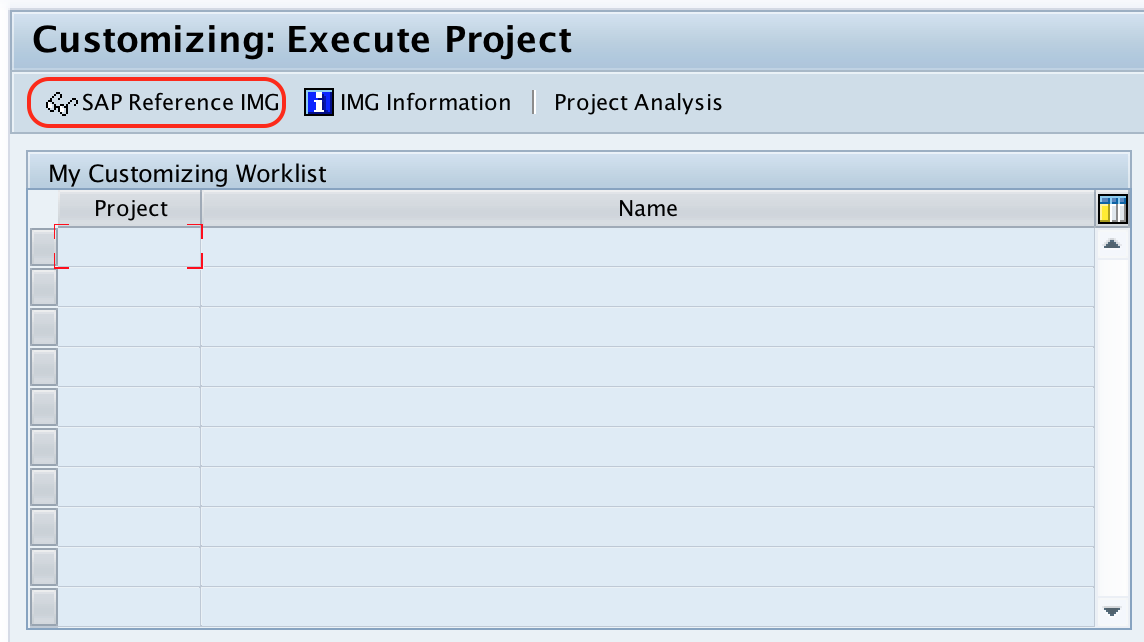
Step 2 : – Choose “SAP Reference IMG” from customizing execute project screen.
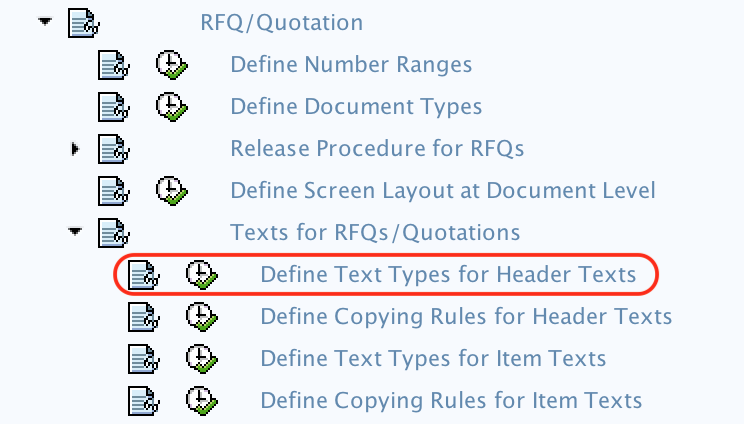
Step 3 : – From display img screen, follow the navigation path Material Management – Purchasing -RFQ/Quotation – Texts for RFQ/ Quotations and choose img activity “define text types for header texts”.
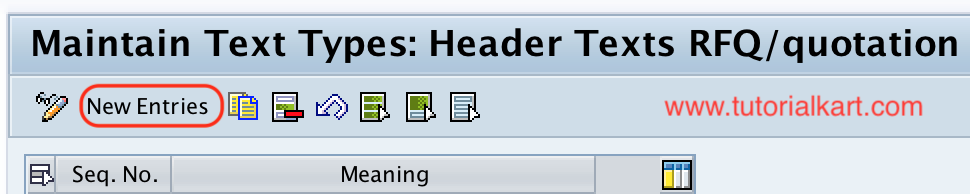
Step 4 : – On maintain text types : header text RFQ/ Quotation screen, choose new entries button for maintaining new header texts in SAP.
Step 5 : – On new entries header texts for RFQ/ quotation maintain the following details.
- Seq. No : – Enter the sequence number for header texts RFQ/ quotation.
- Meaning : – Enter the description of header text of RFQ.
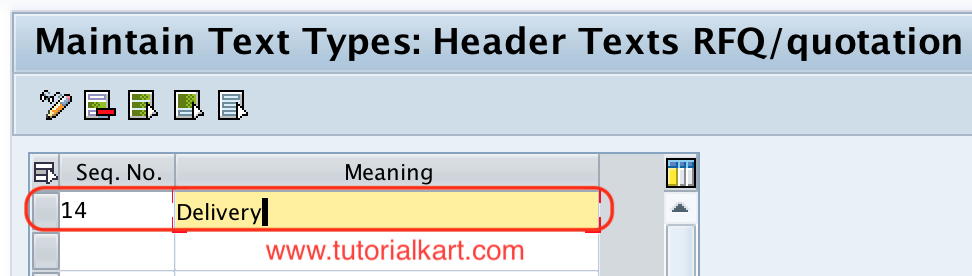
Choose save icon and save the configured details.
After saving, the configured header text type becomes available for maintaining document-level text in RFQ/Quotation processing, subject to the document configuration and authorizations in the system.
Define Text Types for Item Texts in SAP RFQ/Quotation
Item text types are maintained for line-level RFQ or quotation notes. These are useful when each material or service item needs its own technical or purchasing instruction.
Step 1 : – Follow the navigation path Material Management – Purchasing -RFQ/Quotation – Texts for RFQ/ Quotation and choose IMG activity “define text types for item texts”.
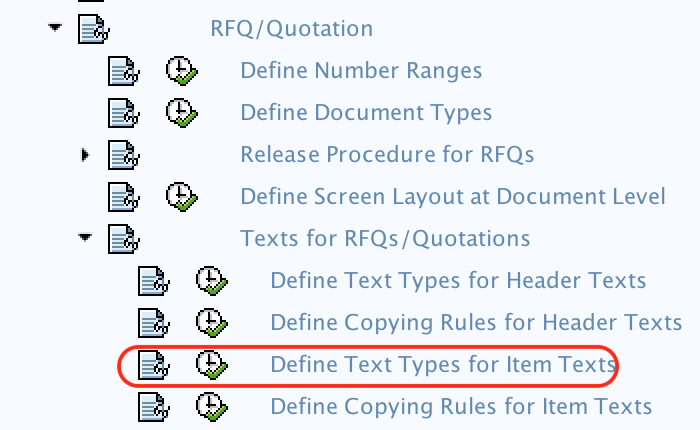
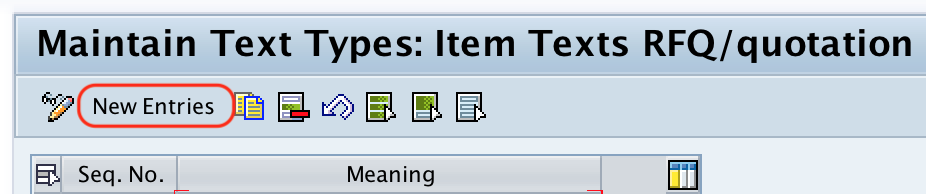
Step 2 : – On maintain text types: item texts RFQ/quotation, choose new entries option for maintaining new text items for item texts.
Step 3 : – On new entries item texts screen, update the following details.
- Seq. No : – Update the sequential number of item texts RFQ/ quotation.
- Meaning : – Update the description text of sequential number.
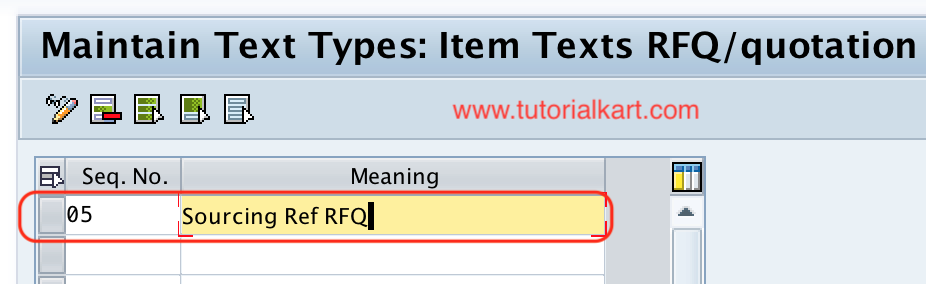
After maintaining all the details, choose save icon and save the configured details of text types for item texts.
Successfully we have maintained text types for RFQ/ Quotation in SAP MM.
RFQ and Quotation Transaction Codes Related to Text Configuration
The text type configuration is done in SPRO, but users see the result while creating or maintaining RFQ and quotation documents. The following transaction codes are commonly checked during testing.
| Transaction code | Purpose in SAP MM purchasing |
|---|---|
| SPRO | Open SAP IMG/customizing to define RFQ/Quotation text types. |
| ME41 | Create request for quotation. |
| ME42 | Change request for quotation. |
| ME43 | Display request for quotation. |
| ME47 | Maintain vendor quotation with reference to RFQ. |
| ME48 | Display quotation. |
RFQ vs Quotation in SAP MM Text Usage
In SAP MM, an RFQ is a purchasing document sent to vendors to request pricing and terms. A quotation is the vendor’s response to that RFQ, usually maintained in SAP so that the purchasing team can compare supplier offers. Text types are relevant in both documents because they help organize instructions, comments, and notes at header and item level.
For example, a buyer may use a header text to add general quotation submission instructions, while item texts can describe material-specific requirements. If the RFQ contains several line items, item text helps avoid mixing technical notes for one item with another.
Text Adoption and Text Type Planning for RFQ/Quotation
Before creating new RFQ/Quotation text types, review whether the business requirement is only to add a new text label or also to control how text is copied from another source. In SAP purchasing, text handling may involve both text type definition and text adoption settings. Text adoption controls whether text can be copied from sources such as master data or reference documents, depending on the configuration used in the system.
Keep the text type list practical. Too many similar text types can confuse users during RFQ and quotation processing. Use clear meanings such as General Instructions, Technical Specification, Delivery Notes, Packing Instructions, Commercial Terms, or Vendor Remarks based on the purchasing process followed by your organization.
Common Checks After Defining RFQ/Quotation Text Types
- Confirm that the new header or item text type appears in the relevant RFQ/Quotation screen.
- Check whether the sequence number places the text type in a logical order for end users.
- Use a clear meaning so buyers know exactly when to use the text type.
- Test the text type in ME41 or ME42 for RFQ processing and in ME47 or ME48 for quotation processing.
- If expected text is not copying from another document or master data, review text adoption configuration separately.
- Save the configuration in the correct transport request if the system is connected to a development, quality, and production landscape.
FAQs on Texts for RFQ/Quotations in SAP MM
What is the tcode for RFQ in SAP MM?
ME41 is used to create an RFQ in SAP MM. ME42 is used to change an RFQ, and ME43 is used to display an RFQ. These transaction codes are used for document processing, while SPRO is used for configuring RFQ/Quotation text types.
What is ME41 used for in SAP?
ME41 is used to create a request for quotation in SAP MM. In this process, purchasing users create an RFQ document and send it to vendors to request prices, delivery terms, and other quotation details.
What is the difference between RFQ and quotation in SAP MM?
An RFQ is the request sent by the buyer to vendors. A quotation is the vendor response maintained in SAP against the RFQ. RFQ text may contain buyer instructions, while quotation text may contain vendor response details or internal purchasing notes.
What is the tcode for quotes in SAP MM?
ME47 is commonly used to maintain a quotation in SAP MM, and ME48 is used to display a quotation. The quotation is normally maintained with reference to an RFQ.
Should RFQ text types be created at header level or item level?
Create header text types for information that applies to the entire RFQ or quotation. Create item text types when the information applies only to a specific line item, such as material specifications, item remarks, or packing instructions.
Editorial QA Checklist for SAP RFQ/Quotation Text Configuration
- The article explains that SPRO is used for RFQ/Quotation text type configuration, not for creating RFQ documents.
- The difference between header text and item text is clear and specific to SAP MM RFQ/Quotation processing.
- The steps preserve the IMG path for defining header text types and item text types.
- The related transaction codes ME41, ME47, and ME48 are explained in the context of RFQ and quotation processing.
- The tutorial warns that text adoption is a separate configuration consideration when text must be copied from another source.