 TutorialKart.com
How to Define Processing Time for Purchase Requisition in SAP MM
You can define processing time for purchase requisition in SAP MM by using transaction code OMEW. This setting represents the number of working days the purchasing department normally needs to convert a purchase requisition (PR) into a purchase order (PO). During external procurement scheduling, SAP uses this purchasing processing time while calculating dates for materials planned by MRP.
Processing time is maintained at plant level. If one plant needs two days for buyer processing and another plant needs five days, you can maintain different values for each plant. The value should reflect the normal internal time required for source review, vendor selection, PR conversion, and PO creation. It is not the vendor’s delivery time and it is not goods receipt processing time.
Where Processing Time Fits in SAP MM Purchase Requisition Scheduling
In SAP MM, a purchase requisition may be created manually or automatically through material requirements planning. When the material is externally procured, the system considers multiple time elements to determine when procurement activities should start and when the material can be available. Processing time is one of those elements.
| Time element | What it means in procurement scheduling | Where it is usually maintained |
|---|---|---|
| Purchasing processing time | Internal time needed by the buyer to convert a PR into a PO | OMEW, plant-level purchasing processing time |
| Planned delivery time | Expected vendor lead time to deliver the material after PO placement | Material master or purchasing info record, depending on setup |
| GR processing time | Time needed after goods receipt for inspection, putaway, or internal processing before stock is available | Material master MRP data |
For example, if a material must be available on a required date, SAP can schedule backward by considering goods receipt processing time, planned delivery time, and purchasing processing time. A higher processing time can make the PR release date or purchasing start date earlier, so maintain a realistic value rather than a random buffer.
Prerequisites Before Maintaining Purchase Requisition Processing Time
You need to define the below configurations before you define processing time for purchase requisition in SAP system.
- Define plant in SAP
- Maintain plant parameters for material requirement planning
Also make sure that the plant belongs to the correct purchasing and MRP setup for your company code. OMEW changes are customizing changes, so they are normally maintained in a development or configuration client and then transported to quality and production according to the project process.
OMEW Transaction and SAP IMG Path for Processing Time
Perform the following steps to define the processing time for purchase requisition in SAP.
| Transaction code | OMEW |
| SAP Menu path | SPRO > IMG > Material Management > Purchasing > Purchase requisition > Processing time. |
| Configuration object | Processing time for purchasing by plant |
| Field maintained | Purchase procurement time in days |
Step 1: Open OMEW to Maintain Processing Time in SAP MM
Step 1 : – Execute t-code “OMEW” in command field from SAP easy access screen.
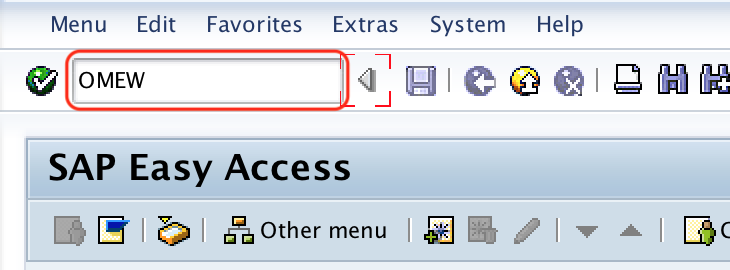
You can also open the same activity through SPRO by following the IMG path shown above. Directly using OMEW is faster when you already know that the requirement is to maintain the plant-level purchasing processing time for purchase requisitions.
Step 2: Choose the Plant for Purchase Requisition Processing Time
Step 2 : – On change view processing time – purchasing overview screen, choose position option and enter your plant key in the given text field plant. So that your plant key displays on top of the screen and you can easily define processing time for purchasing requisition for a plant code.
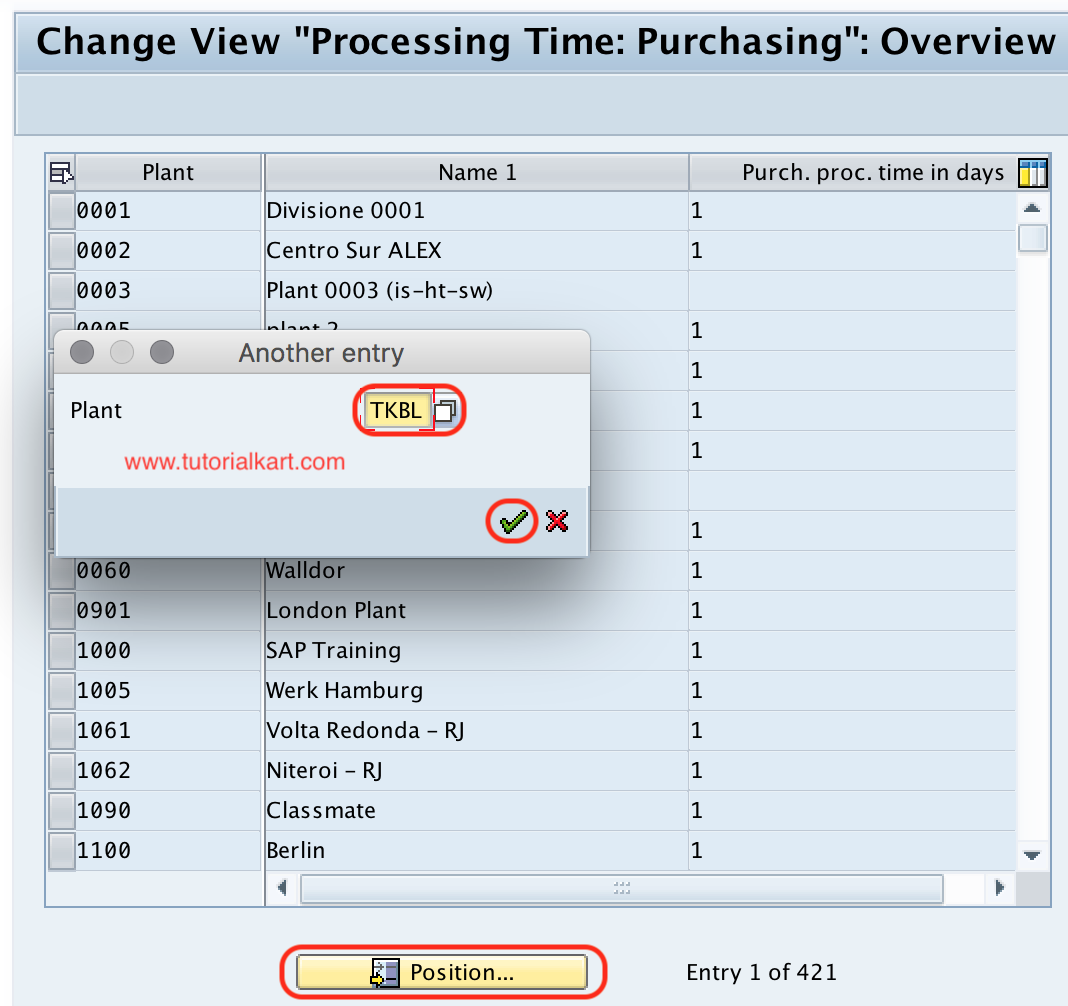
If the plant is not visible in the overview, verify that the plant has been created and that the relevant enterprise structure and MRP settings are complete. Do not create a duplicate plant entry manually unless the configuration activity permits it in your system and the plant master setup is already correct.
Step 3: Enter Purchase Procurement Time in Days for the Plant
Step 3 : – Now update the processing time in days where the buyer need to convert the requisition to purchase order. You can update processing time in days in the given text field purchase procurement time in days.
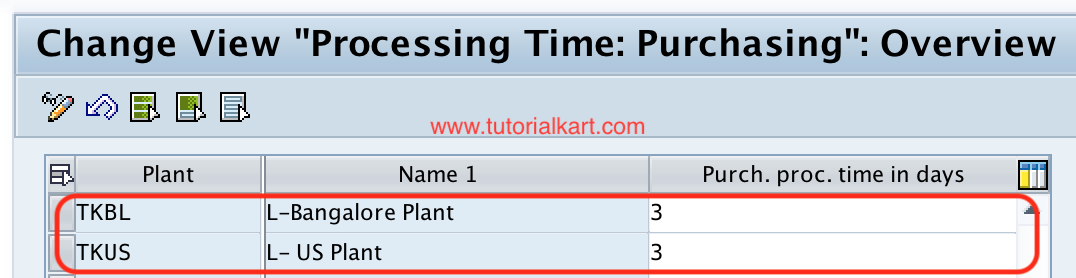
Enter the processing time as a number of days. For example, enter 2 if the purchasing team normally needs two working days to process a PR and convert it into a PO. Use a value that matches the plant’s procurement process. A very low value may create unrealistic purchasing dates, while a very high value may push procurement proposals earlier than needed.
Step 4: Save the SAP MM Processing Time Configuration
After maintaining all the required details for purchasing time processing, choose save icon and save the configured details.
When prompted, assign the change to the relevant customizing transport request. After saving, the processing time becomes available for the plant in procurement scheduling and MRP date calculations. Test the change with a sample material and purchase requisition before moving it to production.
Successfully we have defined processing time for purchase requisition in SAP MM.
Example of Processing Time Impact on Purchase Requisition Dates
The following example shows how purchasing processing time can influence procurement dates. Assume that a material has to be available on 30 June. If the plant has 2 days of GR processing time, 10 days of planned delivery time, and 3 days of purchasing processing time, the buyer may need the PR early enough to complete internal processing before the PO is expected to be sent to the vendor.
| Scheduling element | Example value | Meaning |
|---|---|---|
| Requirement availability date | 30 June | Date when stock should be available for use |
| GR processing time | 2 days | Goods should be received before the availability date |
| Planned delivery time | 10 days | Vendor delivery lead time after PO placement |
| Purchasing processing time | 3 days | Buyer time to process the PR before PO creation |
This is why processing time for purchase requisition should be reviewed with both purchasing and planning teams. The value affects date proposals; it does not by itself approve PRs, assign sources, or create purchase orders.
Processing Time vs GR Processing Time in SAP MM
Processing time and GR processing time are often confused because both are measured in days and both can affect procurement scheduling. They are used for different parts of the process.
| Comparison point | Purchasing processing time | GR processing time |
|---|---|---|
| Business meaning | Time required by purchasing to convert PR into PO | Time required after goods receipt before material is available |
| Process stage | Before PO is issued to the vendor | After material is received from the vendor |
| Main owner | Purchasing department | Warehouse, quality, or receiving process |
| Typical use | PR and PO scheduling for external procurement | Availability date calculation after goods receipt |
How OMEW Relates to ME57 and ME54N in Purchase Requisition Processing
OMEW is a customizing transaction used to maintain processing time. It should not be confused with purchase requisition processing transactions used by end users.
| SAP transaction | Purpose in purchase requisition process |
|---|---|
| OMEW | Maintain purchasing processing time by plant |
| ME54N | Release or approve a purchase requisition, depending on the release strategy setup |
| ME57 | Assign and process purchase requisitions, often used for source assignment and conversion activities |
Maintaining processing time in OMEW does not release a PR in ME54N and does not automatically process the PR in ME57. It only provides the scheduling time maintained for the plant.
Common Checks When Processing Time Is Not Reflected in SAP MM
- Check whether the correct plant was maintained in OMEW.
- Confirm that the material is externally procured and relevant for purchasing scheduling.
- Review planned delivery time and GR processing time because the final date calculation may include more than one time element.
- Check whether the PR was created before the customizing change and whether dates need to be recalculated or recreated for testing.
- Verify that the customizing transport was moved to the correct client or system.
Editorial QA Checklist for SAP MM Processing Time Tutorial
- Confirm that the tutorial clearly distinguishes purchasing processing time from planned delivery time and GR processing time.
- Check that OMEW is described as a configuration transaction, not as a PR approval or PR conversion transaction.
- Verify that all steps mention plant-level maintenance because processing time is maintained per plant.
- Ensure that examples explain business impact without claiming that SAP will create purchase orders automatically from this setting alone.
- Review all SAP menu paths and transaction names before publishing in a system-specific training guide.
FAQs on Processing Time for Purchase Requisition in SAP MM
What is purchasing processing time in SAP MM?
Purchasing processing time in SAP MM is the number of days the purchasing department needs to convert a purchase requisition into a purchase order. It is maintained by plant and used in procurement scheduling for externally procured materials.
Which transaction code is used to define processing time for purchase requisition?
The transaction code used to define processing time for purchase requisition is OMEW. You can also access it through SPRO under Materials Management > Purchasing > Purchase Requisition > Processing Time.
What is the difference between processing time and GR processing time?
Processing time is the buyer’s internal time before the purchase order is created. GR processing time is the time after goods receipt before the material becomes available for use. Both can affect scheduling, but they belong to different stages of procurement.
What is ME54N in SAP purchase requisition processing?
ME54N is used to release or approve purchase requisitions when a release strategy is configured. It is an operational transaction and is different from OMEW, which is used for plant-level processing time configuration.
What is ME57 used for in SAP MM?
ME57 is used to assign and process purchase requisitions. Buyers commonly use it to work with purchase requisitions, assign sources where applicable, and continue the conversion process toward purchase orders.