 TutorialKart.com
SAP MM Material Master Data
In SAP MM, material master data is the central record that stores information about a material used by different business areas such as purchasing, inventory management, production, sales, accounting, and costing. A material can be a raw material, spare part, semi-finished product, finished product, service item, trading good, or any other item that the organization buys, stores, produces, or sells.
The material master record avoids duplicate maintenance of the same material information in different modules. Instead of each department maintaining separate material details, SAP stores the common and department-specific data in one structured master record. The available screens and fields depend on the material type, industry sector, organizational levels, and selected views.
In SAP MM, material master data is commonly maintained at client, plant, storage location, purchasing organization, sales organization, distribution channel, warehouse, and valuation area levels. Accounting information is maintained at valuation area level. The valuation area is the organizational level at which materials are valuated, and it can be a plant or a company code, depending on system configuration.
SAP MM master data records used in procurement and inventory
With reference to material management module, the business users in purchase department maintains the following material master data.
- Material master records
- Vendor master records
- Purchase info records
- Source list records
- Quota arrangement records
- Service master record
- Batch master record
- Condition record, etc.
Material master records in SAP MM
Material master records contains the information of a materials that an organization purchases, manufactures and sells a product. When you are creating material master record in SAP, the following first screen that appears. Transaction code to create material is “MM01”.
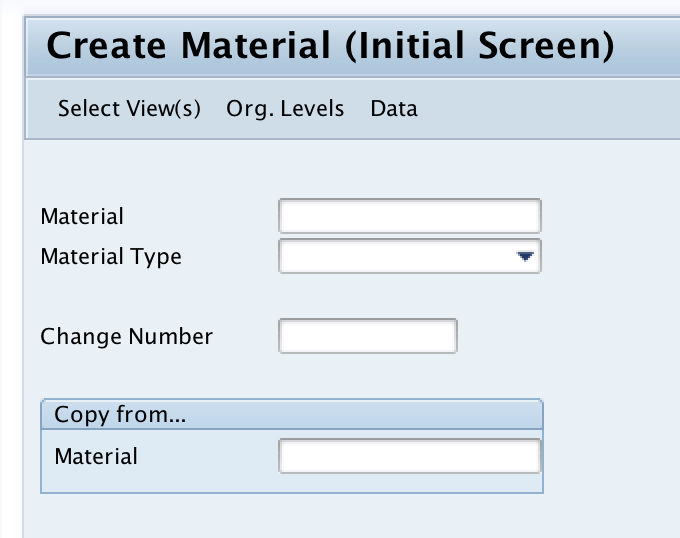
A material master record can contain general data, purchasing data, plant data, storage data, accounting data, costing data, MRP data, sales data, quality management data, warehouse data, and other views. Not every material requires every view. For example, a raw material normally needs purchasing, inventory, accounting, and MRP-related data, while a finished product may also need sales and costing views.
Common SAP material master transaction codes
| Transaction code | Purpose in material master data maintenance |
|---|---|
| MM01 | Create a material master record. |
| MM02 | Change an existing material master record. |
| MM03 | Display material master data without changing it. |
| MM17 | Mass maintenance of material master fields for multiple materials. |
| MASS | General mass maintenance transaction that can also be used for material-related objects, based on authorization and object selection. |
For a beginner in SAP MM, MM01, MM02, and MM03 are the most common transactions. MM17 is used when many material records need the same field update, such as changing a purchasing group, MRP controller, or other allowed mass-maintenance field. MM17 should be used carefully and tested in a non-production client before applying changes to live material master data.
Important organizational levels in SAP material master data
| Organizational level | How it is used in material master data |
|---|---|
| Client | Stores data that is valid across the complete SAP client, such as material description, base unit of measure, and material group. |
| Plant | Stores plant-specific data such as MRP, purchasing, work scheduling, and plant stock settings. |
| Storage location | Stores storage-location-specific inventory data for a material. |
| Valuation area | Stores accounting and valuation data for the material, usually at plant or company code level depending on configuration. |
| Sales organization and distribution channel | Stores sales-specific material data used by SD processes. |
| Warehouse number | Stores warehouse-specific material data where warehouse management is active. |
Frequently used material master views in SAP MM
When creating a material in MM01, users select the views that are relevant for the material and business process. The following views are commonly used in SAP MM.
| Material master view | Typical information maintained |
|---|---|
| Basic Data | Material description, base unit of measure, material group, division, gross weight, net weight, and other general fields. |
| Purchasing | Purchasing group, order unit, purchasing value key, automatic purchase order indicator, and purchasing-related controls. |
| MRP | MRP type, lot size, reorder point, planning time fence, procurement type, special procurement, and planning parameters. |
| Plant Data / Storage | Storage conditions, availability check, batch management indicator, and plant-level storage information. |
| Accounting | Valuation class, price control, moving average price, standard price, and valuation-related data. |
| Costing | Costing lot size, origin group, overhead group, and costing-related settings. |
| Sales | Sales unit, delivering plant, tax classification, item category group, and sales organization-specific data. |
| Quality Management | QM procurement settings, inspection setup, certificate requirements, and quality-related controls. |
SAP material master fields that affect MM processes
Several material master fields directly influence procurement, inventory management, invoice verification, and planning. The exact fields vary by view and configuration, but the following fields are important in most SAP MM implementations.
- Material type: Controls number range, screen selection, field selection, procurement behavior, and allowed views.
- Base unit of measure: Defines the main unit in which stock is managed for the material.
- Material group: Helps classify materials for reporting and procurement analysis.
- Purchasing group: Identifies the buyer or purchasing team responsible for the material.
- MRP type: Determines how the material is planned in material requirements planning.
- Procurement type: Indicates whether the material is procured externally, produced internally, or both.
- Valuation class: Links the material to the correct G/L account determination in automatic postings.
- Price control: Defines whether the material is valuated using standard price or moving average price.
- Batch management: Indicates whether stock of the material is managed in batches.
Vendor master record in SAP MM purchasing
Vendor master record contains the information about vendors – address, financial data, payment terms, purchasing data like currency, order value. Vendor master record is maintained by both purchasing department and accounting department.
In newer SAP systems, vendor master data is often handled through Business Partner functionality, but the purchasing purpose remains the same. The supplier record provides the details required to create purchase requisitions, purchase orders, goods receipts, and invoice verification documents. Vendor master data works together with material master data in procurement transactions.
Purchase info records for material and vendor combinations
Purchase info records is a combination of material master record and vendor master record, it consists the detailed information about materials and vendor supplying the required materials. Types of info records are
- Standard
- Pipeline
- Consignment
- Subcontract
A purchasing info record can store vendor-specific material data such as planned delivery time, purchasing unit, vendor material number, prices, tolerances, and text. During purchase order creation, SAP can propose values from the info record if the material, vendor, plant, and purchasing organization match the maintained data.
Source list record for approved material suppliers
Source list is a type of master data that determines the source of supply for a material, it list the preferred sources from which the material can be procured.
A source list can be used to define valid suppliers, fixed suppliers, blocked suppliers, and time-dependent source assignments for a material at plant level. It is useful when purchasing should be controlled to approved vendors or when source determination is required during procurement processing.
Quota arrangement record for splitting material procurement
Quota arrangement is a method that determines the part of the materials that can be procured from a specific source.
Quota arrangement is normally used when a material can be procured from more than one approved source and the business wants to split requirements between those sources. SAP considers the quota rating and allocation rules when determining the preferred source of supply.
Service, batch, and condition master records in SAP MM
Service master record in SAP MM
A service master record stores reusable service descriptions and units for service procurement. It helps purchasing users create service purchase orders and service entry sheets with consistent service text and measurement units.
Batch master record for batch-managed materials
A batch master record stores batch-specific information for materials that are managed in batches. It is important for industries where traceability, shelf life, manufacturing date, or quality data must be tracked for each batch of stock.
Condition records for purchasing prices and discounts
Condition records store pricing conditions such as gross price, discounts, surcharges, freight, and other purchasing conditions. In SAP MM, these records help determine the correct price in purchase orders and other procurement documents.
How SAP MM material master data supports procurement flow
Material master data is used throughout the procurement cycle. When a user creates a purchase requisition or purchase order, SAP reads the material master to propose values such as material description, unit of measure, purchasing group, valuation data, and inventory settings. During goods receipt, the material master helps determine stock management and valuation behavior. During invoice verification, it supports matching of material, quantity, and value data with purchasing documents.
| Procurement step | Material master data used |
|---|---|
| Purchase requisition | Material description, base unit of measure, plant, MRP data, and purchasing group. |
| Purchase order | Purchasing data, order unit, valuation data, vendor-specific info record data, and account assignment controls. |
| Goods receipt | Stock management data, batch settings, storage data, and valuation data. |
| Invoice verification | Material, quantity, value, price control, and account determination-related data. |
| Inventory reporting | Material group, plant, storage location, batch, valuation class, and unit of measure. |
Create, change, display, and mass update material master data
The normal lifecycle of a material master record starts with creation in MM01, followed by controlled changes in MM02 and display or review in MM03. For large updates, MM17 or MASS may be used if the field is supported for mass maintenance and the user has the required authorization.
- Create material master data: Use MM01 and select the required material type, industry sector, views, and organizational levels.
- Change material master data: Use MM02 when an existing material field needs to be corrected or extended.
- Display material master data: Use MM03 to review material views without making changes.
- Mass maintain material data: Use MM17 or MASS for controlled updates to multiple material records.
- Extend material to a new plant or view: Use MM01 with an existing material number and select the additional organizational levels or views.
Mass changes to material master data should be handled with approval, backup reports, and validation. A small test set should be updated first so that the results can be checked before applying the change to a larger material population.
Common SAP MM material master data issues and corrections
| Issue | Likely reason | What to check |
|---|---|---|
| Material cannot be used in a purchase order | Required purchasing view or plant data is missing. | Check MM03 for the material, plant, and purchasing view. |
| Accounting data is missing during goods movement | Accounting view or valuation data is not maintained. | Check valuation class, price control, and valuation area. |
| MRP does not plan the material correctly | MRP view data is incomplete or incorrect. | Check MRP type, lot size, procurement type, reorder point, and planning parameters. |
| Wrong G/L account is determined | Valuation class or account determination settings are incorrect. | Check accounting view and automatic account determination configuration. |
| Material number cannot be created | Material type number range or authorization may be missing. | Check material type settings, number range, and user authorization. |
QA checklist for SAP MM material master data maintenance
- Confirm that the correct material type is selected before creating the material in MM01.
- Check that all required views are selected for the business process, such as purchasing, MRP, accounting, sales, or quality management.
- Verify plant, storage location, valuation area, purchasing organization, and other organizational levels before saving.
- Review base unit of measure, order unit, material group, purchasing group, and MRP type for consistency.
- Confirm valuation class, price control, and standard or moving average price before using the material in postings.
- Use MM03 to review the saved material master record before creating purchasing or inventory documents.
- For MM17 or MASS updates, test the change on a small group of materials and keep an export of old values for review.
FAQs on SAP MM material master data
What is material master data in SAP MM?
Material master data in SAP MM is the central record that stores information about materials used in purchasing, inventory management, accounting, production, sales, and other business processes. It contains general data and view-specific data based on the material type and organizational levels.
Which transaction code is used to create material master data in SAP?
The transaction code to create material master data is MM01. The transaction code to change material master data is MM02, and the transaction code to display material master data is MM03.
What is MM17 used for in SAP material master maintenance?
MM17 is used for mass maintenance of material master data. It allows authorized users to update supported fields for multiple materials in one process. It should be used carefully because a wrong mass update can affect many material records.
How do you see material master data in SAP?
You can display material master data using transaction code MM03. Enter the material number, choose the required views, enter the organizational levels such as plant or storage location when required, and display the material details.
What is the difference between material master and vendor master in SAP MM?
Material master stores information about the material, such as description, unit of measure, purchasing data, MRP data, and valuation data. Vendor master stores information about the supplier, such as address, payment terms, purchasing data, and accounting data. Procurement transactions often use both records together.