 TutorialKart.com
How to define vendor account groups with screen layout in SAP using OBD3
In this SAP FICO tutorial you will learn how to define vendor account groups with screen layout in SAP using transaction code OBD3. Vendor account groups control how vendor master records are classified, which fields appear during vendor creation, which fields are required, and how vendor numbers are assigned through the related number range settings.
Use this configuration when your company wants separate vendor master rules for domestic suppliers, import suppliers, one-time vendors, intercompany vendors, or other vendor categories. The screen layout part of OBD3 is important because it helps keep vendor master data complete and consistent for accounting and payment processing.
What a vendor account group controls in SAP FICO
A vendor account group is a four-character key assigned to a vendor master record. It determines the behavior of the vendor master screen during creation and change. In practical SAP FICO configuration, the account group normally affects the following areas:
- Vendor classification: Groups vendors such as domestic vendors, import vendors, one-time vendors, and other supplier categories.
- Screen layout: Defines whether fields are suppressed, optional, required, or display-only while maintaining vendor master data.
- Number assignment: Works with vendor number ranges to decide whether the vendor number is entered manually or generated by the system.
- One-time vendor handling: Allows creation of vendors used for occasional transactions where full vendor master details are not maintained permanently.
- Master data consistency: Ensures key fields such as reconciliation account are available and maintained where required.
OBD3 vendor account group setup values used in this tutorial
The following sample configuration values are used to explain the OBD3 setup. You can use different keys and descriptions based on your project naming standards.
| Group | Name | Typical use |
| T001 | Domestic Vendors | Vendors located in the same country as the company code |
| T002 | Import Vendors | Foreign suppliers or vendors used for import purchases |
| T003 | One Time Vendors | Occasional vendors where repeated master data maintenance is not needed |
IMG path and transaction code for defining vendor account groups
| SAP R/3 Role Menu | Define account groups with screen layout (Vendor) |
| Transaction code | OBD3 |
| IMG path | SPRO > IMG >Financial Accounting > Accounts Receivable & Accounts Payable > Vendor Accounts > Master Data > Define Account Groups with Screen Layout (Vendors) |
You can also start the configuration directly by entering transaction code OBD3 in the SAP command field. In many SAP S/4HANA systems, supplier master data is maintained through Business Partner transactions, but the vendor account group settings remain part of the finance configuration that influences supplier accounting data.
Before creating vendor account groups in OBD3
Before you create a new vendor account group, confirm the design with the finance and procurement teams. A clean design avoids duplicate vendor categories and prevents unnecessary changes after vendor master data has already been created.
- Decide the account group key and description.
- Confirm whether the account group is for normal vendors or one-time vendors.
- Decide the vendor number range and whether numbering should be internal or external.
- Identify mandatory accounting fields, especially reconciliation account.
- Review field status requirements for company code data, purchasing data, and general data.
- Confirm whether the configuration should be captured in a transport request.
Step 1: Open OBD3 to maintain vendor account groups in SAP
Enter transaction code “OBD3” in the SAP command field and press Enter.

The system opens the overview screen for vendor account groups. Existing account groups are displayed in the list, and you can either review an existing group or create a new one.
Step 2: Choose New Entries for a new SAP vendor account group
On the change view “Vendor Account Groups” overview screen, click New Entries to create a new vendor account group as per your business requirement.
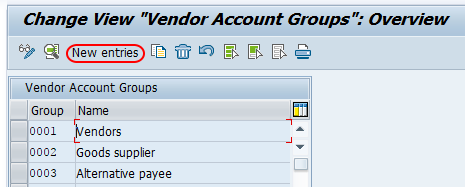
If a similar account group already exists, review it before creating another one. Too many account groups can make vendor master governance difficult, especially when each group has different field status and number range rules.
Step 3: Enter the vendor account group key, description, and one-time vendor setting
On the new entries details screen, maintain the required values for the vendor account group.
- Account group: Enter the four-character key that identifies the vendor account group in SAP.
- Description/Meaning: Enter a clear description, such as Domestic Vendors, Import Vendors, or One Time Vendors.
- One-Time account: Leave this option blank for normal vendor account groups. Select this option only when the account group is meant for one-time vendors.
- Field Status: Double-click the required field status group, such as company code data, to maintain field control for that part of the vendor master.
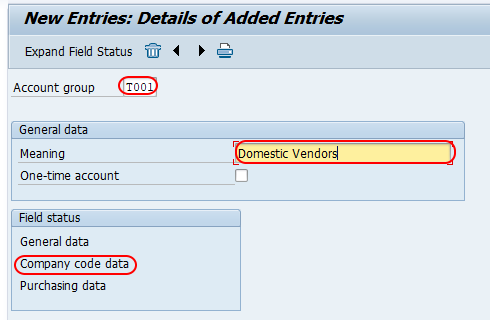
The one-time account indicator should be used carefully. A one-time vendor account group is useful for occasional vendors, but it is not suitable when you need regular vendor reporting, recurring payments, or detailed vendor master history.
Step 4: Maintain company code field status for the vendor account group
On the maintain field status group overview screen, choose Account Management under the selected field group. This is where you control important accounting fields for the vendor account group.
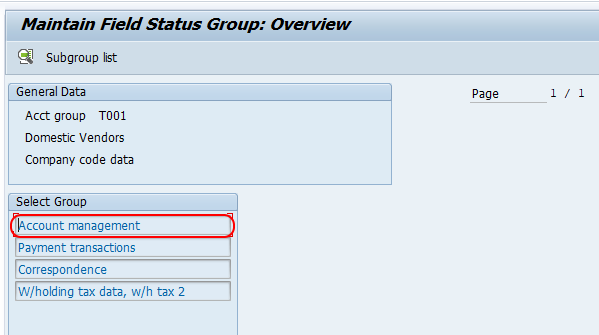
In field status configuration, each field can generally be controlled as suppressed, optional, required, or display-only. For vendor accounting data, the reconciliation account is normally maintained as a required entry so the vendor subledger can be linked correctly to the general ledger.
Step 5: Set reconciliation account as required for vendor accounting data
On the maintain field status group account management screen, choose the reconciliation account as a required entry.
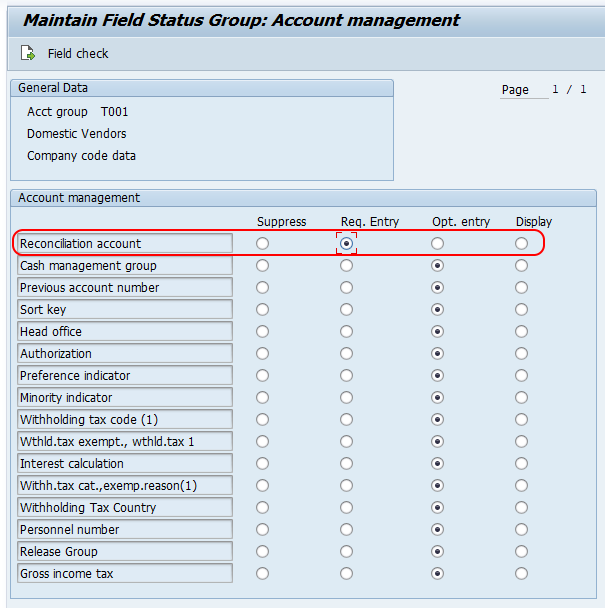
Click the save button and save the configured details. If the system prompts for a customizing request, assign the configuration to the correct transport request for movement to the quality and production systems.
Why reconciliation account is required in vendor account group screen layout
The reconciliation account connects vendor subledger postings to the general ledger. When invoices, payments, and clearing postings are made for a vendor, the system uses the reconciliation account maintained in the vendor master to update the correct G/L account automatically.
For this reason, reconciliation account should normally be set as a required field in the vendor account group screen layout. If it is not maintained for a vendor master, the system cannot process accounting postings correctly for that vendor. Making the field required reduces incomplete vendor master records and avoids errors during invoice posting or payment processing.
Vendor account group field status options in OBD3
While defining vendor account groups with screen layout in SAP, field status must be selected based on business need. Do not make every field required. Required fields should be limited to data that is necessary for accounting, purchasing, tax, payment, or reporting processes.
| Field status option | Meaning in vendor master maintenance | When to use it |
| Suppress | The field is hidden from the screen. | Use when the field is not relevant for this vendor account group. |
| Optional | The field is visible but not mandatory. | Use when the value is helpful but not always required. |
| Required | The user must enter a value before saving. | Use for critical fields such as reconciliation account where master data must be complete. |
| Display | The field is visible but cannot be edited in that screen. | Use when the value should be shown for reference but controlled elsewhere. |
How to display an existing vendor account group in SAP
To display an existing vendor account group, enter transaction code OBD3 and review the account group in the overview list. Select the account group to view its description, one-time account setting, and screen layout controls. If you want to check which account group is assigned to a vendor master, display the vendor master record and review the account group shown in the vendor master data.
For older SAP ERP systems, vendor master records are commonly displayed with vendor master transactions such as FK03 or XK03, depending on whether you need accounting data or purchasing data. In SAP S/4HANA environments, supplier data is commonly viewed through Business Partner maintenance based on the system design.
Testing a new SAP vendor account group after OBD3 configuration
After saving the vendor account group, test it before moving the change to production. The test should confirm that the account group appears during vendor creation and that the required, optional, suppressed, and display-only fields behave as expected.
- Create or simulate a vendor master with the new account group in the development or quality system.
- Check whether the vendor number is assigned according to the expected number range.
- Confirm that the reconciliation account field is required for the relevant vendor accounting data.
- Verify that one-time vendor behavior appears only for the intended account group.
- Check that unnecessary fields are not forced as required for users.
- Confirm that the configuration is included in the correct customizing transport.
Common OBD3 vendor account group configuration mistakes
The most common mistake is creating too many account groups without a clear business reason. Another common issue is setting too many fields as required, which makes vendor creation difficult and encourages users to enter placeholder values. The account group should support clean vendor master data, not make maintenance unnecessarily complex.
- Using a one-time vendor account group for vendors that will be used regularly.
- Forgetting to align the account group with the correct number range.
- Leaving reconciliation account optional when accounting postings require it.
- Changing field status without testing the vendor creation screen.
- Creating similar account groups with only minor naming differences.
- Transporting the configuration without validating it in a test client.
OBD3 vendor account group QA checklist before transport
Use this checklist before releasing the transport request for the vendor account group configuration.
- The account group key follows the project naming convention.
- The description clearly explains the vendor category.
- The one-time account indicator is selected only for one-time vendor groups.
- The reconciliation account field is required where vendor accounting postings are expected.
- Number range assignment has been checked for the account group.
- Field status settings have been tested in vendor or supplier master creation.
- The configuration has been reviewed with finance and procurement stakeholders.
Vendor account groups with screen layout in SAP FAQ
How to define account groups in SAP for vendors?
Use transaction code OBD3 or the IMG path for Define Account Groups with Screen Layout (Vendors). Create a new account group, enter the account group key and description, maintain the one-time account indicator if required, define the field status settings, and save the configuration.
How to display vendor account group in SAP?
To display the configuration of a vendor account group, use OBD3 and select the account group from the overview screen. To check the account group assigned to a vendor master, display the vendor or supplier master record and review the account group shown in the master data.
Why is reconciliation account required for vendor account groups?
The reconciliation account links vendor subledger postings to the general ledger. Making it required in the vendor account group screen layout helps ensure that vendor master records are complete before invoices, payments, or clearing transactions are posted.
What is the difference between a normal vendor account group and a one-time vendor account group?
A normal vendor account group is used for vendors that are maintained and used repeatedly. A one-time vendor account group is used for occasional vendors where full permanent master data is not needed for every supplier.
Are F-44 and FK09 used to define vendor account groups?
No. Vendor account groups with screen layout are defined with OBD3. F-44 is related to vendor clearing, and FK09 is not used for creating vendor account group configuration. Use OBD3 when the requirement is to maintain account group keys and screen layout for vendors.