 TutorialKart.com
What is Valuation Level in SAP?
Valuation level specifies whether material stocks are valuated at plant level or company code level. This setting decides how SAP determines the valuation area for material stock value, material price, and inventory accounting data.
In SAP MM, the valuation level is normally decided during the initial enterprise structure configuration. It is a basic setting for inventory valuation, material master accounting views, and automatic account determination. After the system is used for business transactions, changing the valuation level is difficult and should be treated as a major design change.
Valuation level in SAP MM: plant level vs company code level
- If valuation area is plant, then the material price is unique at plant level i.e. material price may differ from plant to plant.
- If SAP Production Planning is implemented, than the valuation area is to be defined as plant.
- If the valuation area is company code, than the material price will be unique at company code level i.e. material price will be same for all plants under one company code but the material price may differ in other company code.
| Valuation level option | Meaning in SAP MM | Typical impact |
|---|---|---|
| Valuation area is a plant | Each plant is treated as a separate valuation area. | The same material can have different valuation data and price in different plants. |
| Valuation level is company code | The company code is treated as the valuation area. | The same material has one valuation view across plants belonging to that company code. |
In most SAP MM and SAP S/4HANA implementations, plant-level valuation is preferred because it supports plant-specific inventory valuation, costing, and production-related processes. Company-code-level valuation is simpler, but it gives less flexibility when different plants need different material prices or valuation data.
Note: – In the middle of business it is very difficult to change the valuation area from plant to company code or from company code to plant.
Why valuation level is important for material price and inventory posting
The valuation level affects how SAP stores and reads material valuation data. When a material is extended to the accounting view, SAP uses the valuation area to determine where the material price and valuation information is maintained.
- Material price control: The standard price or moving average price is maintained for the valuation area.
- Inventory account posting: Goods receipt, goods issue, and stock transfer postings use valuation data based on the selected valuation level.
- Plant-level costing: If valuation is at plant level, each plant can carry its own material cost and valuation data.
- Material master accounting view: The valuation area controls how the accounting data is created and displayed for a material.
Because this setting influences live stock valuation, it should be finalized before creating productive material masters and before posting inventory transactions.
How to Define Valuation Level in SAP
In our previous training we have leaned how to create purchase organization in SAP. In this SAP MM tutorials, you will learn how to maintain valuation level in SAP step by step.
You can define valuation level by using one of the following navigation method.
- Transaction code: – OX14
- Menu Path: – SPRO -> SAP Customizing Implementation Guide -> Enterprise Structure -> Definition -> Logistics-General -> Define Valuation Level.
OX14 transaction steps to maintain valuation level in SAP
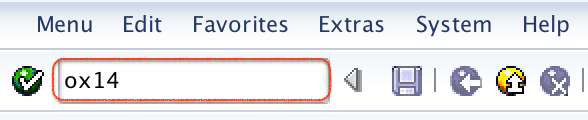
Step 1) Enter T_Code “OX14” in the command field and execute.
Step 2) On valuation level screen, it displays with two options i.e.
- Valuation area is a plant
- Valuation level is company code
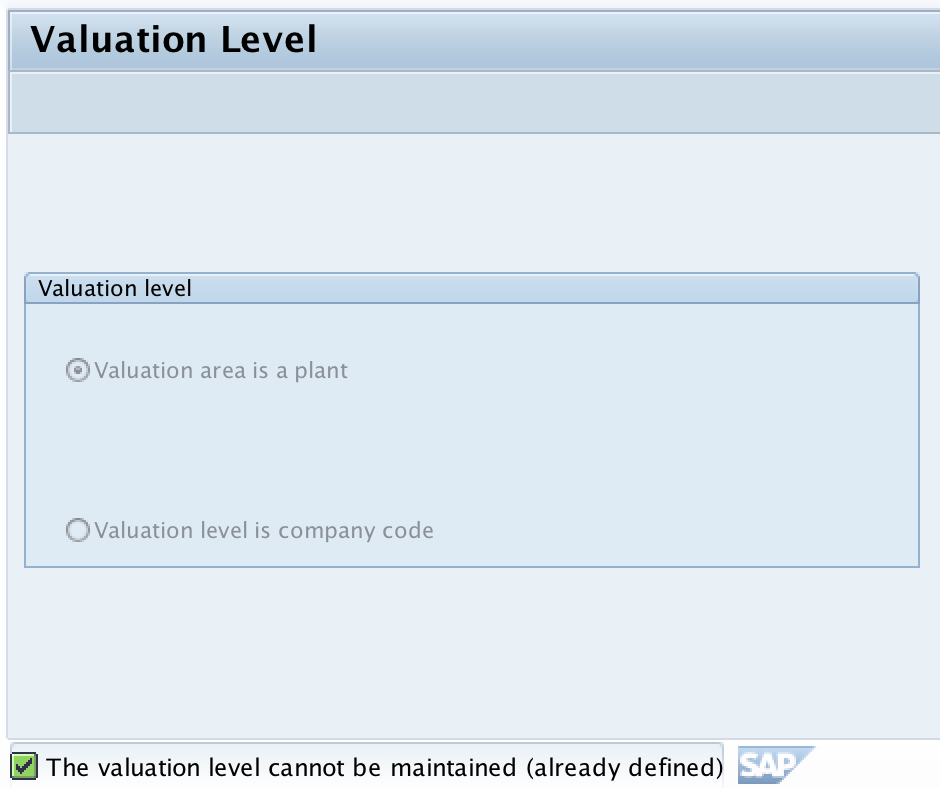
Step 3) Select the required valuation level as per the enterprise structure design. For most plant-based logistics and production scenarios, select Valuation area is a plant. If the business specifically requires one material valuation per company code, select Valuation level is company code.
Step 4) Save the configuration in the correct customizing request. After saving, continue with the remaining enterprise structure and materials management configuration activities.
Note: – In the middle of business it is very difficult to change the valuation area from plant to company code or from company code to plant.
Important checks before selecting SAP valuation level in OX14
- Check whether SAP PP is in scope: If production planning and costing are used, plant-level valuation is generally required.
- Check whether plants need different material prices: If the same material can have different cost or price by plant, use plant-level valuation.
- Check company-code accounting requirements: If all plants under one company code must share the same material valuation, company-code-level valuation may be considered.
- Check future expansion: A simple company-code valuation design may become restrictive when more plants or production processes are added.
- Check material master status: Avoid changing this setting after material masters and stock postings exist in the system.
SAP valuation area and valuation level difference
The terms valuation level and valuation area are related, but they are not exactly the same. Valuation level is the configuration choice that tells SAP whether valuation should happen at plant level or company code level. Valuation area is the actual organizational unit used for valuation after that choice is made.
| Term | Meaning | Example |
|---|---|---|
| Valuation level | The configuration level selected in OX14. | Plant level or company code level. |
| Valuation area | The actual unit at which material stock is valuated. | A plant if plant-level valuation is selected; a company code if company-code-level valuation is selected. |
For example, if plant-level valuation is selected, each plant becomes a valuation area. If company-code-level valuation is selected, the company code becomes the valuation area.
SAP tables related to valuation level and valuation area
Consultants often verify valuation settings through SAP configuration tables. The following table gives the commonly referenced objects for valuation-level checks.
| SAP table or field | Purpose in valuation setup |
|---|---|
| T001K | Stores valuation area related assignment data. |
| BWKEY | Valuation area key used in material valuation data. |
| MBEW | Stores material valuation data by valuation area. |
These tables are useful for checking configuration and material valuation data. Configuration changes should still be performed through the IMG activity or the relevant SAP transaction, not by directly changing database table entries.
Can valuation level be changed after SAP go-live?
Changing the valuation level after productive use is not a normal day-to-day configuration change. The setting affects material master accounting views, inventory values, stock postings, and account determination. If materials and stock postings already exist, changing from plant valuation to company code valuation, or from company code valuation to plant valuation, can require a major conversion and careful data cleanup.
For this reason, valuation level should be decided during the design phase. If a live system needs a change, it should be handled as a controlled project activity with functional, technical, finance, and logistics review.
Common mistakes while defining valuation level in SAP MM
- Selecting company-code valuation only for simplicity: This may limit plant-specific material pricing later.
- Ignoring production planning requirements: SAP PP and plant-level costing scenarios usually need plant-level valuation.
- Changing valuation level after master data creation: This can create serious conversion and reconciliation issues.
- Confusing valuation level with valuation class: Valuation level decides the organizational level of valuation; valuation class helps determine G/L accounts for material postings.
- Not aligning MM and FI teams: Inventory valuation affects both logistics and financial accounting, so both teams should approve the design.
Valuation level in SAP FAQs
What is the transaction code to define valuation level in SAP?
The transaction code to define valuation level in SAP is OX14. You can also access it through SPRO > SAP Customizing Implementation Guide > Enterprise Structure > Definition > Logistics-General > Define Valuation Level.
What is the difference between valuation level and valuation area in SAP?
Valuation level is the configuration setting that decides whether material stock is valuated at plant level or company code level. Valuation area is the actual plant or company code used for valuation after that setting is selected.
How to change valuation level in SAP?
Valuation level is maintained in OX14, but changing it after the system is used for material masters and inventory postings is difficult. In a live system, such a change should be handled as a formal conversion project after checking material valuation data, stock postings, and financial accounting impact.
Is plant-level valuation required for SAP Production Planning?
Plant-level valuation is normally required when SAP Production Planning and plant-specific costing are used, because materials may need different valuation and costing data by plant.
Is valuation level the same as valuation class in SAP?
No. Valuation level decides whether stock is valuated at plant level or company code level. Valuation class is used in automatic account determination to help post material transactions to the correct G/L accounts.
Editorial QA checklist for SAP valuation level tutorial
- Confirm that OX14 is shown as the transaction for defining valuation level in SAP.
- Check that plant-level valuation and company-code-level valuation are explained with their effect on material price.
- Verify that the warning about changing valuation level after business use is clearly retained.
- Confirm that SAP PP and plant-specific costing are connected only with plant-level valuation, not company-code-level valuation.
- Check that valuation level is not confused with valuation class, purchasing organization, or plant assignment configuration.