 TutorialKart.com
General Configuration in Tally.ERP 9 controls common display, date, number, table, import, export, and reporting preferences. In this Tally tutorial, you will learn how to open the F12 General Configuration screen, understand its main settings, and verify the changes before using them for regular accounting work.
How to Open General Configuration in Tally.ERP 9
Open the required company and follow this path:
Gateway of Tally > F12: Configurations > General
You can also press F12 from the Gateway of Tally and select General. The available fields can vary slightly by Tally.ERP 9 release, enabled features, country selection, and the screen from which F12 is opened.
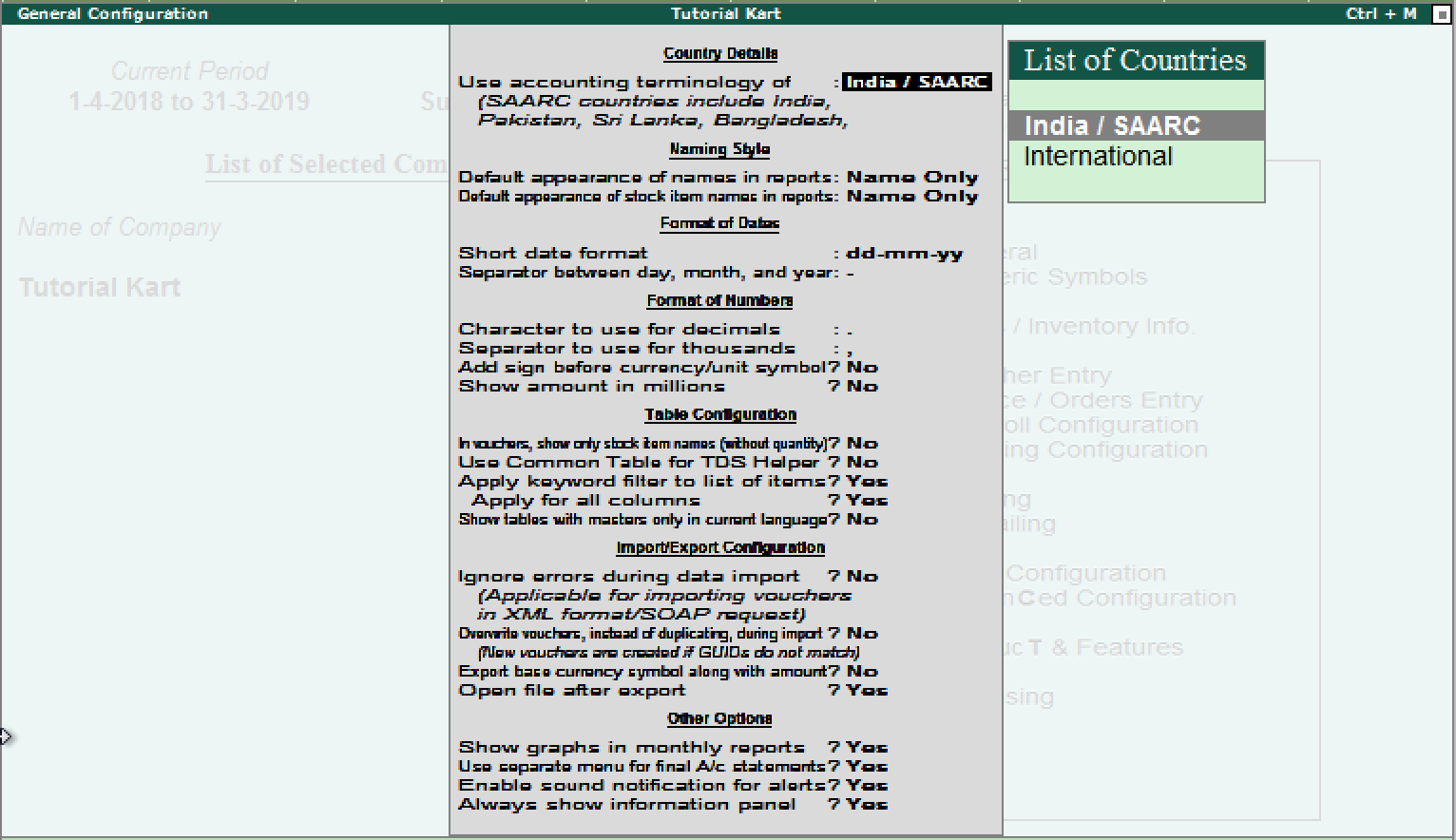
Country Details and Accounting Terminology in Tally
The Country Details section determines the regional accounting terminology used in reports and entry screens. For an organisation using Indian or SAARC accounting conventions, configure the following option as appropriate:
- Use accounting terminology of: India/SAARC
Choose terminology that matches the organisation’s accounting practices. Review this setting before training users or preparing printed reports so that the labels remain consistent.
Name Style for Ledgers and Stock Items
Name Style settings determine how ledger, group, and stock item names appear in reports and selection lists. A straightforward configuration is:
- Default appearance of names in reports: Name only
- Default appearance of stock item names in reports: Name only
If aliases or descriptions are used to distinguish similar masters, select the available display style that makes those identifiers visible. The choice affects presentation; it does not rename the underlying master.
Date Format Settings in Tally.ERP 9
The Format of Dates section controls how dates are displayed in vouchers and reports. A commonly used configuration is:
- Short date format: dd-mm-yy
- Separator between day, month, and year: –
Select a format familiar to the users entering vouchers. After saving the setting, open a day book or voucher register and confirm that dates are unambiguous.
Decimal, Thousand Separator, and Currency Display Settings
The Format of Numbers section controls the visual presentation of quantities and amounts. It does not change the recorded value of an accounting transaction. The following settings use a decimal point and comma separator:
- Character to use for decimals: .
- Separator to use for thousands: ,
- Add space before currency/unit symbol: No
- Show amount in millions: No
Check the resulting amount format in a report before applying it as an office standard. In particular, confirm whether the organisation expects the Indian grouping style or an international thousands-and-millions presentation.
Table Configuration for Voucher and Master Selection
Table Configuration changes how masters and stock items are displayed or filtered while users select them. The example configuration shown here is:
- In vouchers, show only stock item names without quantity: No
- Use common table for TDS helper: No
- Apply keyword filter to list of items: Yes
- Apply for all columns: Yes
- Show tables with masters only in the current language: No
Keyword filtering is useful when a company has many ledgers or stock items. Test the filter by entering part of a master name, alias, or other displayed value and confirming that the expected record remains available for selection.
Import and Export Configuration in Tally.ERP 9
Import/Export Configuration determines how Tally handles incoming data and exported files. An example configuration is:
- Ignore errors during data import: No
- Overwrite vouchers instead of duplicating during import: No
- Export base currency symbol along with amount: Yes
- Open file after export: Yes
Keep error reporting enabled when validating a new import file. If errors are ignored, incomplete or rejected records can be harder to identify. The overwrite option also requires care because voucher matching and alteration can affect existing company data. Take a backup and test the import in a copy of the company before processing a large or unfamiliar file.
Graph, Final Accounts, Alert, and Information Panel Options
The Other Options section contains general interface and reporting preferences. The settings may include:
- Show graphs in monthly reports: Yes
- Use separate menu for final accounts statements: Yes
- Enable notifications for alerts: Yes
- Always show information panel: Yes
These choices mainly affect navigation and presentation. For example, disabling graphs can provide a simpler report view, while a separate final accounts menu can make related statements easier to locate.
How to Save F12 General Configuration Changes
After updating the required fields, press Ctrl+A to accept the configuration when that shortcut is available. You can also press Enter through the remaining fields and accept the screen. Return to the relevant voucher or report and confirm that the new display or behaviour is in effect in Tally.ERP 9.
F11 Features and F12 Configuration in Tally: Key Difference
F11: Features is used to enable or disable accounting, inventory, taxation, payroll, and other company capabilities. F12: Configuration is used mainly to control how enabled functions, screens, reports, and entry forms are displayed or operated. If a required field is unavailable, first check whether the related feature has been enabled under F11.
General Configuration Verification Checklist
- Confirm that the required company is open before changing its working preferences.
- Record the previous date, number, and name-display settings before modifying them.
- Open a voucher register and verify the date and amount presentation after saving.
- Search a long ledger or stock-item list to confirm that keyword filtering works as expected.
- Back up company data before testing import overwrite or error-handling options.
- Export a small report and verify the currency symbol and automatic file-opening behaviour.
- Reopen the General Configuration screen and confirm that the selected values were accepted.
FAQs About General Configuration in Tally.ERP 9
What is configuration in Tally.ERP 9?
Configuration refers to preferences that control the display and operation of Tally screens, reports, voucher entry forms, tables, imports, and exports. Most of these preferences are accessed through F12.
What does the F12 key do in Tally?
F12 opens configuration options. The exact configuration screen can depend on where F12 is pressed. From the Gateway of Tally, you can open general settings, while pressing it in a voucher or report can show options relevant to that screen.
Does changing General Configuration alter voucher values?
Display preferences such as date format, name style, separators, and graph visibility do not normally change recorded voucher values. Import settings require more caution because they can affect how incoming vouchers are processed.
Why are some F12 General Configuration options not visible?
Available options can differ by Tally.ERP 9 release, country, active company features, user permissions, language, and the screen from which F12 is opened. Check F11 Features if an option depends on a company feature that has not been enabled.
How can I restore a General Configuration setting?
Open F12 General Configuration again, replace the changed value with the previous selection, and accept the screen. Keeping a note or screenshot of the original settings makes restoration easier.