 TutorialKart.com
In this SAP SD tutorial, you will learn how to define partner functions and setup partner determination procedure in SAP step by step using transaction code VOPAN. Partner determination controls which business partners, such as sold-to party, ship-to party, bill-to party, payer, contact person, forwarding agent, or any custom partner role, are proposed and allowed in customer master records and sales documents.
The configuration shown here is focused on the customer master partner object. The same VOPAN transaction is also used for other partner objects in Sales and Distribution, but the assignment level and business impact can differ by object.
What partner determination procedure controls in SAP SD
A partner determination procedure in SAP SD is a grouping of partner functions. It tells the system which partner functions are valid for a particular business object and whether each function is mandatory, unique, or not modifiable. In customer master processing, this helps the system determine which partners must be maintained for the customer account group.
For example, a customer account can require a sold-to party and allow related ship-to, bill-to, and payer partners. If a business needs an additional role such as transport coordinator or tax contact, a custom partner function can be defined and included in the relevant partner determination procedure.
SAP SD partner functions, partner types, and account group assignment
Before creating a partner determination procedure, it is important to understand three configuration elements used in VOPAN.
| Configuration element | Purpose in partner determination |
|---|---|
| Partner function | Defines the role of the partner, such as sold-to party, ship-to party, bill-to party, payer, or a custom role. |
| Partner type | Defines the category of the partner. For customer-related partner functions, the partner type is normally customer. |
| Account group function assignment | Controls which partner functions are allowed for a specific customer account group. |
| Partner determination procedure | Groups partner functions and controls mandatory, unique, and modifiability settings. |
In most SAP SD customer master scenarios, standard partner functions such as SP, SH, BP, and PY are already available. Create a new partner function only when the business requirement cannot be met with standard SAP partner functions.
Navigation for setup partner determination in SAP SD
In order to get the required partner functions into customer master data, we have to define partner determination procedure in SAP SD.
| SAP R/3 Role Menu | Setup partner determination |
| Transaction Code | VOPAN |
| SAP Menu Path | SPRO => Sales and Distribution(SD) => Basic functions => Partner determination => Setup partner determination. |
Step 1: Open VOPAN to maintain SAP SD partner determination
Execute transaction code VOPAN in the SAP command field.
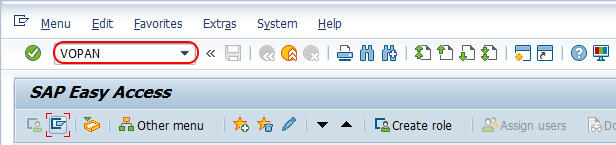
Step 2: Choose customer master as the partner object in VOPAN
On the maintain partner determination screen, choose the partner object Customer Master and click the change button. This selection is important because the partner functions and procedures maintained here will apply to customer master partner data, not directly to sales documents or deliveries.
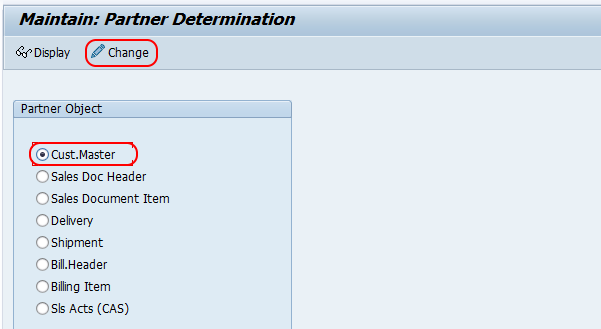
Step 3: Define partner functions for SAP SD customer master
For each partner function you have to specify a corresponding partner type, which controls the functionality of the partner. For a customer-related partner function, partner type KU represents customer. If a partner function is marked as unique, only one partner of that function can be maintained where the function is used. The standard sold-to party function SP is always treated as unique.
From the partner determination procedures overview screen, click on New Entries to create new partner determination procedure entries as per the requirements of the client.
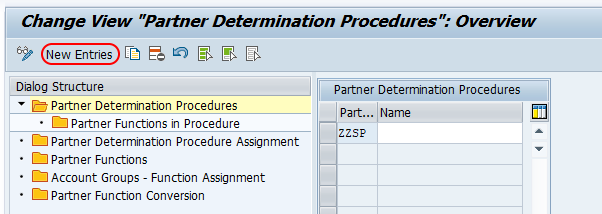
Under the dialog structure, choose the Partner Functions option.
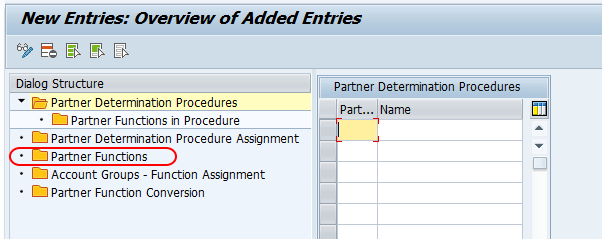
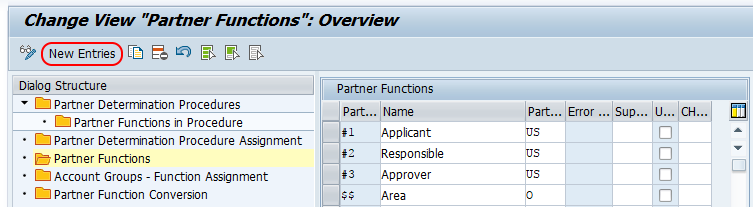
From the change view partner functions overview screen, click on the New Entries button to define new partner functions in SAP.
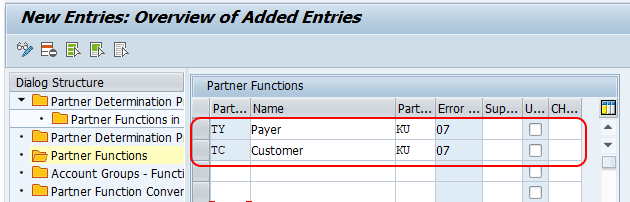
On the new entries partner functions screen, enter the following details.
- Partner: Enter the key that defines the partner function in SAP. For custom partner functions, use a naming approach that follows your project convention.
- Name: Enter the description name of the partner function in SAP.
- Partner type: Update the partner type key from the list. For customer partner functions, KU represents customer.
- Error: This field is automatically updated by the system when you press Enter from the keyboard.
Click on the save button and save the configured partner functions in SAP.
Step 4: Assign SAP SD partner function to customer account group
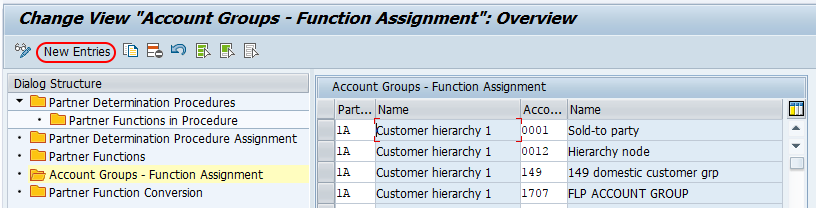
Choose Account Groups – Function Assignment and click on the New Entries button as shown in the image below. This assignment is required because customer account groups control the type of customer master record and the partner functions allowed for that customer category.
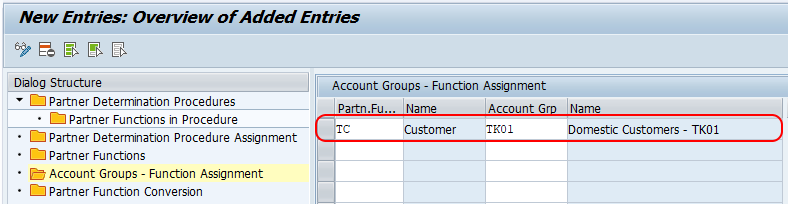
From the new entries account group function assignment screen, enter the following details.
- Partner function: Enter the partner function key, for example TC, in the field.
- Account Grp: Enter the account group key for assignment of partner functions to the required customer account group.
Click on the save button and save the details.
Step 5: Define partner determination procedure key in SAP SD
Under the dialog structure, choose Partner Determination Procedure and click on the New Entries button to create a new partner determination procedure in the SAP SD module.
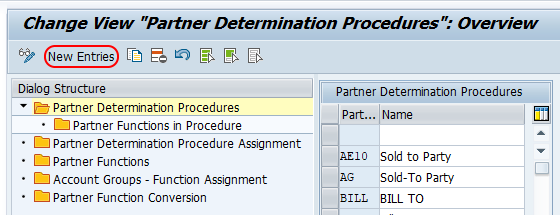
On the new entries partner determination procedures screen, update the following details.
- Part.Det.Proc: Update the four-character key that identifies the partner determination procedure in SAP.
- Name: Enter the description of the partner determination procedure key.
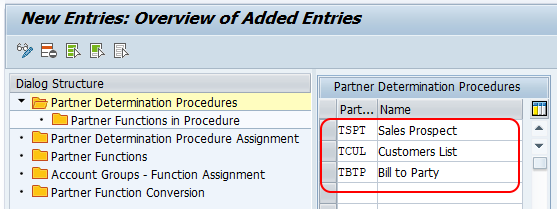
Click on the save button and save the configured details.
Step 6: Assign partner functions in the SAP partner determination procedure
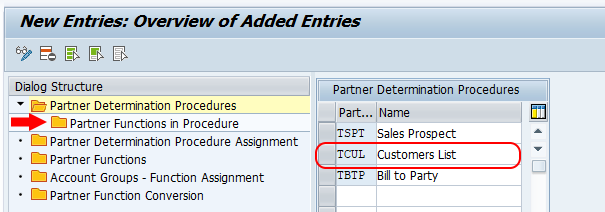
Choose the defined partner determination procedure key and double click on Partner Functions in Procedure. This step links the partner functions to the procedure and defines how each function behaves when the procedure is used.
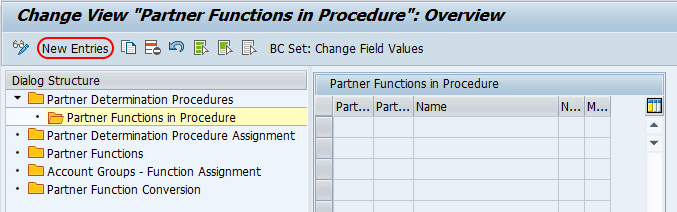
On the change view partner functions in procedure overview screen, choose the New Entries button for assignment of partner functions to the partner determination procedure.
On the new entries assignment screen, assign the partner functions for the partner determination procedure key and choose the required control indicators.
| Indicator | Meaning in partner determination procedure |
|---|---|
| Mandatory function | The partner function must be maintained where the procedure is used. |
| Not modifiable | The partner function cannot be changed manually in the relevant business process, depending on object and procedure usage. |
| Unique | Only one partner can be maintained for that partner function. |
| Source | Controls where the system can determine or propose partner data from, based on the selected configuration. |
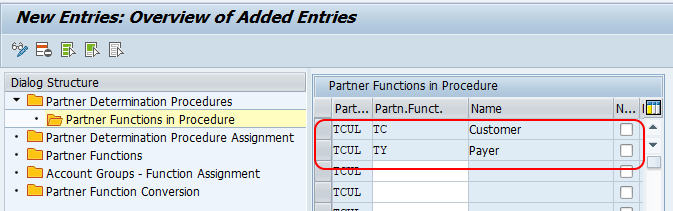
After maintaining all the required details, choose the save button and save the details.
Checks after configuring partner determination procedure in SAP SD
After saving the SAP SD partner determination configuration, check the setup before moving the transport to the next system. A small configuration mistake can cause missing partner functions in customer master maintenance or incorrect partner proposal during sales processing.
- Confirm that the partner function key and description are correct.
- Check that the correct partner type is assigned to the partner function.
- Verify that the partner function is assigned to the required customer account group.
- Confirm that the partner function is included in the correct partner determination procedure.
- Review whether mandatory, unique, and not modifiable indicators match the business requirement.
- Create or change a test customer master record and confirm that the partner function appears as expected.
Common mistakes in SAP SD partner determination setup
The most common issue is defining a partner function but not assigning it to the required account group or partner determination procedure. In that case, the function exists in configuration but does not appear where the user expects it.
- Creating a custom partner function when a standard SAP partner function already meets the requirement.
- Using the wrong partner type for the partner function.
- Forgetting the account group function assignment for the relevant customer account group.
- Marking a partner function as mandatory without ensuring that users can maintain the required partner data.
- Using not modifiable too early in testing, which can prevent business users from correcting partner data manually.
Result of SAP SD partner determination procedure configuration
Successfully, we have created partner functions and partner determination procedures in SAP. The configured partner function can now be used with the assigned customer account group and controlled through the selected partner determination procedure.
FAQs on partner determination procedure in SAP SD
What is partner determination procedure in SAP SD?
Partner determination procedure in SAP SD is a configuration object that groups partner functions and controls how those partner functions are proposed, required, and maintained for a business object such as customer master or sales document.
Which transaction code is used for partner determination procedure in SAP SD?
Transaction code VOPAN is used to setup partner determination in SAP SD. From VOPAN, you select the required partner object such as customer master and maintain partner functions, account group assignments, procedures, and partner functions in procedure.
Why is account group assignment required for partner functions?
Account group assignment is required because customer account groups control the customer master category. If a partner function is not assigned to the relevant account group, it may not be available for that customer master scenario.
What is the difference between partner function and partner determination procedure?
A partner function defines a role, such as sold-to party or ship-to party. A partner determination procedure groups partner functions and controls whether those functions are mandatory, unique, or restricted from manual changes.
Can we create custom partner functions in SAP SD?
Yes, custom partner functions can be created in SAP SD when standard partner functions do not meet the business requirement. The custom function must be assigned correctly to the relevant account group and partner determination procedure.
Editorial QA checklist for this SAP SD partner determination tutorial
- Does the tutorial clearly identify VOPAN as the transaction code for setup partner determination?
- Does it explain the relationship between partner functions, partner types, customer account groups, and partner determination procedures?
- Are the customer master configuration steps presented in the same order a user follows in SAP?
- Are mandatory, unique, and not modifiable indicators explained in practical SAP SD terms?
- Are the existing SAP screenshots and internal SAP SD links preserved without changing their URLs?