 TutorialKart.com
How to assign division to sales organization in SAP SD
In this SAP SD tutorials, you will learn how to assign division to sales organization in SAP systems step by step. In previous training we have learned how to assign a distribution channel to a sales organization in SAP.
The link between division and sales organization in SAP is established through the assignment of division to sales organization. This assignment is part of SAP SD enterprise structure configuration and helps build valid sales area combinations.
What Division Assignment Means for a SAP SD Sales Organization
A sales organization represents the selling unit responsible for sales transactions. A division is commonly used to group products, product lines, or business areas for sales processing and reporting. When you assign division to sales organization, you allow that sales organization to use the selected division in SAP SD configuration and master data.
This assignment becomes important when you create or use a sales area. In SAP SD, a sales area is built from three organizational elements: sales organization, distribution channel, and division. If the sales organization is not assigned to the required division, the intended sales area combination may not be available for customer master data, sales documents, and related SD settings.
Prerequisites Before Assigning Division to Sales Organization in SAP
- The sales organization should already be created in SAP SD enterprise structure.
- The division should already be defined with the correct division key and description.
- The required distribution channel assignment should be completed if you are building a full sales area.
- You should have authorization to maintain SAP Customizing through transaction code SPRO.
- A customizing request should be available if the SAP system asks for a transport request while saving.
SAP SPRO Path to Assign Division to Sales Organization
You can assign division to sales organization by using the following navigation method.
- Transaction code: – SPRO
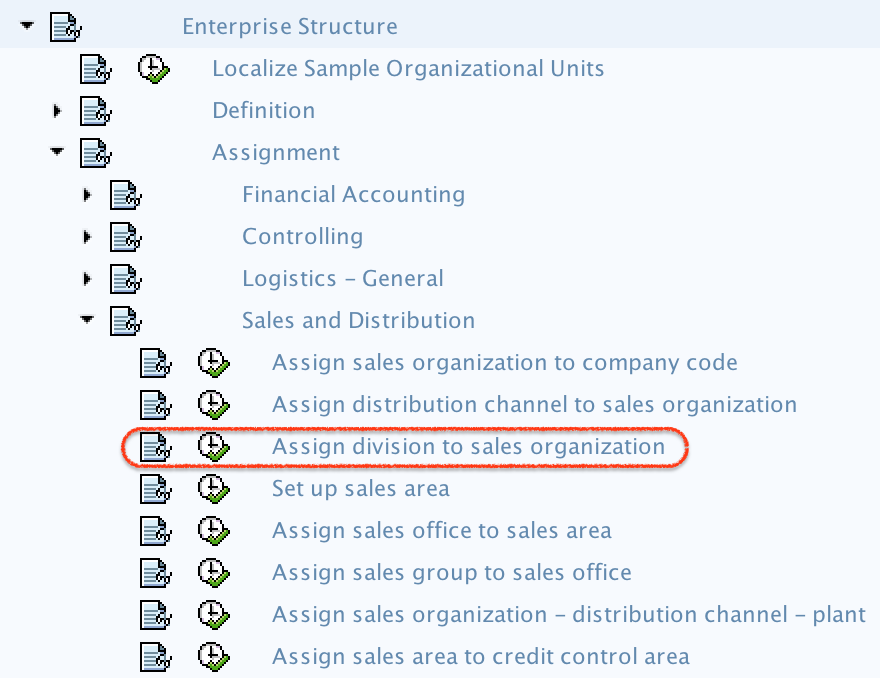
- Menu path: – SPRO > SAP implementation Guide > Enterprise Structure > Assignment > Sales & Distribution > Assign division to sales organization.
| Field | Purpose in this SAP SD assignment |
|---|---|
| SOrg | Sales organization key that will be allowed to use the selected division. |
| Dv | Division key that is assigned to the selected sales organization. |
| Customizing request | Transport request used to save and move the configuration across SAP systems. |
Step-by-Step Configuration to Assign Division to Sales Organization in SAP
Step 1) Enter T-code SPRO in command field as shown below image and click on execute button.

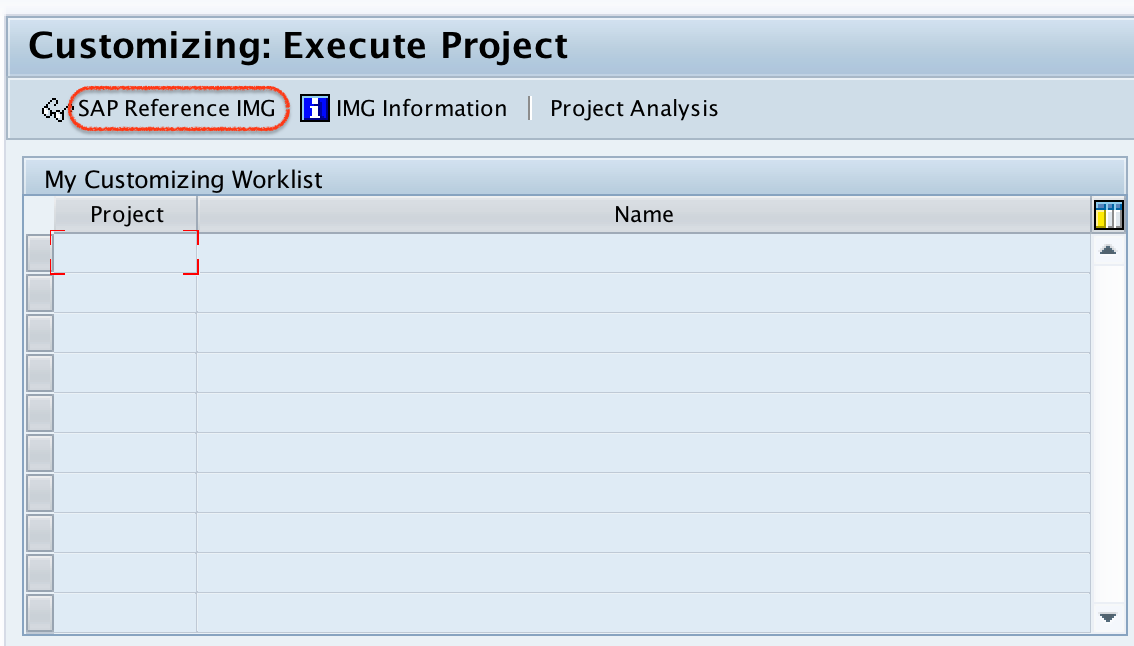
Step 2) On customizing: execute project screen, click on SAP Reference IMG.
Step 3) On display IMG screen, navigate the menu path and execute IMG assign division to sales organization.
Step 4) On change view “Assignment sales organization — Division” Overview screen, click on new entries button for assignment further configuration process.

Step 5) On new entries assignment screen, update the following details.
- SOrg: – Update the sales organization for assignment to division
- Dv: – Update the division key for sales organization assignment.
For example, if sales organization TK01 should use division 01, enter TK01 under SOrg and 01 under Dv. Use the actual sales organization and division keys configured in your SAP system.
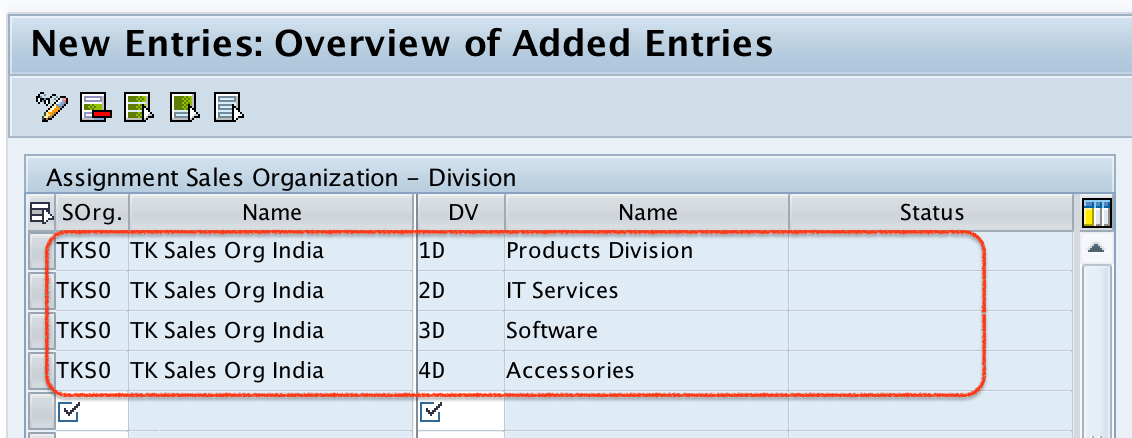
Step 6) After maintaining the required details for assignment, click on save button and save the details.

If the system prompts for a customizing request, choose the correct request and continue saving the configuration. Successfully we have assigned sales organization to division in SAP.
How Division Assignment Fits into SAP SD Sales Area Setup
Assigning division to sales organization is one part of the SAP SD enterprise structure. A complete sales area normally depends on the relationship between sales organization, distribution channel, and division. Therefore, this assignment should be checked together with the distribution channel assignment before creating or using sales area data.
| SAP SD element | What it represents | Why it matters in sales area setup |
|---|---|---|
| Sales organization | Selling unit responsible for sales activities | Forms the main selling structure for customer and sales document processing. |
| Distribution channel | Route through which products or services reach customers | Controls channel-based sales processing such as wholesale, retail, or direct sales. |
| Division | Product group, product line, or business segment | Allows sales processing and master data to be organized by product or business division. |
How to Check the Sales Organization and Division Assignment
After saving, go back to the overview screen for Assignment sales organization — Division and verify that the required SOrg and Dv combination is listed. This check confirms that the assignment was saved correctly in the current client.
If the entry is not visible, confirm that you entered the correct keys, saved the entry, and selected the correct customizing request. Also check whether the system client allows customizing changes and whether your user has the required authorization.
Common Issues in SAP Division to Sales Organization Assignment
| Issue | Likely reason | What to check |
|---|---|---|
| Sales area combination is not available | The sales organization is not assigned to the required division. | Check the assignment under Enterprise Structure > Assignment > Sales and Distribution. |
| Wrong division appears in later SD work | An incorrect Dv key was entered during configuration. | Verify the division key in the define division activity. |
| Configuration is missing in quality or production | The customizing request was not transported or imported. | Check the transport request status with the SAP basis team. |
| New Entries button is not editable | The user lacks authorization or the client is not open for changes. | Check customizing access, authorization roles, and client settings. |
Editorial QA Checklist for Assigning Division to Sales Organization in SAP
- Confirm that the article explains why sales organization and division must be linked in SAP SD.
- Confirm that the SPRO path is specific to Assign division to sales organization.
- Confirm that SOrg and Dv field meanings are clear for beginner SAP SD learners.
- Confirm that the tutorial connects this assignment with sales area setup.
- Confirm that troubleshooting covers missing sales area combinations, wrong division keys, transport issues, and authorization restrictions.
FAQs on Assigning Division to Sales Organization in SAP SD
How do I create a sales division in SAP before assignment?
To create a division, define the division key and description in SAP Customizing before using it in assignment activities. After the division is created, you can assign it to the required sales organization through the SPRO assignment path.
Why should a division be assigned to a sales organization in SAP SD?
A division should be assigned to a sales organization so that the sales organization can use that division in valid sales area combinations, customer master sales area data, sales documents, and related SAP SD configuration.
Can one sales organization be assigned to multiple divisions?
Yes. One sales organization can be assigned to multiple divisions when the business sells products or services across different product groups or business areas. Each sales organization and division combination must be maintained separately.
Is assigning division to sales organization enough to complete a sales area?
No. This assignment links only the sales organization and division. A complete SAP SD sales area also requires the sales organization, distribution channel, and division combination to be valid based on the enterprise structure setup.
How is assigning division different from assigning distribution channel to sales organization?
Assigning division connects the sales organization to a product or business division. Assigning distribution channel connects the sales organization to a sales route or channel. Both assignments are required when the business needs a valid sales area that includes sales organization, distribution channel, and division.