 TutorialKart.com
In this SAP SD tutorial, you will learn how to configure and define access sequences in SAP using transaction code V/07. Access sequences are used mainly in condition technique, especially for pricing, output determination, text determination, and similar SAP SD functions where the system has to search condition records in a defined order.
What Is an Access Sequence in SAP SD?
An access sequence is a search strategy that helps the SAP system determine valid condition records for condition types during pricing in sales documents. Access sequences are cross-client configuration objects and are usually saved in a workbench transport request.
An access sequence can contain one or more accesses. Each access usually points to a condition table. During pricing, SAP reads the accesses in sequence and searches the corresponding condition records. The usual design is to arrange condition tables from the most specific search combination to the most general search combination.
For example, a price condition may first search for a record maintained for customer and material. If that record is not available, the same condition type may then search for a record maintained only for material. This search order is controlled by the access sequence.
Purpose of Defining Access Sequences in SAP Pricing
Access sequences must be configured when a condition type needs to read condition records from one or more condition tables. In a pricing procedure, the access sequence is assigned to a condition type, and the condition type is then used in the pricing procedure.
The main purpose of an access sequence in SAP SD is to answer this question: in what order should SAP search for condition records? Without the correct access sequence, a condition type may not find the expected price, discount, surcharge, freight, tax, or output condition record.
How Access Sequence Fits into SAP SD Condition Technique
Before configuring access sequences, it is useful to understand the relationship between the main condition technique objects.
| Condition Technique Object | Role in SAP SD |
|---|---|
| Condition table | Stores the field combination used to maintain condition records, such as Sales Organization / Distribution Channel / Customer / Material. |
| Access sequence | Defines the ordered list of condition tables that SAP searches for a condition type. |
| Condition type | Represents the business condition, such as price, discount, freight, tax, or output. |
| Pricing procedure | Controls how condition types are processed in sales document pricing. |
| Condition record | Stores the actual business value, such as price amount, discount percentage, or output medium. |
In simple terms, the condition type uses the access sequence, the access sequence reads condition tables, and the condition records provide the value used in the sales document.
SAP SD Define Access Sequences Using Transaction Code V/07
Navigation details for maintaining access sequences in SAP SD
| SAP R/3 Role Menu | Maintain Access Sequences |
| Transaction Code | V/07 |
| SAP IMG Path | SPRO (Tcode) -> Implementation Guide for R/3 Customizing (IMG) => Sales and Distribution (SD) => Basic functions => Pricing => Pricing control => Maintain access sequences. |
Step 1 : – Enter Tcode “V/07” in the command field and click on execute option.

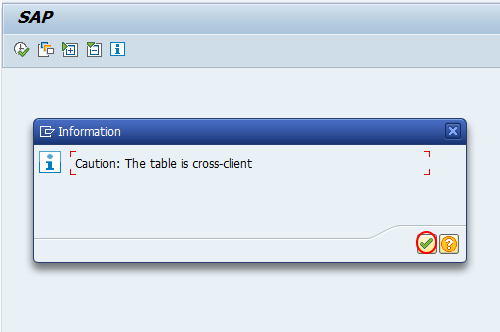
An information message appears because access sequence configuration is cross-client. Press Enter to continue. Since this setting can affect multiple clients in the same SAP system, make sure the configuration is created only in the correct customizing or development client.
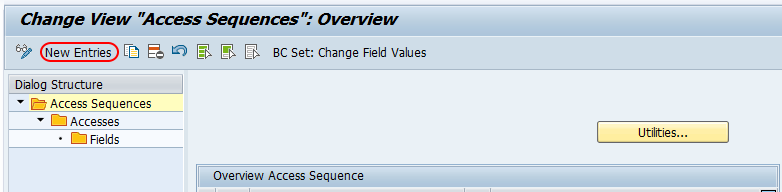
Step 2: – On change view access sequences overview screen, click on new entries button to create a new access sequence in SAP as per requirements of project.
Step 3 : – On new entries access sequence screen, update the following details.
- AS : – Enter the key that identifies the access sequence in SAP. Use the naming standard followed in your project.
- Description : – Update the descriptive text of the access sequence so that consultants can understand its purpose later.
- Ty. : – Choose the access category if it is required for the specific condition technique area.
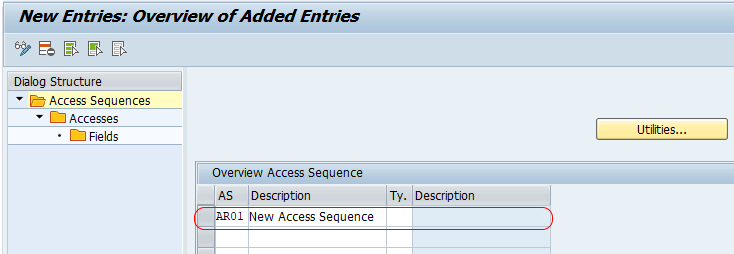
Click on save button and save the configured access sequences details in SAP.
Step 4 :– Choose newly defined access sequence key and double click on Accesses.
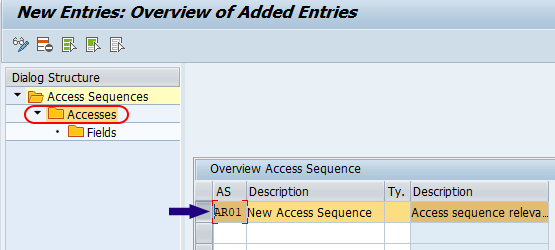
On change view accesses overview screen, click on new entries button and place the condition table from most specific to most general.
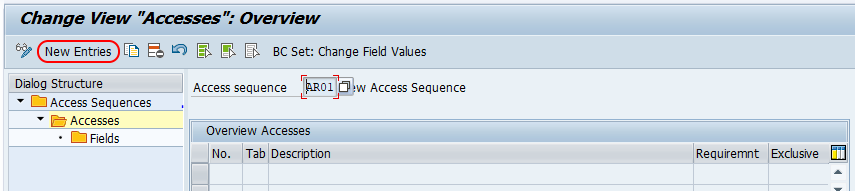
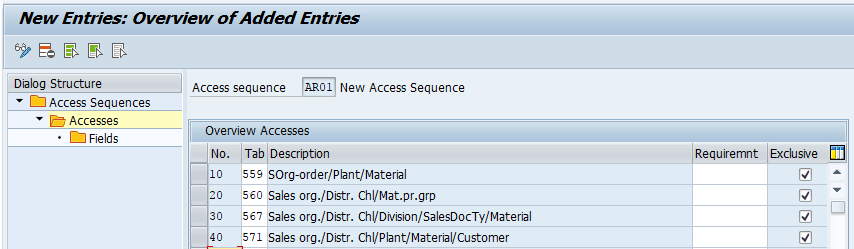
On new entries accesses screen, update the required condition tables in the required order from most specific to most general.
- No : – It specifies the sequential number of the access. SAP reads the accesses according to this number.
- Table :- In this field, you need to specify the condition table number.
- Exclusive : – If the exclusive indicator is selected, the system stops searching further accesses after it finds a valid condition record for that access. Use this only when the business rule requires SAP to stop at the first valid result.
Select the condition table entered in access sequences and click on fields. The system gives the warning messages as “The field assignment has not yet been made”, press enter till you get the fields. Repeat the same procedure for all the condition tables in access sequences. Choose the save button and save the details.
Field Assignment in SAP Access Sequence
Field assignment is an important part of access sequence configuration. It tells SAP how the fields in the condition table are filled from the sales document, customer master, material master, or other communication structures during condition record search.
When you click Fields for an access, SAP displays the fields of the selected condition table. Check that the correct source fields are assigned. For standard condition tables, SAP generally proposes the required assignments. For custom condition tables, the field catalog and field assignment should be reviewed carefully.
| Configuration Point | What to Check |
|---|---|
| Condition table fields | Confirm that the required key fields are available in the selected condition table. |
| Access number | Keep the search order logical, starting with the most specific access. |
| Exclusive indicator | Select it only when further searching must stop after a record is found. |
| Field assignment | Check that SAP can derive the condition table fields from document or master data. |
| Transport request | Save the access sequence in the correct workbench transport request. |
Example Search Order for SAP SD Access Sequence
The exact condition tables depend on the business requirement. The following example shows the logic of arranging accesses from specific to general.
| Access No. | Possible Search Combination | Reason for Position |
|---|---|---|
| 10 | Sales Organization / Distribution Channel / Customer / Material | Most specific because the price is maintained for a particular customer and material. |
| 20 | Sales Organization / Distribution Channel / Material | Less specific because the customer is not part of the key. |
| 30 | Material | Most general because only the material is used for the condition record search. |
With this design, SAP first checks whether a customer-specific condition record exists. If no valid record is found, it checks a more general material-level record. This keeps the access sequence aligned with common pricing requirements.
Assign Access Sequence to a Condition Type in SAP SD
After creating the access sequence, assign it to the required condition type. For pricing, this is usually done in condition type configuration. A condition type without an access sequence can still be used in some cases, but it will not search condition records through condition tables in the same way.
To assign an access sequence for pricing, use the relevant pricing condition type configuration path and maintain the access sequence field for the condition type. Then include the condition type in the pricing procedure if it is not already included.
For output determination, the access sequence is assigned to the output type instead of a pricing condition type. The concept is similar: SAP searches output condition records using the accesses maintained in the access sequence.
Testing Access Sequence in a Sales Document
After defining access sequences in SAP SD, maintain the required condition records and test the result in a sales order, quotation, or billing document depending on the condition type. In sales order pricing, open the item conditions and use the analysis option to check which access was used and whether SAP found a valid condition record.
- Check whether the expected condition type appears in the document.
- Open the pricing analysis and review the accesses attempted by SAP.
- Verify whether the condition record exists for the key combination shown in the analysis.
- Check validity dates, sales area, customer, material, currency, and unit of measure.
- If SAP skips an access, review the field assignment and requirement routine if one is maintained.
Common Issues While Maintaining Access Sequences in SAP
| Issue | Possible Reason | Correction |
|---|---|---|
| Condition record is not found | The required condition record is not maintained for the access key combination. | Maintain the condition record for the correct table, validity period, sales area, customer, material, currency, and unit. |
| Wrong price or discount is picked | The access order is too general before the specific access, or the exclusive indicator is used incorrectly. | Rearrange the accesses from most specific to most general and review the exclusive indicator. |
| Field assignment warning appears | The field assignment has not yet been generated or reviewed. | Open the Fields screen for the access and confirm the field assignments. |
| Access sequence not visible for condition type | The access sequence may be configured for a different condition technique area or not saved correctly. | Check the access sequence key, transport request, and condition type configuration. |
| Custom field is not available in access | The field may not be included in the field catalog or communication structure. | Review the field catalog and required enhancement before using the field in a condition table. |
Best Practices for SAP SD Access Sequence Configuration
- Use existing standard access sequences when they meet the business requirement.
- Create a new access sequence only when the required search order is different from standard SAP configuration.
- Arrange condition tables from specific to general so that SAP checks the most accurate record first.
- Use clear descriptions for access sequence keys and accesses.
- Do not select the exclusive indicator unless the condition search must stop after the first valid record.
- Document the business reason for each access, especially in custom pricing requirements.
- Test the access sequence using pricing analysis instead of checking only the condition value in the document.
FAQs on Access Sequences in SAP SD
What is the T code for access sequence in SAP?
The transaction code for maintaining pricing access sequences in SAP SD is V/07. You can also reach the same configuration from SPRO under Sales and Distribution > Basic functions > Pricing > Pricing control > Maintain access sequences.
What is an access sequence in SAP SD?
An access sequence in SAP SD is a search strategy assigned to a condition type. It controls the order in which SAP searches condition tables to find a valid condition record.
What are access sequences assigned to in SAP?
In pricing, access sequences are assigned to condition types. In output determination, access sequences are assigned to output types. The assignment depends on the condition technique area where the access sequence is used.
How do you assign an access sequence to an output type?
For output determination, go to the output type configuration for the relevant application and maintain the access sequence field for the output type. The output type then uses that access sequence to search output condition records.
Why should condition tables be placed from specific to general in an access sequence?
Condition tables are usually placed from specific to general so that SAP first searches the most precise condition record. If no record is found, SAP continues with broader combinations. This helps avoid picking a general price or discount when a more specific record should apply.
Editorial QA Checklist for This SAP Access Sequence Tutorial
- Confirms that V/07 is the transaction code used for maintaining SAP SD pricing access sequences.
- Explains that access sequences are search strategies used with condition records and condition tables.
- Shows the relationship between condition table, access sequence, condition type, pricing procedure, and condition record.
- Preserves the configuration steps for creating the access sequence and maintaining accesses.
- Clarifies the meaning of the exclusive indicator and when it should be used.
- Includes testing guidance using sales document pricing analysis.
- Answers topic-specific questions on access sequence assignment, output type usage, and search order.
Successfully we have configured access sequences in SAP.