 TutorialKart.com
In this SAP tutorials you will learn what is credit control area and how to define credit control area in SAP FICO step by step with real time scenario. Credit control area configuration is used to group company codes for customer credit limit monitoring and credit management checks.
How to create credit control area in SAP
A credit control area in SAP is an organizational unit used to control and monitor the credit limits of customers. It is commonly used with Financial Accounting and Sales and Distribution settings, because customer credit exposure is affected by accounting data, sales orders, deliveries, billing, and payment behavior.
Credit Control Area Meaning in SAP FICO
Credit control area in SAP is an organizational element that controls and monitors customer credit limits. A credit control area can include one or more company codes, but a company code cannot be assigned to more than one credit control area in SAP.
For example, if multiple company codes follow the same customer credit policy and currency, they can be assigned to one credit control area. If each company code needs separate credit control, separate credit control areas may be created and assigned accordingly.
Important SAP Configurations Before Defining Credit Control Area
Before you define credit control area in SAP, check the related configuration objects that are normally required for credit management setup.
- Define risk category
- Maintain fiscal year variant
- Define credit groups
- Maintain company code configuration
- Assign credit control area to company code after creating the credit control area
Scenario for Credit Control Area T120 in SAP
Scenario: – We need to define the following credit control area configuration.
| Credit Control | Description |
| T120 | Credit Control Area for TK Software |
Credit control area configurations are generally shared by SAP SD consultants and SAP FICO consultants. Some configuration objects are maintained from the SD side, and some are maintained from the FI side. So this topic is usually handled as a combined SAP FI and SAP SD configuration area.
OB45 Transaction Code and IMG Path for Credit Control Area
- Navigation: – SPRO – IMG – Enterprise Structure – Definition – Financial Accounting – Define Credit Control Area
- Transaction code: – OB45
- Database Table: – T014, T014T
Transaction code OB45 is used to define credit control area in SAP. Do not confuse this with FD33. FD33 is used to display customer credit management data, while OB45 is used for credit control area configuration.
Steps to Define Credit Control Area T120 in SAP FICO
Step 1) Enter T-Code “OB45” in the SAP command field and enter.

Step 2) On change view “credit control areas” overview screen, click on “New Entries” button to configure new credit control area as per company requirements.

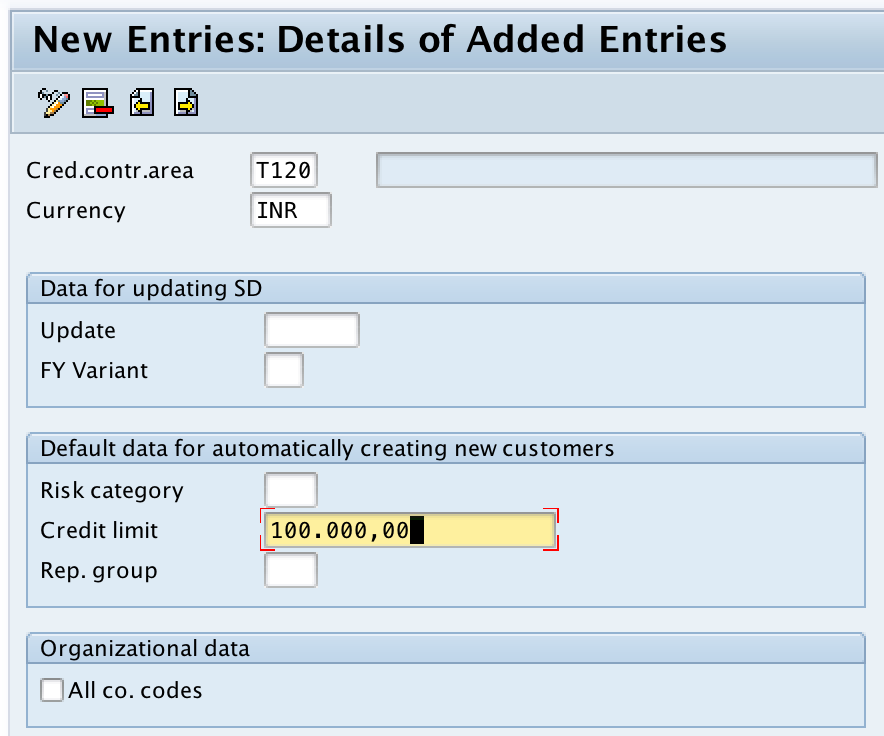
Step 3) On new entries credit control area screen, update the following details.
- Cred.control.area: – Give the four digits alphanumeric key that identifies credit control area in SAP.
- Description: – Update the descriptive text of credit control area. Now this field remains blank, it allows you to update description after saving this key.
- Currency: – Give the currency key
- Fiscal year variant: – Update the fiscal year variant key.
- Risk Category: – It is required to define the risk category of different nature and assign them to credit control area.
- Credit Limit: – Under this field, you need to maintain credit limits for customers.
- Organizational data: – If you choose all company codes options, than this credit control area is applicable for company codes.
After updating the required details, click on save button to save the configured detail.
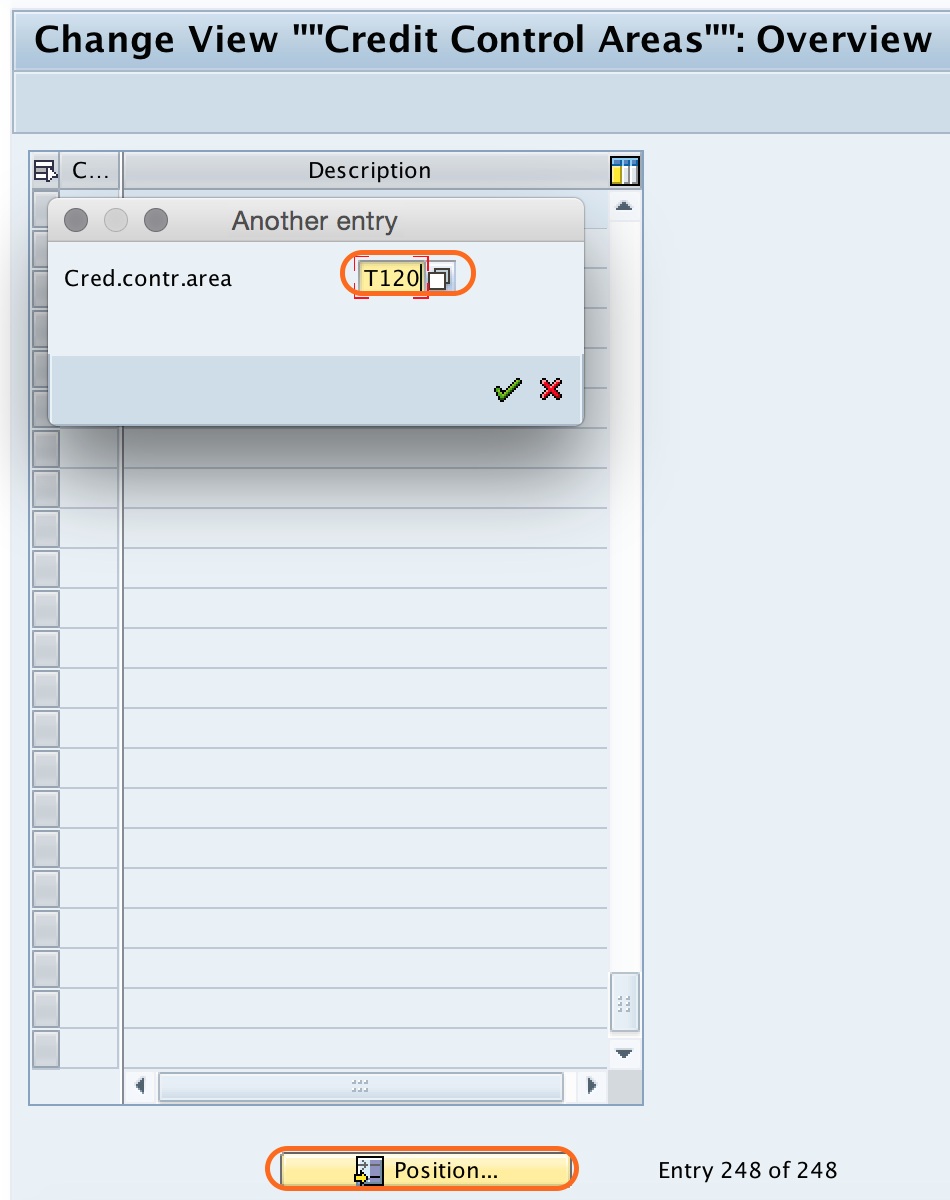
Step 4) Now go back to main credit control area screen, click on position button and give credit control key. So your credit control area key display at the top of window screen.
Step 5) Update the descriptive text of credit control area and click on save button to save the details.
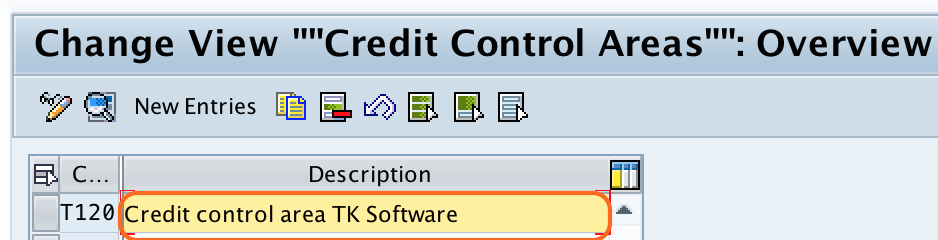
Successfully we have defined credit control area in SAP. Next configuration step is assignment of credit control area to company code in SAP.
Credit Control Area Fields to Verify Before Saving OB45
| Field in OB45 | What to verify |
|---|---|
| Credit control area | Use a four-character key such as T120. Keep the key consistent with your naming convention. |
| Description | Enter a clear description that helps users identify the purpose of the credit control area. |
| Currency | Use the currency in which credit exposure and credit limits are managed for this credit control area. |
| Fiscal year variant | Maintain the correct fiscal year variant so credit-related values follow the expected fiscal period structure. |
| Risk category | Use a risk category that matches your customer credit policy and credit checking requirements. |
| Credit limit | Maintain limits carefully because they affect customer credit monitoring and credit checks. |
Credit Control Area, Company Code, and Controlling Area Difference
Credit control area is often confused with company code and controlling area. They are different SAP organizational units and are used for different purposes.
| SAP organizational unit | Main purpose |
|---|---|
| Credit Control Area | Controls and monitors customer credit limits and credit exposure. |
| Company Code | Represents an independent accounting entity for which financial statements can be prepared. |
| Controlling Area | Used for management accounting and cost controlling. |
After defining the credit control area, you need to assign the company code to the credit control area. Without the assignment, the credit control area will not be properly linked to the company code for credit management processing.
Common Mistakes While Defining Credit Control Area in SAP
- Using FD33 to create a credit control area. FD33 is for displaying customer credit management data, not for defining the credit control area.
- Creating the credit control area but missing the company code assignment step.
- Using the wrong currency, which can affect how credit limits and exposure are interpreted.
- Entering an unclear description that makes it difficult to identify the credit control area later.
- Assuming one company code can be assigned to multiple credit control areas. A company code is assigned to only one credit control area.
Define Credit Control Area in SAP FAQ
What is the Tcode for credit control area in SAP?
The transaction code to define credit control area in SAP is OB45. You can also access it from SPRO under Enterprise Structure, Definition, Financial Accounting, Define Credit Control Area.
What is a credit control area in SAP?
A credit control area in SAP is an organizational unit used to monitor and control customer credit limits. It helps manage credit exposure for one or more company codes.
Can one company code be assigned to multiple credit control areas?
No. A company code cannot be assigned to more than one credit control area in SAP. However, one credit control area can include multiple company codes.
What is FD33 in SAP credit management?
FD33 is used to display customer credit management data. It is not used to define a credit control area. To define the credit control area, use OB45.
What is the next step after defining credit control area in SAP?
After defining the credit control area, assign the credit control area to the relevant company code and then continue with related credit management settings such as risk categories, credit groups, and customer credit master data.
Editorial QA Checklist for SAP Credit Control Area Tutorial
- Confirm that OB45 is shown as the transaction code for defining credit control area.
- Check that FD33 is explained only as a display transaction for customer credit management data.
- Verify that the tutorial states one credit control area can contain multiple company codes, but one company code cannot be assigned to multiple credit control areas.
- Confirm that the field explanations include credit control area key, description, currency, fiscal year variant, risk category, and credit limit.
- Check that the next configuration step clearly says assignment of credit control area to company code.