 TutorialKart.com
In this SAP tutorials, you will learn what a condition type is in SAP SD, where it fits in the pricing condition technique, and how to define condition types in SAP SD using transaction code V/06.
What is condition type in SAP SD pricing?
A condition type in SAP is a configuration key that represents one pricing element in a sales document. It tells the system whether the element is a base price, discount, surcharge, tax, freight, rebate-related value, or another pricing component. In SAP SD, condition types work with condition records, access sequences, and pricing procedures to calculate the final value in sales orders, deliveries, and billing documents.
In a real-time business scenario, the entire pricing can be divided into the following common elements.
- Basic Price
- Discount/Surcharge
- Tax
- Freight
There can be different condition types for each price element. Each pricing element has its own functionality and usage in the SAP system, so the corresponding condition type must be defined with the correct condition class, calculation type, plus/minus indicator, access sequence, and control settings.
How condition types work with access sequence and pricing procedure
A condition type does not work alone in SAP SD pricing. It is one part of the condition technique. The condition type controls what is being calculated, the access sequence controls where the system searches for condition records, and the pricing procedure controls the order in which pricing elements are processed.
| Pricing object | Purpose in SAP SD | Example use |
|---|---|---|
| Condition type | Defines the pricing element and its calculation behavior. | Base price, discount, freight, tax. |
| Access sequence | Defines the sequence of condition tables used to find valid condition records. | Search by customer/material, price list/material, or material. |
| Condition record | Stores the actual rate, amount, percentage, or value for a condition type. | Price of 1000 INR for a material or 10% discount for a customer. |
| Pricing procedure | Determines the sequence of condition types used during pricing. | Price first, then discount, then freight, then tax. |
For example, if a sales order item needs a basic price, the pricing procedure may call a base price condition type. The condition type uses its assigned access sequence to search condition records. If a valid record is found, the system brings the value into the pricing screen and calculates the item price according to the condition type settings.
Examples of condition types in SAP SD
SAP systems usually include several standard condition types, but the exact list can differ based on system version, localization, and activated business functions. The following examples are commonly used in SAP SD learning and configuration discussions. Always check the delivered configuration in your own client before copying a condition type.
| Condition type example | Typical purpose | Typical condition class |
|---|---|---|
| PR00 | Base price | Price |
| K004 / K005 | Discount-related condition | Discount or surcharge |
| K007 | Customer discount | Discount or surcharge |
| KF00 | Freight | Freight |
| MWST | Output tax | Tax |
When you create a new condition type for a business requirement, the safer approach is usually to copy a similar standard condition type and adjust only the required fields. This reduces the chance of missing important control settings.
How to create condition types in SAP using V/06
Navigation
| SAP R/3 Role Menu | Maintain condition types |
| Transaction code | V/06 |
| SAP IMG Path | SPRO(Tcode) -> Implementation Guide for R/3 Customizing (IMG) => Sales and Distribution (SD) => Basic functions => Pricing => Pricing control =>Define condition types => Maintain condition types. |
Note : – SAP system delivers various predefined condition types and you use this types as per your requirements. However you can define new condition type in SAP as per requirements of client using option new entries or copy as option.
Create condition type directly with New Entries in V/06
Step 1 : – Enter Tcode “V/06” and enter.

Step 2 : – On change view conditions: condition types overview screen, choose new entries button and update the following details.
Condition type : – Update the key that identifies as condition type in SAP and update the descriptive text of condition type.
Access Sequence : – Update the corresponding access sequence key of the condition type.
Condition class : – It determines the structure of condition type and allows to control each condition type as per its functionalities.
Plus/minus : – This filed for discounts and surcharges, if you enter negative (X), then it becomes discount. If you choose the value as positive (A), it becomes surcharge.
Calculation type : – It determines how the condition amount of condition type is to be calculated.
Condition category : – It specifies the classification of different condition types.
Scale basis : – It specifies how the scale amount of condition type is calculated.
Check value : – Specifies the scale rates to be entered as per ascending order or descending order.
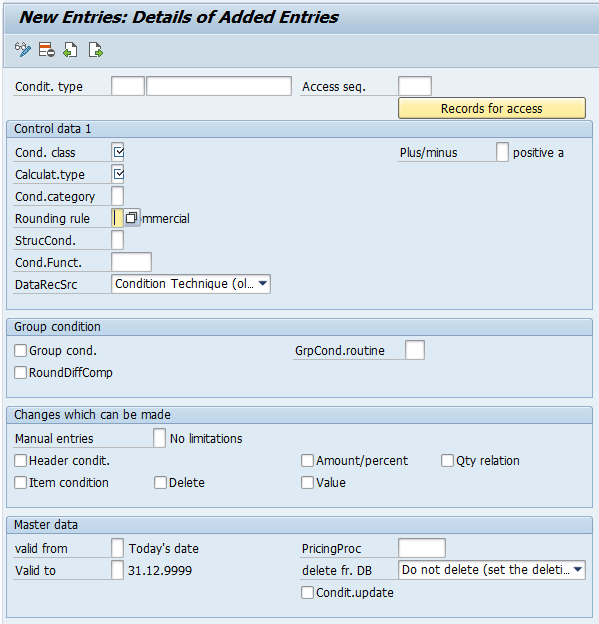
Click on save button and save the configured condition type details in SAP.
Important fields while defining condition types in SAP SD
The fields in V/06 control how the condition behaves during pricing. Before saving a new condition type, review the following settings carefully.
| Field in condition type | What it controls | Configuration note |
|---|---|---|
| Condition class | Whether the condition is treated as price, discount/surcharge, tax, freight, or another class. | Select the class that matches the business purpose of the condition type. |
| Calculation type | How the value is calculated. | Common options include fixed amount, percentage, quantity-based amount, or weight/volume-related calculation depending on system configuration. |
| Plus/minus | Whether the value increases or decreases the price. | Use the correct sign for discounts and surcharges so the net value is calculated correctly. |
| Access sequence | How the system finds condition records. | Required for condition types that should read master condition records. It may be blank for some manually entered or statistical conditions. |
| Manual entries | Whether the condition can be entered manually in the sales document. | Restrict manual entry for pricing elements that must come only from approved condition records. |
| Scales | How quantity, value, weight, or other scale-based rates are handled. | Use scale basis and check value carefully when graduated pricing or discounts are required. |
A small error in these fields can change pricing results across many sales documents. For this reason, condition type changes should be tested with representative sales order, delivery, and billing scenarios before being moved to production.
Define condition type with reference of standard condition type
You can create new condition type by coping the standard condition type, so the all the settings of predefined condition type are copied to new condition type.
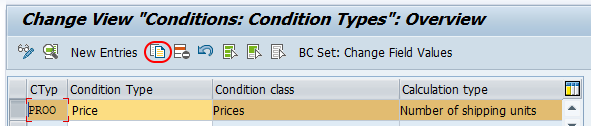
Update new condition type and description and press enter to continue.
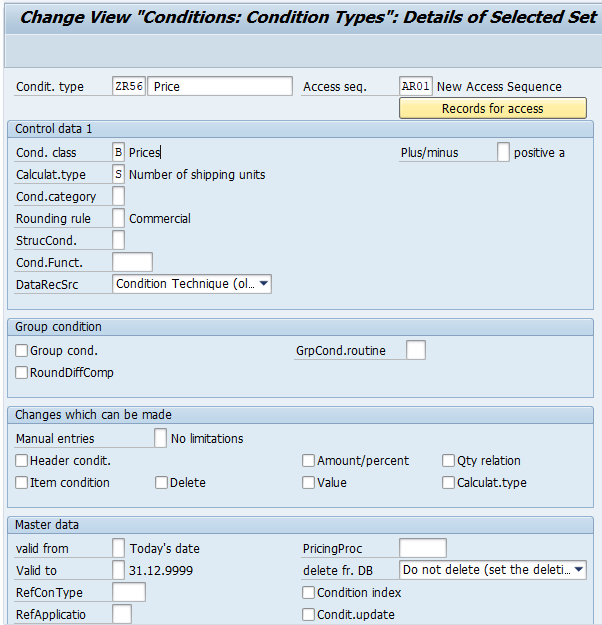
Click on save button and save the condition type in SAP.
When to copy an SAP condition type instead of creating a new one
Copying an existing condition type is recommended when the new requirement is similar to a delivered or already-tested condition type. For example, if you need a new discount that behaves almost like an existing customer discount, copying the current discount condition type is usually better than building it from the beginning.
After copying, change only the required values such as condition type key, description, account key, access sequence, manual entry control, or scale settings. Do not change tax, freight, or pricing control fields unless the requirement is clear, because these fields can affect pricing, accounting, and billing behavior.
Condition type creation example for a custom discount
Assume a business needs a new sales discount condition type for a special customer program. A practical configuration approach is shown below.
| Requirement | Suggested configuration decision |
|---|---|
| New condition type key | Use a customer namespace such as ZDIS or YDIS, based on your project naming convention. |
| Reference condition type | Copy an existing discount condition type with similar behavior. |
| Condition class | Use a discount/surcharge class suitable for the copied condition type. |
| Plus/minus indicator | Set the condition as a discount so it reduces the net value. |
| Calculation type | Use percentage if the discount is percentage-based, or fixed amount if the discount is value-based. |
| Access sequence | Assign an access sequence only if the discount should be determined from condition records. |
| Pricing procedure | Add the new condition type at the correct step in the pricing procedure after testing. |
Creating the condition type is only one part of the setup. If the condition must be determined automatically, you must also maintain the required condition tables, access sequence, condition records, and pricing procedure assignment.
Common mistakes while configuring condition types in SAP
- Leaving access sequence blank for automatic pricing: If the condition type must read condition records, assign the correct access sequence.
- Using the wrong plus/minus indicator: A discount configured as a surcharge can increase the price instead of reducing it.
- Choosing the wrong calculation type: Percentage, fixed amount, and quantity-based calculation types produce different pricing results.
- Not adding the condition type to the pricing procedure: A condition type will not appear in pricing just because it is created in V/06.
- Changing a standard condition type directly: In many projects, it is safer to copy the standard condition type and create a custom Z or Y condition type.
- Skipping end-to-end testing: Test the pricing result in sales order and billing flow, especially when the condition affects taxes, freight, or accounting.
Transaction codes related to SAP SD condition types
| Transaction code | Use in SAP SD pricing |
|---|---|
| V/06 | Define and maintain condition types. |
| V/07 | Define and maintain access sequences. |
| V/08 | Define and maintain pricing procedures. |
| VK11 | Create condition records. |
| VK12 | Change condition records. |
| VK13 | Display condition records. |
The main transaction code for condition type configuration is V/06. However, automatic pricing also depends on related configuration and master data maintained through other pricing transactions.
FAQs on condition types in SAP SD
What is a condition type in SAP?
A condition type in SAP is a key that represents one pricing element, such as base price, discount, freight, or tax. In SAP SD, it controls how that pricing element is calculated and processed in the sales document pricing procedure.
What is the transaction code for condition type in SAP?
The transaction code to define and maintain condition types in SAP SD is V/06. You can also reach the same configuration from SPRO under Sales and Distribution -> Basic Functions -> Pricing -> Pricing Control -> Define Condition Types.
How do you create a condition type in SAP SD?
To create a condition type in SAP SD, open transaction V/06, choose New Entries or copy an existing condition type, enter the condition type key and description, maintain fields such as condition class, calculation type, plus/minus indicator, access sequence, and scale settings, and then save the configuration.
Should I create a condition type from scratch or copy a standard condition type?
In most SAP SD projects, copying a similar standard condition type is safer because many control fields are copied with it. After copying, adjust only the fields required for the new business process and test the pricing result carefully.
Why is my new condition type not appearing in the sales order pricing screen?
A new condition type may not appear if it is not included in the pricing procedure, if the correct access sequence or condition record is missing, if the pricing procedure determination is wrong, or if manual entry is not allowed. Check the pricing procedure, condition record, and analysis screen in the sales order.
Editorial QA checklist for SAP condition type tutorial
- Confirm that V/06 is shown as the transaction code for maintaining SAP SD condition types.
- Check that condition type, access sequence, condition record, and pricing procedure are not described as the same object.
- Verify that examples such as PR00, discounts, freight, and tax are presented as common examples, not mandatory settings for every SAP system.
- Confirm that the tutorial explains both New Entries and Copy As methods for creating condition types.
- Check that the user is reminded to test pricing in sales order and billing scenarios before production transport.