 TutorialKart.com
How to Define Customer Account Groups in SAP Using OBD2
Customer account groups in SAP classify customer master records and control how those records are created. In configuration, a customer account group is used to define the account group key, description, number-related settings where applicable, and the field status for general data, company code data, and sales data.
In this SAP FI/SD configuration tutorial, we will create the following customer account groups as examples.
| Customer Account Group | Description | Typical Use |
|---|---|---|
| TK01 | Domestic Customers | Customers located in the local business country or region |
| TK02 | Export Customers | Customers used for export sales and foreign trade scenarios |
| TK03 | One-Time Customers | Customers used when individual customer master records are not required for every buyer |
Customer Account Group in SAP: What OBD2 Controls
The account group is selected when a customer master record is created. Based on the account group, SAP decides which fields are available, which fields are mandatory, which fields are display-only, and which fields are hidden for that customer type.
- Account group key: A short key such as TK01, TK02, or TK03 that identifies the customer account group.
- Description: A readable name that explains the purpose of the group, such as Domestic Customers or One-Time Customers.
- Field status: Controls whether fields are suppressed, optional, required, or displayed while creating or changing customer master data.
- One-time account behavior: Used when the account group is intended for one-time customer processing.
- Customer master consistency: Helps ensure that important fields, such as reconciliation account under company code data, are not missed.
Transaction Code and IMG Path for Customer Account Groups in SAP
- Transaction Code: – OBD2
- Menu path: – SPRO > Financial Accounting (New) -> Accounts Receivable and Accounts Payable –> Customer Accounts —> Master Data —-> Preparations for Creating Customer Master Data.
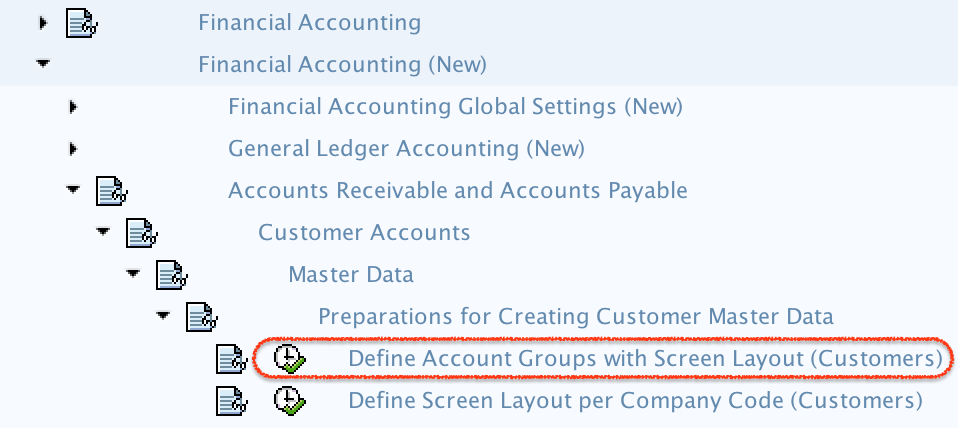
Before Creating Customer Account Groups in SAP OBD2
Before maintaining a new customer account group, decide the business purpose of the group. Do not create separate account groups only for naming convenience. Create separate groups when the customer types need different field controls, one-time account handling, or master data governance rules.
- Decide the 4-character account group key.
- Use a clear description that business users can understand.
- Confirm which fields must be required for domestic, export, and one-time customers.
- Check whether the group should be used for normal customers or one-time customer processing.
- Ensure that a customizing request is available before saving configuration changes.
Step 1: Open SAP Customer Account Group Configuration with T-Code OBD2
Enter T-Code OBD2 in the SAP command field and press Enter from the keyboard.

Step 2: Choose New Entries for SAP Customer Account Groups
On the Change View “Customer Account Groups”: Overview screen, click New Entries to define new customer account groups in SAP as per the business requirement.

Step 3: Enter the Account Group Key and Description in OBD2
On the new entries screen for customer account groups, update the basic details for each account group.
- Account group: Enter the key that identifies the customer account group in SAP. The account group key can contain up to 4 alphanumeric characters.
- Description: Enter a meaningful description of the account group, such as Domestic Customers, Export Customers, or One-Time Customers.
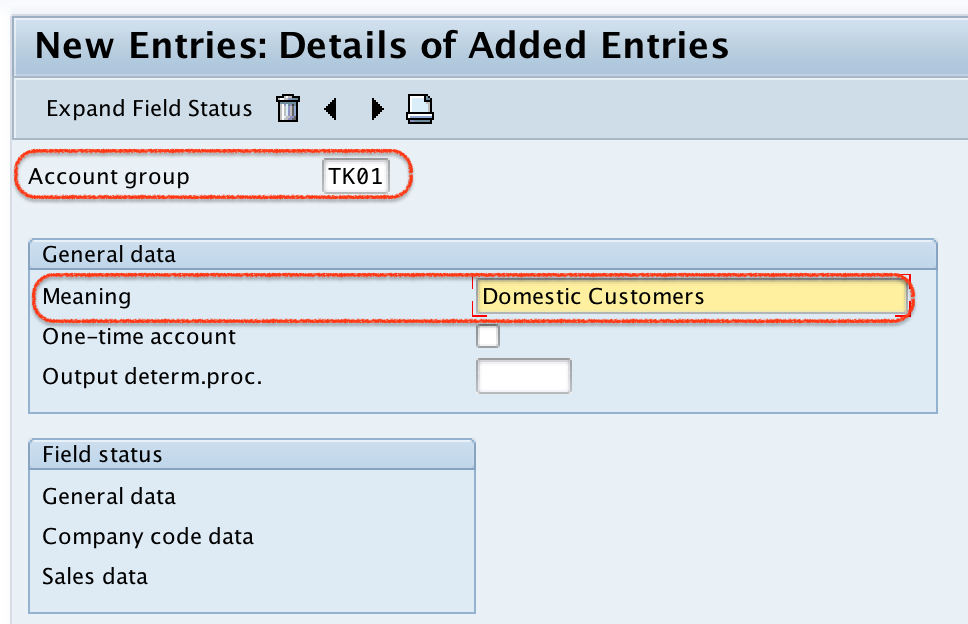
Click the Save button, choose the appropriate customizing request, and save the configured data.
Step 4: Maintain General Data Field Status for Customer Account Groups
Now double click on General Data. General data contains common customer information that is not limited to one company code or one sales area, such as name, address, communication, and control-related details.
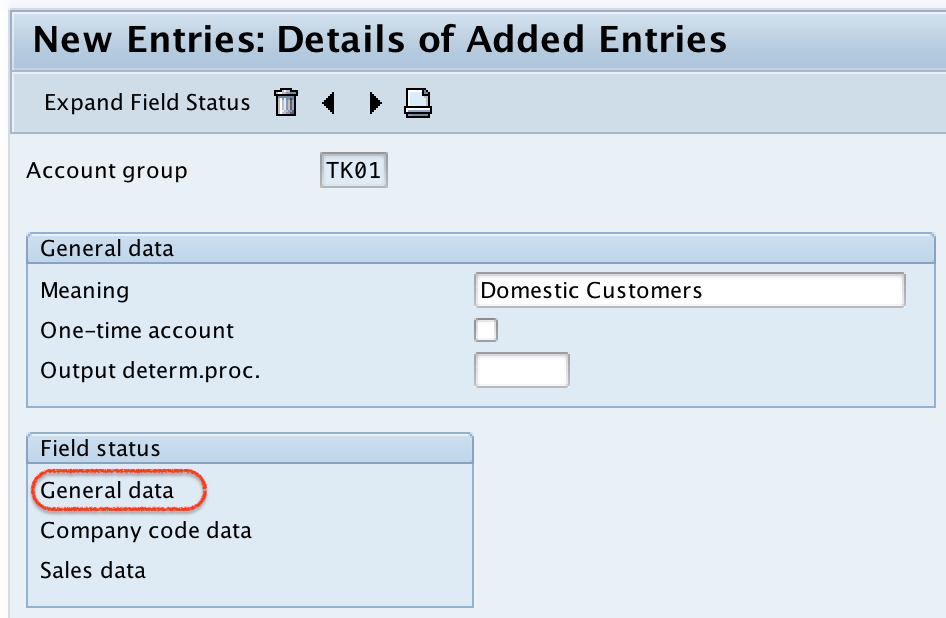
Double click the required subgroups under general data and set the field status of the fields as Optional, Suppressed, Required, or Display.
| Field Status | Meaning in Customer Master Creation |
|---|---|
| Suppress | The field is hidden from the customer master screen. |
| Required | The user must maintain the field before saving the customer master record. |
| Optional | The field is available, but the user may leave it blank if it is not needed. |
| Display | The field is visible but cannot be changed on that screen. |
Note: – Based on the field selection, SAP prompts or hides fields when the customer master record is created or changed.
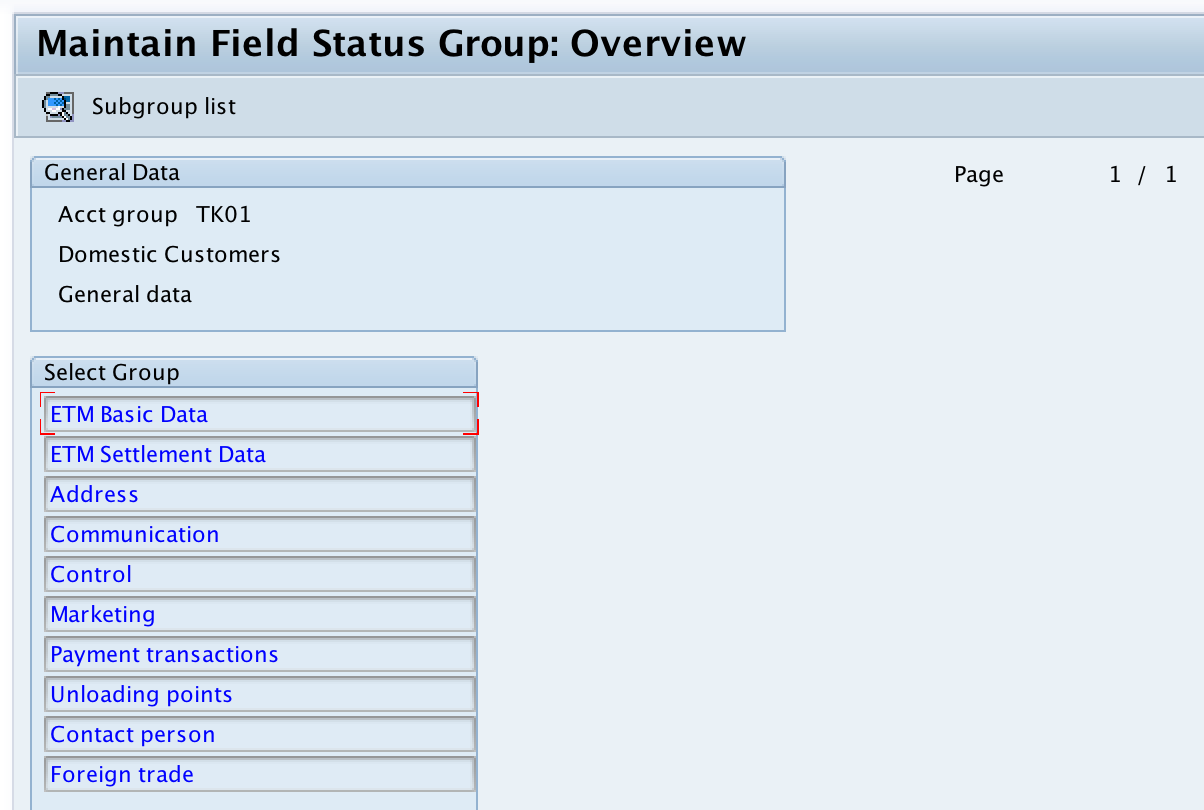
After maintaining the field status for customer account general data, return to the main screen by pressing the F3 key or by clicking the back button.
Step 5: Maintain Company Code Data Field Status for Customer Accounts
Now double click on Company Code Data. Then double click the relevant company code data subgroups and maintain the field status as optional, suppressed, required, or display as per the company requirement.
- Set the Reconciliation account as a required entry when the customer must be posted in Accounts Receivable.
- Choose other company code fields as suppressed, required, optional, or display depending on the accounting process.
- Keep required fields limited to data that users can maintain correctly during customer master creation.
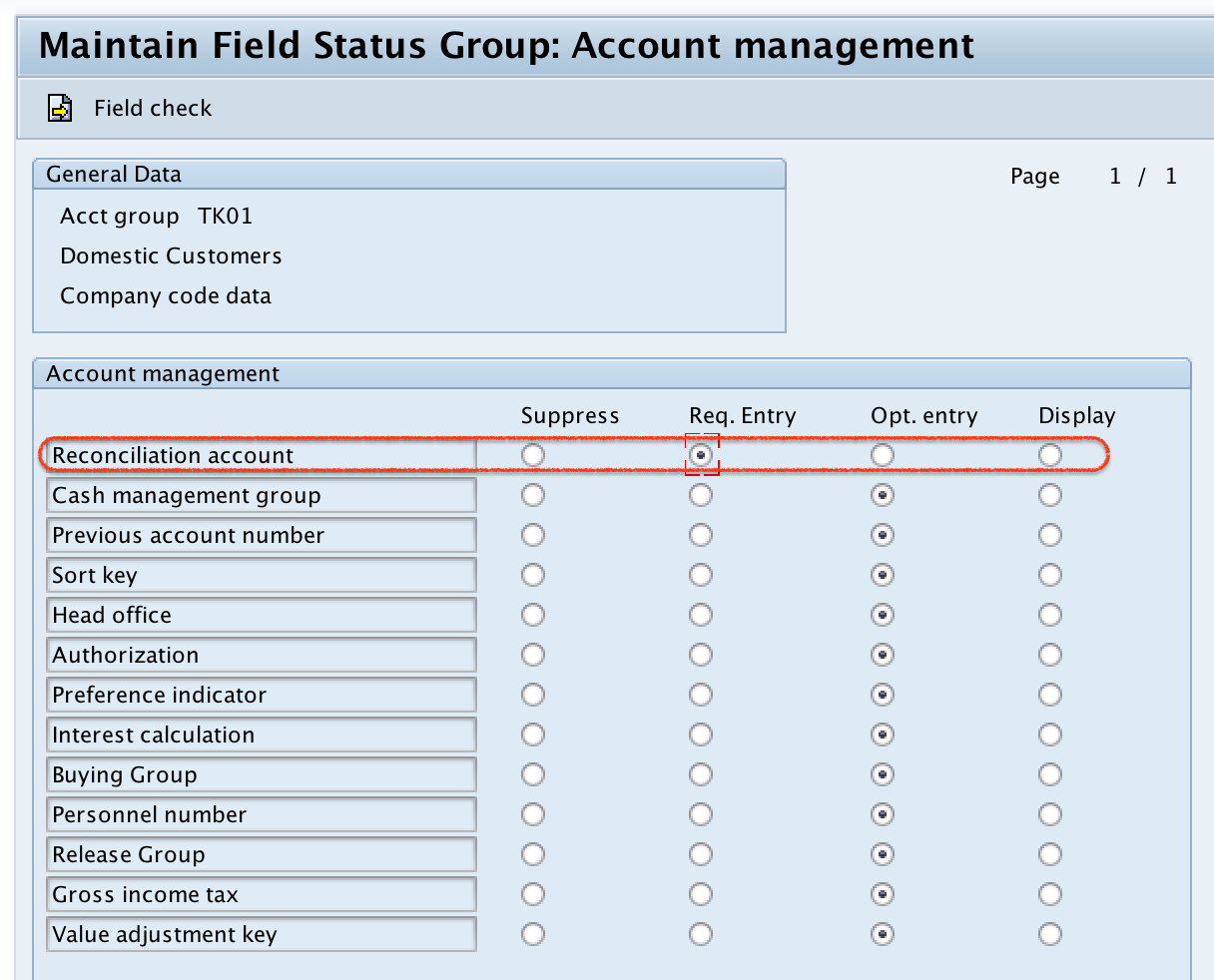
Click the Save button to save the company code field status settings.
Step 6: Maintain Sales Data Field Status for SAP SD Customer Groups
Now double click on Sales Data to maintain the field status group related to SAP SD customer master data. Double click the required subgroups of sales data and maintain the fields as optional, required, suppressed, or display according to the sales process.
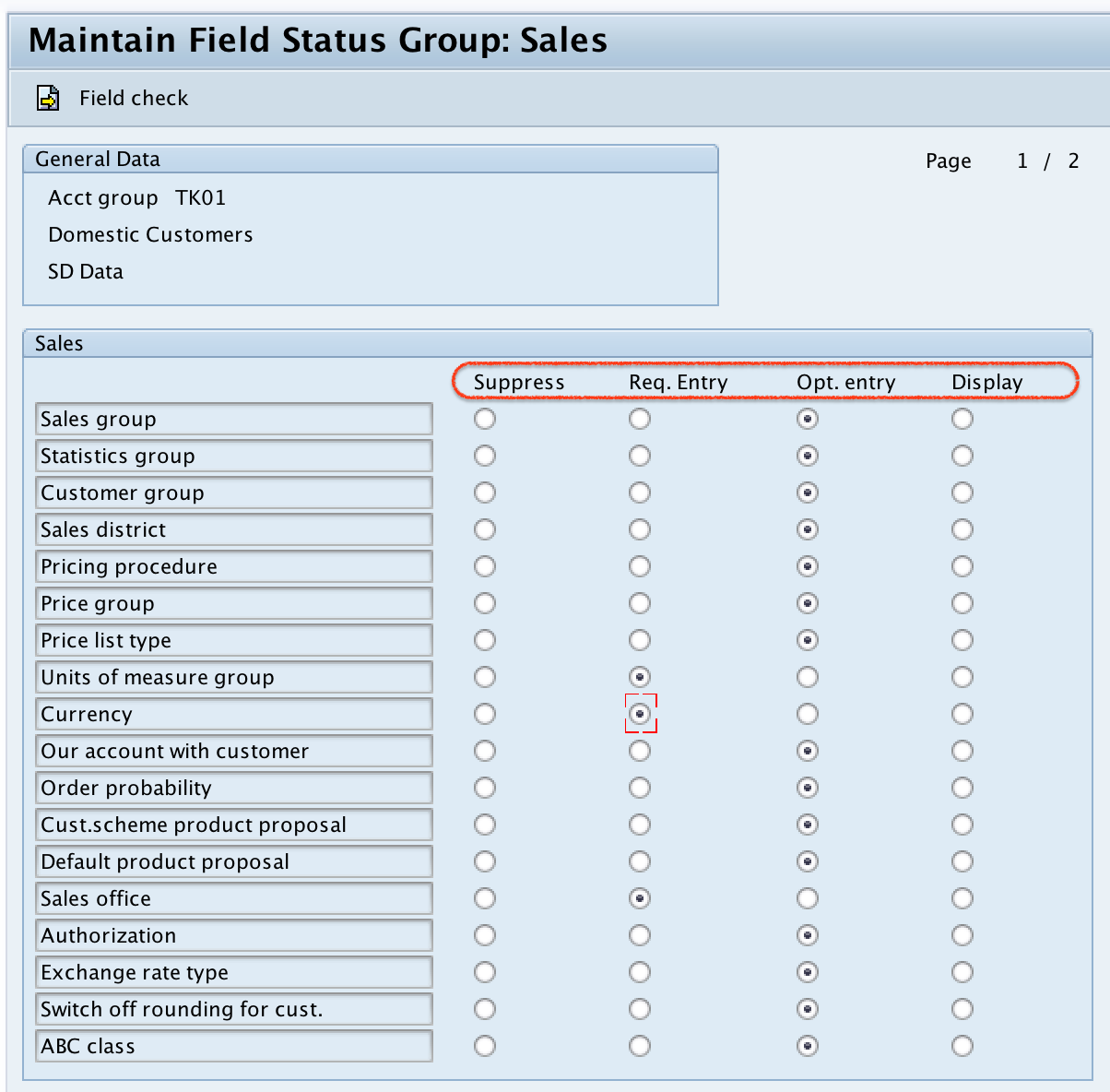
Click the Save button and save the configured customer account group details.
Successfully, the customer account groups have been defined in SAP.
Customer Account Group Field Status: Practical Configuration Tips
Field status settings should be maintained carefully because they directly affect customer master creation. A field marked as required will stop the user from saving the customer master if the field is blank. A field marked as suppressed will not be available to the user on that screen.
- Use Required only for fields that are mandatory for accounting, sales, tax, reporting, or compliance.
- Use Suppress for fields that are not relevant to the customer type.
- Use Optional when the field is useful but not always available at the time of customer creation.
- Use Display when users should see the value but should not change it from that screen.
- Test the account group by creating a sample customer master record after saving the configuration.
Common Mistakes While Defining Customer Account Groups in SAP
- Creating too many account groups: Separate account groups are useful only when they control different master data behavior.
- Making too many fields required: This can slow down customer creation and cause incorrect placeholder values.
- Suppressing fields needed later: If a business process needs a field, suppressing it can create follow-up corrections.
- Not testing with customer master creation: Always verify the field status by creating or changing a customer master record in a test client.
- Using unclear descriptions: Descriptions such as “Group 1” or “Test Customer” make configuration difficult to maintain.
Customer Account Groups in SAP: Frequently Asked Questions
What are account groups in SAP customer master data?
Account groups in SAP customer master data are configuration keys that classify customers and control customer master behavior. They help determine which fields are required, optional, suppressed, or display-only for different customer types.
What is the T-code to define customer account groups in SAP?
The transaction code to define customer account groups in SAP is OBD2. You can also reach the same configuration through the SPRO IMG path under Accounts Receivable and Accounts Payable customer master data preparation.
How do you create a customer account group in SAP?
Use T-code OBD2, choose New Entries, enter the account group key and description, maintain the field status for general data, company code data, and sales data, and then save the configuration in a customizing request.
Is customer group the same as customer account group in SAP?
No. A customer account group is a master data control configuration used during customer creation. A customer group in sales processing can be a separate sales-area classification used for pricing, reporting, or sales analysis depending on the SAP configuration.
Why should reconciliation account be required for a customer account group?
The reconciliation account links customer subledger postings with the general ledger. If the customer account group is used for normal Accounts Receivable customers, making the reconciliation account required helps prevent incomplete accounting master data.
Editorial QA Checklist for SAP Customer Account Group Configuration
- Confirm that the tutorial uses OBD2 for defining customer account groups.
- Check that the SAP IMG path points to customer master data preparation under Accounts Receivable and Accounts Payable.
- Verify that the example account groups TK01, TK02, and TK03 are treated as sample keys, not SAP standard keys.
- Ensure the field status explanation correctly covers suppress, required, optional, and display.
- Confirm that reconciliation account is recommended as required for normal Accounts Receivable customer account groups.