 TutorialKart.com
Assign Credit Control Area to Company Code in SAP
In this SAP FICO tutorial, you will learn how to assign credit control area to company code in SAP using transaction code OB38. In our previous SAP tutorial, we configured how to define credit control area in SAP. After the credit control area is created, it must be assigned to the relevant company code before classic credit management can use it for customer credit checks and credit limit control.
Note: – After you define credit control area in SAP, it is mandatory to assign to company code. Ensure that appropriate credit limit is specified in credit control area, so you can determine credit limits via Accounts Receivable.
The link between credit control area and company code in SAP system is established through the assignment of credit control area to company code. This assignment is stored at company code level and is commonly reviewed during FI-AR credit management configuration.
OB38 Credit Control Area Assignment Details in SAP
You can assign credit control area to company code in SAP by using the IMG navigation path or by entering the transaction code directly. Use the direct transaction code when you already know the company code and credit control area keys.
- Navigation path: – SPRO – IMG – Enterprise Structure – Assignment – Financial Accounting – Assign company code to credit control area
- Transaction code: – OB38
- Database Table: – T001
Before assigning company code to credit control area in OB38
Before you maintain the assignment in OB38, check the following configuration points. These checks help avoid errors when the system validates the company code and credit control area entries.
- The company code must already be created in SAP FI.
- The credit control area must already be defined in the enterprise structure.
- The credit control area key should be known before you start the assignment.
- You should have customizing authorization to change enterprise structure assignments.
- If you are working in a transport-controlled system, use the correct customizing request when saving the change.
Steps to Assign Credit Control Area to Company Code in SAP
Follow the steps below to maintain the company code and credit control area assignment in SAP.
Step 1) Enter T-code “OB38” in the SAP command field and enter.

Step 2) On change view “Assign company code –>Credit control area“: overview, click on position button and update your company code in the given filed and press enter.
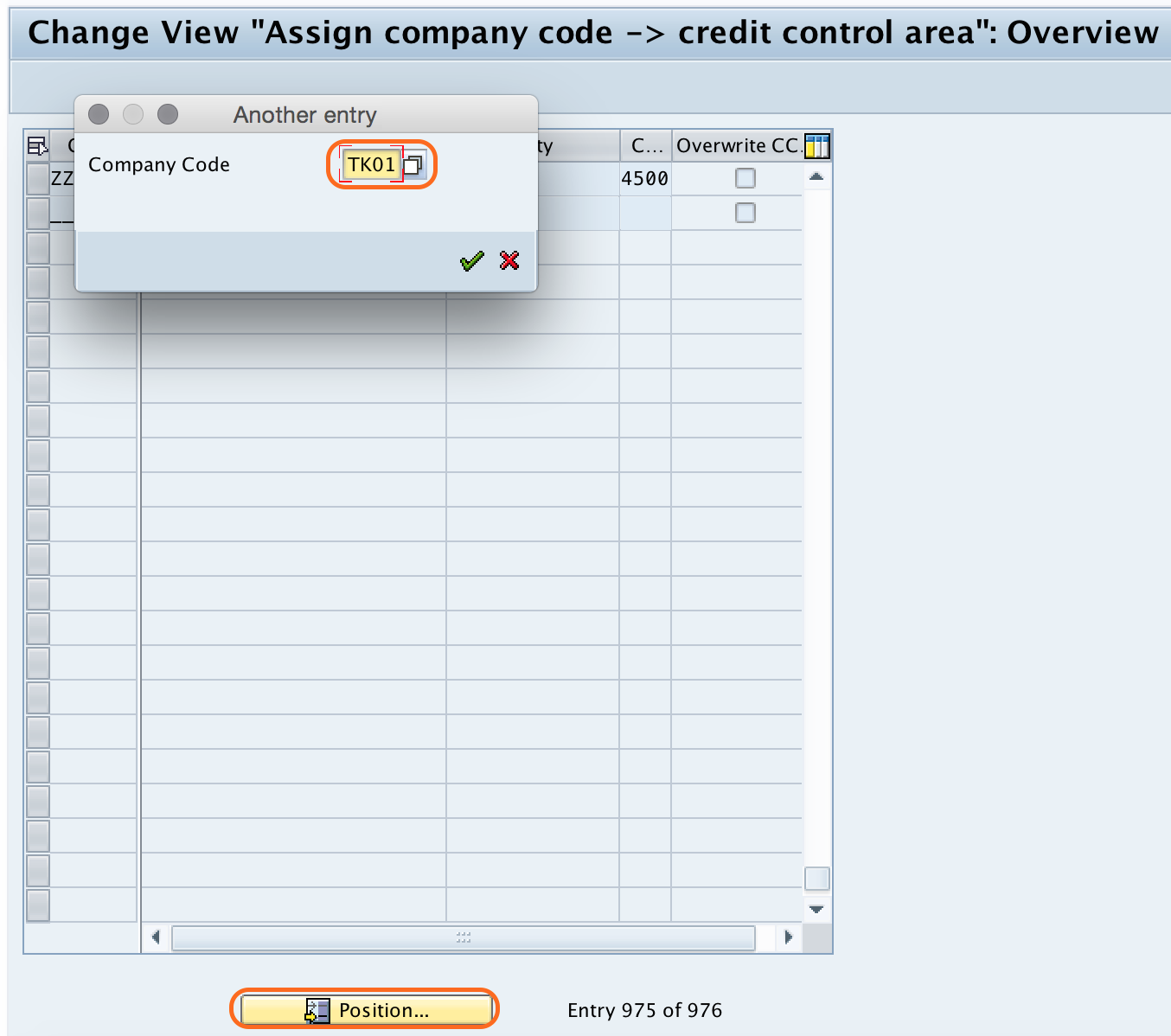
Step 3) Now your company code “TK01” display at the top of window screen. Now update the credit control area key against your company code.

Step 4) Click on save button and save the configured details.

Successfully we have assigned credit control area to company code in SAP.
How SAP Stores the Company Code and Credit Control Area Link
The company code assignment is maintained in table T001. In practical SAP FICO work, this table is often checked when you want to confirm which credit control area is assigned to a company code. The assignment tells SAP which credit control area should be considered for that company code in classic FI credit management processing.
| SAP item | Purpose in this assignment |
|---|---|
| Company code | The legal accounting unit for which FI transactions are posted. |
| Credit control area | The organizational unit used to control customer credit limits. |
| OB38 | The transaction used to assign company code to credit control area. |
| T001 | The company code table where the related credit control area field can be checked. |
OB38, OB45, and OB37 Difference for SAP Credit Configuration
Several SAP transaction codes look similar because they are all used in enterprise structure or financial accounting configuration. For this specific task, use OB38. Do not confuse it with the transaction codes below.
| Transaction code | Used for | Use it for this tutorial? |
|---|---|---|
| OB38 | Assign company code to credit control area | Yes |
| OB45 | Define credit control area | No, this is normally done before OB38 |
| OB37 | Assign company code to fiscal year variant | No, this is not the credit control area assignment |
Checks After Assigning Credit Control Area to Company Code
After saving the assignment, run these quick checks before moving to the next SAP FICO configuration activity.
- Reopen transaction OB38 and confirm that the correct credit control area appears against the company code.
- Check that the company code entry is not accidentally assigned to a wrong credit control area.
- Confirm that the credit control area has the required currency and credit limit settings for your business design.
- Verify the change in the correct client, especially if you use separate development, quality, and production systems.
- Confirm that the customizing request has been saved, released, and transported according to your project process.
Common OB38 Assignment Errors and Fixes
If the assignment does not save or the expected credit control area is not available, review these common causes.
| Issue in OB38 | Likely reason | What to check |
|---|---|---|
| Credit control area key is not accepted | The credit control area may not be defined yet. | Define or verify the credit control area before assigning it. |
| Company code is not found | The company code may be incorrect or not created in the current client. | Check the company code configuration and client. |
| Save option is restricted | The user may not have customizing authorization. | Check SAP authorization and transport request access. |
| Wrong credit control area appears later | The assignment may have been maintained against another company code or overwritten in a later change. | Recheck OB38 and review the customizing transport history. |
FAQ on Assigning Credit Control Area to Company Code in SAP
What is the transaction code to assign credit control area to company code in SAP?
The transaction code is OB38. You can also reach the same configuration through SPRO > IMG > Enterprise Structure > Assignment > Financial Accounting > Assign company code to credit control area.
Which SAP table stores the credit control area assignment for a company code?
The assignment can be checked in company code table T001. This table contains company code level settings, including the related credit control area field used in classic credit management.
Should I use OB38 or OB45 for credit control area configuration?
Use OB45 to define the credit control area first. Use OB38 after that to assign the credit control area to a company code.
Is OB37 used to assign credit control area to company code?
No. OB37 is used for assigning a company code to a fiscal year variant. For the credit control area assignment, use OB38.
Can one credit control area be assigned to more than one company code?
Yes, in common SAP FI configuration, one credit control area can be assigned to multiple company codes when the business wants credit management to be controlled centrally. The assignment should follow the credit management design approved for the implementation.
Editorial QA Checklist for This SAP OB38 Tutorial
- Confirms that OB38 is the transaction code for assigning company code to credit control area.
- Explains that OB45 is for defining the credit control area, not for assigning it to a company code.
- Clarifies that OB37 is related to fiscal year variant assignment, not credit control area assignment.
- Keeps the existing SAP screenshot sequence for command field, position, assignment, and save steps.
- Mentions table T001 as the company code table used to check the assignment.
- Includes post-save checks and troubleshooting points specific to OB38 configuration.