 TutorialKart.com
How to assign sales area to credit control area in SAP SD
This SAP SD tutorial explains how to assign sales area to credit control area in SAP step by step. In our previous training we have learned how to assign sales group to sales office in SAP systems.
The link between sales area and credit control area is established through this assignment in SAP systems. This setting tells SAP which credit control area should be used when sales documents are created for a particular sales organization, distribution channel, and division combination.
Purpose of assigning sales area to credit control area in SAP
In classic SAP credit management, the credit control area is the organizational unit used for customer credit limit checks. A sales area belongs to Sales and Distribution, while a credit control area belongs to credit management and financial control. The assignment connects these two areas so that sales orders, deliveries, and credit exposure checks can use the correct credit control area.
For example, if sales organization TKSO, distribution channel TK, and division TK are assigned to credit control area TKCA, sales documents created under that sales area can be checked against the customer credit data maintained for that credit control area.
Prerequisites before SAP sales area and credit control area assignment
- Sales organization, distribution channel, and division should already be defined.
- The required sales area should be created by assigning sales organization, distribution channel, and division.
- The credit control area should already be defined.
- The company code and credit control area assignment should be completed if your configuration requires it.
- You should have authorization to maintain SAP IMG configuration and save customizing requests.
SAP transaction and IMG path for assigning sales area to credit control area
You can assign credit control area to sales area by using the following navigation method.
- Transaction code: SPRO
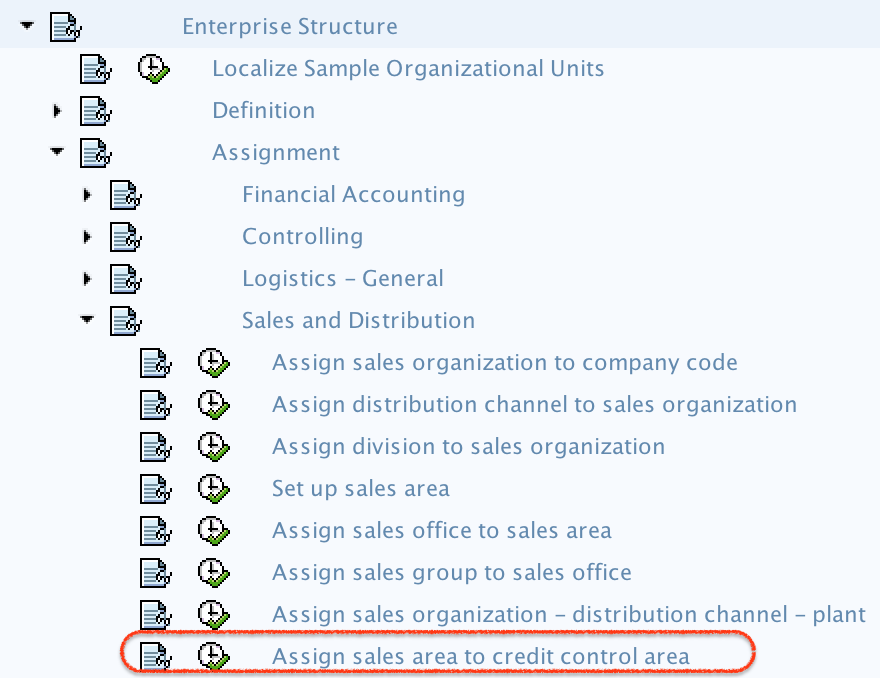
- Menu path: SPRO > SAP Customizing Implementation Guide > Enterprise Structure > Assignment > Sales and Distribution > Assign sales area to credit control area.
Step-by-step configuration to assign sales area to credit control area in SAP
Step 1) Enter t-code SPRO in SAP command field as shown below image and click on enter from your keyboard.

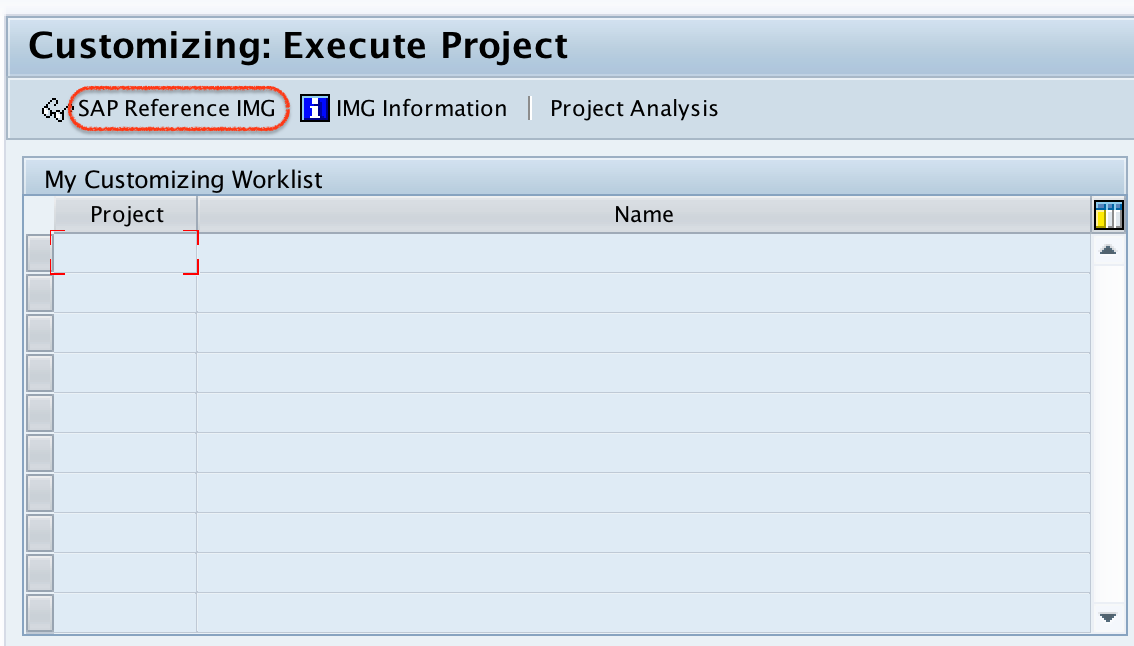
Step 2) On the next screen, click on SAP Reference IMG as shown below image.
Step 3) Now navigate the following menu path as shown below image and double click on assign credit control area to sales area.
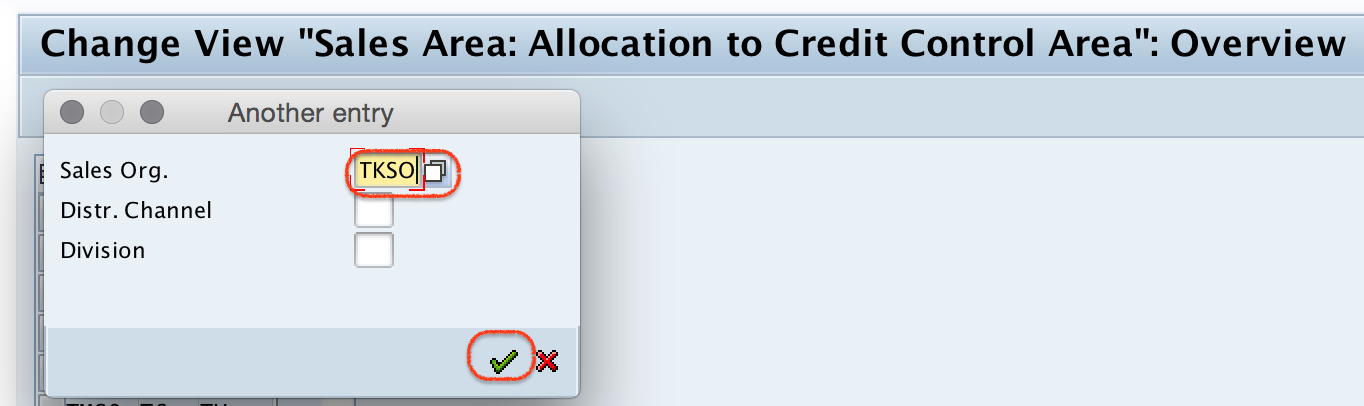
Step 4) On change view sales area: allocation to credit control area overview screen, click on position button and update sales organization key “TKSO” in the given field and enter.
Step 5) Now assign credit control area to sales areas by updating the credit control area key in the given field CCA.
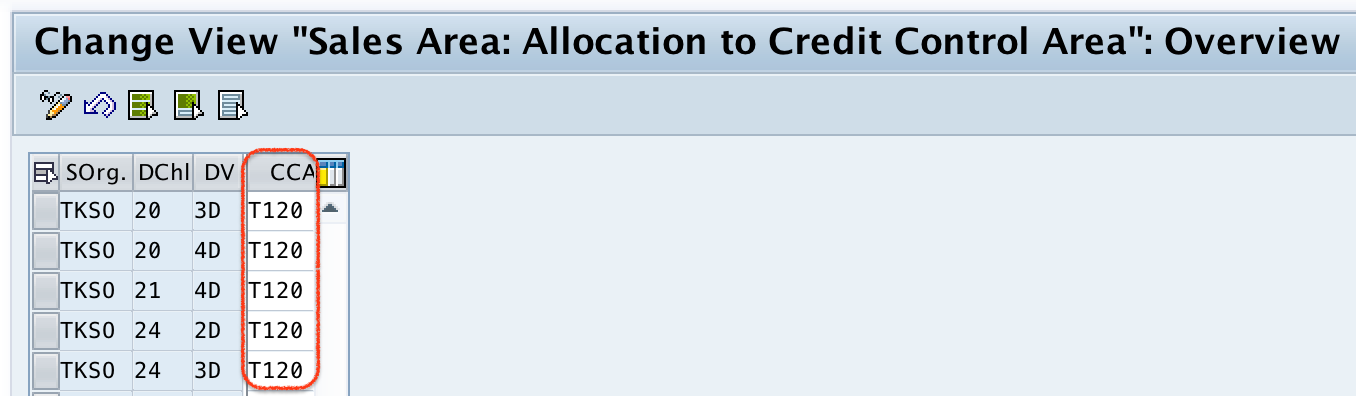
After allocation of sales area to credit control areas as per the company requirements, click on save button and save the configured details.

Successfully we have assigned sales area to credit control area in SAP systems.
Fields used in sales area allocation to credit control area
| Field | Meaning in SAP configuration | Example |
|---|---|---|
| Sales Organization | The selling organizational unit for the sales area. | TKSO |
| Distribution Channel | The channel through which goods or services are sold. | TK |
| Division | The product or service division used in the sales area. | TK |
| CCA | The credit control area assigned to the sales area. | TKCA |
The important field in this configuration screen is CCA. Enter the correct credit control area for every sales area that should be included in credit checks. If a sales area is left without the expected credit control area, credit-related checks and customer credit data may not work as intended for that sales area.
How this SAP SD credit control assignment affects sales documents
When a sales order is created, SAP determines the sales area from the sales organization, distribution channel, and division. Based on this configuration, the corresponding credit control area is used for customer credit management checks. This is why the sales area to credit control area assignment should match the way the company manages credit exposure.
- If one company manages credit centrally, multiple sales areas may point to the same credit control area.
- If credit is managed separately by company code or business unit, different sales areas may be assigned to different credit control areas.
- If credit checks are not behaving as expected, this assignment is one of the configuration points to review along with customer credit master data and credit management settings.
Checking customer credit data after the sales area assignment
After completing the assignment, consultants usually verify the result with sales documents and customer credit master data. In classic SAP credit management, transaction FD32 is commonly used to display or change customer credit management data for a credit control area. Blocked sales documents may be reviewed with credit management transactions such as VKM1, VKM3, or VKM5, depending on the business process and system configuration.
These transactions do not replace the IMG assignment. They are used after configuration to maintain or review credit data and credit blocks. The IMG assignment decides which credit control area is connected to the sales area.
Common issues while assigning credit control area to sales area
| Issue | Likely reason | What to check |
|---|---|---|
| Sales area is not found in the overview screen | The sales area may not be defined completely. | Check sales organization, distribution channel, division, and their assignment. |
| Credit control area value cannot be saved | The credit control area may not exist or authorization may be missing. | Check credit control area definition and user authorization. |
| Credit check does not work as expected | Credit control assignment is only one part of the setup. | Review customer credit data, automatic credit control, risk category, and document settings. |
| Wrong credit control area appears in sales order | The sales area may be assigned to a different credit control area. | Verify the sales organization, distribution channel, division, and CCA entry. |
SAP S/4HANA note for credit control area and credit segment
In many SAP S/4HANA implementations, credit management is handled through SAP Credit Management and credit segments. However, some systems still display or use classic credit control area settings for compatibility, migration, or specific processes. Before changing this assignment in an S/4HANA project, check the project design, activated credit management scope, and related credit segment configuration.
FAQ on assigning sales area to credit control area in SAP
What is the use of assigning sales area to credit control area in SAP?
It connects an SAP SD sales area with the credit control area used for customer credit checks. This helps SAP determine the relevant credit control area when sales documents are processed.
Which transaction is used to assign sales area to credit control area?
The assignment is maintained through transaction SPRO under Enterprise Structure assignment for Sales and Distribution. From there, open the IMG activity for assigning sales area to credit control area.
What is FD32 t-code in SAP credit management?
FD32 is used in classic SAP credit management to change customer credit management data for a credit control area. It is useful after the configuration is completed, but it is not the IMG transaction for assigning sales area to credit control area.
What is VKM3 transaction in SAP?
VKM3 is used to process sales documents that are blocked for credit reasons, depending on system setup. It helps review and release blocked documents, while the sales area assignment is maintained separately in SPRO.
Can one credit control area be assigned to multiple sales areas?
Yes. A company can assign the same credit control area to multiple sales areas when credit exposure is managed centrally. The correct design depends on how the organization controls customer credit.
Editorial QA checklist for SAP sales area to credit control area tutorial
- Confirm that the IMG path mentions Enterprise Structure assignment for Sales and Distribution.
- Verify that the tutorial explains the CCA field as credit control area.
- Check that the example sales organization, distribution channel, division, and credit control area are clearly identified as sample values.
- Ensure that FD32, VKM3, and related credit management transactions are described as verification or processing tools, not as the configuration path.
- Review S/4HANA wording so that classic credit control area and credit segment concepts are not mixed incorrectly.