 TutorialKart.com
Define Sales Document Type in SAP SD Using VOV8
A sales document type in SAP SD controls how a sales transaction behaves from order entry to delivery and billing. It determines the number range, item numbering, screen sequence, transaction group, delivery relevance, billing relevance, credit settings, output application, and several other controls used when users create sales orders, quotations, contracts, returns, or other sales documents.
In this tutorial, you will learn how to create sales document type in SAP using transaction code VOV8. The preferred configuration method in most projects is to copy a standard SAP sales document type and then adjust the required settings, because this reduces the risk of missing important control fields.
| SAP R/3 Role Menu | Document type maintenance |
| Transaction code | VOV8 |
| SAP IMG Path | SPRO => Sales & Distribution => Sales => Sales Documents => Sales Document header => Define sales document type. |
What a Sales Document Type Controls in SAP SD
Before creating a new order type, it is important to understand what the sales document type controls. In SAP SD, the document type is not only a label such as order, quotation, or return. It is a control object that influences how the sales document is created, processed, copied, delivered, billed, and reported.
| Control area | Purpose in sales document type configuration |
|---|---|
| Number system | Controls internal or external number assignment and item number increment. |
| General control | Controls credit checks, credit group, output application, reference requirements, and document behavior. |
| Transaction flow | Controls screen sequence group, transaction group, document pricing procedure, and display range. |
| Shipping | Controls whether delivery processing is relevant and which delivery type is proposed. |
| Billing | Controls order-related or delivery-related billing type proposals. |
| Contracts and scheduling agreements | Controls contract-specific options such as billing request and partner authorization checks. |
| Availability check | Controls availability and business transaction relevance for the document type. |
Access Sales Document Type Customizing with T Code VOV8
Step 1 : – Execute tcode “VoV8” from the SAP easy access screen.
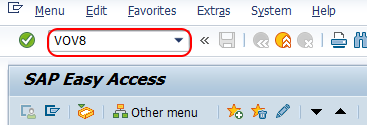
You can also reach the same configuration screen through the IMG path shown above. The SAP Easy Access transaction code is faster when you already know that the sales document type is maintained in VOV8.
Transaction code: VOV8
IMG path: SPRO > Sales and Distribution > Sales > Sales Documents > Sales Document Header > Define Sales Document Type
Create Sales Document Type in SAP SD by Copying an Existing Type
Step 2 : – From change view “Maintain sales order types” overview screen, a list defined document types displays with detailed description. Click on new entries option to create new sales document types in SAP.
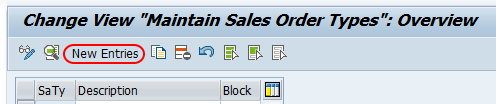
In project work, it is usually safer to select an existing standard document type and use the copy option. For example, if the new business requirement is close to a standard order, copy the standard order type and change only the fields required by the business process. This helps keep dependent controls consistent across delivery, billing, pricing, and copy control.
Step 3 : – On new entries document type screen, update the following details.
Sales document type : – Enter four digits key that defines as sales document type in SAP systems.
Description : – Update the descriptive text of document type.
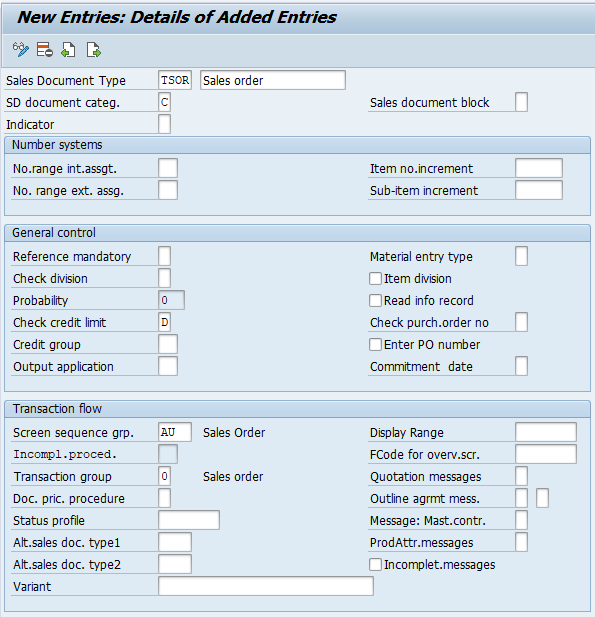
After updating all the required for sales document type, click on save button and save the configured details in SAP.
Successfully we have defined sales document type in SAP SD module by using copy option.
Create Sales Document Type in SAP SD by Using New Entries
Lets create sales document types by using new entries option.
From change view maintain sales order types overview screen, choose new entries button for creation of new sales document types with our own customized settings.
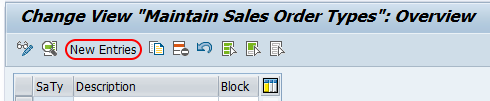
Using New Entries means you are defining the sales document type controls manually. Use this option only when the new document type is clearly different from existing standard or custom order types. If the business requirement is similar to an existing sales order, quotation, debit memo request, credit memo request, return order, or contract, copying that document type is normally easier to validate.
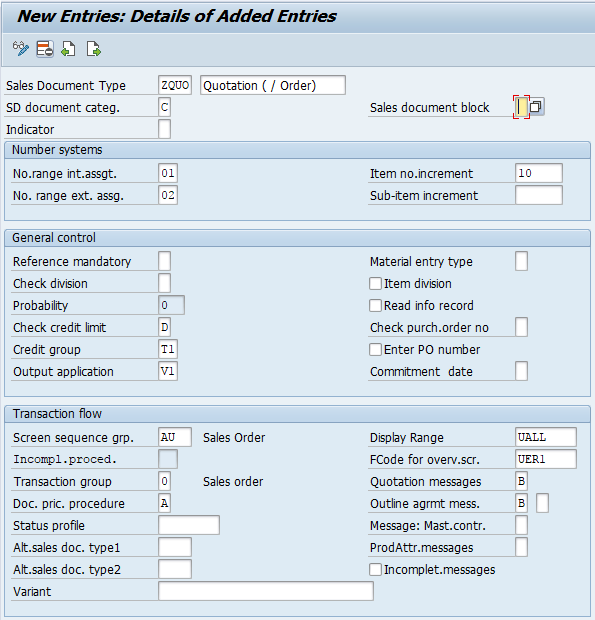
From new entries sales document type screen, update the following details.
Sales document type : – Enter 4 digits that defines as sales document type in SAP system, and update the description in the given text field.
Number system : – Assign number range for interval assignment and external assignment, and update increment of item number.
General Control : – Update required fields of check credit limit, credit group, output application and other required details as per requirements of project.
Transaction flow : – Update the required fields of screen sequence group, transaction group, document price procedure, display range, quotation message and other required details.
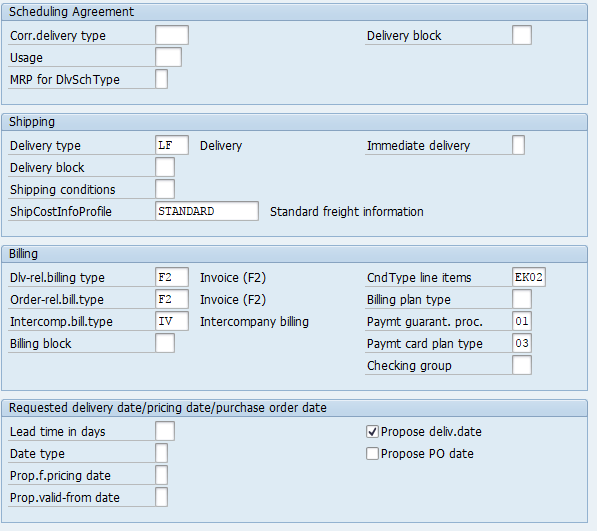
Shipping : – Update the details of delivery type, shipment cost information profile.
Billing : – Under billing you need to update billing type for delivery related billing document, ordered related billing type, Condition type line items, payment guarantee procedure and other required fields.
Contract : – Under contract update billing request and check partner authorization.
Availability check : – Update business transaction details.
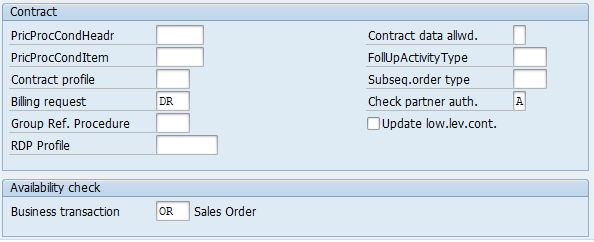
After maintaining all the required details, click on save button and save the configured sales document type in SAP.
Important Fields While Defining Sales Document Type in SAP
The following fields need careful review when you define sales document type in SAP SD. The exact values depend on the business process, but these fields usually decide how the document behaves in sales processing.
- Sales document category: Classifies the document, such as order, quotation, contract, or return. This field affects document processing logic.
- Number range assignment: Decides whether SAP assigns the sales document number internally or allows external entry.
- Item number increment: Controls the numbering interval for line items, such as 10, 20, 30.
- Screen sequence group: Controls the screens and tabs shown during document creation and change.
- Transaction group: Helps classify the document flow for sales processing.
- Document pricing procedure: Works with customer and sales area settings to determine the pricing procedure.
- Delivery type: Proposes the delivery document type when the sales process is delivery relevant.
- Billing type: Proposes the billing document type for order-related or delivery-related billing.
- Credit group and credit check: Determines whether the document is relevant for credit management control.
Copy Sales Document Type or Use New Entries in VOV8?
Use the copy method when the new sales document type is similar to an existing SAP standard or custom document type. This is common for business-specific order types because the copied document type already contains related settings that are easy to review and adjust.
Use the New Entries method only when you want to maintain the fields from the beginning. This approach requires more checking because missing values in shipping, billing, number range, pricing, or transaction flow can cause errors during sales order creation, delivery creation, or billing.
| Method | When to use | Main caution |
|---|---|---|
| Copy as | When the new document type is close to a standard or existing custom type. | Review copied values and remove controls that are not required. |
| New entries | When the document type has a clearly different business process. | Every required control field must be maintained and tested. |
Testing the New Sales Document Type After Saving
After saving the sales document type, test the configuration before moving it to production. A sales document type normally works with other SAP SD settings, so testing only the VOV8 screen is not enough.
- Create a sales document with the new document type and check whether the number range is assigned correctly.
- Enter line items and confirm that item numbers are incremented as expected.
- Check whether the correct screen sequence and transaction group are used.
- Run pricing and verify that the expected pricing procedure is determined.
- Create delivery, if the process is delivery relevant, and confirm that the correct delivery type is proposed.
- Create billing, if the process is billing relevant, and verify the order-related or delivery-related billing type.
- Check document flow to ensure that order, delivery, and billing documents are connected correctly.
Common Issues in SAP SD Sales Document Type Configuration
If the new sales document type does not work as expected, check the dependent configuration first. Many issues appear during order creation, delivery, or billing because the document type is connected with number ranges, item categories, schedule line categories, copy control, pricing, output, and credit management.
| Issue | Likely area to check |
|---|---|
| Sales order number is not generated | Number range assignment and internal/external number range setting. |
| Required fields or tabs are missing | Screen sequence group and incompletion procedure. |
| Pricing is not determined correctly | Document pricing procedure and pricing procedure determination. |
| Delivery is not created | Delivery type, item category, schedule line category, and copy control. |
| Billing document is not created | Billing type, copy control, billing relevance, and document flow. |
| Credit check is not triggered | Credit group, credit check setting, and credit management configuration. |
FAQ on Creating Sales Document Type in SAP SD
What is the T code for sales document type in SAP SD?
The transaction code for defining and maintaining sales document types in SAP SD is VOV8. You can also access it through SPRO under Sales and Distribution > Sales > Sales Documents > Sales Document Header > Define Sales Document Type.
How do I access VOV8 in SAP?
Enter VOV8 in the SAP command field and press Enter. If you prefer the IMG menu, use SPRO and follow the Sales and Distribution customizing path for sales document header configuration.
What are common sales document types in SAP SD?
Common sales document types include standard order, quotation, inquiry, contract, scheduling agreement, rush order, cash sale, return order, debit memo request, and credit memo request. The exact list can vary depending on the SAP system and project configuration.
Should I create a sales document type with Copy As or New Entries?
Use Copy As when the new document type is similar to an existing one. Use New Entries only when you need a fully separate configuration and you are ready to maintain all required control fields manually.
Why is delivery or billing not working for a new sales document type?
Delivery or billing problems usually occur because related controls are incomplete. Check delivery type, billing type, item category determination, schedule line category, copy control, pricing procedure determination, and document flow settings.
Editorial QA Checklist for This SAP SD Configuration Tutorial
- Confirm that the transaction code VOV8 is clearly mentioned for sales document type configuration.
- Check that the IMG path matches the SAP SD sales document header configuration path.
- Verify that the tutorial explains both Copy As and New Entries methods.
- Ensure that sales document type fields such as number range, transaction flow, shipping, billing, and credit control are described in practical terms.
- Confirm that the FAQ answers address actual search intent around VOV8 access, SAP SD document types, and document type creation.