 TutorialKart.com
In this SAP SD tutorial, you will learn how to define sales area in SAP step by step. A sales area in SAP SD is created by assigning a sales organization, distribution channel, and division together. In our previous training, we learned how to define divisions in SAP.
What is Sales Area in SAP SD?
In SAP, a sales area is the combination of three organizational units: sales organization, distribution channel, and division. This combination represents how a company sells products or services to customers in a particular market or channel.
The sales area is used in SAP SD for customer master sales views, sales document processing, pricing relevance, reporting, and several SD configuration assignments. For example, a company may sell the same product through wholesale and retail channels, and each channel can be represented through a different sales area.
Note: A sales area must be selected for sales transactions such as inquiries, quotations, sales orders, deliveries, and billing-related SD processes.
Sales Area Structure in SAP SD
| Sales area component | Meaning in SAP SD | Example |
|---|---|---|
| Sales Organization | Represents the selling unit responsible for sales and distribution activities. | 1000 – Domestic Sales |
| Distribution Channel | Represents how products or services reach customers. | 10 – Wholesale, 20 – Retail |
| Division | Represents a product line or business division. | 00 – Common Division |
A valid sales area is created only when these three values are assigned together. For example, sales organization 1000, distribution channel 10, and division 00 together form one sales area.
Before You Define Sales Area in SAP
Before you create a sales area in SAP SD, make sure the required organizational units are already defined. If any of these objects are missing, the sales area assignment cannot be completed correctly.
- Sales organization should already be created.
- Distribution channel should already be defined.
- Division should already be defined.
- The combination should match the real business sales process.
- Avoid creating unnecessary combinations, because each sales area may require additional master data and configuration maintenance.
For general SAP configuration reference, you can also review SAP documentation for sales and distribution enterprise structure in SAP S/4HANA at SAP Help Portal.
SAP Menu Path to Set Up Sales Area
You can set up a sales area in SAP by using the following IMG navigation path.
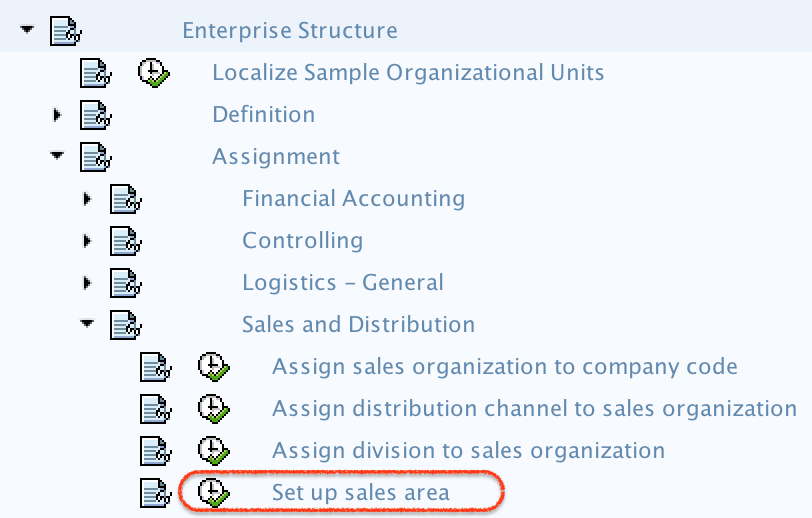
- Path: – SPRO -> IMG –> Enterprise Structure –> Assignment –> Sales and Distribution –> Set up sales area.
This activity assigns the sales organization, distribution channel, and division together. In many SAP systems, this configuration is maintained through the IMG activity for assignment of sales organization, distribution channel, and division.
How to Define Sales Area in SAP SD Step by Step
Step 1) Enter T-code “SPRO” in command field as shown below and execute.

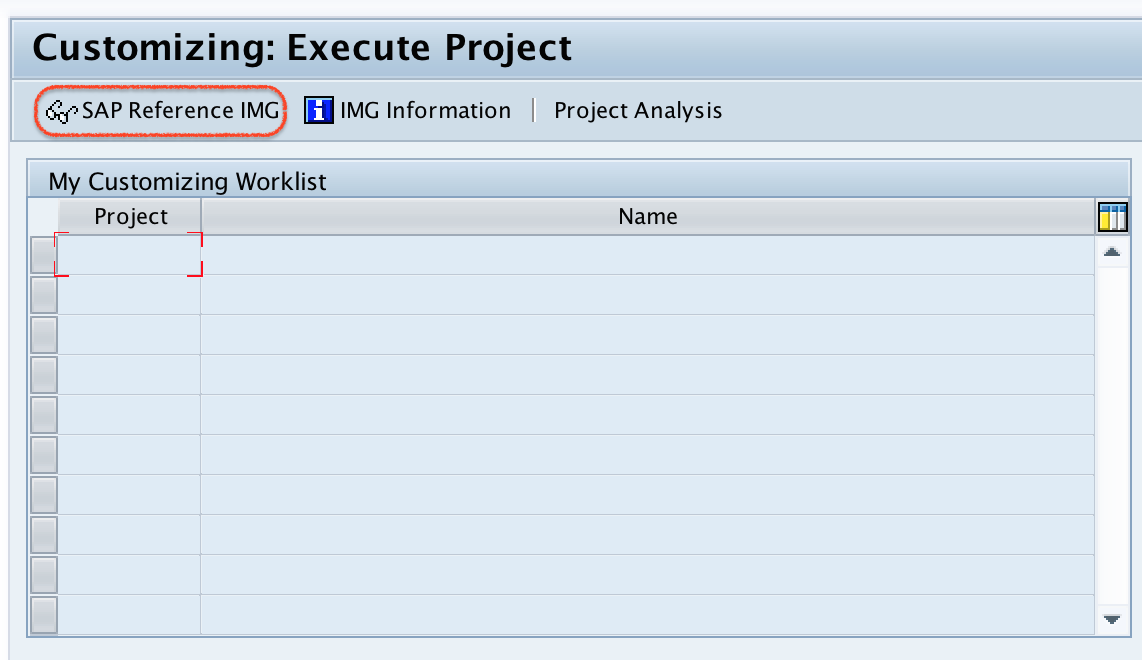
Step 2) Choose “SAP Reference IMG” on choose execute project.
Step 3) On display IMG screen, follow the menu path and double click on set up sales area.
Step 4) On change view Assignment sales organization, distribution channel and division, click on new entries to define new sales area as per company requirements.

Step 5) On new entries sales area screen, update the following details.
- SOrg: – Update the Sales Organization key for assignment.
- DChl: – Update the distribution channel for assignment.
- DV: – Update the division key for assignment.
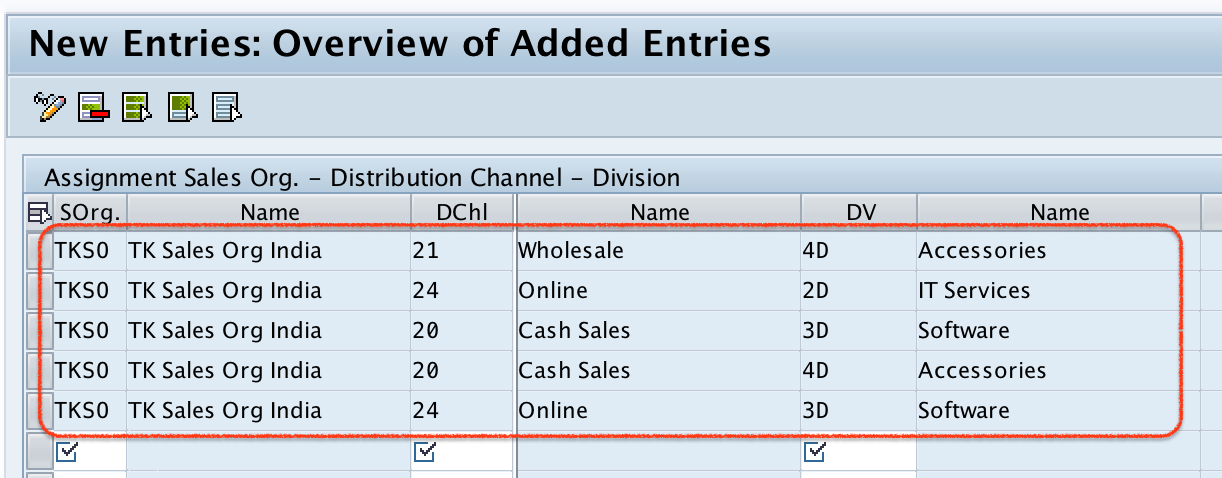
After updating the details of sales area, click on save button and choose customizing request, save the configured data.
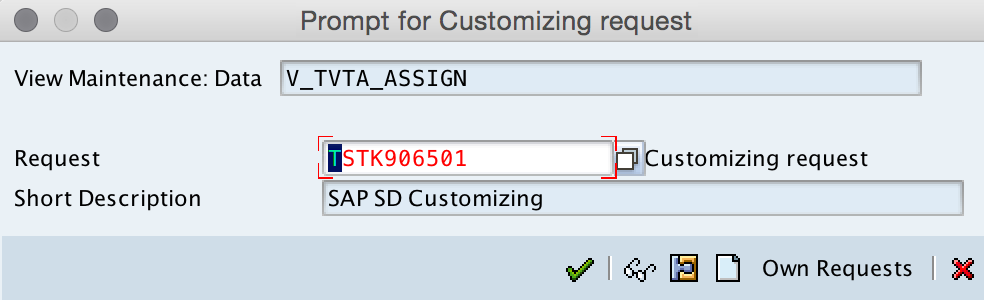
Successfully we have defined new sales area in SAP systems.
Example of Sales Area Assignment in SAP SD
The following example shows how sales area combinations are usually understood in SAP SD configuration.
| Sales Organization | Distribution Channel | Division | Sales area meaning |
|---|---|---|---|
| 1000 | 10 | 00 | Domestic sales through wholesale channel for common division |
| 1000 | 20 | 00 | Domestic sales through retail channel for common division |
| 2000 | 10 | 01 | Another sales organization selling a specific division through wholesale |
Only create combinations that are required by the business. If a company does not sell a division through a specific channel, that combination does not need to be created as a sales area.
Where Sales Area is Used in SAP SD
Sales area is not only an enterprise structure assignment. It is used repeatedly in SAP SD master data and transaction processing.
- Customer master data: Sales views are maintained for a specific sales area.
- Sales documents: Sales orders, quotations, and inquiries are created for a selected sales area.
- Pricing and condition records: Many SD condition records depend on sales organization, distribution channel, and division.
- Reporting: Sales reports can be analyzed by sales organization, channel, and division.
- Business control: The sales area helps separate responsibilities across markets, channels, and product divisions.
Difference Between Sales Organization and Sales Area in SAP
A sales organization is a single organizational unit responsible for selling and distribution. A sales area is broader because it combines the sales organization with a distribution channel and a division.
| Point | Sales Organization | Sales Area |
|---|---|---|
| Definition | Represents the selling unit | Combination of sales organization, distribution channel, and division |
| Configuration level | Individual enterprise structure object | Assignment of three SD organizational units |
| Example | 1000 – Domestic Sales | 1000 / 10 / 00 |
| Usage | Responsible for sales activities | Used for sales transactions and customer sales data |
Common Checks After Creating Sales Area in SAP
After saving the sales area, check whether the configuration is complete enough for the next SD activities. Defining the sales area alone may not be sufficient for end-to-end sales order processing.
- Confirm that the correct sales organization, distribution channel, and division were selected.
- Check that the sales area combination is not duplicated unnecessarily.
- Verify that the sales area can be used in customer master sales area data.
- Confirm that the required downstream assignments are maintained for the SD process.
- Save the configuration under the correct customizing request.
Editorial QA Checklist for SAP Sales Area Tutorial
- Does the tutorial clearly explain that sales area means sales organization + distribution channel + division?
- Are all three prerequisite organizational units linked or explained before the configuration steps?
- Does the step-by-step SAP IMG path match the screenshots used in the article?
- Are SAP SD terms such as SOrg, DChl, and DV explained in plain language?
- Does the article avoid suggesting that every possible combination should be created?
FAQs on Define Sales Area in SAP
How do you define a sales area in SAP SD?
You define a sales area in SAP SD by assigning a sales organization, distribution channel, and division together in the SAP IMG path: Enterprise Structure > Assignment > Sales and Distribution > Set up sales area.
What is the meaning of sales area in SAP?
A sales area in SAP is the combination of sales organization, distribution channel, and division. It represents the selling structure used for customer master data and sales document processing.
Is sales area required for sales order creation in SAP SD?
Yes. A sales order is processed for a specific sales area. The sales area helps determine the relevant sales organization, channel, and division for the transaction.
Can one sales organization have multiple sales areas?
Yes. One sales organization can be combined with different distribution channels and divisions to create multiple sales areas, depending on the business requirement.
What should be created before defining sales area in SAP?
The sales organization, distribution channel, and division should be created before defining the sales area. The sales area is an assignment of these three existing organizational units.