 TutorialKart.com
Tally Payroll Tutorial
This Tally Payroll tutorial explains how to set up and maintain employee payroll records step by step. It covers payroll configuration, employee masters, attendance units, pay heads, salary details, payroll vouchers, payslips, and statutory payroll settings.
Payroll Accounting in Tally helps an organization calculate salaries, record earnings and deductions, process attendance-based payments, and generate payroll reports. A properly configured payroll system reduces repeated calculations and keeps employee salary records connected with the accounting books.
Payroll refers to the wages, salaries, allowances, incentives, deductions, employer contributions, and other amounts associated with employees for a specified pay period. Payroll processing normally includes recording attendance or production details, calculating gross earnings, applying deductions, determining net pay, and posting the resulting amounts to accounts.
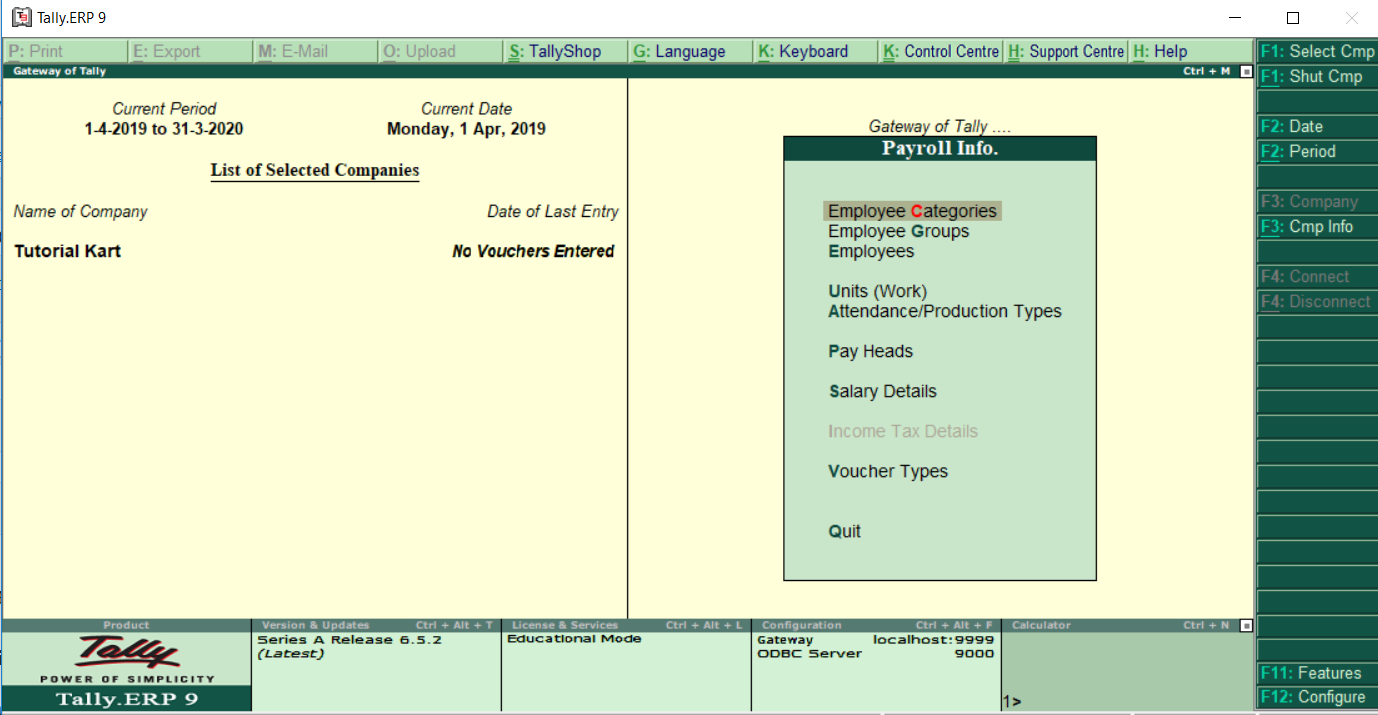
What You Learn in This Tally Payroll Tutorial
- How payroll processing works in Tally
- How to enable and configure payroll features
- How to create employee categories, groups, and employee masters
- How to define simple and compound payroll units
- How to create attendance, leave, and production types
- How to configure earnings and deduction pay heads
- How to assign salary details to employees
- How to record payroll and attendance vouchers
- How to generate payslips, payroll statements, and employee reports
- How statutory and taxation settings relate to payroll processing
Prerequisites for Learning Tally Payroll
The lessons begin with basic payroll concepts, so previous payroll experience is not required. However, familiarity with company creation, ledgers, groups, vouchers, and accounting periods will make the payroll configuration easier to understand.
- Understand basic salary terms such as earnings, deductions, gross salary, and net salary.
- Know how to navigate company features and accounting menus in Tally.
- Be familiar with basic voucher entry and ledger concepts.
- Before learning Tally payroll, refer to the Tally tutorial for step-by-step coverage of the core accounting features in Tally.ERP 9.
How Tally Payroll Processing Is Organized
A practical Tally payroll setup is normally completed in the following order:
- Enable payroll and the required statutory features.
- Create employee categories and employee groups.
- Create employee masters with employment details.
- Define payroll units such as days, hours, or pieces.
- Create attendance, leave, and production types.
- Create earnings, deductions, and employer-contribution pay heads.
- Assign salary structures to employees or employee groups.
- Record attendance and payroll vouchers for the pay period.
- Review payslips, payroll statements, and accounting entries.
Following this sequence is important because later payroll masters depend on information created in earlier steps. For example, salary details use previously created pay heads, and payroll vouchers use the employee and salary masters already configured.
Tally Payroll Employee Masters
Employee masters store the information needed to identify and group workers for payroll processing. Depending on the organization’s requirements, employee records may include the employee name, joining date, designation, department, location, bank details, statutory identifiers, and salary-effective dates.
Employee Categories in Tally Payroll
An employee category provides a broad classification for employees. Categories can be used when an organization wants to maintain separate payroll structures, locations, projects, or administrative divisions.
Employee Groups in Tally Payroll
Employee groups organize employees who share a department, role, salary structure, or reporting requirement. Grouping employees can make salary assignment and payroll reporting easier, especially when several employees use the same pay heads.
Employee Records in Tally Payroll
Each employee master should be created with accurate employment and payroll information. Before processing a salary, verify the employee’s group, joining date, salary-effective date, and any statutory details required by the organization.
Tally Payroll Units and Attendance Types
Payroll units define how attendance, overtime, production, or other measurable payroll values are recorded. The selected unit should match the calculation method used by the corresponding pay head.
Simple Payroll Units
A simple payroll unit represents one measurement, such as days, hours, minutes, or pieces. For example, an overtime pay head may use hours, while a daily attendance type may use days.
Compound Payroll Units
A compound payroll unit combines two related measurements, such as hours and minutes. It is useful when payroll values must be entered with a smaller subunit instead of being rounded to a single unit.
Attendance, Absence, Leave, and Production Types
Attendance types determine how employee attendance or production information affects payroll. Common configurations include present days, absent days, paid leave, unpaid leave, overtime hours, and production quantities. The attendance type must be linked correctly to the pay head that uses it.
Tally Payroll Pay Heads for Earnings and Deductions
A pay head represents a payroll component that contributes to an employee’s salary calculation. Each pay head must be classified according to its purpose and configured with the appropriate calculation method.
- Basic pay: The principal fixed component of salary.
- House rent allowance: An allowance configured according to the organization’s salary structure.
- Conveyance allowance: An earning component provided for travel or commuting, when applicable.
- Overtime pay: An earning calculated from overtime attendance and the applicable rate.
- Variable pay: An amount that changes by employee, period, performance, or another defined basis.
- Employee deductions: Amounts subtracted from gross earnings, such as authorized recoveries or statutory deductions.
- Employer contributions: Payroll costs borne by the employer and recorded separately from employee deductions.
Before assigning a pay head, confirm whether it is an earning, deduction, reimbursement, or employer contribution. Also verify whether it is fixed, attendance-based, production-based, percentage-based, or entered manually.
Salary Details and Effective Dates in Tally Payroll
Salary details connect employees or employee groups with the pay heads used to calculate their payroll. A salary structure may include fixed earnings, attendance-based earnings, deductions, and employer contributions.
Use the correct effective date when creating or revising salary details. The effective date determines the period from which a salary structure or revised amount applies. If an increment, allowance change, or deduction begins in a later month, enter a new effective date instead of overwriting historical salary information.
Attendance and Payroll Vouchers in Tally
Payroll processing commonly uses attendance vouchers and payroll vouchers. Their exact use depends on the calculation methods configured in the pay heads.
- Attendance voucher: Records attendance, leave, overtime, or production values for employees.
- Payroll voucher: Calculates or records the salary components for a selected payroll period.
When earnings depend on attendance, record and verify attendance values before processing the payroll voucher. After payroll calculation, review each employee’s earnings, deductions, and net amount before accepting the voucher.
Tally Payroll Reports and Payslips
Payroll reports help verify employee payments and the accounting effect of payroll transactions. The available reports depend on the features, masters, and vouchers configured in the company.
- Employee payslips showing earnings, deductions, and net pay
- Payroll statements for a selected period
- Attendance and production reports
- Employee-wise and group-wise payroll summaries
- Pay-head-wise analysis
- Outstanding or payable salary information
- Statutory payroll reports when the relevant features are enabled and configured
Before distributing payslips or finalizing payroll, compare the reports with attendance records, approved salary revisions, deductions, and the payroll voucher totals.
Tally Payroll Training Syllabus
- Payroll configuration
- Enable payroll in Tally
- Enable payroll statutory & taxation
- Define employee categories
- Create employee group
- Create employees
- Create simple payroll units
- Compound payroll units
- Create attendance type
- Create absent type
- Create user defined calendar type
- Create basic pay head
- Create house rent allowance
- Create conveyance pay head
- Create overtime pay head
- Create variable pay head
- Create salary details
Recommended Order for Completing the Tally Payroll Lessons
Complete the lessons in syllabus order. Begin by enabling payroll, then create the employee structure, payroll units, and attendance types. Create pay heads only after deciding how each salary component should be calculated. Finally, assign salary details and test the setup with attendance and payroll vouchers for a sample period.
Using a test company or backup copy is advisable while learning. It allows you to revise masters and voucher entries without affecting live payroll records.
Common Tally Payroll Configuration Errors
- Creating pay heads before defining the calculation method: Decide whether the component is fixed, attendance-based, production-based, percentage-based, or manually entered.
- Using an incorrect salary-effective date: This may apply a salary structure to the wrong payroll period.
- Assigning an employee to the wrong group: Group-level salary details and reports may then produce incorrect results.
- Using mismatched payroll units: The attendance unit must correspond with the pay head calculation basis.
- Processing payroll before attendance entry: Attendance-based earnings and deductions may calculate incorrectly or remain blank.
- Changing old salary details instead of creating a revision: This can make historical payroll difficult to verify.
- Skipping payroll report review: Always check earnings, deductions, net pay, and accounting totals before finalizing the period.
Tally Payroll Questions
What is payroll in Tally?
Payroll in Tally is a set of features used to maintain employee information, salary components, attendance or production details, payroll vouchers, payslips, and related accounting entries.
What should be created first in Tally Payroll?
First enable payroll features. Then create employee categories and groups, employee masters, payroll units, attendance types, and pay heads. Salary details should be assigned only after the required pay heads have been created.
What is the difference between an attendance voucher and a payroll voucher?
An attendance voucher records attendance, leave, overtime, or production values. A payroll voucher uses the configured salary details and relevant attendance information to calculate or record payroll for the selected period.
Why is the effective date important in Tally Payroll?
The effective date controls when a salary structure or revised salary amount begins. Correct effective dates preserve historical salary records and ensure that increments or changes apply to the intended payroll period.
Can Tally generate employee payslips?
Yes. After employee masters, salary details, attendance information, and payroll vouchers are configured correctly, payroll reports can be used to review and generate employee payslips.
Tally Payroll Tutorial Editorial Checklist
- Confirm that payroll is enabled before describing employee or pay-head creation.
- Verify that each pay head is identified correctly as an earning, deduction, reimbursement, or employer contribution.
- Check that attendance-based examples use matching attendance types and payroll units.
- Confirm that salary revisions use a new effective date rather than replacing historical values.
- Verify payroll voucher totals against employee earnings, deductions, and net pay.
- Check that statutory examples avoid fixed rates or limits unless they are verified for the applicable period and organization.
- Confirm that menu paths and screen labels match the Tally version used in the accompanying lesson.
Summary of Tally Payroll Accounting
Tally Payroll combines employee masters, attendance information, pay heads, salary details, vouchers, and reports into one payroll workflow. Configure these elements in the correct order, use accurate effective dates, and review payroll reports before finalizing employee payments. The lessons listed in this tutorial provide a structured path from enabling payroll to creating a complete salary setup.