 TutorialKart.com
Schedule Line Categories in SAP Sales and Distribution (SAP SD) are essential components that manage delivery dates and confirmed quantities for sales transactions. They control the division of items in a sales document based on delivery schedules. Schedule lines are crucial for ensuring timely order fulfillment and smooth integration with inventory and material planning processes.
What are Schedule Line Categories?
- Schedule Line Categories determine how delivery dates and quantities are handled in sales orders.
- These categories define whether an item is relevant for inventory management, Material Requirements Planning (MRP), and delivery.
- Schedule line data is stored in the VBEP table.
- Use Transaction Code
VOV6to define and customize schedule line categories.
Key Functions of Schedule Line Categories in SAP SD
Schedule Line Categories control the following critical aspects of sales orders:
- Availability Checks:
- Determines whether an availability check should be performed for the item.
- Ensures inventory availability for delivery on the requested date.
- Movement Types:
- Specifies the inventory movement type used during goods issue or receipt.
- Example: 601 for goods issue during sales, 651 for goods receipt in returns.
- External Procurement:
- Indicates whether the material is procured externally (e.g., in third-party processing scenarios).
- Requirement Transfer to MRP:
- Defines whether the material requirements are transferred to Material Requirement Planning (MRP).
- Delivery and Billing Relevance:
- Controls whether the schedule line is relevant for delivery and billing.
SAP SD Schedule Line Category Controls
Here are the primary controls and their functionalities:
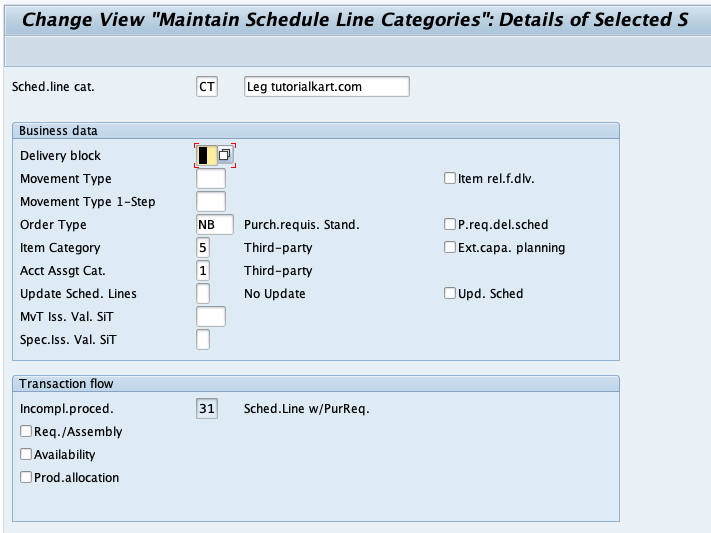
1 Delivery Block
- Definition: Temporarily prevents the delivery of an item or an entire order.
- Use Case: Often used for scenarios like quality inspections, credit checks, or customer-requested delays.
2 Movement Type
- Definition: Represents the type of stock posting in inventory (e.g., goods issue, goods receipt).
- Use Case:
- 601: Goods issue for sales.
- 651: Goods receipt for returns.
3 Order Type
- Definition: Classifies the sales order type (e.g., standard orders, rush orders, returns).
- Use Case:
- OR: Standard Order.
- RO: Rush Order.
- RE: Return Order.
4 Item Category
- Definition: Defines how a line item behaves in a sales transaction (e.g., pricing, delivery relevance).
- Use Case:
- TAN: Standard items.
- TANN: Free-of-charge items.
5 Account Assignment Category
- Definition: Determines the account assignment type for a line item, integrating SD with Financial Accounting (FI) and Controlling (CO).
- Use Case:
- K: Cost center.
- P: Project.
6 Req./Assembly
- Definition: Specifies whether the item will trigger a material requirement or assembly process.
- Use Case: Used in make-to-order production scenarios.
7 Availability Check
- Definition: Ensures that the requested product is available for delivery on the specified date.
- Use Case: Checks inventory levels, planned receipts, and scheduled issues.
How to Identify Schedule Line Categories
Each schedule line category is identified by a two-character alphanumeric code:
| Character | Meaning |
|---|---|
| First Character | Represents the type of sales document (e.g., C for Order). |
| Second Character | Indicates inventory management or MRP relevance (e.g., P for MRP-related). |
Examples of Common Schedule Line Categories
| Schedule Line Category | Functionality | Key Characteristics |
|---|---|---|
| AT | Inquiry | No inventory management, not relevant for delivery. |
| BN | Quotation | No MRP, not delivery-relevant, used for quotations. |
| CP | Standard Order | Availability check active, relevant for delivery (601). |
| CV | Analysis Purpose | No inventory management, used for analysis. |
| DN | Returns | Relevant for goods receipt (651), used for returns. |
Real-World Use Case: Standard Order with Schedule Lines
Consider a scenario where a customer places an order for 100 units of a product. Here’s how schedule lines would be used:
- Sales Order Creation:
A standard order is created using T-code VA01. The system assigns schedule lines (category CP) for the item. - Availability Check:
The system performs an availability check and confirms delivery dates for partial quantities if necessary. - Delivery Document Creation:
Based on the schedule lines, a delivery document is created for confirmed quantities. - Goods Issue:
Inventory is updated using movement type 601.
Table for SAP SD Schedule Line Categories
| Schedule Line Category | Functionality | T-Code to Define | Table |
|---|---|---|---|
| AT | Inquiry | VOV6 | VBEP |
| BN | Quotation | VOV6 | VBEP |
| CP | Standard Order | VOV6 | VBEP |
| DN | Returns | VOV6 | VBEP |
Conclusion
Schedule Line Categories are vital for managing delivery schedules and inventory integration in SAP SD. By configuring these categories in T-code VOV6, businesses can ensure smooth order fulfillment and accurate inventory management. Properly assigned schedule lines enhance efficiency and customer satisfaction while ensuring system compliance with business processes.