 TutorialKart.com
In this SAP tutorial, you will learn how to maintain transportation planning point in SAP SD using transaction code OVXT and the SAP IMG path. A transportation planning point is the organizational unit used for transportation planning and shipment processing activities.
Maintain Transportation Planning Point in SAP SD
A transportation planning point in SAP is an organisational unit that manages and controls transportation activities. Shipment documents are assigned to the relevant transportation planning point so that transportation planning, shipment creation, and shipment monitoring can be handled for a defined responsibility area.
In SAP SD and Logistics Execution, transportation planning point configuration is normally completed before shipment processing is used. The planning point can represent a transportation department, a logistics office, a regional planning team, or any unit responsible for planning transportation for deliveries.
Transaction Code OVXT for Transportation Planning Point Configuration
You can create and maintain a transportation planning point in SAP using either the transaction code or the IMG menu path.
> Transaction Code : OVXT
> SAP IMG Path : SPRO > SAP Reference IMG > Enterprise Structure > Definition > Logistics > Maintain Transportation Planning Point.
Use OVXT when you want to go directly to the transportation planning point maintenance screen. Use the IMG path when you are reviewing the configuration as part of the complete enterprise structure setup.
Prerequisites Before Creating a Transportation Planning Point in SAP
Before maintaining a transportation planning point, check that the related organizational structure is already available in the system. In most projects, the following master configuration objects are reviewed first.
- Company code: The transportation planning point is assigned to a company code.
- Shipping structure: Shipping points and loading points may be used later in delivery and shipment processing.
- Address information: Maintain a clear address for the transportation planning point so that it can be identified properly in logistics documents.
- Naming convention: Decide a four-character key that fits the client configuration standard.
Create Transportation Planning Point in SAP Using OVXT
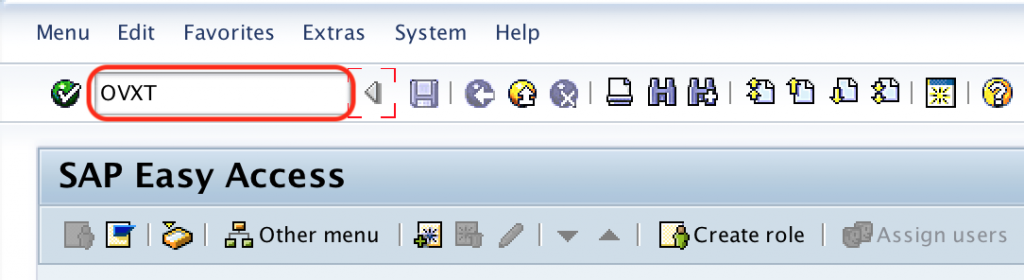
Step 1 : – Execute transaction code OVXT in the SAP command field as shown below Image.
Step 2 : – From change view “Transportation Planning Points” overview screen, click on new entries button to create a new transportation planning point in SAP as requirements of an organization.

Step 3 : – On new entries transportation planning points screen, update the following details to maintain the new transportation planning points in SAP.
- TPPt : – Enter the four digits key that defines as transportation planning point in SAP system.
- Description : Update the descriptive text of an planning point.
- CoCd : – Update the company code for assignment.
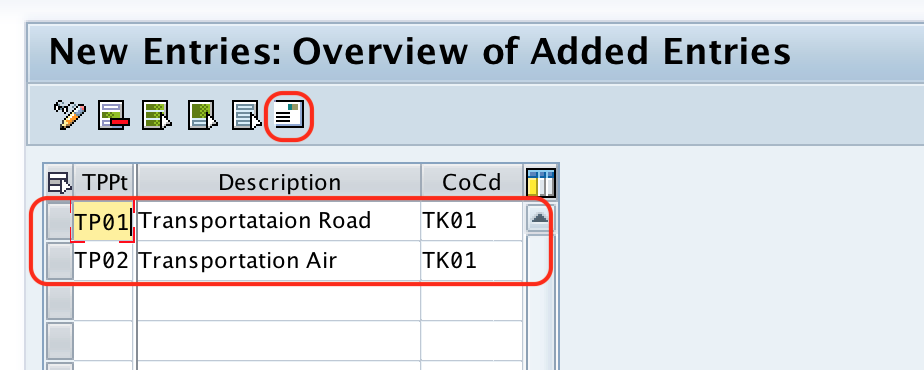
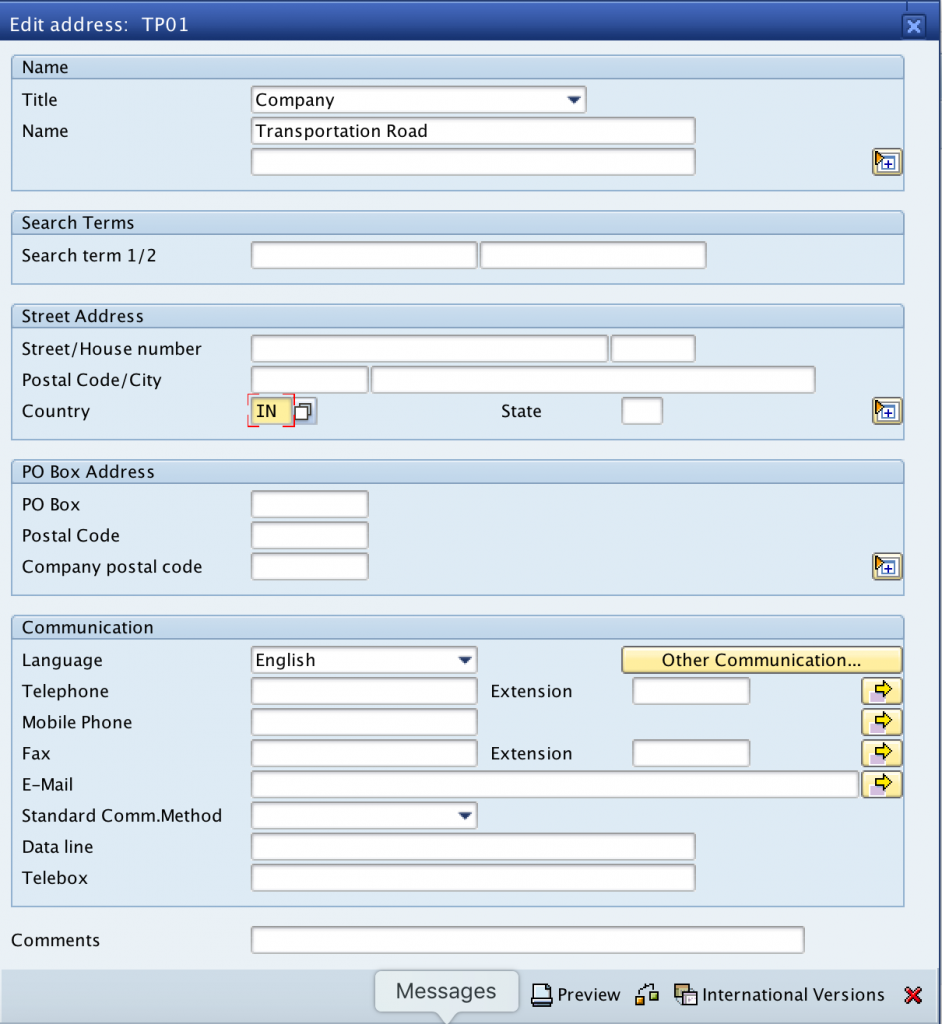
Now click on address icon, and update the address details of transportation planning point.
After updating all the required details, click on save button and save the configured details in SAP.
Successfully we have maintained transportation planning points in SAP.
Transportation Planning Point Field Details in SAP OVXT
| Field | Meaning | How to maintain it |
|---|---|---|
| TPPt | Transportation planning point key | Enter a four-character key that identifies the planning point. |
| Description | Name or short text of the planning point | Enter a meaningful description, such as the transport office, region, or logistics team name. |
| CoCd | Company code assignment | Assign the company code responsible for the transportation planning point. |
| Address | Address data of the planning point | Maintain postal and communication details from the address icon. |
The transportation planning point key should be easy to recognize in shipment processing. Avoid using unclear keys when multiple plants, regions, or logistics teams are maintained in the same SAP client.
Transportation Planning Point and Shipment Processing in SAP SD
The transportation planning point is used in shipment processing to group transportation planning responsibility. When deliveries are relevant for transportation, shipment documents can be created and processed under the appropriate planning point.
It is different from a shipping point. A shipping point is mainly responsible for shipping activities such as delivery processing, picking relevance, and goods issue processing. A transportation planning point is responsible for transportation planning activities connected with shipments.
| SAP object | Main purpose | Common transaction code |
|---|---|---|
| Transportation planning point | Controls transportation planning and shipment responsibility | OVXT |
| Shipping point | Controls shipping and delivery processing | OVL2 |
| Loading point | Represents a loading area under a shipping point | OVL3 |
How Transportation Planning Is Completed After Maintaining OVXT
Maintaining the transportation planning point is only one part of transportation setup. In a complete SAP SD shipment process, the configuration is usually followed by delivery creation, transportation relevance checks, shipment document creation, route or carrier planning as applicable, shipment execution, and completion of goods movement and billing-related activities.
The exact process can vary by SAP ECC, SAP S/4HANA, and project-specific logistics design. Therefore, after creating the planning point, validate it with the shipment process used in your system instead of checking the OVXT entry alone.
Common Issues While Maintaining Transportation Planning Point in SAP
- Wrong company code assignment: Check the company code before saving the planning point, especially in multi-company-code systems.
- Unclear transportation planning point key: Use a key that fits the client naming standard and is easy to identify during shipment processing.
- Missing address details: Maintain address information if the planning point needs to appear clearly in logistics communication or documents.
- Confusion with shipping point: Do not use transportation planning point and shipping point as the same configuration object. They serve different purposes in logistics execution.
- No validation in shipment process: After saving the planning point, test it with the relevant shipment or transportation scenario.
FAQs on Transportation Planning Point in SAP SD
What is the transportation planning point in SAP SD?
A transportation planning point in SAP SD is an organizational unit used to manage transportation planning activities. It is assigned to shipment processing responsibility and helps identify the planning unit that handles transportation for relevant deliveries.
What is the transaction code to maintain transportation planning point in SAP?
The transaction code to maintain transportation planning point in SAP is OVXT. You can also access the same configuration from SPRO through Enterprise Structure > Definition > Logistics > Maintain Transportation Planning Point.
What is the difference between transportation planning point and shipping point?
A transportation planning point is used for transportation and shipment planning responsibility. A shipping point is used for delivery processing activities such as shipping execution, picking relevance, and goods issue processing. The common transaction code for defining a shipping point is OVL2.
What is OVL3 in SAP SD?
OVL3 is used to define loading points in SAP SD. A loading point is different from a transportation planning point. Loading points are linked with loading activities, while transportation planning points are used for transportation planning and shipment responsibility.
How do I check whether transportation planning point configuration is correct?
Check that the transportation planning point key, description, company code assignment, and address details are maintained correctly. Then validate the configuration in the relevant shipment or transportation planning process used by your SAP system.
Transportation Planning Point Configuration QA Checklist
- Confirm that transaction code OVXT and the IMG path are both mentioned correctly.
- Check that the tutorial clearly defines transportation planning point as an organizational unit for transportation planning and shipment responsibility.
- Verify that the difference between transportation planning point, shipping point, and loading point is explained without mixing their purposes.
- Ensure that company code assignment and address maintenance are covered in the configuration steps.
- Review whether the saved OVXT entry is validated through the shipment process used in the SAP system.
Summary of Maintaining Transportation Planning Point in SAP
To maintain transportation planning point in SAP SD, execute transaction code OVXT or follow the IMG path under Enterprise Structure. Create a four-character transportation planning point key, enter a description, assign the company code, maintain address details, and save the configuration. After saving, test the planning point in the relevant shipment or transportation process to confirm that the setup works as expected.