 TutorialKart.com
Read a Text File in Swift Using Foundation
To read a text file in Swift, create the file’s URL and pass it to the String(contentsOf:encoding:) initializer. This initializer reads the file and returns its contents as a Swift String.
The file operation can fail when the file does not exist, the application lacks permission to access it, or the selected character encoding does not match the file. For this reason, the initializer is called with try inside a do-catch statement.
Read a UTF-8 Text File from the Documents Directory
Consider the following sample.txt file stored in the user’s Documents directory.
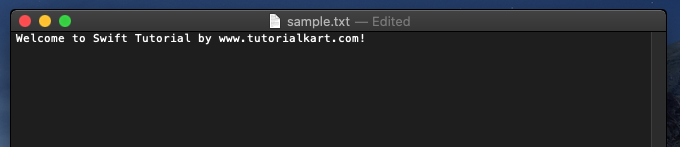
The following Swift program reads the file in three steps:
- Locate the user’s Documents directory with
FileManager.default.urls(for:in:). - Append
sample.txtto the directory URL withappendingPathComponent(_:). - Read the UTF-8 file with
String(contentsOf:encoding:).
main.swift
import Foundation

let file = "sample.txt"

var result = ""

//if you get access to the directory
if let dir = FileManager.default.urls(for: .documentDirectory, in: .userDomainMask).first {

	//prepare file url
    let fileURL = dir.appendingPathComponent(file)

    do {
        result = try String(contentsOf: fileURL, encoding: .utf8)
    }
    catch {/* handle if there are any errors */}
}

print(result)
How the Swift File-Reading Code Works
FileManager.default provides access to common file-system locations. The call to urls(for: .documentDirectory, in: .userDomainMask) returns the Documents directory URLs available to the current user. The example uses the first URL returned.
appendingPathComponent(file) safely creates the complete file URL. It should be used instead of manually joining directory and file-name strings.
The .utf8 argument tells Swift how the bytes in the file should be decoded. UTF-8 is appropriate for most modern plain-text files. The resulting text is assigned to result and printed after the file operation completes.
Handle Errors While Reading a Swift Text File
An empty catch block hides useful information when reading fails. During development, print the error or handle it according to the application’s requirements.
import Foundation

let fileURL = URL(fileURLWithPath: "/path/to/sample.txt")

do {
    let text = try String(contentsOf: fileURL, encoding: .utf8)
    print(text)
} catch {
    print("Unable to read the text file: \(error.localizedDescription)")
}
Replace /path/to/sample.txt with an absolute path that exists on the computer running the program. A command-line Swift program can read such a path only when the current process has permission to access it.
Read a Text File Included in an App Bundle
When a text file is packaged as an application resource, obtain its URL from Bundle.main. The resource must be included in the app target before it can be found at runtime.
import Foundation

if let fileURL = Bundle.main.url(forResource: "sample", withExtension: "txt") {
    do {
        let text = try String(contentsOf: fileURL, encoding: .utf8)
        print(text)
    } catch {
        print("Could not read sample.txt: \(error.localizedDescription)")
    }
} else {
    print("sample.txt was not found in the app bundle.")
}
Pass the resource name without its extension as the first argument. In this example, Swift searches the main bundle for a file named sample.txt.
Read a Text File When Swift Should Detect the Encoding
If the file encoding is not known in advance, the String(contentsOf:usedEncoding:) initializer can report the encoding selected while reading the file.
import Foundation

let fileURL = URL(fileURLWithPath: "/path/to/sample.txt")
var detectedEncoding = String.Encoding.utf8

do {
    let text = try String(contentsOf: fileURL, usedEncoding: &detectedEncoding)
    print(text)
    print("Detected encoding: \(detectedEncoding.rawValue)")
} catch {
    print("Unable to read the file: \(error.localizedDescription)")
}
Specify .utf8 directly when the application’s file format is known. Encoding detection is more suitable when files may come from different external sources.
Run the Swift Text File Example
Run the program. The first time the executable attempts to access the Documents directory, macOS may display a permission dialog. Click OK to grant access.
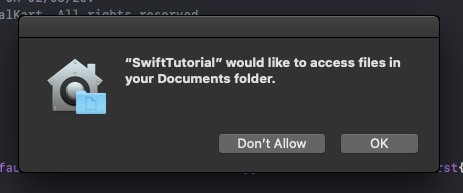
After permission is granted, the contents of sample.txt are printed.
Terminal Output
Welcome to Swift Tutorial by www.tutorialkart.com!
Program ended with exit code: 0
Common Swift Text File Reading Problems
- File not found: Print
fileURL.pathand verify that the file exists at that exact location. - Permission denied: Confirm that the application or command-line process is allowed to access the selected directory.
- Text cannot be decoded: Use the file’s actual character encoding instead of assuming UTF-8.
- Bundle resource returns nil: Verify the resource name, extension, capitalization, and target membership.
- Large file uses too much memory: Reading with
String(contentsOf:)loads the complete file into memory. Process very large files incrementally instead.
Swift Text File Reading Checklist
- Import
Foundationbefore usingFileManager,URL, or file-basedStringinitializers. - Construct file locations with URL APIs rather than manual path concatenation.
- Confirm that the file name and extension match their capitalization on disk.
- Use the correct text encoding, such as
.utf8. - Handle thrown errors instead of silently ignoring the
catchblock.
Frequently Asked Questions About Reading Text Files in Swift
How do I read an entire text file into a String in Swift?
Create a URL for the file and call try String(contentsOf: fileURL, encoding: .utf8). Place the call inside a do-catch statement because reading the file can throw an error.
Why does String(contentsOf:) require try in Swift?
The operation can fail because of an invalid path, a missing file, insufficient permissions, an input/output error, or incompatible text encoding. Swift therefore marks the initializer as throwing.
How do I find a text file in the Swift app bundle?
Use Bundle.main.url(forResource:withExtension:). Also confirm that the text file is included in the application’s target membership or copy resources build phase.
Does String(contentsOf:) load the whole file into memory?
Yes. It creates a string containing the complete file, making it suitable for small and moderately sized text files. Very large files should be read and processed in smaller portions.
How can I check the final file path in Swift?
Print fileURL.path before reading the file. This helps verify that the directory and file name were combined correctly.
Summary of Reading a Text File in Swift
In this Swift Tutorial, we used Foundation URL APIs and String(contentsOf:encoding:) to read a text file into a string. We also covered file-system paths, app bundle resources, encoding detection, permissions, and error handling.